


The Default Mistake: Rebuilding When You Should Optimize
Navigation problems tend to provoke one of two reactions. The first: "our navigation is broken, we need to redesign the whole thing." The second: "let's adjust a few labels and see if that helps." Both have failure modes. Full rebuilds are expensive, time-consuming, and disruptive to the regular customers who have memorized the existing navigation — and they're often undertaken in response to symptoms whose root cause could have been addressed more cheaply. Label adjustments and minor tweaks are cheap and low-risk but insufficient when the underlying navigation architecture is structurally wrong.
The cost implication of choosing incorrectly is significant in either direction. An unnecessary full rebuild might cost $3,000–10,000 in developer time plus weeks of team disruption, when the actual problem was three category names that needed renaming. An optimization-only approach applied to structurally broken navigation produces marginal improvements at best, while the underlying architecture continues generating conversion losses. The decision between rebuild and optimize should be driven by diagnosis, not by the severity of the frustration or the enthusiasm of whoever is pushing for change.
"We spent $8,000 on a full navigation redesign because our bounce rate was high. Six months later, after working with an analytics consultant, we realized the bounce rate problem was caused by two category names that visitors misunderstood — 'Collections' and 'Styles' were perceived as the same thing by most visitors, so half our navigation traffic went to the wrong place. Renaming those two labels would have cost a few hundred dollars at most. The redesign fixed the problem but so would the renaming, and we wouldn't have disrupted the 30% of customers who'd memorized the old structure."
— A Navi+ customer, apparel brand
Signals That Point Toward Optimization (Not Rebuild)
Several patterns in navigation analytics suggest that targeted optimization will resolve the problem without architectural change:
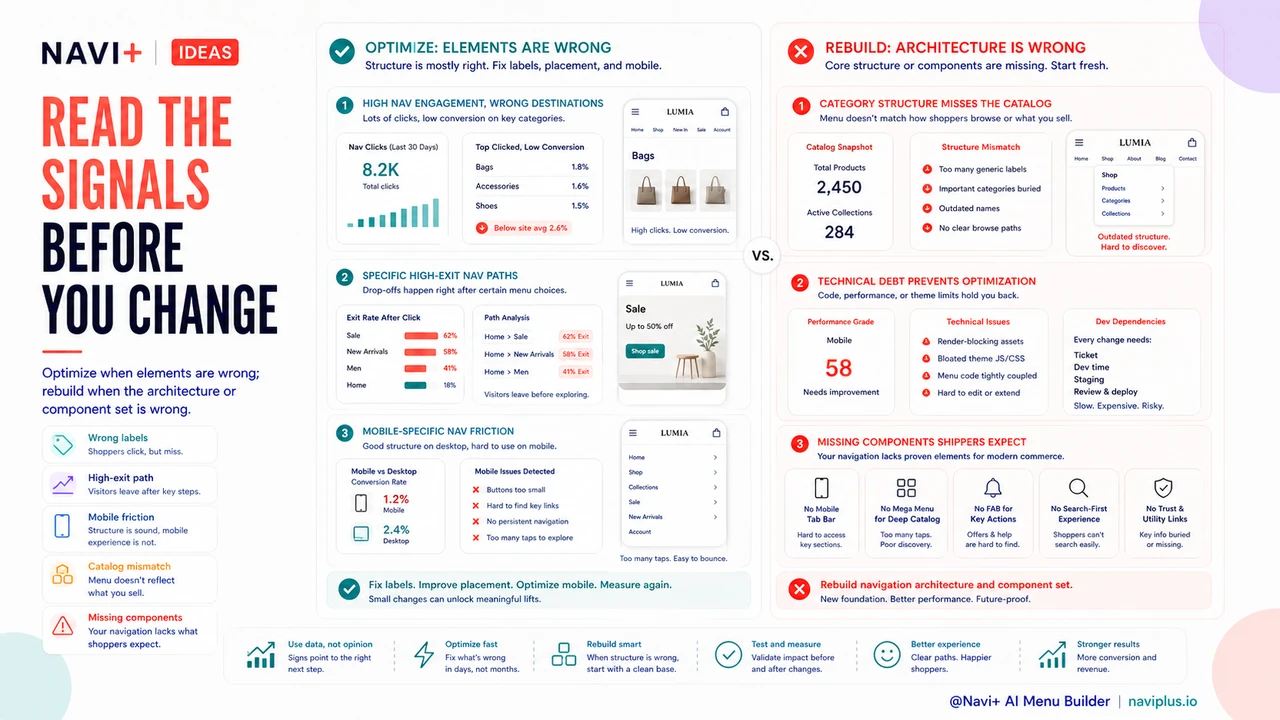
High navigation engagement but wrong destination choices. If analytics show that visitors are actively interacting with navigation (high menu open rates, many navigation clicks per session) but frequently backtracking (clicking a category, returning to the menu, clicking a different category), the problem is likely label clarity rather than architecture. Visitors are engaging with the navigation; they're just choosing wrong because the labels are misleading. Renaming, splitting, or merging categories resolves this without structural change.
Specific high-exit navigation paths. If analytics reveal that visitors who navigate to one specific category have significantly higher exit rates than visitors to other categories, the problem may be specific to that category — its products, its page design, or its subcategory structure — rather than the navigation as a whole. Targeted optimization of the problematic section is proportionate; rebuilding the entire navigation is not.
Mobile-specific navigation problems. If bounce rate and navigation abandonment are significantly higher on mobile than on desktop, and the navigation structure itself is logically sound, the problem is likely mobile presentation rather than architecture. Converting from a hamburger menu to a Tab Bar, improving touch target sizes, or adjusting the Slide Menu's opening behavior are optimization decisions that don't require rebuilding the category structure.
Signals That Point Toward Rebuild
Category structure that no longer reflects the catalog. When the existing top-level categories were designed for a different catalog than the current one — fewer products, different product lines, a different customer segment — no amount of label optimization will fix the mismatch. A navigation built for 80 products in three categories cannot serve 500 products in 12 categories without structural change. The rebuild is warranted when the architecture itself has become the wrong shape.
Technical debt that prevents optimization. Some navigation implementations are built on theme code that makes incremental changes costly — each optimization requires developer involvement, testing, and deployment that makes the optimization cycle prohibitively expensive. When the cost of each optimization exceeds the value of the improvement, switching to a self-managed navigation platform that enables fast iteration is a rebuild that pays for itself through reduced future optimization costs.
Navigation components missing from the current implementation. If the current navigation lacks capabilities that would significantly improve conversion — no Tab Bar on mobile, no Mega Menu despite catalog depth that warrants one, no Floating Action Button for key actions — the rebuild is adding genuine new capability rather than fixing existing problems. The rebuild ROI is calculated against the conversion improvement from new capabilities, which is easier to justify than replacing functional navigation with slightly better functional navigation.
| Problem Signal | Likely Cause | Recommended Approach |
|---|---|---|
| Visitors choose wrong categories, then backtrack | Ambiguous label names | Optimize: rename categories |
| Mobile bounce much higher than desktop | Poor mobile navigation format | Optimize: convert to Tab Bar + Slide Menu |
| Navigation structure mismatches current catalog | Architectural mismatch | Rebuild: new category hierarchy |
| Every navigation change requires developer ticket | Technical debt in implementation | Rebuild: switch to self-managed platform |
The Decision Framework
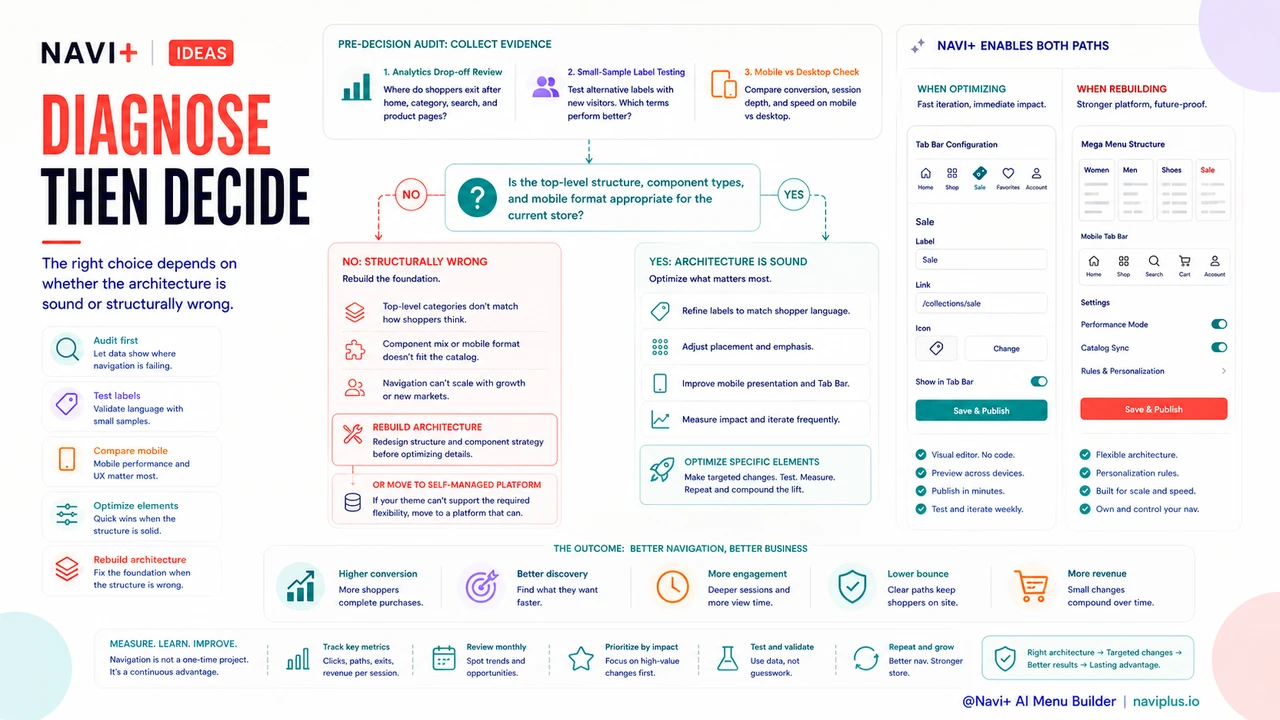
The rebuild-vs-optimize decision reduces to one core question: is the navigation architecture — the top-level structure, the component types, the mobile format — appropriate for the current store, or has it become structurally wrong? If the architecture is right and specific elements are wrong, optimize. If the architecture itself is the problem, rebuild. Running a navigation audit before deciding — reviewing analytics for where visitors drop off, testing navigation labels with a small sample of new visitors, comparing mobile vs. desktop performance — turns an emotionally driven decision into a diagnostic one and almost always reduces the total investment required to fix the actual problem.
無料で試す — コード不要、開発者不要
Shopify、WordPress、またはあらゆるウェブサイトに数分でインストール。