Special Report • Updated October 2026

Shopify Canvas & Sidekick AI: The Definitive Breakdown

Shopify has officially entered the spatial AI design era. From natural-language code generation to infinite canvas freedom, here is an objective, unfiltered look at what Canvas delivers, what breaks, and what you must prepare.

Oct 1, 2026
Official Early Access Launch Date
Real-Time
Direct Liquid & CSS Theme Modification
0 App Blocks
App Embed & Block Support (Current Limit)
10 Guides
Satellite Technical Deep-Dives Below
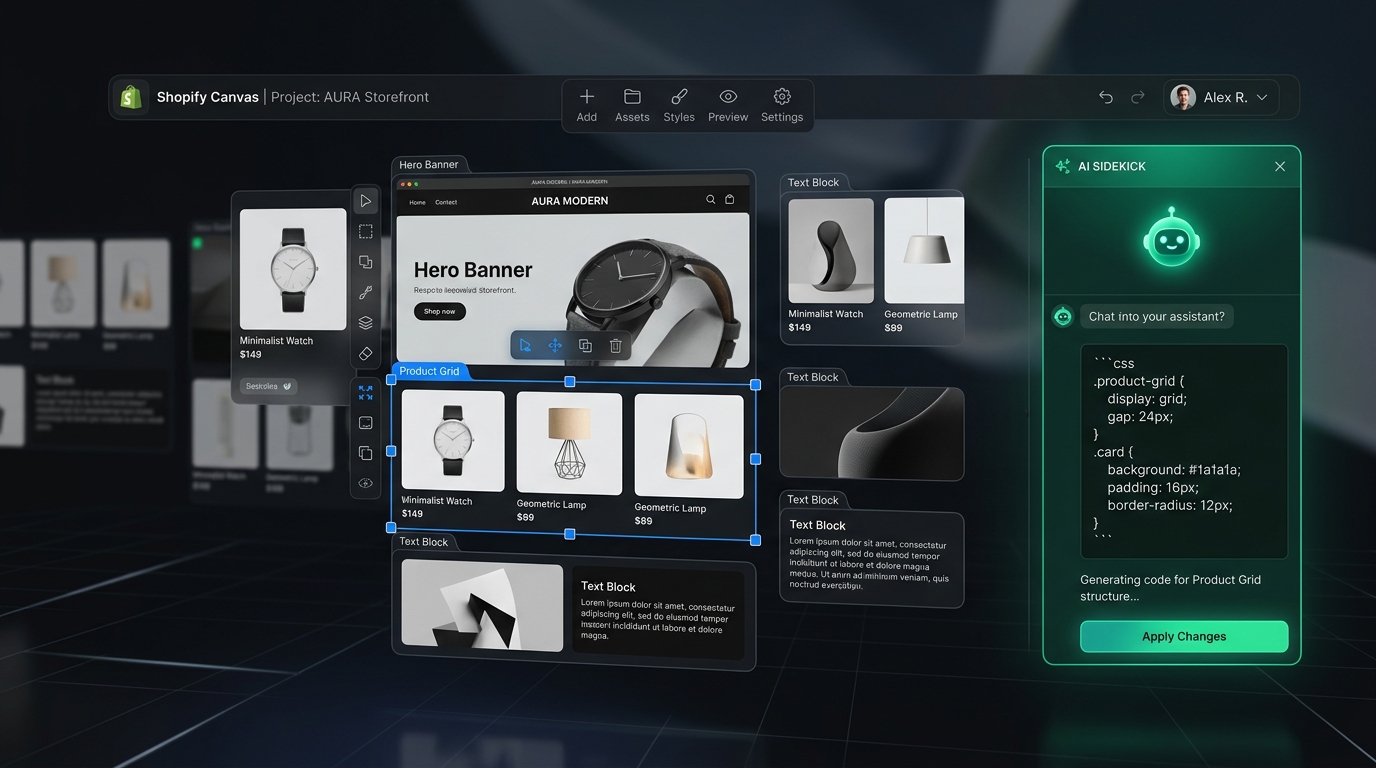
Shopify Canvas Spatial Design Interface and Sidekick AI

Shopify Canvas Reality Matrix: What Works vs. What’s Missing

Before testing or committing your live production theme, understand the boundaries of the Early Access release.

Feature Dimension Official Status Technical Reality & Impact
Spatial Freeform Canvas Supported Drag, drop, and resize sections freely on desktop without rigid block boundaries.
Sidekick AI Code Generation Supported Generates functional Liquid, CSS animations, and layout modifications from natural language prompts.
Third-Party Theme Store Themes Not Supported Only works on Shopify-built themes (Dawn, Horizon) and custom themes. Not available for Theme Store purchases yet.
App Blocks & App Embeds Not Supported Third-party app blocks and embeds cannot currently be placed onto sections created inside Canvas.
Automatic Theme Updates Broken Themes modified via Canvas become disconnected from future theme version upgrades due to custom file overwrites.
Mobile Thumb Navigation Limited Canvas handles basic responsive scaling, but cannot build persistent Mobile Tab Bars or App-like thumb navigation.
Shopify Markets & Translations Manual Translate & Adapt and market-specific content layers are currently bypassed during real-time AI code generation.

The 10-Part In-Depth Technical Hub

Every article follows our rigorous 5-part review standard: Shopify's Claim • Hands-on Test • Community Reaction • Navi+ Verdict • Actionable Checklist.

Strategic Architecture

The Canvas Paradox: Cheaper Customization vs. Exponential Maintenance (The Snowflake Theme Trap)

"Canvas makes customization cheap. Navi+ should make intelligence maintainable."

There is a core architectural paradox every merchant must recognize: Canvas makes bespoke code generation fast and inexpensive, but the hidden cost is maintenance debt that compounds exponentially.

Technical Reality: Bespoke Code vs. Engine Architecture

⚠️ The Canvas Path (Snowflake Themes):
THEME
├── Shopify original code
├── Canvas generated layout
├── Sidekick modification 1
├── Sidekick modification 2
└── ... modification 100

When you prompt AI to "Build a smart mega menu", it injects 1,000+ lines of custom Liquid, CSS, and JS directly into your theme. Over 100 prompt iterations, your theme becomes a fragile one-off ("snowflake"). 500 stores = 500 unmaintainable codebases that can never receive automated theme updates!

✅ The Navi+ Path (Decoupled Engine):
THEME
  ↓ (Designated Slot: "Navi+ Container")
[Navi+ Slot]
  ↓
Navi+ Engine (CDN Edge < 16ms)
  ├── Smart Merchandising & Personalization
  ├── Multi-market & Auto-translate
  └── Live A/B Testing & Analytics

Your theme remains 100% pristine. When Navi+ upgrades its core engine from v1 to v2 to v3, all 2,000+ stores automatically receive new capabilities and performance enhancements without Sidekick ever rewriting individual store themes.

Does This Replace Navi+? How Navi+ Powers Your Conversion Engine

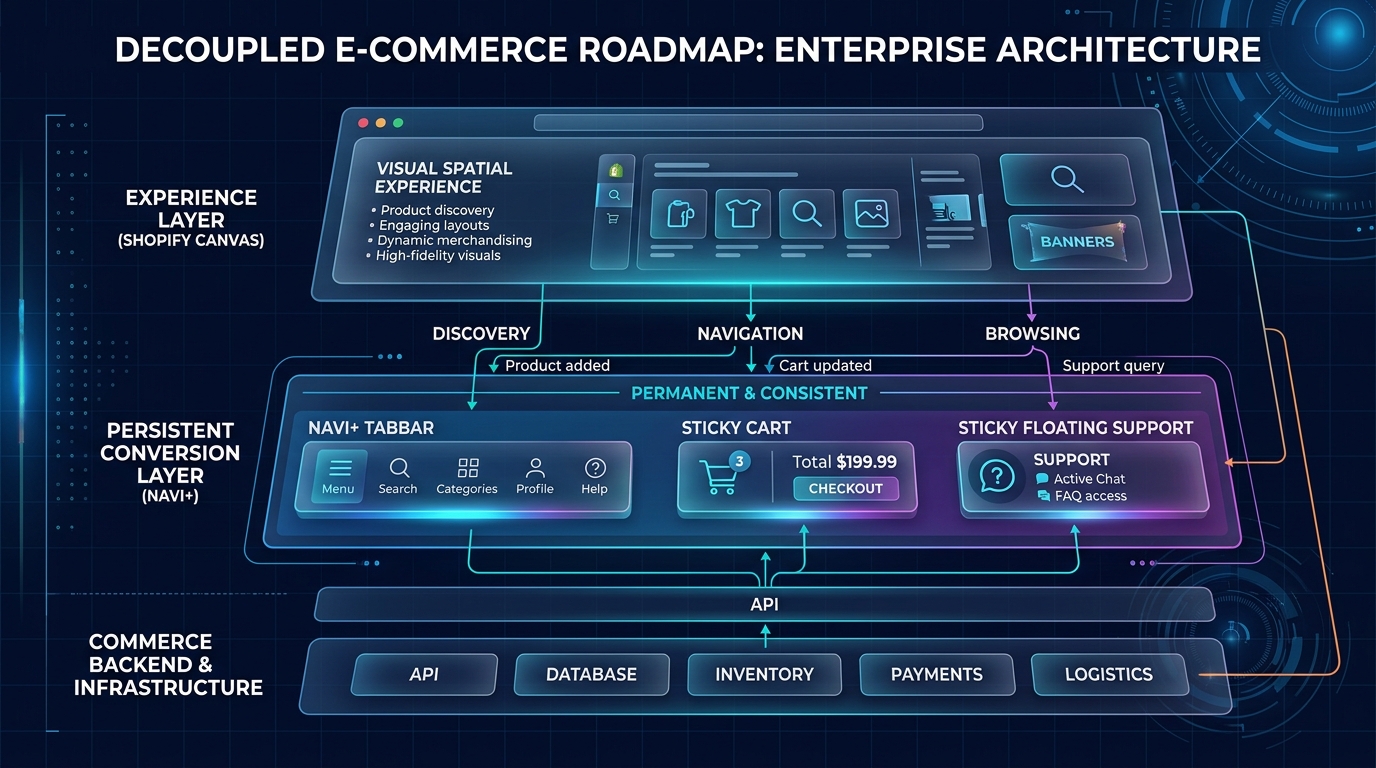
The definitive answer is NO. The winning formula in the AI commerce era: "Canvas provides the slot. Navi+ owns the product inside the slot."

  • Thumb-Zone Ergonomics on Mobile: Canvas focuses on infinite desktop exploration and stacked page sections. Navi+ commands the bottom 20% of the mobile screen with an app-grade Mobile Tab Bar driving 75%+ of purchasing traffic.
  • 100% Immunity to Theme Forking & App Block Breakage: While Canvas remains isolated from App Blocks/Embeds and breaks theme upgrade streams, Navi+ runs completely decoupled on Edge CDN, safeguarding your mission-critical navigation.
  • Deep Shopify Markets & Multi-Currency Localization: Manage complex multi-tiered catalogs, mega menus, currency switchers, and auto-translated navigation trees without polluting your theme repository with bespoke Liquid code.
Decoupled E-commerce Roadmap: Canvas Experience Layer vs Navi+ Persistent Conversion Layer

Frequently Asked Questions About Shopify Canvas

Clear answers to the most common questions merchants and developers are asking right now.

What is Shopify Canvas?

Shopify Canvas is an infinite, spatial storefront editor announced in October 2026. Powered by Shopify’s Sidekick AI, it allows merchants to prompt layout changes and visual designs that are translated into real-time Liquid and CSS modifications directly within the theme.

How do I get Early Access to Shopify Canvas?

Early Access is rolling out gradually to selected Shopify merchants. Stores must be on desktop, running a Shopify-developed theme (like Dawn or Horizon), and have Sidekick enabled in their Shopify Admin settings.

Can I use Shopify Canvas with third-party themes from the Theme Store?

Currently, no. Early Access is strictly limited to first-party Shopify themes and fully custom themes. Commercial themes purchased from the Shopify Theme Store are not yet supported.

Will Shopify Canvas break my existing Shopify Apps?

Sections generated on the Canvas cannot currently host Theme 2.0 App Blocks or App Embeds. Apps that inject floating scripts or headless elements (like Navi+ CDN menus) continue to function normally, but in-section app widgets must be placed outside Canvas containers.

Does using Shopify Canvas affect my theme update eligibility?

Yes. Because Sidekick writes custom code directly into your theme's files, the automated theme update system cannot reconcile these modifications without risk of overwriting. Always duplicate and backup your theme before enabling Canvas.

Navi+ で始めましょう

プラットフォームを選択してください — 無料でインストール、数分でライブ。