


Navigation Debt Accumulates Quietly
Store owners review their homepage copy, refresh product images, and test new ad creatives on a regular cadence. Navigation rarely gets the same treatment — and the gap compounds over time. Products go out of stock permanently but their collection pages remain in the menu. New categories get added without retiring the old ones they replace. Seasonal content created for last December's sale is still sitting in the menu in March. Labels that made sense when the catalog had 50 SKUs no longer describe what's actually inside after the catalog grew to 500.
None of this shows up as a sudden conversion rate drop. The cost is diffuse — a few visitors each day who click a dead link and leave, a few who open the menu and can't find what they're looking for because the label doesn't match what they expect, a few who arrived for the Christmas gift guide in February and concluded the store wasn't relevant to them. Each instance is small. Over a quarter, across tens of thousands of sessions, the accumulated cost is significant.
A quarterly navigation audit addresses this systematically. It takes 2–3 hours to complete, requires no developer, and every issue it surfaces can be fixed the same day. The return on that time is compounding — every session the store receives after the audit runs on cleaner navigation than before.
"We did our first proper navigation audit after two years of adding to the menu without ever removing anything. We had eleven top-level categories. Three of them had fewer than five products. One linked to a collection that had been deleted. Cleaning it down to six categories with accurate labels moved our mobile conversion rate by a full percentage point within a month."
— A Navi+ customer, fashion accessories brand
The 5-Part Audit Checklist
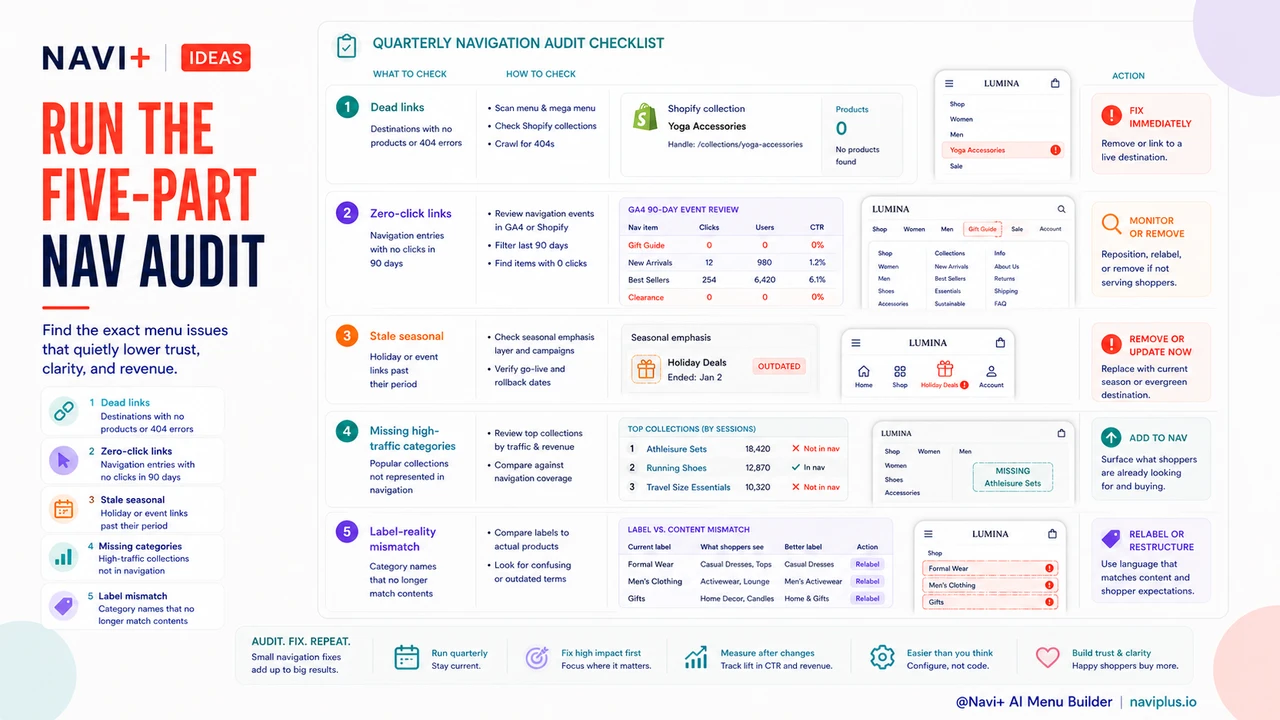
Each of these five checks can be completed without a developer, using tools already available in your analytics platform and Shopify admin.
1. Dead Links — destinations with no products or 404 errors
Click every navigation link manually, on both desktop and mobile. Check that each destination loads, and that the resulting collection or page has active products in it. A link that 404s loses the visitor immediately and damages trust. A link to an empty collection is functionally the same problem — visitors arrive, find nothing, and leave with a negative impression of the store's organization.
In Shopify admin, navigate to Products > Collections and filter for collections with zero products. Cross-reference that list against your active navigation links. Any match is an immediate fix: either repopulate the collection or remove the navigation entry.
2. Zero-Click Links — navigation entries that receive no clicks in 90 days
In Google Analytics 4, use the Events report filtered for your navigation click event (or Pages and Screens filtered by the destination URLs of your navigation links). Sort by sessions over the trailing 90 days. Navigation entries at zero or near-zero clicks over that period are candidates for removal or relabeling — but evaluate them carefully before acting. A link with no clicks might be genuinely irrelevant, or it might serve a high-value niche audience that doesn't appear in session volume. Check the conversion rate for the sessions that do click it before removing it.
3. Stale Seasonal Content — holiday or event content past its period
Search your navigation for entries that reference seasons, holidays, events, or time-bounded promotions: "Summer Sale," "Christmas Gifts," "Black Friday Deals," "Back to School." Flag any that are outside their relevant window. These entries confuse new visitors who arrive without seasonal context — they raise a question about whether the store is actively maintained. Remove them or replace them with evergreen equivalents ("Sale," "Gift Ideas," "New Arrivals").
4. Missing High-Traffic Categories — new products not yet represented in navigation
Pull a list of your top-traffic collection pages from Google Analytics or Shopify Analytics for the trailing 90 days. Compare that list against your navigation structure. If any of your highest-traffic collections are only accessible via search or direct URL — not through navigation — you are leaving navigation-driven revenue on the table. High-traffic collections that aren't in the navigation are getting their traffic from sources other than navigation, but they would convert additional visitors if navigation pointed to them.
5. Label-Reality Mismatch — category names that no longer match their contents
Click into each navigation destination and read the first 20–30 products. Ask honestly: if a visitor who had never seen this store clicked this navigation label, would they find what they expected? Catalogs evolve faster than navigation labels do. A category called "Accessories" that now contains primarily bags and luggage should probably say "Bags & Luggage." A category called "Gifts Under $50" that now has products ranging up to $200 will frustrate visitors who came in with a budget expectation.
The Cost of Unaudited Navigation
Each of the five issues above has a specific cost mechanism. Dead links generate immediate exits and, over time, reduce trust in the store's professionalism — visitors who encounter one dead link are less likely to persist through exploration. Zero-click navigation links dilute menu clarity; every entry that doesn't serve visitors makes the entries that do serve them harder to find. Stale seasonal content confuses new visitors about whether the store is current and relevant. Missing high-traffic categories leave revenue on the table by keeping the most popular destinations out of the navigation flow. Label-reality mismatches create expectation gaps — the visitor expects one thing, finds another, and interprets the gap as a store that isn't well-organized.
None of these costs register in standard reporting. They're absorbed into the aggregate conversion rate and average session depth. A quarterly audit makes them visible and addressable before they compound further.
What to Fix Immediately vs. What to Monitor
Not all findings from the audit warrant the same urgency. Dead links and stale seasonal content are immediate fixes — they have no upside, only cost. Remove or redirect them the same day you find them.
Zero-click links require judgment. Before removing a navigation entry that's received no clicks in 90 days, check its conversion rate on the sessions that do click it. A link might have very low click volume but high conversion among the visitors who use it — removing it would eliminate a high-value path for a small but commercially important audience. The right action for a zero-click link that converts well is to consider whether it needs better placement or labeling, not removal.
Missing high-traffic categories should be added to navigation promptly, but their placement requires thought. Adding a popular category to a menu that's already crowded may not help if it gets buried. Use the audit as an opportunity to restructure, not just append.
Label-reality mismatches should be fixed, but test the change if you have the traffic. A label rename on a high-traffic navigation entry can move click-through rates significantly in either direction. Where possible, implement and measure over two to four weeks before treating the change as permanent.
The Audit Documentation Template
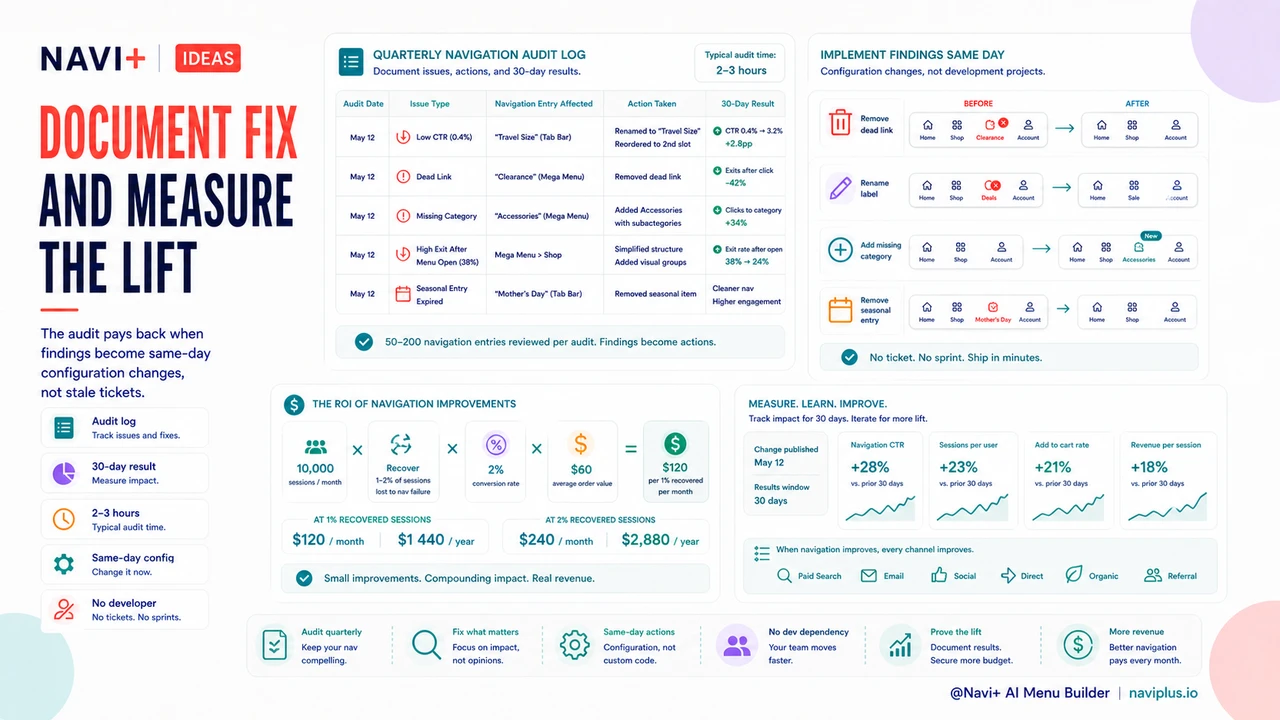
The value of a quarterly audit compounds when each audit builds on the last. Keep a simple log — a spreadsheet or shared doc — with the following columns: Audit Date, Issue Type (from the five categories above), Navigation Entry Affected, Action Taken, and 30-Day Result. After two or three audit cycles, patterns emerge: which types of issues recur most frequently, which fixes produce the clearest measurable improvements, and where navigation changes should be monitored most closely after implementation.
This documentation also turns the audit from a reactive cleanup into a strategic record. If a particular category consistently appears as a zero-click entry quarter after quarter, that's a signal about catalog organization or labeling strategy, not just a navigation maintenance issue.
| Audited Navigation | Unaudited Navigation (12 months) | |
|---|---|---|
| Dead Link Rate | Near zero — caught and removed each quarter | Accumulates; often 5–15% of links after a year of catalog changes |
| Navigation Clarity | Stable or improving — redundant entries pruned regularly | Degrades over time as new entries are added without removing old ones |
| Revenue Lost to Navigation Gaps | Low — new high-traffic categories added to navigation promptly | High — popular collections may go unlinked for months or quarters |
| Seasonal Content Drift | Caught within one quarter at most | Holiday content can remain in navigation for 6–12 months |
| Label Accuracy | Reviewed against catalog each quarter | Diverges silently as catalog evolves without label updates |
Time Investment and Return
A complete five-part audit — including manual click-through checks, analytics review, Shopify admin cross-referencing, and documentation — takes 2–3 hours for a typical store with 50–200 navigation entries. For a store with a simpler navigation structure, an hour is sufficient. The time cost is fixed; the return scales with store traffic.
A store receiving 10,000 sessions per month that eliminates two dead links, removes three stale seasonal entries, and adds one missing high-traffic category might recover 1–2% of sessions that were previously lost to navigation failure. At a 2% conversion rate and $60 average order value, each 1% of recovered sessions is $120 per month — $1,440 per year. The audit that found it took 2 hours.
The compounding factor is what makes the quarterly cadence worth maintaining. A store that audits its navigation four times a year has a navigation structure that drifts at most three months before correction. A store that never audits accumulates problems indefinitely, and the cost of each problem grows with every additional session served by unclean navigation.
Implementing Findings Without Developer Time
The practical barrier to regular navigation audits, historically, has been implementation. Finding the problems is straightforward; fixing them required scheduling developer time, writing tickets, waiting for a sprint, and verifying the changes in production. That cycle could take two to four weeks and often meant audit findings sat unaddressed long enough to lose the momentum of the discovery.
Navi+ removes this barrier. Every finding from a navigation audit — dead link removal, label rename, new category addition, seasonal entry removal — is a same-day configuration change. No ticket, no developer handoff, no sprint cycle. Run the audit in the morning, implement the findings before lunch. The results show up in analytics within the week.
This changes the economics of the audit. When implementation is fast, the quarterly cadence becomes easy to maintain. When implementation is slow, audits get deferred, findings age, and the problems they identified continue accumulating cost until someone finally has time to fix them.
Try it free — no code, no developer needed
Install in minutes on Shopify, WordPress, or any website.