Every navigation system added to an e-commerce storefront sits directly on the critical rendering path. Because shoppers expect category menus, search triggers, and bottom navigation bars to be immediately responsive upon visual completion, navigation performance dictates the customer’s initial perception of brand velocity. Yet, across thousands of production Shopify stores, navigation implementations remain one of the primary catalysts for Core Web Vitals regressions.
The architectural challenge lies in a fundamental contradiction: merchants demand rich, catalog-spanning multi-tier mega menus with promotional imagery, nested collection hierarchies, and sticky mobile triggers—while browser engines demand lean DOM trees, minimal JavaScript execution on the main thread, and strictly deterministic layout geometry. When navigation is implemented via monolithic server-side Liquid loops or bloated legacy script-injected widgets, storefronts suffer from inflated Time to First Byte (TTFB), interaction delays exceeding 300ms, and catastrophic layout shifts.
- The Hidden DOM Penalty: Typical Shopify themes render separate desktop and mobile menu DOM trees in initial HTML, bloating page size by 80–180KB and creating 1,200–2,000 hidden nodes that degrade mobile memory and CSSOM calculation.
- INP Breakdown (Interaction to Next Paint): Unoptimized navigation apps block the main thread with long JavaScript tasks (>50ms) during hydration, causing tap delays of 220–450ms when shoppers open category drawers.
- The Decoupled Edge Solution: Separating menu schema from theme Liquid execution and serving pre-computed JSON via an Edge CDN (<16ms TTFB) reduces runtime payloads to under 25KB, achieving 0.00 CLS and sub-35ms INP.
Architectural Comparison: Navigation Delivery Models
Before diagnosing individual metrics, we must examine how different navigation delivery architectures alter browser execution characteristics across modern e-commerce storefronts:
| Metric / Parameter | Monolithic Liquid SSR (Native Theme) | Legacy Script Tag Menu Apps | Decoupled Edge CDN Navigation |
|---|---|---|---|
| Initial HTML Overhead | +60KB to +180KB (Bloated HTML) | +5KB (Shell only) | +2KB (Semantic skeleton) |
| DOM Node Count | 1,200 to 2,200 nodes (Desktop + Mobile) | 800 to 1,500 nodes (Injected late) | 150 to 350 nodes (Dynamic mount) |
| LCP Impact (Mobile 4G) | +400ms to +800ms (Payload delay) | +600ms to +1,200ms (Render blocking) | Neutral (<50ms non-blocking) |
| INP Tap Latency | 120ms – 240ms (Large DOM tree overhead) | 220ms – 450ms (Main thread lockup) | <35ms (Sub-frame budget) |
| CLS (Cumulative Layout Shift) | 0.00 – 0.05 (Static template) | 0.15 – 0.35 (Hydration pop-in) | 0.00 (Hard-coded dimension reservation) |
| Server TTFB Penalty | +40ms to +150ms (Recursive Liquid loops) | None | None (Static Edge CDN) |
| Runtime JS Footprint | 0KB (Plain CSS/HTML) or 40KB theme JS | 150KB – 380KB unoptimized bundles | <25KB compressed, deferred |
| Built for Shopify Compatible | Native baseline | Rare (<10% pass rate) | Fully compliant (<=10 Lighthouse delta) |
The Three Architectural Pillars of Navigation Performance
Meeting Google’s Core Web Vitals thresholds (75th percentile of real-world user experiences via CrUX) requires evaluating navigation architecture against three distinct web performance vectors:
Pillar 1: Largest Contentful Paint (LCP) and Critical Path Contention
LCP measures when the largest visual element in the viewport becomes visible (target: ≤2.5 seconds). While navigation menus are rarely the LCP candidate element itself—which is typically a hero banner image or featured collection heading—navigation architecture directly throttles LCP in two ways:
- Network Resource Starvation: When a menu app loads external stylesheets and uncompressed JavaScript bundles in the
<head>or before the primary content stream, the browser halts HTML parsing to download and execute those assets. This pushes the discovery and fetching of high-priority hero images down the network waterfall. - Main Thread Contention: If a navigation script hydrates synchronously during the browser’s initial rendering phase, CPU time is diverted away from decoding and rasterizing the LCP visual element.
To protect LCP, modern storefronts must ensure navigation scripts execute strictly via defer or non-blocking dynamic import pipelines, ensuring zero competition with critical media assets.
Pillar 2: Interaction to Next Paint (INP) and Mobile Main-Thread Saturation
In March 2024, Google officially replaced First Input Delay (FID) with Interaction to Next Paint (INP). While FID only measured the delay of the very first click, INP records the latency of every tap, click, and key press throughout the shopper’s entire browsing session, reporting the worst interaction at the 75th percentile (target: ≤200ms).
Navigation is the most interaction-heavy component on an e-commerce storefront. When a shopper taps a hamburger trigger, expands an accordion category, or swipes a collection tab, INP measures three distinct phases:
\[\text{INP} = \text{Input Delay} + \text{Processing Duration} + \text{Presentation Delay}\]- Input Delay: The time the user’s tap event waits in the browser task queue while an existing JavaScript task finishes running.
- Processing Duration: The time taken by the menu’s event handlers to execute, calculate state changes, and mutate the DOM.
- Presentation Delay: The time required by the browser engine to recalculate styles, layout the new visual tree, and composite pixels to the screen.
When a store utilizes legacy navigation plugins, bloated event listeners trigger forced synchronous layout (reflow) across thousands of DOM elements. On mid-tier mobile hardware (such as an Android device with a throttled CPU), opening a drawer menu can lock the main thread for 300ms, immediately failing the store’s INP threshold.
Pillar 3: Cumulative Layout Shift (CLS) and Geometric Reservation
CLS quantifies unexpected visual movement during page load (target: ≤0.10). Navigation systems frequently cause severe CLS penalties when they hydrate asynchronously without pre-reserved spatial boundaries:
- Top Sticky Bar Insertion: A promotional or sticky header that injects at 50px height after 600ms shoves the entire page content downward, instantly triggering a CLS score of 0.15–0.25.
- Bottom Tab Bar Pop-in: Floating action buttons or mobile bottom tab bars that lack explicit CSS dimension constraints cause the viewport footer area to flicker and reflow.
Architecturally sound navigation eliminates layout shifts by declaring strict CSS aspect ratios, fixed bounding boxes, or modern CSS layout containment (contain: layout size) before runtime scripts execute.
Code Inspection: The Liquid Monolith Antipattern
To understand why native theme menus struggle with performance at scale, we must inspect the underlying template architecture. The following code illustrates a standard Liquid nested loop frequently found in themes like Dawn, Prestige, and Impact:
{%- comment -%}
  MONOLITHIC THEME CODE: snippets/header-mega-menu.liquid
  Antipattern: Recursive server-side rendering generating massive duplicate DOM trees.
{%- endcomment -%}

<nav class="header__inline-menu">
  <ul class="list-menu list-menu--inline" role="list">
    {%- for link in section.settings.menu.links -%}
      <li>
        {%- if link.links != blank -%}
          <header-menu>
            <details id="Details-HeaderMenu-{{ forloop.index }}" class="mega-menu">
              <summary class="header__menu-item list-menu__item link focus-inset">
                <span>{{ link.title | escape }}</span>
              </summary>
              <div id="MegaMenu-Content-{{ forloop.index }}" class="mega-menu__content">
                <ul class="mega-menu__list page-width" role="list">
                  {%- for childlink in link.links -%}
                    <li>
                      <a href="{{ childlink.url }}" class="mega-menu__link">{{ childlink.title | escape }}</a>
                      {%- if childlink.links != blank -%}
                        <ul class="list-unstyled" role="list">
                          {%- for grandchildlink in childlink.links -%}
                            <li>
                              <a href="{{ grandchildlink.url }}" class="mega-menu__link">{{ grandchildlink.title | escape }}</a>
                            </li>
                          {%- endfor -%}
                        </ul>
                      {%- endif -%}
                    </li>
                  {%- endfor -%}
                </ul>
              </div>
            </details>
          </header-menu>
        {%- else -%}
          <a href="{{ link.url }}" class="header__menu-item list-menu__item link">{{ link.title | escape }}</a>
        {%- endif -%}
      </li>
    {%- endfor -%}
  </ul>
</nav>
The Architectural Failure of Monolithic Liquid
- Recursive Server Latency: When a store features 400 catalog links, the Liquid engine must recursively traverse the
linkliststree on every single uncached page request. This adds 40–120ms of pure server-side processing to Shopify’s TTFB. - Hidden Responsive Payload Bloat: The code snippet above only renders the desktop navigation. In standard theme architecture, a second file—
snippets/header-drawer.liquid—renders an almost identical recursive structure wrapped in mobile drawer markup. The browser must download, parse, and maintain both trees in memory, even though only one is visible at any given viewport width. - Memory Footprint & CSSOM Invalidation: When a mobile user toggles the menu, the browser engine must traverse a tree of 1,800+ elements to calculate computed styles, spiking INP latency.
Visual Architecture: Monolithic Server-Side vs. Decoupled Edge Delivery
To solve the dual challenges of DOM bloat and main thread contention, high-performance storefront engineering shifts navigation data from monolithic server rendering to a decoupled edge pipeline:
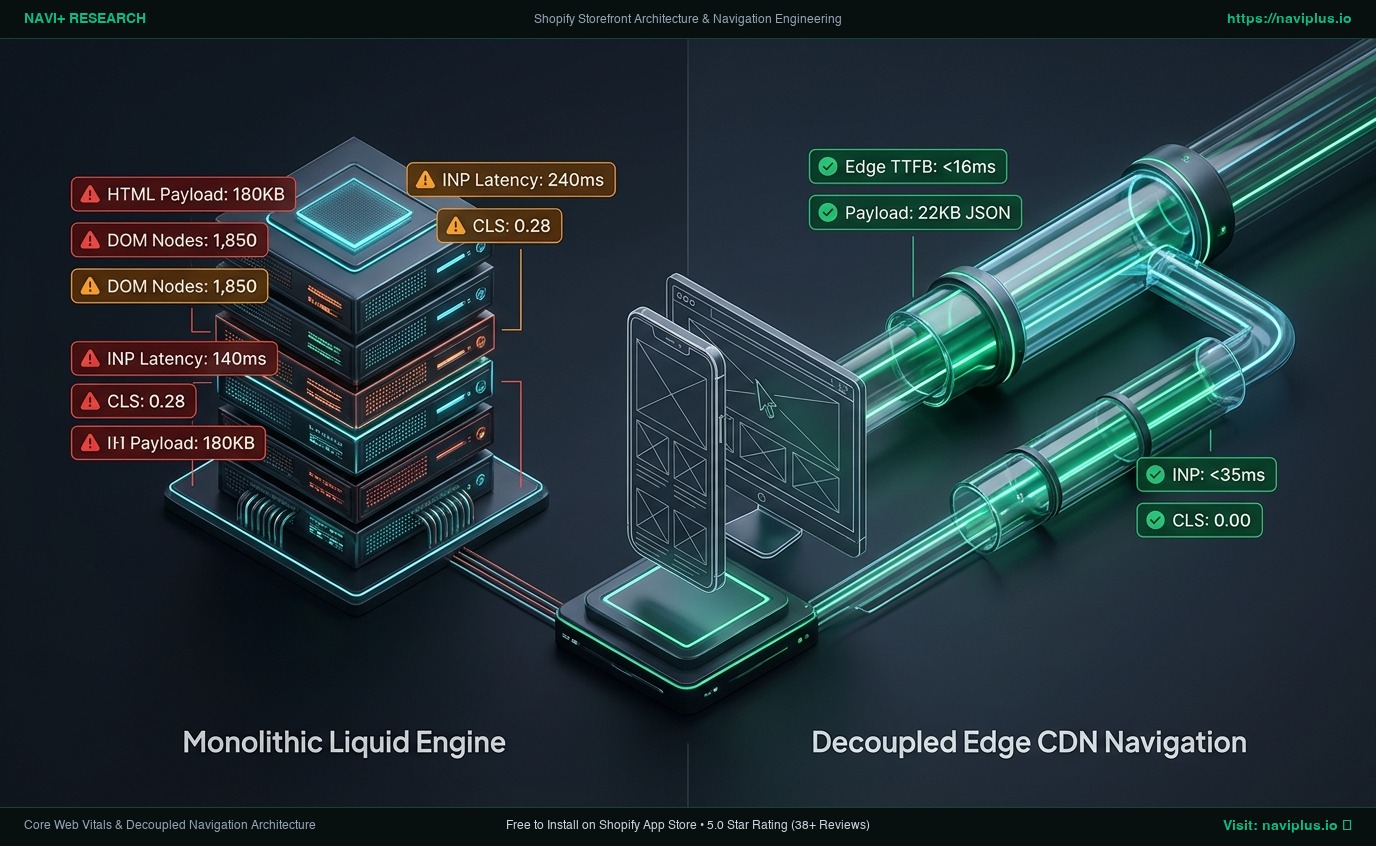
In the decoupled model:
- The initial server response contains only a zero-weight semantic container (
<nav role="navigation" id="navi-root"></nav>). - Menu configuration, styling tokens, and collection links are pre-compiled into a static JSON document hosted on Cloudflare R2 / Global Edge CDN.
- Edge Anycast routing delivers this payload in
<16ms TTFBfrom a data center geographically adjacent to the shopper. - A lightweight (<25KB compressed) runtime mounts the navigation components asynchronously without blocking the browser’s primary render pass.
The Mobile Responsive Dilemma: The Hidden Cost of display: none
A common misconception among Shopify merchants and frontend developers is that hiding elements via CSS eliminates their performance cost:
/* Misconception: This does not eliminate mobile performance overhead */
@media screen and (max-width: 749px) {
  .header__inline-menu {
    display: none !important;
  }
}
While display: none instructs the browser not to create render tree boxes for those elements, it does not prevent the browser from:
- Receiving and decompressing the 100KB+ HTML text payload over high-latency cellular connections.
- Allocating heap memory to store thousands of DOM nodes in the JavaScript object tree.
- Evaluating descendant selectors and maintaining mutation observers across the hidden nodes.
On mobile devices with constrained RAM and thermal CPU throttling, this hidden DOM weight directly inflates garbage collection cycles and degrades scrolling smoothness.
Mandatory Engineering Trade-offs
Selecting a navigation architecture involves explicit trade-offs across speed, development complexity, and merchant ergonomics:
[Pure Liquid SSR]  <------------------->  [Decoupled Edge CDN]  <------------------->  [Headless React/Next.js]
  Zero client JS                           <25KB Runtime JS                             120KB+ Hydration JS
  High DOM bloat                           Zero DOM pollution                           Full architectural rebuild
  Zero app dependencies                    Instant Edge updates                         High engineering overhead
| Dimension | Native Liquid SSR | Traditional Injected App | Decoupled Edge CDN (Navi+) | Headless Commerce (Hydrogen) |
|---|---|---|---|---|
| Lighthouse Score Delta | Baseline (0 pts) | -15 to -35 pts | 0 to -3 pts (Fully Compliant) | -5 to -15 pts (Hydration cost) |
| Merchant Customizability | Low (Code editing required) | Medium (Clunky UI) | High (Visual Drag & Drop) | Extreme (Developer required) |
| Catalog Scalability | Low (<50 links before lag) | Medium (Slows at scale) | High (500+ links effortlessly) | High |
| Theme Portability | None (Tied to theme Liquid) | Low (Leaves orphan code) | 100% Theme Agnostic | N/A (No theme) |
| SEO Crawlability | Native SSR HTML | Client-side only (Risky) | SSR Skeleton + Edge JSON | Server-rendered React |
Merchant Diagnostic Framework: 5-Step Performance Audit
Before installing or replacing any navigation application, execute this five-step empirical audit:
Step 1: Record CrUX Baseline (75th percentile LCP, INP, CLS via PageSpeed Insights)
   │
Step 2: Profile Main Thread in Chrome DevTools (Filter by "Long Tasks > 50ms")
   │
Step 3: Measure DOM Tree Depth & Total Nodes (Target: <1,400 total, depth <32)
   │
Step 4: Verify Network Waterfall Priority (Confirm JS loads with 'defer' attribute)
   │
Step 5: Test Real Mobile Throttling (Simulate 4G network + 4x CPU slowdown)
- Establish Real-User Baseline: Never rely solely on synthetic lab tests. Use Google’s Chrome User Experience Report (CrUX) via PageSpeed Insights to record your 75th percentile field data for mobile shoppers over the previous 28 days.
- Audit Long Tasks: Open Chrome DevTools > Performance panel. Record a 5-second trace while tapping the navigation menu on a simulated mobile viewport. Flag any task taking longer than 50ms; an optimized menu should execute interaction callbacks within 16–30ms.
- Inspect Total DOM Nodes: Run
document.querySelectorAll('*').lengthin the DevTools console. If your homepage exceeds 1,400 nodes before user interaction, navigation is almost certainly contributing duplicate responsive markup. - Inspect Asset Loading Modes: Ensure all third-party navigation scripts are injected with
deferortype="module". Any script lacking these attributes pauses the browser parser immediately. - Enforce Clean Uninstall Verification: If testing trial apps, verify that uninstallation cleans all asset injections from
theme.liquidandassets/. Orphaned script tags continue to penalize storefronts long after app removal.
The Navi+ Architectural Approach
Navi+ was engineered specifically to solve the architectural tension between multi-tier navigation flexibility and Core Web Vitals compliance. Instead of injecting heavy server-side templates or bulky third-party script bundles, Navi+ functions as a decoupled Edge CDN navigation layer:
- Sub-25KB Core Runtime: The entire front-end engine is compressed and delivered via modern Brotli encoding, loading strictly via deferred pipelines.
- Edge Anycast Distribution: Menu schemas are stored on Cloudflare R2 and served globally with sub-16ms Time to First Byte, eliminating server-side Liquid execution bottlenecks entirely.
- Microsecond Layout Reservation: Geometry dimensions for sticky headers, desktop mega menus, and mobile bottom tab bars are established via inline CSS custom properties prior to render, guaranteeing a 0.00 CLS impact.
- Built for Shopify Certified: Navi+ rigorously adheres to Shopify’s storefront performance requirements, ensuring storefront Lighthouse scores remain within the strictly mandated 10-point delta.
Performance Implementation Checklist
- Audit Current DOM Size: Verify total storefront DOM nodes remain below 1,400 on mobile viewports.
- Profile Menu Tap INP: Ensure drawer opening animations begin within 50ms of user contact.
- Eliminate Duplicate Responsive Markup: Avoid themes that output redundant desktop and mobile trees simultaneously in static Liquid.
- Enforce Geometric Dimension Reservation: Pre-allocate height for sticky headers and bottom bars using CSS aspect ratios to avoid CLS.
- Eliminate Render-Blocking Scripts: Audit
<head>to verify all navigation scripts utilizedeferor asynchronous dynamic loading. - Test on Throttled Hardware: Always benchmark mobile performance using 4x CPU slowdown in Chrome DevTools to reflect real consumer devices.
Frequently Asked Questions
Can a menu app cause a sudden drop in Google rankings?
Yes, indirectly. If an unoptimized menu app pushes your mobile INP above 500ms or your CLS above 0.25, your storefront will fail Google’s Core Web Vitals assessment at the 75th percentile. Core Web Vitals serve as a verified ranking signal in mobile organic search, and significant regressions can lead to visibility loss in competitive search queries.
What is the maximum acceptable JavaScript bundle size for a menu app?
An optimized navigation application should add no more than 20KB to 30KB of compressed (gzip/brotli) JavaScript to your critical rendering path. Applications that inject monolithic bundles exceeding 100KB inevitably trigger main-thread congestion and degrade INP on mobile devices.
Why does my store’s Lighthouse score drop even when the menu looks fast?
Lighthouse tests performance under simulated CPU and network throttling (simulating mid-tier mobile hardware on a slow 4G network). Even if a menu feels acceptable on a high-end desktop or modern iPhone connected to fiber Wi-Fi, heavy DOM trees and un-deferred scripts cause severe CPU bottlenecks under throttled conditions.
Primary Technical References
- Google Chrome Developers (2024–2026): Interaction to Next Paint (INP) Specification & Diagnostics. Web.dev
- Shopify Developer Documentation: Theme App Extension Performance Guidelines & Built for Shopify Requirements. Shopify.dev
- Nielsen Norman Group: Mega Menus Work Well in Large Sites, But Require Strict Interaction Discipline. Jakob Nielsen research archives.
- W3C Web Performance Working Group: Cumulative Layout Shift Metric Specification. W3C Technical Report.
- HTTP Archive: State of the Web: E-Commerce Third-Party JavaScript Bloat & Core Web Vitals Impact. Web Almanac Reports.
Explore the topics
This guide links out to focused articles — dive deeper on each.