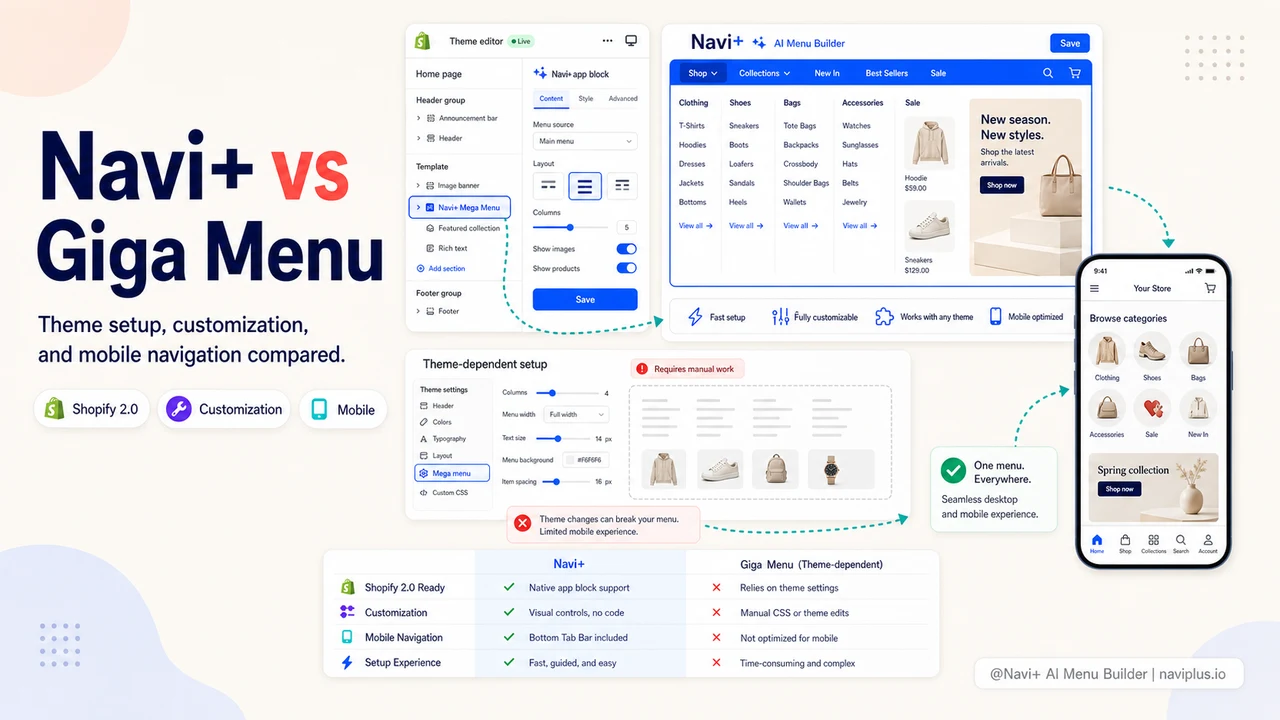
Giga Menu is a Shopify navigation app focused on customizable mega menus with animation support. Navi+ brings five menu types, AI generation, and cross-platform support to the same category. Here’s how they compare.
TL;DR — Quick Verdict
Giga Menu is a capable mega menu builder with good animation and customization options. Navi+ covers mega menus and adds Tab Bar, Floating Button, AI generation, multilingual support, and cross-platform deployment — at a comparable price.
Bottom line: Giga Menu does one thing well. Navi+ does everything Giga does, plus the features that matter most for mobile conversion in 2026.
What Is Giga Menu?
Giga Menu is a Shopify-focused navigation app known for its visual editor and support for animated mega menus. It allows merchants to build multi-column dropdowns with images, icons, and custom styling. The app targets store owners who want more visual polish than default Shopify navigation but don’t need a complex multi-menu solution.
Giga Menu’s strengths:
- Smooth menu animations and transitions
- Good visual editor for mega menus
- Works well with Shopify 2.0 app blocks
- Decent mobile-responsive design for its mega menu
Giga Menu’s limitations:
- No Tab Bar or bottom navigation
- No FAB
- No AI menu generation
- Shopify only
- No native multilingual support
- No Smart Publish or device-specific menu rules
What Is Navi+?
Navi+ is a complete navigation platform: Tab Bar, Mega Menu, Mobile Menu, Floating Button, and Icon Menu — all in one app. It’s AI-powered, runs on Shopify and WordPress/WooCommerce, and supports 9 languages out of the box.
Understanding Mega Menus for Shopify: Definition, Value & Architecture
Before diving into how Navi+ and Giga Menu compare, it is important to understand why mega menus have become the gold standard for ecommerce navigation and how they operate on modern Shopify stores.
What Is a Shopify Mega Menu?
A Shopify mega menu is an expandable, multi-column navigation panel that organizes a store’s product categories, sub-collections, featured products, and promotional banners into a single comprehensive visual dropdown. Unlike standard single-column dropdown menus that hide subcategories behind multiple nested hover tiers, a modern Shopify mega menu app lays out your store’s entire taxonomy at a single glance.
Key elements of an effective mega menu include:
- Multi-column category layouts: Grouping related collections side-by-side (e.g., Men, Women, Accessories, Sale).
- Visual thumbnails and badges: Highlighting “New Arrivals”, “Best Sellers”, or specific seasonal promotions with image cards.
- Featured promotional banners: Embedding clickable marketing banners directly inside the dropdown to direct traffic to high-margin campaigns.
- Direct category access: Allowing shoppers to jump straight to specific sub-collections in 1 click, bypassing top-level landing pages.
- For in-depth structuring rules and layout inspiration, check out our guide on Shopify mega menu best practices.
Why Is a Mega Menu Critical for Shopify Stores?
If your Shopify store carries more than 30–50 products across multiple collections, traditional navigation quickly becomes a bottleneck for conversion:
- Eliminating the “3-Click Drop-off”: Studies consistently show that bounce rates spike when shoppers have to click through more than 3 layers to reach a product. A visual multi-column mega menu reveals all product tiers in 1 hover or tap.
- Accelerating Product Discovery: Customers often enter an online store looking for one item. A visual mega menu exposes them to complementary collections, seasonal sales, and trending items right from the header.
- Enhancing Visual Hierarchy: Text-only menus fail to communicate product variety. Adding brand imagery, category thumbnails, and color accents builds trust and guides the shopper’s eye naturally.
- Improving Search Engine Architecture (SEO): A properly structured mega menu creates clean internal linking pathways for search engine crawlers, distributing link equity from your homepage deep into collection and product pages.
How Do Mega Menus Work on Shopify Themes (Shopify 2.0)?
Implementing a mega menu on Shopify typically happens in one of three ways:
- Theme Built-In Menus (Limited): Some premium themes (like Prestige, Impulse, or Horizon) offer basic mega menu settings. However, they are rigid, hardcoded to specific theme layouts, and frequently break or disappear when you switch or update themes.
- Custom Liquid Coding (Expensive & Fragile): Hiring a Shopify developer to code a custom mega menu costs anywhere from $500 to $2,500+. Worse, future theme updates can easily wipe out or conflict with custom Liquid snippets.
- Shopify App Embeds (Recommended — No Code): Modern solutions like the Navi+ Shopify Mega Menu app inject mega menus dynamically using Shopify App Embeds (Online Store 2.0). They require zero theme code edits, load via fast global CDNs, preserve your menu when you change themes, and provide an intuitive visual drag-and-drop editor through a complete Shopify menu builder.
Feature-by-Feature Comparison
| Feature | Navi+ | Giga Menu |
|---|---|---|
| Tab Bar / Bottom Navigation | ✓ | ✗ |
| Mega Menu | ✓ | ✓ |
| Slide Menu / Drawer | ✓ | ~ |
| FAB / Floating Action Button | ✓ | ✗ |
| Grid Menu | ✓ | ✗ |
| Sticky Navigation | ✓ | ✓ |
| Menu Animations | ✓ | ✓ |
| AI Menu Generation | ✓ | ✗ |
| AI Design Suggestions | ✓ | ✗ |
| Smart Publish (Device / URL filters) | ✓ | ✗ |
| Visual Drag & Drop Editor | ✓ | ✓ |
| Custom CSS | ✓ | ~ |
| Mobile-Responsive Preview | ✓ | ✓ |
| Dark Mode Support | ✓ | ✗ |
| Multi-Language (9+ langs) | ✓ | ✗ |
| Shopify | ✓ | ✓ |
| WordPress / WooCommerce | ✓ | ✗ |
| CDN-delivered assets | ✓ | ~ |
| Free Plan Available | ✓ | ✓ |
| Live Chat Support | ✓ | ~ |
✓ = Fully supported · ~ = Partial / limited · ✗ = Not available
WordPress GuideCan You Use Giga Menu on WordPress & WooCommerce? Read the Migration Guide →
Deep-diveRead the full breakdown → Giga Menu Customization vs Navi+
Key Differences
1. Mobile Navigation — Tab Bar Changes the Game
Giga Menu’s mega menu is responsive, meaning it collapses gracefully on mobile. But it still uses the classic hamburger pattern: one icon, tap to expand, navigate through a vertical list.
Navi+’s Tab Bar places your four or five most important navigation destinations permanently at the bottom of the screen — where users’ thumbs naturally rest. It’s the navigation pattern used by Instagram, TikTok, and Amazon. For ecommerce, it consistently improves category discovery and reduces exit rates on mobile.
For any store where mobile is a significant traffic source (and it is for virtually every Shopify store), Tab Bar alone represents a meaningful UX upgrade that Giga Menu simply can’t match.
2. AI-Powered Menu Building
Setting up a mega menu in Giga requires manually creating every item, column, and image link. For stores with deep category trees, this is time-consuming.
Navi+ reads your store’s category and product structure and proposes a complete menu hierarchy with AI. You review, adjust, and publish — instead of building from scratch.
3. Smart Publish — Context-Aware Menus
Navi+’s Smart Publish rules let you define when and where each menu appears:
- Mobile devices see the Tab Bar; desktop sees the Mega Menu
- Sale pages show a promotional slide menu
- Logged-in customers see a loyalty-aware menu
Giga Menu publishes one menu globally with no targeting rules.
4. Animations
This is one area where Giga Menu has historically focused more development effort. Its transition animations are smooth and varied. Navi+ supports animations and transitions but if animation variety is your top priority, Giga has more options here.
Deep-diveRead the full breakdown → Navi+ Tab Bar vs Giga Menu Mobile
Pricing Comparison
Both apps offer free plans with their core mega menu features. Paid plans for both fall in the $10–$25/month range.
Giga Menu paid tiers typically unlock: more menu items, branding removal, priority support, and more animation options.
Navi+ paid tiers unlock: unlimited AI generation, Smart Publish rules, the Navi+ Care design service, and priority support. You get more functionality per dollar spent, especially if you’re using multiple menu types.
Deep-diveRead the full breakdown → Giga Menu for Shopify 2.0 Themes
Shopify 2.0 Compatibility
Both Giga Menu and Navi+ work with Shopify 2.0 themes. Giga Menu integrates via app blocks within the theme editor. Navi+ uses its own controlled deployment that doesn’t depend on theme block positions, giving you more layout freedom.
Quick Feature Comparison Matrix
| Feature | Navi+ | Giga Menu |
|---|---|---|
| Desktop Mega Menu | ✅ Multi-column, images, badges | ✅ Basic / Standard |
| Mobile Tab Bar (Bottom Nav) | ✅ Yes (App-like thumb zone) | ❌ No |
| Mobile Drawer Replacement | ✅ Multi-level drill down | ⚠️ Basic list / theme default |
| AI Menu Design / Auto-Build | ✅ Yes | ❌ No |
| Multi-language Support | ✅ Native 9 languages | ⚠️ Limited |
| Shopify App Store Rating | ⭐ 5.0 (38+ reviews) | 4.4 – 4.8★ |
| Theme Compatibility | 100% (Horizon, Dawn, 331+ themes) | Depends on theme |
| Free Plan Available | ✅ Yes (No forced branding) | Varies |
Who Should Choose Giga Menu?
- Mega menu with rich animations is your primary need
- You’re on Shopify only
- You’ve already set up Giga and migrating would take significant time
- Animation variety is more important than menu type variety
Who Should Choose Navi+?
- Mobile UX is a priority — Tab Bar and FAB aren’t optional for your store
- You want AI to accelerate menu setup and reduce manual work
- You run Shopify and WordPress, or plan to go cross-platform
- You need different menus for different devices, pages, or customer types
- You want multilingual menus without a third-party translation app
The Verdict
Giga Menu is a solid Shopify navigation app for merchants who need polished animated mega menus and are comfortable with manual setup. It does what it does reliably.
Navi+ is the more capable platform: more menu types, AI-powered, cross-platform, multilingual, and with Smart Publish targeting. For a store that thinks beyond desktop-first mega menus, Navi+ is the stronger long-term investment.
Explore the topics
This guide links out to focused articles — dive deeper on each.