


The Highest-Impact Element Most Stores Never Optimize
Every page on your store loads your navigation. Product pages, collection pages, the homepage, the cart, the checkout flow — all of them pull in the same navigation JavaScript, the same navigation CSS, and the same navigation images. This makes navigation code unique among all the elements on your site: optimizing it improves performance everywhere, simultaneously, for every visitor on every page. And ignoring it means every page carries the weight of whatever performance debt your navigation has accumulated.
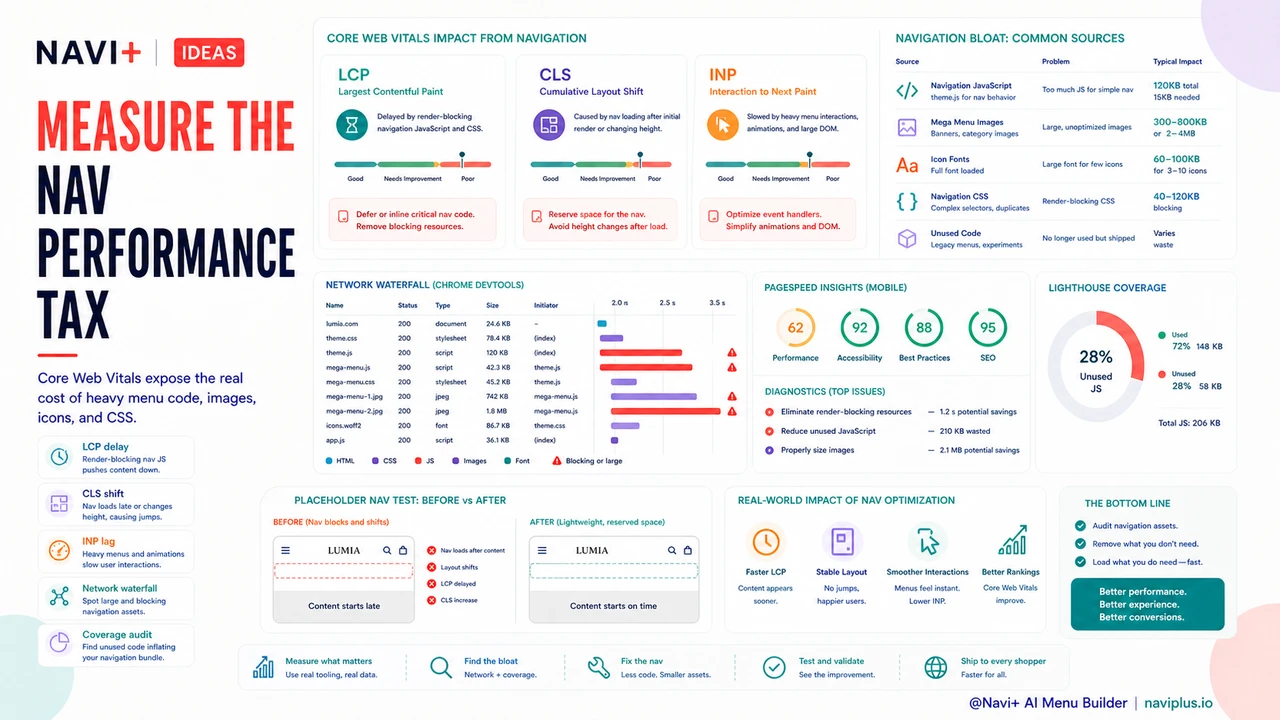
Most Shopify merchants understand that slow product images hurt their product pages. Far fewer recognize that a navigation component with a 150KB JavaScript bundle, an unoptimized icon font, and a Mega Menu full of full-resolution category images is adding 400–600ms of load overhead to every single page on the store — including the pages where that Mega Menu never even opens. The navigation code loads regardless.
This asymmetry — high payload, universal load, low optimization attention — makes navigation one of the most cost-effective performance improvements available to a store that hasn't addressed it.
How Navigation Affects Core Web Vitals
Google's Core Web Vitals are the performance metrics that directly influence search ranking. Two of the three primary CWV metrics are meaningfully affected by navigation implementation:
LCP (Largest Contentful Paint) measures how long it takes for the largest visible element on the page to render. On most pages, LCP is a hero image or a large product image — not the navigation itself. But heavy navigation JavaScript can still delay LCP indirectly: JavaScript is render-blocking by default, meaning the browser pauses HTML parsing to execute JS files. A large navigation bundle that loads synchronously in the <head> adds directly to the time before any large content can paint. A navigation JavaScript file that adds 200ms to script execution time adds 200ms to LCP on every page.
CLS (Cumulative Layout Shift) measures unexpected movement of visible page content. Asynchronously-loaded navigation components are a common CLS culprit: when the navigation loads after the initial HTML render, it pushes page content down, generating a layout shift. Sticky headers that pop in after scroll, Mega Menus that expand and reflow content, and navigation bars that render at a different height than their placeholder all generate CLS. Even a small CLS score from navigation — 0.05 to 0.1 — can drop a page from "Good" to "Needs Improvement" in Google's assessment.
INP (Interaction to Next Paint), which replaced FID as a Core Web Vitals metric, measures how quickly the page responds to user interactions. Navigation interactions — opening a menu, expanding a dropdown, triggering a search overlay — are exactly the interactions INP measures. A navigation built with heavy JavaScript event handlers and complex animation logic will score poorly on INP, especially on lower-end mobile devices.
The Performance Tax of Navigation Bloat
Navigation performance problems tend to compound because navigation is assembled from multiple independently problematic choices:
Large JavaScript bundles. Animated navigation components — sliding panels, hover-triggered dropdowns with transitions, search overlays with autocomplete — require JavaScript. But many theme navigations bundle this JavaScript with unrelated theme functionality, meaning the navigation loads code for features it doesn't use. A navigation that requires 15KB of focused JavaScript for its actual behavior may load 120KB because it's part of a theme's monolithic theme.js file.
Mega Menu images. Mega Menus with category thumbnails, featured product images, or promotional banners are common on fashion and multi-category stores. If those images are not optimized — served as JPEG or PNG instead of WebP, sized at full resolution instead of the display dimensions, and not lazy-loaded — a Mega Menu panel can add 300–800KB of image payload to the initial page load even if the visitor never opens it. The browser fetches image resources referenced in the DOM regardless of whether the containing element is visible.
Icon fonts. Icon fonts (FontAwesome, custom icon fonts bundled with themes) are commonly used for navigation icons: hamburger menus, search icons, cart icons, chevrons. A full icon font file can be 60–100KB. A navigation that uses 6 icons from a 300-icon font is loading 294 icons it doesn't need. SVG icons or CSS-only icons eliminate this overhead entirely.
Render-blocking CSS. Navigation CSS loaded in the <head> without optimization blocks rendering until the stylesheet is parsed. A navigation stylesheet that's included as part of a large combined theme CSS file may be adding seconds to initial render time on slow connections, even though the visitor hasn't interacted with the navigation at all.
The Google Penalty: CWV as a Ranking Signal
Core Web Vitals have been a confirmed Google ranking signal since the Page Experience update in 2021. Pages with "Good" CWV scores receive a ranking benefit over equivalent pages with "Needs Improvement" or "Poor" scores. The magnitude of this benefit is contested — Google characterizes it as a tiebreaker rather than a primary ranking factor — but the cost of ignoring it compounds over time and across an entire catalog.
For a store with 500 product pages, navigation code that generates CWV failures affects all 500 pages' ranking potential simultaneously. The SEO cost isn't a single page performing slightly worse — it's every page on the store leaving ranking potential on the table. When navigation improvement lifts CWV scores store-wide, the organic traffic benefit scales with catalog size.
The calculation is straightforward: if navigation optimization improves organic ranking positions for 10% of your indexed pages by an average of 2 positions, and if each position improvement generates an average click-through rate increase of 0.5%, the cumulative organic traffic benefit for a large catalog can exceed the cost of the optimization within weeks. Navigation performance is not a technical nicety — it's a recoverable SEO cost that compounds the longer it goes unaddressed.
The Mobile Performance Multiplier
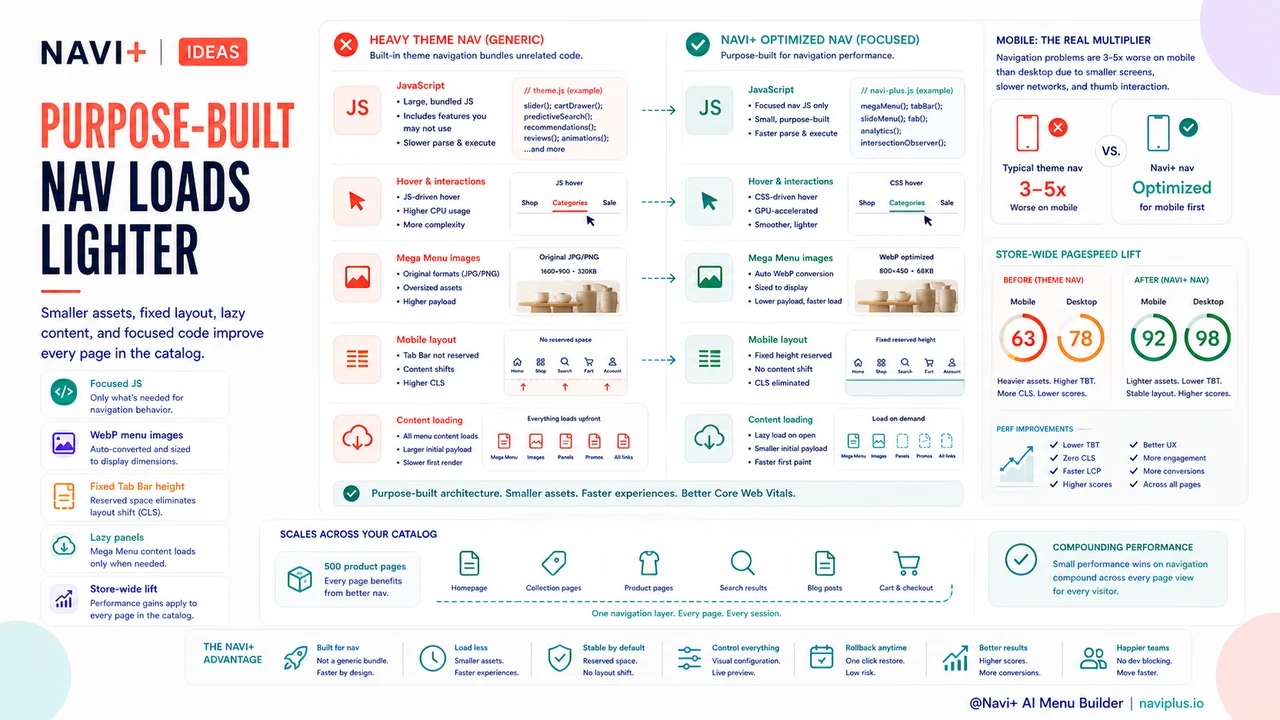
Every navigation performance problem is 3–5× more severe on mobile than on desktop. This is not a rough estimate — it follows directly from the hardware and network constraints of mobile devices:
Mobile processors are slower than desktop processors at JavaScript execution. A navigation script that takes 50ms to parse and execute on a desktop browser takes 150–250ms on a mid-tier Android device. On a budget device — the median device in many Southeast Asian and Latin American markets — the multiplier is even higher.
Mobile network connections are faster than they were five years ago, but 4G connections still have higher latency and lower bandwidth than most wired desktop connections. More importantly, network quality is variable: a visitor on 4G in a building with poor signal may be effectively on 3G for the duration of their session. Navigation JavaScript and images that are "acceptable" on a good 4G connection can be critically slow on a variable connection.
A desktop navigation that adds 300ms to LCP may receive a "Needs Improvement" CWV score but still feel reasonably fast to the visitor. The same navigation on mobile, on a variable 4G connection, on a mid-tier device, may add 900ms+ to LCP and represent a materially broken experience — one that visitors abandon before the page is interactive. The mobile performance stakes for navigation are categorically different from the desktop stakes.
What Fast Navigation Looks Like Technically
High-performance navigation implementations share a consistent set of technical characteristics:
CSS-only hover effects. Navigation dropdown menus and hover states that are implemented with CSS :hover and :focus selectors require zero JavaScript. CSS transitions and animations are handled by the browser's compositor thread, which runs independently of the main JavaScript thread and does not block rendering. JavaScript-driven hover effects add main-thread work that blocks other operations.
Lazy-loaded Mega Menu content. Mega Menu panels that are not visible on initial load do not need to be fully rendered or have their images fetched on page load. Lazy-loading Mega Menu images — using loading="lazy" on images or deferring panel rendering until the menu is triggered — keeps initial page payload small without degrading the experience when the menu is actually opened.
WebP images under 30KB per panel. Category thumbnails and promotional images used in Mega Menus should be served as WebP (not JPEG or PNG), sized to their display dimensions (not full resolution), and compressed to under 30KB each. A Mega Menu with 6 panels at 30KB per panel adds 180KB of image payload. The same menu with unoptimized full-resolution JPEGs can easily add 2–4MB.
Minimal DOM elements. Each DOM element the browser has to track and render has a cost. A navigation with deeply nested structures, hidden panels for every dropdown state, and redundant wrapper elements is more expensive to render and update than a navigation with a flattened, minimal DOM. Performance-first navigations typically have fewer than 200 DOM elements for the entire navigation structure.
Focused, purpose-built JavaScript. Navigation JavaScript that does only what the navigation needs — and is loaded as a small, focused module rather than as part of a large theme bundle — can be as small as 8–15KB minified and gzipped. This is an order of magnitude smaller than the navigation footprint of many Shopify themes.
Testing Your Navigation's Performance Contribution
Isolating how much of your site's performance problem is attributable to navigation requires specific tooling approaches:
Chrome DevTools Network waterfall. Open DevTools, navigate to the Network tab, and load your store's homepage with cache disabled. Sort by file size. Look for JavaScript and CSS files associated with navigation — often labeled with "nav," "menu," or "header" in their filenames, or identifiable as theme files. Note their sizes and load times. Then check the waterfall for render-blocking behavior: files that appear as horizontal bars at the top of the timeline, before any content renders, are render-blocking.
PageSpeed Insights. Run your homepage and a representative product page through PageSpeed Insights (pagespeed.web.dev). The "Opportunities" and "Diagnostics" sections will flag specific issues: render-blocking resources, unused JavaScript, large layout shifts. Cross-reference the flagged resources with your navigation implementation to identify navigation-specific contributions.
Lighthouse Coverage tab. In Chrome DevTools, run a Lighthouse audit and then open the Coverage tab (available under the three-dot menu → More Tools). This shows JavaScript and CSS coverage — what percentage of each loaded file was actually executed during the page load. A navigation JavaScript file with 15% coverage is loading 85% unused code on every page.
Before/after testing. The cleanest way to measure navigation's performance contribution is to temporarily replace your navigation with a minimal placeholder (a simple text header with no JavaScript) and compare PageSpeed scores. The difference between scores with your real navigation and the placeholder navigation is the navigation's performance cost.
Why Shopify Theme Navigations Often Underperform
Shopify themes are built to be general-purpose tools for stores of many types and sizes. This generality is what makes them useful — but it's also what makes their navigations systematically inefficient.
A theme's navigation component is typically one section of a large, monolithic theme JavaScript file. That file includes code for the navigation, but also code for product quick-view, video embeds, countdown timers, color swatches, and every other feature the theme supports. Even if a store uses only the navigation from this feature set, the entire JavaScript file loads on every page — because separating individual features would require a level of theme architecture complexity that most theme developers don't implement.
The same pattern applies to CSS. Theme CSS files frequently exceed 100KB minified because they contain styles for every possible theme feature, most of which any individual store doesn't use. Critical CSS — the styles needed to render the above-the-fold content — is mixed with styles for features that appear only deep in the page or not at all.
This structural inefficiency isn't a criticism of Shopify themes — it's an inherent consequence of the general-purpose design goal. Purpose-built navigation components, designed specifically for navigation and nothing else, can be dramatically smaller and faster because they carry no feature weight beyond what they need.
Navigation Performance Impact: Heavy vs. Optimized
| Metric | Heavy Navigation Code | Optimized Navigation Code |
|---|---|---|
| LCP Impact | +200–500ms from render-blocking JS and CSS | Minimal — non-blocking, focused bundle |
| CLS Risk | High — async load shifts page layout | Low — reserved space, synchronous render |
| Mobile Load Time | 3–5× worse than desktop due to device/network constraints | Optimized for mid-tier devices and variable networks |
| Google Ranking Effect | CWV failures suppress rankings site-wide | CWV "Good" scores support ranking across full catalog |
| JavaScript Payload | 80–200KB (bundled with unrelated theme code) | 8–20KB (purpose-built, navigation-only) |
| Image Payload (Mega Menu) | 1–4MB unoptimized images loaded on every page | <180KB lazy-loaded WebP images |
| INP on Mobile | Poor — heavy event handlers block main thread | Good — CSS-driven interactions, minimal JS |
Navi+'s Performance-First Approach
Navi+ is built as a purpose-built navigation component — not a general-purpose theme feature. This distinction matters technically: the JavaScript bundle Navi+ loads is written specifically for navigation behavior and contains nothing else. There is no dead code, no bundled functionality for features the navigation doesn't use, and no shared file with unrelated theme features.
Mega Menu images served through Navi+ are automatically converted to WebP and sized to display dimensions. Hover interactions are CSS-driven where possible, with JavaScript reserved for behaviors that genuinely require it. The Tab Bar on mobile is rendered at a fixed height that is reserved in the layout from initial paint, eliminating CLS from navigation load.
For stores that have been carrying the performance cost of a theme navigation without measuring it, replacing it with Navi+ typically produces measurable improvements in PageSpeed scores within the first measurement cycle — improvements that scale across every page in the catalog simultaneously.
Try it free — no code, no developer needed
Install in minutes on Shopify, WordPress, or any website.