


The Hidden Cost of Universal Navigation
Every store that shows the same navigation to every visitor is making an implicit trade-off: for the sake of consistency and simplicity, the navigation is optimized for no one in particular. The new visitor who needs orientation gets the same menu as the loyal customer who wants to reorder quickly. The visitor arriving from a sale ad gets the same menu as the visitor browsing organically for gift ideas. The result is navigation that is adequate for everyone and optimal for no one — a structural inefficiency that accumulates into real conversion losses across thousands of sessions.
Personalized navigation is not a luxury feature reserved for enterprise retailers with engineering teams. The most impactful forms of navigation personalization require no custom development — they require only an understanding of the distinct segments visiting your store and navigation configurations that reduce friction for each. The ROI of these changes comes from doing less work per segment, not from building more complexity into the navigation system.
"Our store serves two very different customer types: first-time buyers who need a lot of guidance about what our products actually do, and repeat customers who know exactly what they want and just want to get it fast. We created two navigation configurations — a discovery-heavy Slide Menu with explained categories for new visitors, and a streamlined Tab Bar with direct category and account access for logged-in customers. The segmentation was simple — logged in vs. not logged in. The conversion lift from logged-in customers was significant because we stopped making them navigate a menu designed for people who didn't know the store."
— A Navi+ customer, specialty skincare brand
Forms of Navigation Personalization and Their ROI
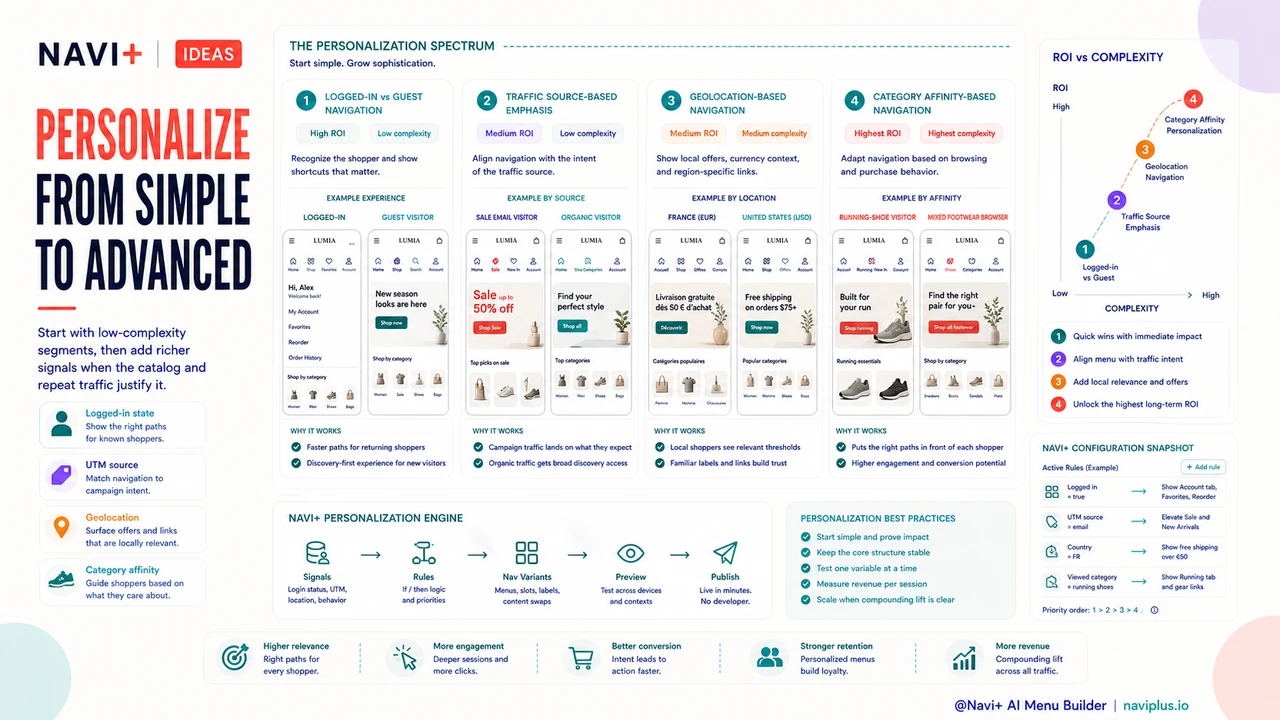
Navigation personalization spans a spectrum from simple to sophisticated. The most effective starting points are segment-based changes that can be implemented without real-time algorithms:
Logged-in vs. guest navigation (high ROI, low complexity). The simplest and most impactful navigation personalization is showing different Tab Bar slots to logged-in versus guest visitors. Logged-in visitors are typically returning customers — they benefit from quick account access, direct links to their favorite categories, and reorder shortcuts. Guest visitors are typically new or returning but not yet committed — they benefit from discovery-oriented navigation, clear category labels, and social proof signals. This single segmentation, requiring only a logged-in state check, can meaningfully improve conversion for both segments simultaneously.
Traffic source-based navigation emphasis (medium ROI, low complexity). Visitors arriving from a sale email have different intent than visitors arriving from organic search. A Tab Bar configuration that prominently features "Sale" and "New Arrivals" for email traffic, and "Shop All" and top categories for organic traffic, aligns the navigation with the intent the visitor arrived with. This doesn't require different menu structures — it requires adjusting which Tab Bar slot is visually emphasized (using an accent color or badge) based on UTM parameters available at page load. The implementation is simple; the alignment of navigation to intent is real.
Geolocation-based navigation (medium ROI, medium complexity). Stores that serve multiple countries or regions benefit from navigation that reflects geographic context. A visitor from France should see French-language navigation (handled by Jekyll Polyglot), but also potentially see region-specific product lines, shipping information, or promotional links that are geographically relevant. Showing "Free shipping on orders over €50" as a featured link in the navigation to French visitors and "Free shipping on orders over $75" to US visitors is a form of navigation personalization that reduces a common pre-purchase friction point — finding out whether free shipping applies — before the visitor has to look for it.
Category affinity-based navigation (highest ROI, highest complexity). The most sophisticated form of navigation personalization uses behavioral data — categories visited, products viewed, purchase history — to surface the most relevant navigation shortcuts for each visitor. A visitor who has only ever looked at running shoes sees a Tab Bar slot for "Running" prominently. A visitor who browses both running and casual footwear sees "All Footwear." This level of personalization requires either a customer data platform or custom development against the store's behavioral data, but for stores with high repeat purchase rates and large catalogs, the conversion impact is substantial.
| Personalization Type | Implementation Complexity | Best For |
|---|---|---|
| Logged-in vs. guest menus | Low — uses existing auth state | Any store with significant repeat purchase share |
| Traffic source emphasis | Low — reads UTM parameters | Stores with distinct campaign and organic traffic |
| Geolocation navigation | Medium — requires geo-lookup | Multi-region stores with regional offers |
| Behavioral/affinity navigation | High — requires behavioral data pipeline | Large catalog stores with strong repeat purchase rates |
The Cost Framework: What Navigation Personalization Replaces
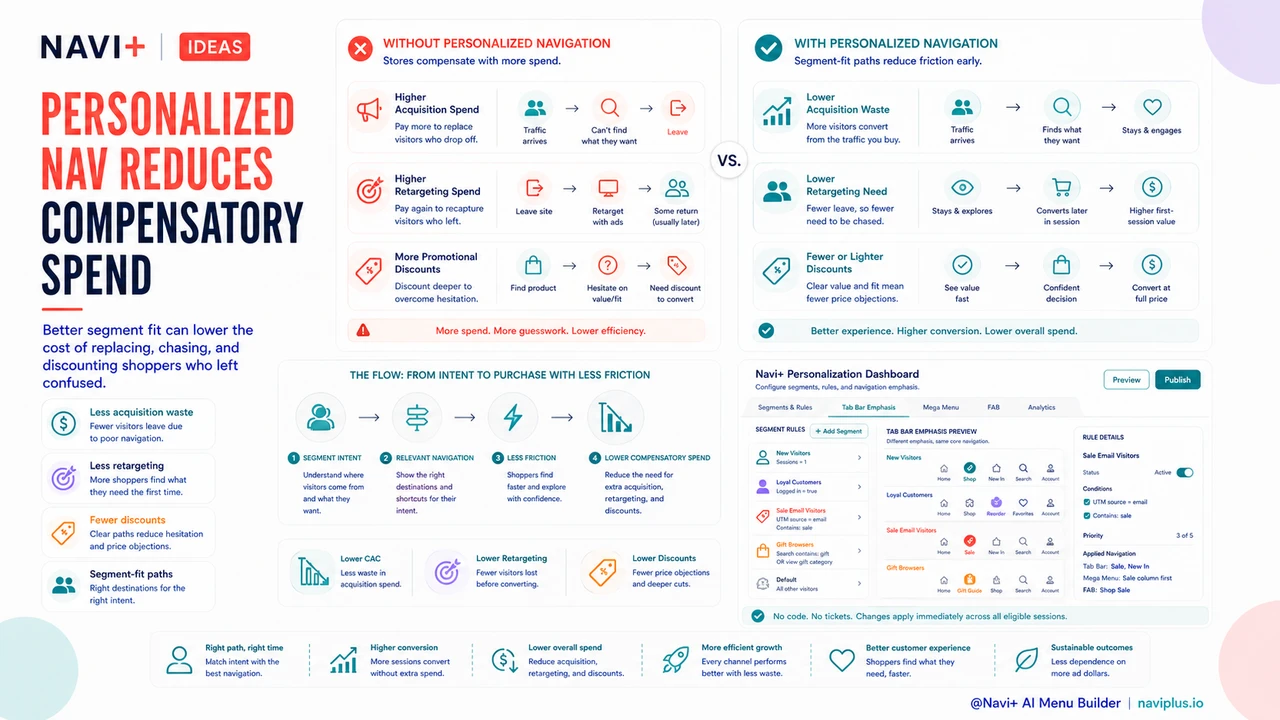
The ROI case for navigation personalization is not just about conversion lift — it's about what navigation personalization replaces. Stores that don't personalize navigation often compensate by spending more on acquisition (to replace visitors who dropped off due to navigation friction), retargeting (to recapture visitors who left without converting), and promotional discounts (to overcome purchase hesitation that better navigation would have prevented). Navigation personalization reduces the need for each of these compensating expenses by reducing the friction that necessitates them. A modest investment in navigation configuration replaces a more expensive investment in compensatory marketing spend.
Try it free — no code, no developer needed
Install in minutes on Shopify, WordPress, or any website.