


The Navigation Rebuild Problem
Most stores don't plan their navigation architecture for growth. They build a menu that works for their current catalog — simple, flat, appropriate for 50–100 products — and then face a structural problem when the catalog grows to 300, 500, or 1,000 products. The simple menu that worked at launch becomes inadequate at scale: too many top-level categories without meaningful subcategory organization, category names that were chosen for a small catalog but don't work when each category has 80+ products, a Tab Bar configured for the most popular products at launch that no longer reflects the store's range.
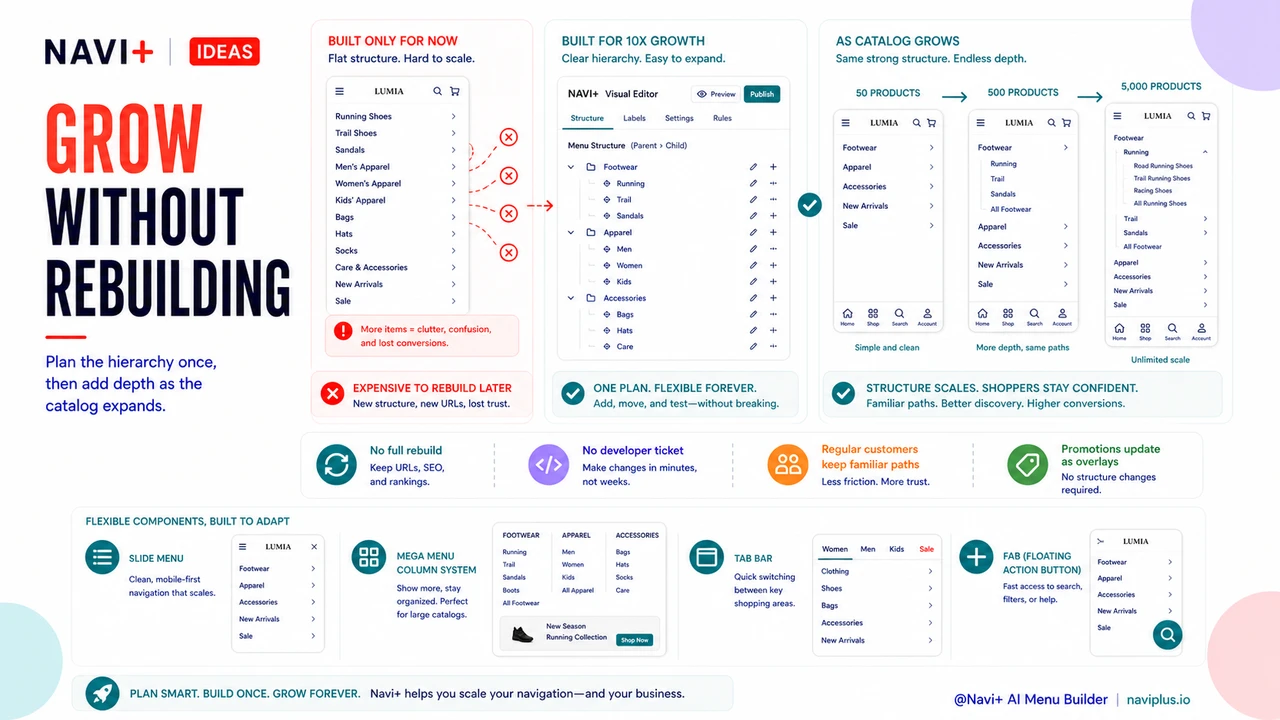
The navigation rebuild that follows catalog growth is expensive. It requires inventory of existing navigation, analysis of what isn't working, redesign of the category structure, updates to all internal links that referenced the old structure, and re-education of any regular customers who had memorized the old navigation. The cost isn't just the developer time to rebuild — it's the disruption to the store and the lost productivity of existing customers who suddenly can't find things. A navigation architecture designed for scale avoids most of this cost by building in flexibility from the start.
"We launched with six product categories and a simple Slide Menu. Two years later we had 22 categories and the navigation was chaos — every new product line we added went somewhere slightly wrong, and we had customers emailing to ask where things had moved. The rebuild cost us about $3,000 in developer time and a month of disruption. Looking back, if we'd built the category hierarchy with scalability in mind at launch — using a parent-child structure instead of flat categories — we would have just added subcategories as we grew, not needed to rebuild the whole thing."
— A Navi+ customer, outdoor lifestyle brand
Principles for Scalable Navigation Architecture
A navigation architecture that scales well shares several structural properties that distinguish it from navigation designed only for the current catalog state:
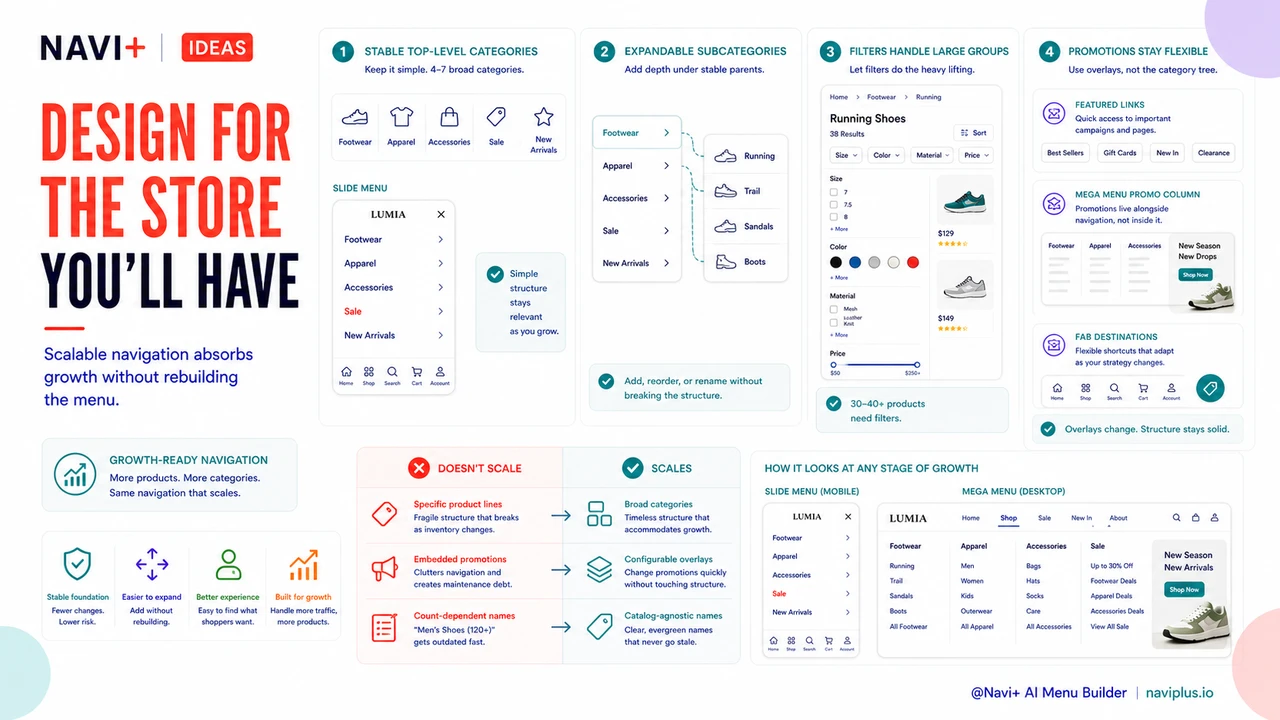
Stable top-level categories with expandable subcategory depth. The most durable navigation structures use a small set of top-level categories (4–7) that are broad enough to remain relevant as the catalog grows, with the expectation that subcategories will expand as product lines are added. "Footwear," "Apparel," and "Accessories" as top-level categories can absorb decades of product additions without changing — only the subcategories below them grow. "Men's Running Shoes" as a top-level category becomes obsolete the moment you add women's running shoes or trail running shoes. Design top-level categories at the broadest useful level; save specificity for subcategories.
Attribute-based filtering as the primary navigation tool for large subcategories. When a subcategory grows beyond 30–40 products, hierarchical navigation (more subcategories) becomes less useful than attribute filtering (size, color, material, price range). A scalable navigation architecture anticipates this transition and builds filtering capability alongside the category hierarchy, so that when "Running Shoes" grows too large to browse without guidance, filters can absorb the navigation load without requiring a structural change to the menu.
Featured links as a flexible overlay, not structural navigation. Seasonal promotions, new arrivals spotlights, and limited-time campaigns shouldn't be embedded in the primary category structure — that's what breaks navigation integrity as the catalog changes. A scalable approach treats these as configurable overlays: featured links in the Slide Menu header, Mega Menu promotional columns, or Floating Action Button destinations that can be updated quickly without touching the underlying category hierarchy. The core navigation stays stable; the promotional layer adapts.
Naming conventions that don't require renaming at scale. Category names chosen for a 50-product catalog often break at 500 products because they were too specific. "Bestsellers" as a navigation category works when you have 8 bestsellers; it's meaningless when you have 80. "New Arrivals" works when new arrivals are a small fraction of the catalog; it becomes confusing when new arrivals are added weekly. Naming conventions that scale are either broad enough to absorb catalog growth or are understood by visitors to be dynamic by nature (a "Sale" category is expected to change).
| Navigation Decision | Doesn't Scale | Scales Well |
|---|---|---|
| Top-level category structure | Specific product lines ("Men's Running Shoes") | Broad categories ("Footwear") with subcategories |
| Large subcategory navigation | More subcategory layers | Attribute-based filters as primary navigation |
| Promotional navigation | Embedded in category structure | Configurable overlay (featured links, FAB) |
| Category naming | Specific count-dependent names ("Top 10") | Broad, catalog-agnostic names ("Popular") |
Planning the Navigation for the Store You'll Have
The cost of rebuilding navigation at scale is entirely avoidable with modest planning at launch. The question to ask is not "what navigation do I need now?" but "what navigation will still work when my catalog is 10 times larger?" Answering this question honestly — and building category hierarchy with that growth in mind — produces a navigation architecture that absorbs years of catalog growth through subcategory additions rather than structural rebuilds. Navi+'s hierarchical Slide Menu, Mega Menu column system, and configurable Tab Bar are built to accommodate this parent-child structure natively, meaning the infrastructure for scalable navigation doesn't require custom development — only intentional initial planning.
Try it free — no code, no developer needed
Install in minutes on Shopify, WordPress, or any website.