


The Hidden Navigation App Stack
Most Shopify store owners don't think of themselves as maintaining a "navigation app stack" — but that's exactly what they have. The typical store running for more than a year accumulates navigation-adjacent apps gradually, adding one when a specific problem surfaces, then another for a different problem, without ever auditing the total cost or functional overlap. The result is a collection of apps that each do one navigation-related thing, with a combined monthly cost that would justify a much more capable solution if the total were visible.
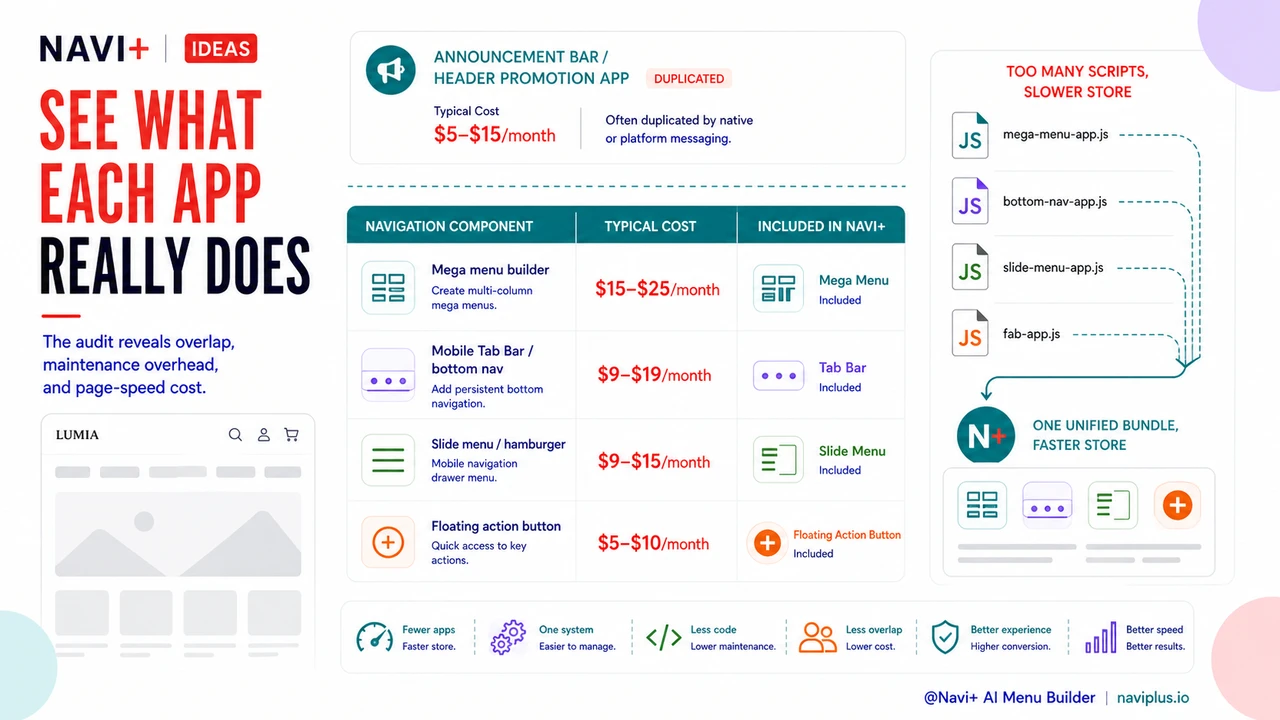
The most common navigation-adjacent apps in a typical Shopify store's subscription stack include: a mega menu or custom dropdown builder, a mobile bottom navigation or Tab Bar app, an announcement bar or header promotion app, a back-to-top floating button, and sometimes a sticky header app. Each of these solves a real problem. Together, they add $50–150 per month in combined subscription fees, introduce multiple JavaScript files that slow page load, and create a maintenance overhead as each app requires separate updates, compatibility checks, and support relationships. Most of this functionality — mega menu, Tab Bar, slide menu, floating button, announcement bar — is available in a single consolidated navigation platform at a fraction of the combined cost.
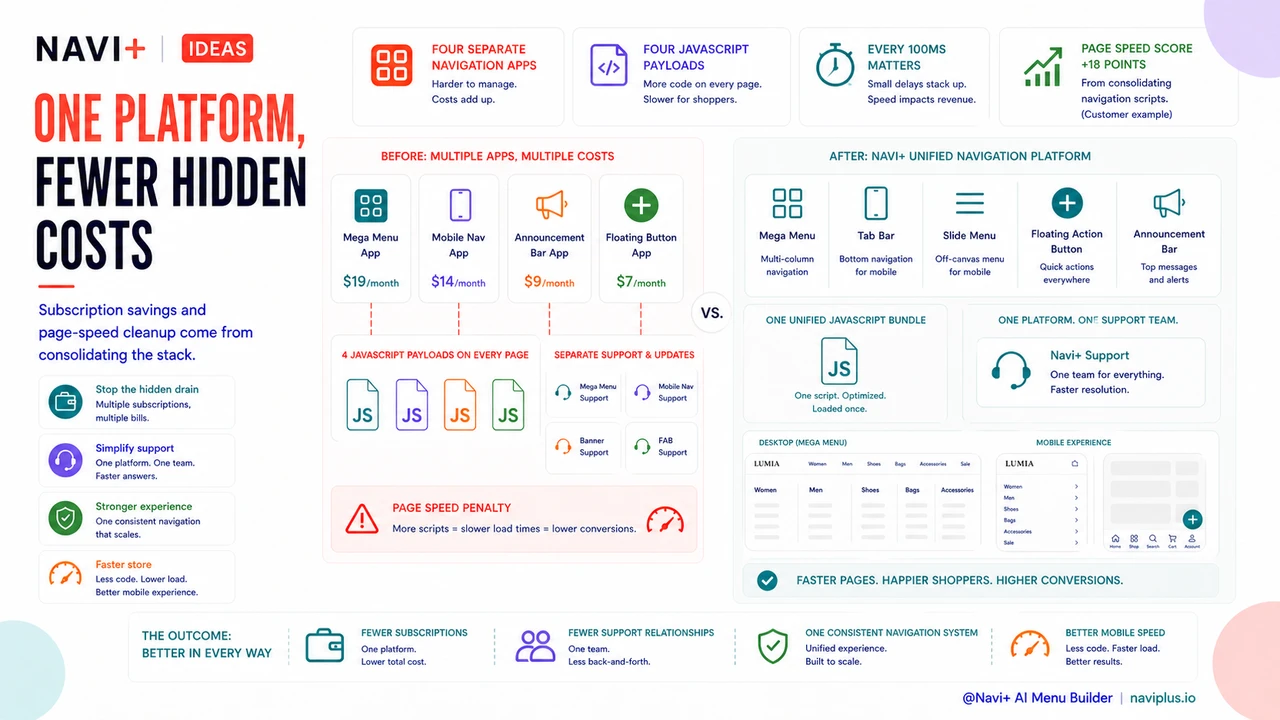
"When I actually added up what I was paying for navigation: $19/month for a mega menu app, $14/month for a mobile nav app, $9/month for an announcement bar, $7/month for a floating button. That's $49/month for four apps that together did less than Navi+ does on its own. And they were all loading their own JavaScript — my Lighthouse scores on mobile were embarrassing. After switching, I saved almost $40/month and my page speed score went up by 18 points. The navigation looks better too because it's all one consistent system."
— A Navi+ customer, fashion accessories brand
The Navigation App Audit: What to Look For
Running a navigation app audit starts with listing every app in your Shopify store's installed apps that touches any aspect of navigation, header, or menu functionality. The categories to look for:
Mega menu or dropdown navigation builders. Apps specifically designed to create expanded desktop navigation menus with columns, images, and multi-level dropdowns. These typically run $15–25/month and are the most common single-purpose navigation apps. They solve the desktop navigation depth problem but don't address mobile navigation, floating buttons, or tab bars.
Mobile navigation or bottom bar apps. Apps that add a Tab Bar, bottom navigation bar, or sticky mobile footer to a Shopify theme that doesn't natively support one. These run $9–19/month and solve the mobile navigation problem but don't address desktop mega menus or other navigation components.
Announcement bar or header promotion apps. Apps that add a dismissible or scrolling announcement bar above the main navigation, typically used for free shipping thresholds or sale announcements. These run $5–15/month and are often functionally duplicated by Shopify's native announcement bar capability or by navigation platforms that include header messaging.
Floating action button or back-to-top apps. Apps that add persistent floating buttons (cart access, back-to-top, contact, etc.) to the page. These run $5–10/month and provide a single function that is included in any comprehensive navigation platform.
| App Type | Typical Cost | Included in Navi+? |
|---|---|---|
| Mega menu builder | $15–25/month | Yes — Mega Menu component |
| Mobile Tab Bar / bottom nav | $9–19/month | Yes — Tab Bar component |
| Slide menu / hamburger | $9–15/month | Yes — Slide Menu component |
| Floating action button | $5–10/month | Yes — Floating Action Button component |
The Page Speed Cost Hidden in Multiple App Subscriptions
The subscription cost is the visible part of the multi-app navigation overhead; the page speed cost is invisible but significant. Each installed Shopify app that renders on the storefront adds at least one JavaScript file to the page's load sequence. Four navigation-adjacent apps add four separate JavaScript files, each with its own load time and execution overhead. Google's PageSpeed Insights penalizes pages with excessive JavaScript, and conversion research consistently shows that every 100ms of page load time increases abandonment probability. A store running four separate navigation apps is paying a page speed penalty equivalent to four separate JavaScript payloads — a cost that doesn't appear on the monthly subscription invoice but shows up directly in bounce rate and conversion rate. Consolidating to a single navigation platform that uses one unified JavaScript bundle eliminates this multiplication effect and produces measurable page speed improvements alongside the subscription savings.
Try it free — no code, no developer needed
Install in minutes on Shopify, WordPress, or any website.