

The Problem
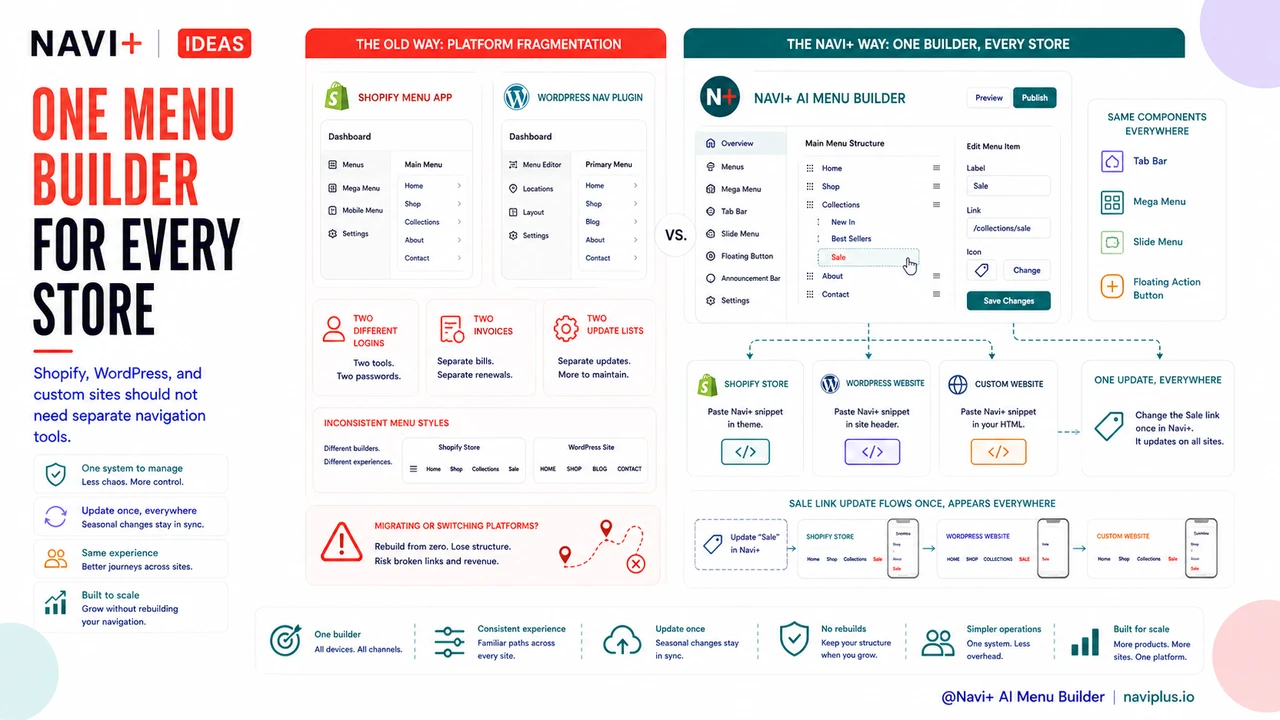
Picture this: you run a Shopify store and a WordPress site. The Shopify store is your main sales channel; the WordPress site powers your blog, landing pages, and a second niche product line. Both need navigation. Both need to be updated when you launch a new collection or run a seasonal campaign. And right now, you're doing it twice — in two completely different tools, with two different interfaces, two logins, and two separate billing lines at the end of the month.
The Shopify mega menu app you paid for doesn't install on WordPress. The WooCommerce navigation plugin you set up on WordPress has no Shopify equivalent with the same feature depth. So you've built two menus that look different, behave differently, and drift further apart every time you make a change to one without remembering to mirror it on the other. Customers who visit both properties get an inconsistent experience. You get twice the maintenance headache for no strategic reason.
And then comes the moment you decide to migrate. Maybe you're moving from Shopify to WooCommerce for cost reasons, or the reverse for scale reasons. That's when you discover the real price of platform-locked tools: everything you built — every carefully arranged category, every styled dropdown, every image you added to your mega menu — has to be rebuilt from zero. The tool you paid for doesn't cross the border with you.
"I had two stores — one on Shopify, one on WordPress — and I was paying for two different menu plugins. They looked completely different and I had to update both separately. Switching to Navi+ was the first time both stores actually felt like the same brand."
— A Navi+ customer
Platform fragmentation costs more than you think
The obvious cost is the subscription you pay for each tool. But the hidden costs stack up faster. Every new person you bring onto the team has to learn two interfaces instead of one. Every time you update your navigation structure, there's a checklist to make sure both platforms were updated. And every time there's an inconsistency — a link that exists on your Shopify store but not your WordPress site, a menu color that's slightly off on one — you erode the brand coherence that makes customers trust you.
- Double subscription cost — two tools, two invoices, often with feature gaps that mean neither does everything you need.
- Double onboarding time — every team member who touches navigation has to learn both systems, not one.
- Inconsistent brand experience — when menus look and behave differently across your properties, customers notice, even if they can't articulate why.
- Doubled update overhead — a "quick" change to add a promotional link becomes two tasks, which means it gets delayed, forgotten, or done inconsistently.
- Zero transferable knowledge during migration — if you ever move platforms, your menu configuration doesn't come with you. You're starting over.
None of these individually feel catastrophic. Together, they represent a compounding drag on your time, budget, and the quality of your customer experience.
How Navi+ AI Menu Builder solves this
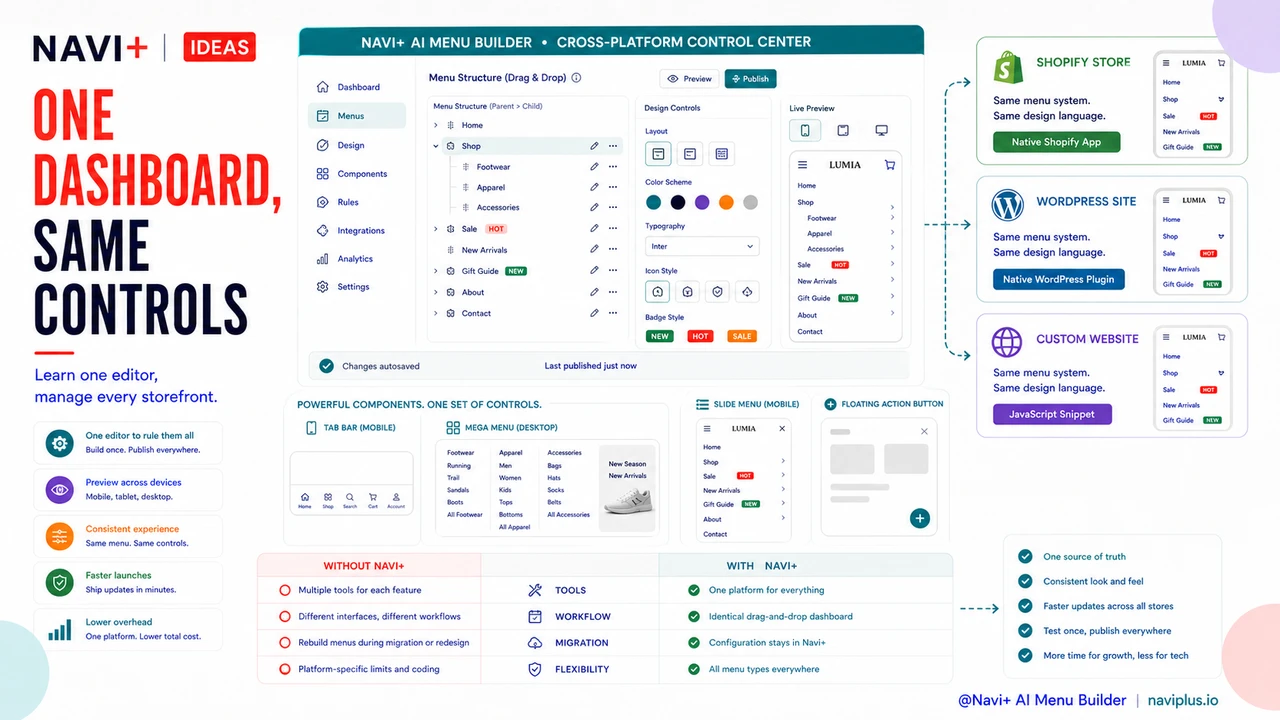
Navi+ AI Menu Builder was built from the start to work across platforms — not as an afterthought, but as a core design principle. It installs as a native app on Shopify and as a native plugin on WordPress. Once installed on either platform, you get the same dashboard: the same drag-and-drop editor, the same menu types, the same design controls.
You can build a Tab Bar for your mobile shoppers, a Mega Menu for your desktop navigation with image columns and badge labels, a Slide Menu that opens from the left, or a Floating Action Button that stays accessible no matter how far the user has scrolled. All of these work identically whether your store runs on Shopify or WordPress. The interface you learn on one platform is the exact interface you use on the other.
For stores that embed Navi+ on a custom website — outside of Shopify or WordPress — it works there too via a JavaScript snippet. One dashboard, one set of menu configurations, one place to make changes. When you update your navigation for a seasonal campaign, you do it once. When you bring on a new team member, you train them on one tool. When you migrate platforms, your Navi+ configuration doesn't care — it follows you.
Platform comparison
| Feature | Default / Without Navi+ | With Navi+ AI Menu Builder |
|---|---|---|
| Works on Shopify and WordPress | ✗ Separate tools required | ✓ One tool, both platforms |
| Same interface across platforms | ✗ Different UIs, different learning curve | ✓ Identical drag-and-drop dashboard |
| Menu config survives platform migration | ✗ Rebuild from scratch on new platform | ✓ Configuration stays in Navi+ |
| Advanced menu types (Mega Menu, Tab Bar, FAB) | ✗ Usually platform-specific or limited | ✓ All types on every platform |
| Single subscription for all stores | ✗ Pay per platform, per tool | ✓ One plan, multiple installs |
| Consistent brand navigation across properties | ✗ Drift is inevitable with separate tools | ✓ Same design system everywhere |
What you get after switching
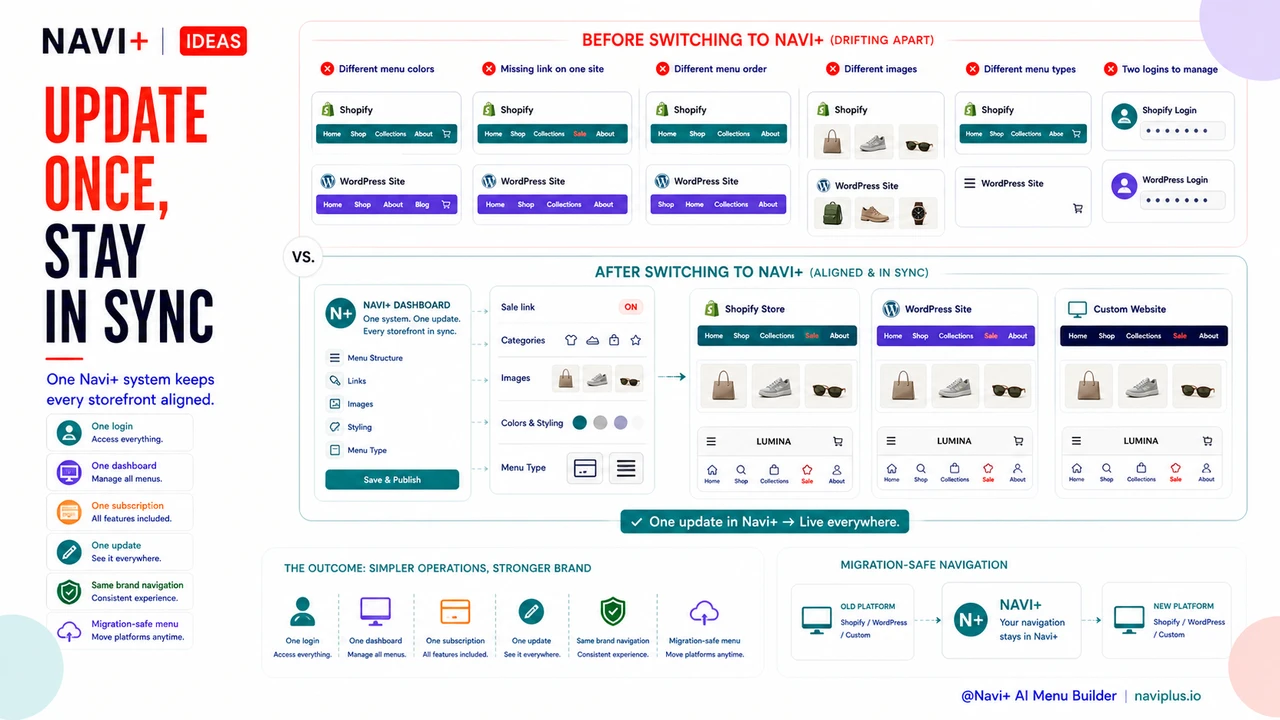
The immediate change is the most obvious one: one login instead of two, one dashboard instead of two, one subscription line instead of two. But the more meaningful shift happens over the following weeks. Updates get made once. Your menus stay in sync. A team member who learns Navi+ on your Shopify store can immediately work on your WordPress navigation without any additional training.
A practical example: you're running a mid-season sale and need to add a "Sale" link to the top of your navigation on both stores. With separate tools, that's two logins, two different interfaces, two sets of steps to remember, and a non-trivial chance that one gets done slightly differently than the other. With Navi+, you make the change in one place and it's done. If your two stores are running on the same domain ecosystem, you can manage both from the same Navi+ dashboard without toggling between accounts at all.
For store owners who are weighing a platform migration, Navi+ removes navigation from the list of things to worry about. Your menu structure — the categories, subcategories, images, styling, menu type configurations — lives in Navi+, not in your theme or platform. The migration involves your products, your checkout, your templates. Your navigation just keeps working.
Try it free — no code, no developer needed
Install in minutes on Shopify, WordPress, or any website.