


The Most Crawled Part of Your Store Is Your Navigation
Most e-commerce SEO discussions focus on product descriptions, meta titles, page speed, and backlinks. Navigation structure rarely comes up. This is a significant blind spot, because navigation is the element of your store that Google's crawler encounters on every single page it visits.
When Googlebot crawls a 10,000-product store, it processes each page's navigation links on every crawl. Every category link in your header menu is traversed repeatedly, on every page load, on every crawl cycle. Navigation links are not just user interface elements — they are the primary signal Google uses to understand your store's architecture, allocate its crawl budget, and determine which pages deserve ranking authority.
Stores that treat navigation as a UX decision and ignore its SEO implications are leaving significant organic traffic on the table — and spending more on paid advertising to compensate for organic rankings that proper navigation structure would improve for free.
Internal Linking Power: How Navigation Distributes PageRank
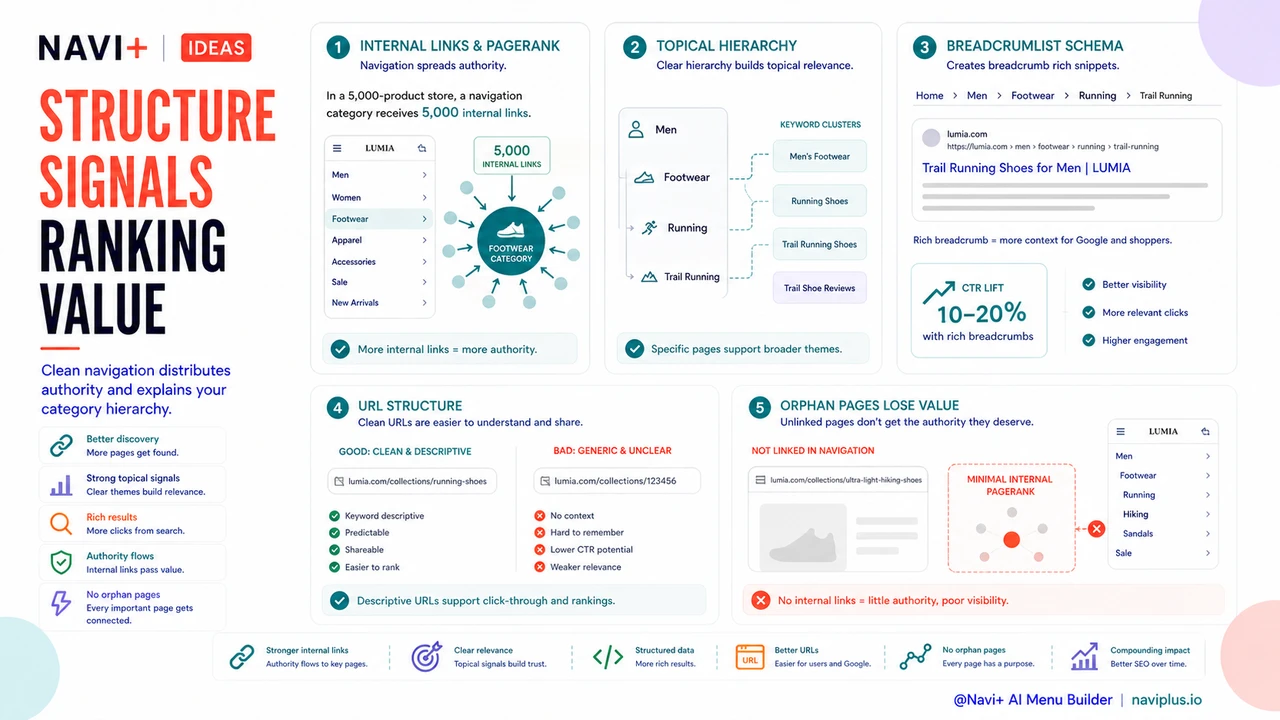
Every internal link passes a fraction of a page's ranking authority — PageRank — to the destination page. Navigation links are internal links that appear on every page of your store. A category linked in your main navigation receives PageRank signals from every product page, every blog post, every landing page that carries that navigation. In a 5,000-product store, a navigation link to a category is effectively 5,000 internal links pointing at that page.
The practical implication is direct: categories you want to rank for high-value search terms should appear in your navigation. Categories that exist only as deep collection pages — accessible via search or browsing but not linked in navigation — receive a fraction of the ranking signal of navigation-linked categories, and correspondingly rank worse for competitive keywords.
This is why stores with flat, well-structured navigation consistently outrank stores with messy or over-nested navigation on category-level keywords. The PageRank distribution from navigation is an ongoing, compounding advantage that costs nothing beyond the architectural decision to link the right categories.
Category Hierarchy as a Topical Signal
Search engines interpret navigation structure as a signal of topical organization. A store that navigates as Men → Footwear → Running → Trail Running is telling Google that trail running shoes are a specific subcategory within a broader footwear taxonomy. That hierarchy helps Google understand the topical relationship between pages — which is a prerequisite for ranking well across the full keyword cluster, from broad terms like "men's running shoes" down to specific terms like "men's trail running shoes waterproof."
Stores with flat navigation — where every collection is a top-level navigation item — lose this hierarchical signal. Google sees a flat list of categories with no apparent relationship. The store appears less authoritative on any specific topic because it has provided no topical organization for its content. The result is weaker rankings across the board, particularly for mid-tail and long-tail keywords where topical relevance is the deciding factor.
A well-organized navigation hierarchy is not just better for users who want to browse — it is a direct input to search engine topical authority calculations.
Breadcrumb Structured Data: Free Rich Snippet Improvements
Navigation architecture directly enables breadcrumb structured data (BreadcrumbList schema). When your navigation is hierarchically organized, each product and collection page can carry BreadcrumbList markup that tells Google exactly where that page sits in your category hierarchy. Google uses this to generate breadcrumb rich snippets in search results — the category path that appears below the page title in organic listings.
Breadcrumb rich snippets consistently improve click-through rates from organic search, typically by 10–20%, because they give searchers immediate context about what the page contains and where it sits in the store. That CTR improvement is free — it requires no additional ad spend. The only prerequisite is a navigation architecture clean enough to generate meaningful breadcrumb paths.
Stores with disorganized navigation — where products belong to multiple overlapping collections with no clear hierarchy — cannot generate coherent breadcrumb structured data. They forfeit this CTR advantage on every organic impression their pages receive.
URL Structure: Navigation Architecture Made Permanent
In most e-commerce platforms, your navigation hierarchy directly shapes your URL structure. A store that organizes navigation as Footwear → Running Shoes generates URLs like /collections/running-shoes. A store that uses numeric IDs or default platform slugs generates URLs like /collections/123456 or /collections/collection-1.
URL structure affects SEO in two ways. First, keyword-containing URLs provide a direct relevance signal for the terms in the URL. A page at /collections/running-shoes carries a mild but real ranking advantage for "running shoes" queries compared to a page at /collections/123456. Second, meaningful URLs improve click-through rates from organic search results, because users can read the URL and immediately understand what the page contains.
More importantly, URL structure is difficult to change without SEO consequences. If your navigation architecture is disorganized today, fixing it later requires redirecting URLs that may already have accumulated backlinks and ranking history. Getting the structure right early — while the store is smaller and the redirect cost is lower — is materially cheaper than restructuring later.
The Orphan Page Problem
Any product or collection not linked in navigation is, from Google's perspective, an orphan page — accessible only through site search, deep internal links, or direct URL entry. Googlebot crawls orphan pages less frequently, because it encounters no navigation links pointing to them on the high-traffic pages it visits most often.
Orphan pages rank worse because they receive minimal internal PageRank. If you want those pages to rank for organic search terms, you either need to accept their lower organic position or compensate with paid advertising. In either case, the root cause is a navigation architecture that failed to link high-value pages.
This problem is common in stores that have grown organically — new collections added as needed, navigation updated partially, some categories linked from navigation and others not. The result is a two-tier store: well-navigated categories rank well organically, orphan categories cost disproportionately more to promote. Restructuring navigation to include high-value orphan pages is often the highest-ROI SEO action available to mid-sized stores.
What Happens When Stores Restructure Navigation
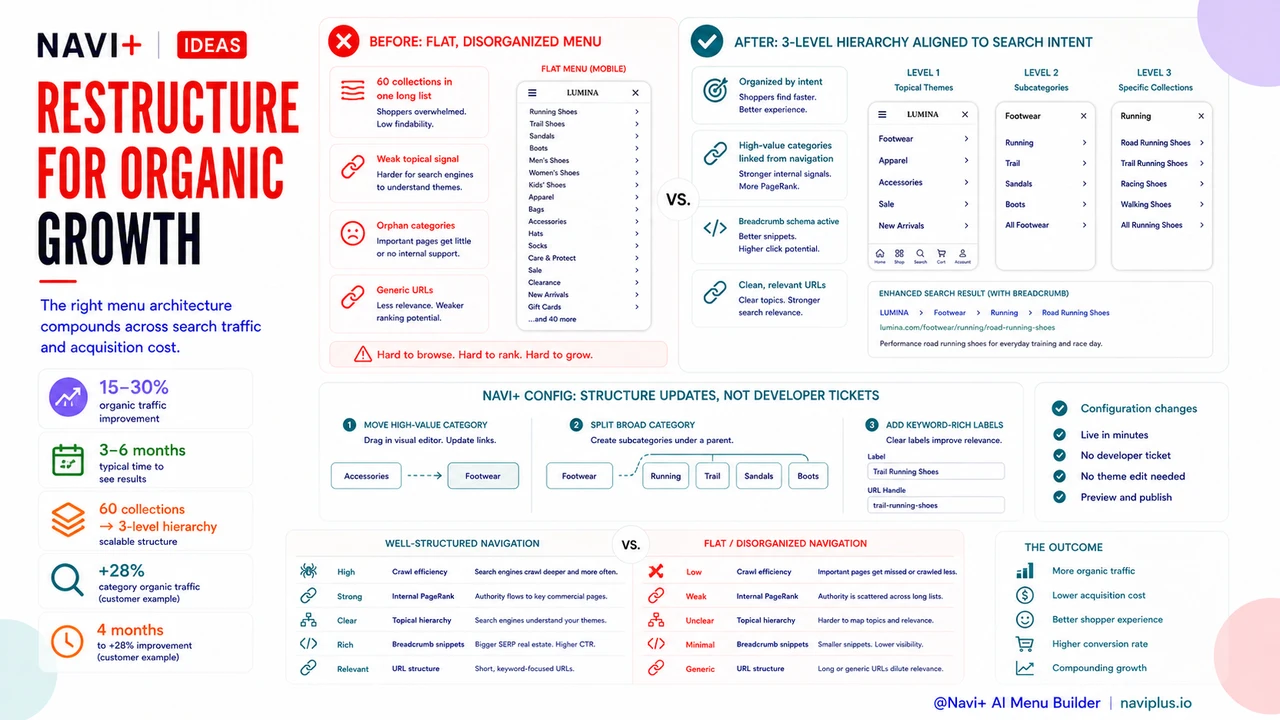
Stores that align their navigation architecture with keyword intent clusters — organizing categories around the terms their target customers search for, rather than internal product taxonomy — typically see 15–30% improvements in organic traffic within 3–6 months of restructuring. The mechanism is not mysterious: better navigation structure improves crawl efficiency, increases internal PageRank to target pages, strengthens topical relevance signals, and enables breadcrumb rich snippets that improve CTR.
These gains compound. A 20% organic traffic improvement reduces paid advertising spend required to hit revenue targets. Reduced ad spend improves margin. Better organic rankings reduce customer acquisition cost over time. The initial investment in navigation restructuring — which is primarily a planning and configuration effort, not a development project — pays dividends on every subsequent month of organic search performance.
"We restructured our navigation from a flat list of 60 collections to a three-level hierarchy organized around how customers search — not how we had organized our warehouse. Within four months, organic traffic to our category pages was up 28% and our Google Ads cost-per-acquisition dropped because we needed fewer paid clicks to hit our targets."
— A Navi+ customer, outdoor apparel brand
Well-Structured vs. Flat Navigation: SEO Impact Comparison
| Factor | Well-Structured Navigation | Flat / Disorganized Navigation |
|---|---|---|
| Crawl Efficiency | Crawler traverses clear hierarchy; crawl budget concentrated on high-value pages | Crawler encounters flat list; crawl budget spread inefficiently across all pages equally |
| Internal PageRank Distribution | Target categories receive PageRank from every page; strong ranking signals on priority collections | PageRank distributed randomly; many high-value pages are effectively orphaned |
| Organic Ranking Potential | Topical hierarchy signals authority on specific keyword clusters; ranks across broad and long-tail terms | No topical hierarchy signal; weaker authority, especially on competitive mid-tail keywords |
| Breadcrumb Rich Snippets | BreadcrumbList schema generates automatically; higher CTR from organic results | No coherent breadcrumb path; rich snippets unavailable or inaccurate |
| URL Keyword Relevance | Meaningful URL paths (/collections/running-shoes) carry keyword relevance signals | Generic or numeric URLs (/collections/123456) provide no relevance signal |
Navi+ and SEO-Optimized Navigation Architecture
Navi+ is built around navigation structures that align with both user experience and search engine requirements. Clean heading hierarchy in Slide Menu ensures that the navigation renders correctly for accessibility and for search engine parsing — both Google and assistive technologies interpret heading levels as structural signals. Breadcrumb support means that hierarchical navigation automatically generates the structured data needed for rich snippet eligibility.
Critically, Navi+ makes navigation restructuring fast to implement. When analytics reveal that a navigation change would improve organic rankings — moving a high-value category higher in the hierarchy, splitting a broad category into more targeted subcategories, adding keyword-rich labels — the change is a configuration update, not a development ticket. The iteration cycle between SEO insight and navigation implementation is measured in minutes, not weeks.
Stores that treat navigation as SEO infrastructure — and invest in getting its structure right — consistently outperform competitors who treat navigation as a purely aesthetic or UX decision. The organic traffic advantage compounds over time, reducing paid acquisition costs and improving margin on every customer acquired through search.
Try it free — no code, no developer needed
Install in minutes on Shopify, WordPress, or any website.