

The Problem
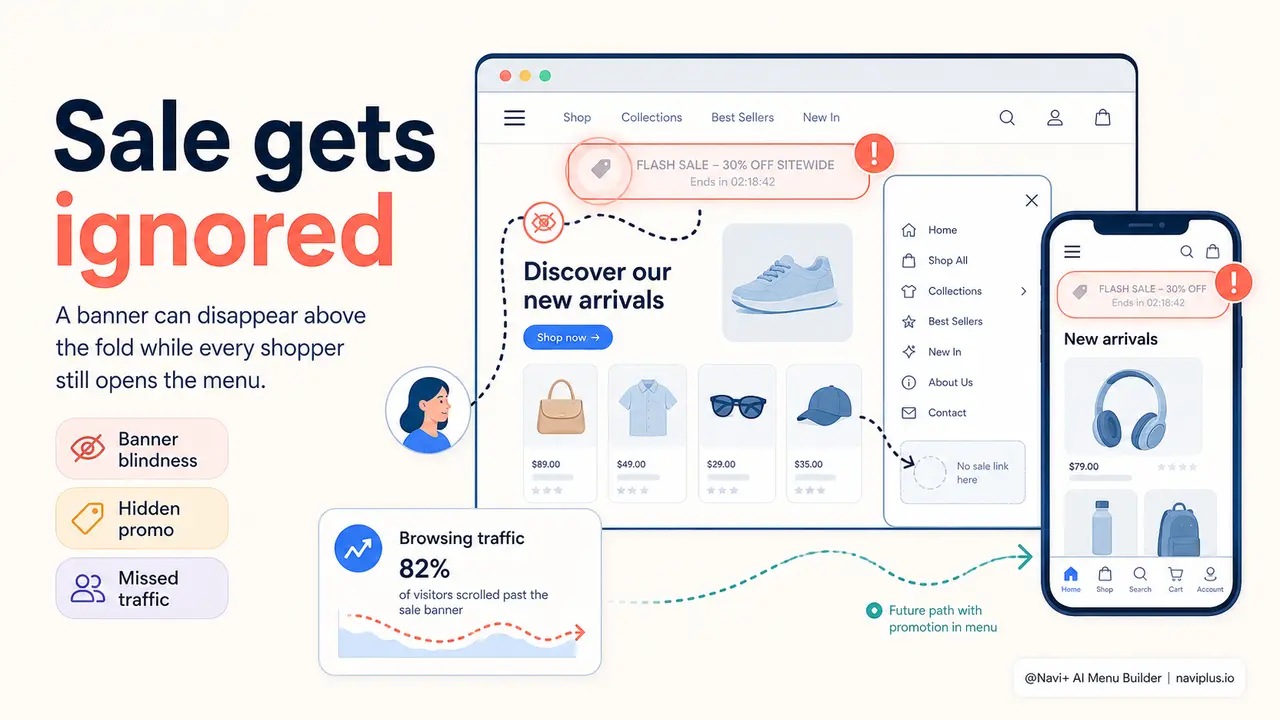
You have a flash sale live. Twenty-four hours, thirty percent off, everything in the summer collection. You sent the email at 8 a.m. You scheduled the hero banner three days in advance. You posted on Instagram. The campaign is running — and then you watch your analytics. Organic visitors, the ones arriving from Google searches and direct bookmarks, are converting at their usual baseline rate. They are landing on category pages, browsing normally, adding nothing to their cart. The sale might as well not exist for them.
The banner sits at the top of the homepage. But half your traffic enters through product detail pages, collection pages, or blog posts. Those visitors never see the homepage banner. They open your menu to navigate — that same menu you have not touched in four months — and they see the exact same structure as always: Women, Men, Accessories, Sale. There is no "Flash Sale ends tonight" label. No red badge. No urgency. Just the permanent architecture of a store that has no awareness of its own promotions.
When the sale ends, you look at the numbers and think the discount was not enough to move people. But the problem was distribution. Your highest-intent audience — the visitors actively navigating your store, opening menus, exploring categories — never received the message at all. The tool they used most during their session was completely silent about the most important thing happening in your store.
A Navi+ customer on exactly this
"We ran a 36-hour flash sale and the results were disappointing. We only realized afterward that every visitor who came through Google landed on a category page — they never saw our homepage banner. The menu said nothing about the sale. We had thousands of people browsing the store during those 36 hours who had no idea."
— A Navi+ customer
Navigation reach matters more than you think
Every promotional channel you use has a ceiling. Email reaches your list — and no one else. Social posts reach followers who happen to be online at that moment. Hero banners reach visitors who enter through the homepage. None of these channels reaches the visitor who is already inside your store, navigating through your menu right now.
The navigation menu is the one element your entire audience interacts with. Not some of them — all of them. Someone browsing on mobile opens the slide-out menu. Someone on desktop hovers the mega menu. Someone landing on an inner page taps the tab bar at the bottom to figure out where to go next. These are high-intent visitors. They are not passively scrolling. They are actively trying to find something to buy.
Missing this audience during a time-limited promotion has direct, measurable costs:
- Organic visitors convert at baseline rates during a sale period because they receive no promotion signal through the channel they actually use
- Urgency — the engine that drives flash sale conversions — does not reach browsers who skip banners and go straight to navigation
- You pay for ads and email infrastructure to push the sale, then fail to reach the audience that costs you nothing extra: your current organic traffic
- Visitors who would have bought the discounted item leave because they found the regular-priced version and hesitated — they did not know the discount existed
- Post-sale, customers who missed the deal feel frustrated when they find out — and some will wait for the next sale instead of buying at full price
How Navi+ solves this
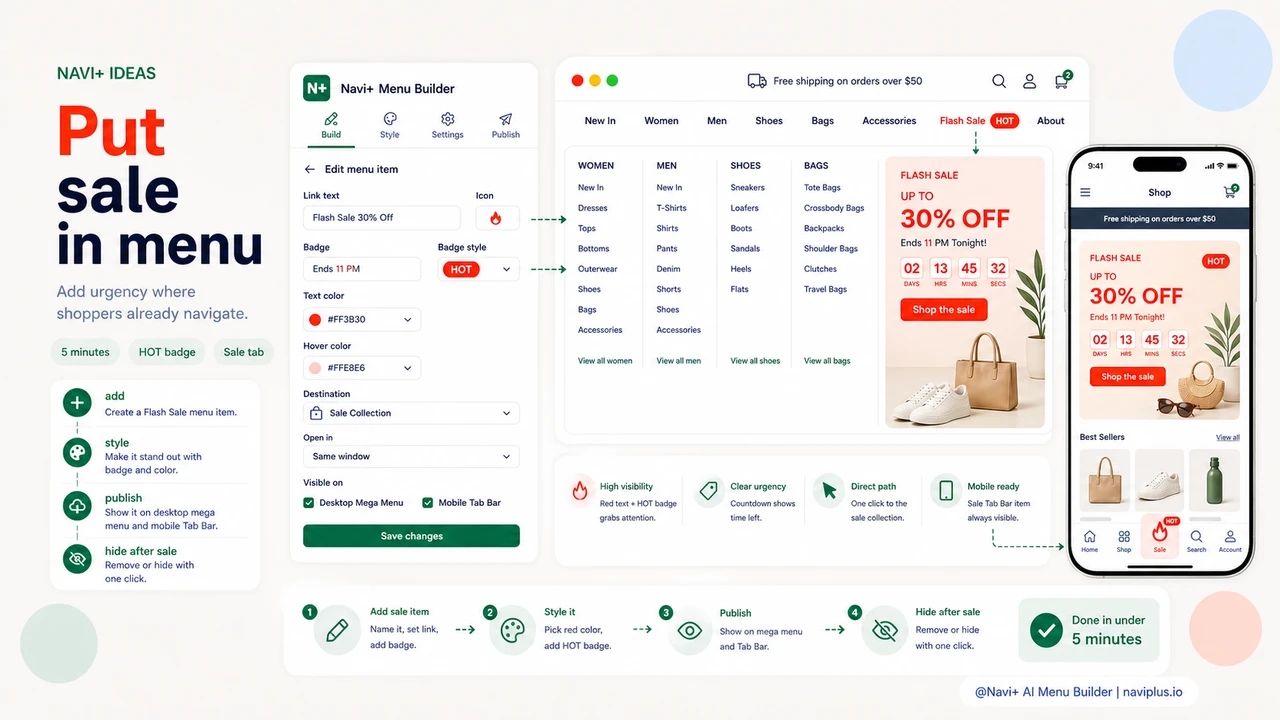
Navi+ lets you add, style, and remove menu items without touching code or waiting for a developer. For a flash sale, the workflow is straightforward: open the builder, add a new link to your existing menu structure, name it "Flash Sale — 30% Off" or whatever matches your promotion, point it to your sale collection page, and style it to stand out.
Styling is where the impact happens. In the Navi+ editor, you can give this link a distinct color — red text, a colored background chip — or add a badge label like "HOT" or "Ends Tonight" that sits next to the link text. On mobile, if you are using a Tab Bar, you can pin the sale link as a dedicated tab so it is permanently visible at the bottom of the screen without the visitor ever opening the full menu. On desktop, a Mega Menu column can carry a promotional banner image alongside the sale link, so hovering the menu immediately surfaces a visual cue about the discount.
Setup takes under five minutes. When the sale ends, you remove the item or swap the label to your next promotion. No deployment. No support ticket. No waiting until Monday when the developer is back.
How it compares
| Feature | Default / Without Navi+ | With Navi+ |
|---|---|---|
| Flash sale visible in navigation | ✗ Not possible without code edits | ✓ Add in under 5 minutes, no code |
| Distinct styling for sale link (badge, color) | ✗ All links look identical by default | ✓ Per-item color, badge, and icon control |
| Pinned sale tab on mobile | ✗ Buried in hamburger menu | ✓ Tab Bar keeps sale permanently visible |
| Promotional banner inside mega menu | ✗ Text links only | ✓ Image columns supported in Mega Menu |
| Remove sale link when promotion ends | ✗ Requires developer or theme edit | ✓ Delete or hide the item in the builder |
| Works across Shopify, WordPress, and custom sites | ✗ Each platform requires separate work | ✓ One tool, all platforms |
What you get
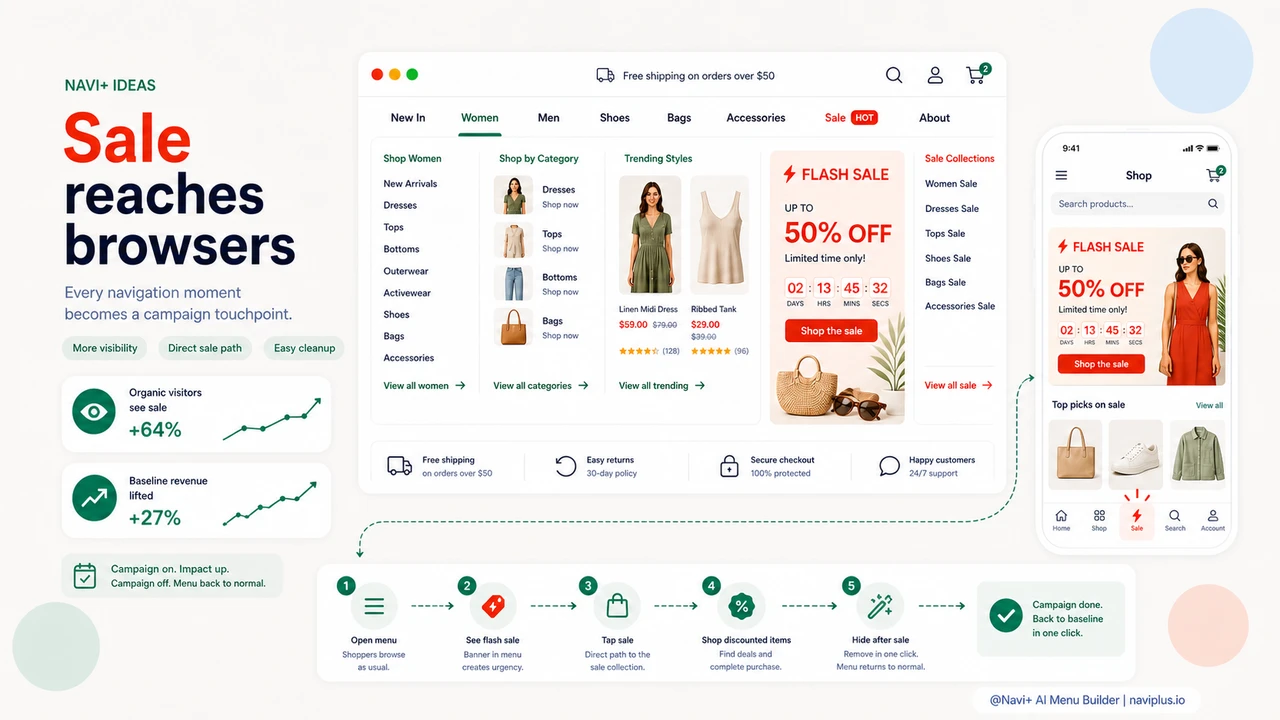
The practical result is that your promotion reaches a segment of your audience that no other channel touches: the visitors already inside your store, actively navigating. These are not cold prospects. They are warm browsers with open wallets, making decisions about what to click next. A clearly labeled "Flash Sale" link in the menu is a direct prompt at the exact moment of navigation intent.
A specific setup that works well
On desktop, add a highlighted link in your top-level navigation with a red badge label. In Navi+, set the link text to your sale name, add a badge with the end time ("Ends 11 PM"), and set the link text color to red or your brand accent. On mobile, if you use Navi+'s Tab Bar, add the sale as a fifth tab with a flame or tag icon. Visitors on mobile phones — which often make up 70% or more of e-commerce traffic — will see the sale tab on every page they visit, without having to open any menu at all.
When the sale ends, open the Navi+ dashboard, delete or hide the item, and publish. The menu reverts to its normal state. The next sale, you repeat the same steps in the same five minutes. Over time this becomes a repeatable operational workflow, not a one-off scramble to get a developer involved before the sale goes live.
Try it free — no code, no developer needed
Install in minutes on Shopify, WordPress, or any website.