Shopify Theme Menu Limitations: When to Use a Dedicated Navigation System (2026 Architectural Guide)
For an emerging direct-to-consumer brand launching with a dozen products, Shopify’s out-of-the-box navigation is an engineering triumph. You configure a few collections in the Shopify Admin, assign them to a main menu linklist, and your theme renders a functional horizontal navbar on desktop and a clean slide-out drawer on mobile.
However, as a merchant’s inventory scales into hundreds or thousands of SKUs across multiple collections, seasons, and customer segments, this monolithic architecture hits a series of hard technical and ergonomic boundaries. Merchants suddenly encounter rigid 3-level depth caps, theme editor block limits, ballooning Document Object Model (DOM) sizes, and mobile navigation patterns that force customers into high-friction hand gymnastics.
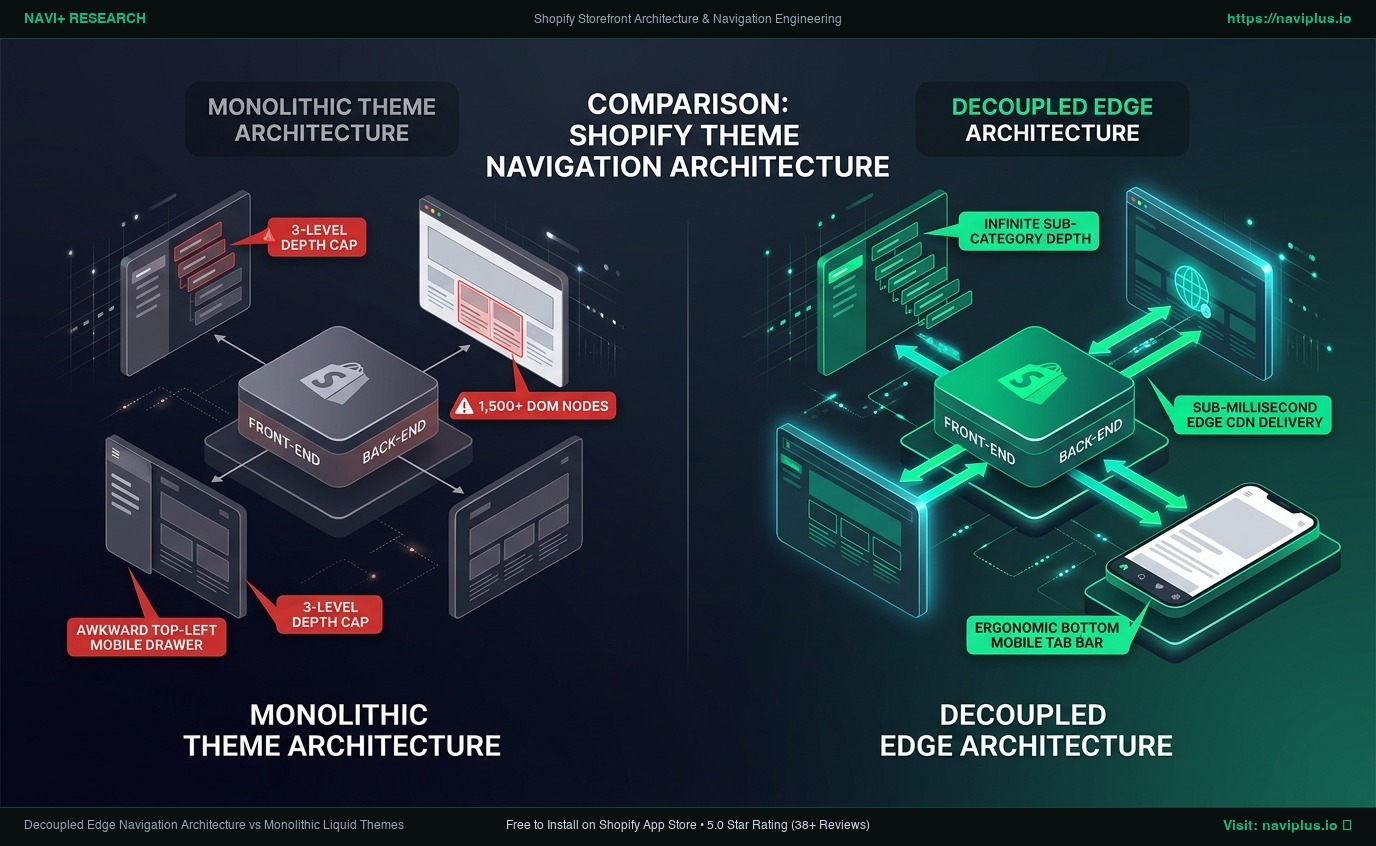 Figure 1: Architectural comparison between monolithic Shopify theme navigation (left) and modern decoupled edge navigation (right). Concept illustration.
Below is an exhaustive architectural teardown of why Shopify themes enforce these constraints, the usability science behind why they fail at scale, an empirical trade-off analysis, and a practical decision framework for deciding when to keep your native theme menu and when to transition to a dedicated navigation engine.
Quick Answer & Architectural Comparison
| Dimension | Out-of-the-Box Theme Menu (e.g., Dawn, Horizon) | Custom Hardcoded Liquid / Theme Hack | Dedicated Decoupled App (e.g., Navi+) |
|---|---|---|---|
| Hierarchy Depth Limit | Strict 3-Level Cap (Top → Child → Grandchild) | 4+ Levels (Requires recursive Liquid snippets) | Unlimited Hierarchical Depth (Multi-tier tree) |
| Max Section Blocks | 16 to 50 Blocks (Theme schema constraint) | Unlimited (Hardcoded into theme template files) | Unlimited Blocks & Collections (External payload) |
| Mobile UX Pattern | Top-left Hamburger Drawer only (Off-screen) | Custom drawer (High maintenance across updates) | Bottom Sticky Tab Bar + Slide Drawer (Thumb zone) |
| Initial Header DOM Impact | Medium to High (1,200–1,600+ nodes for 150 items) | High (All markup generated server-side in Liquid) | Near Zero (Decoupled edge CDN async load) |
| Maintenance Overhead | Low (Handled entirely in Shopify Admin / Editor) | Extreme (Breaks during theme upgrades) | Low (No-code visual builder, zero code editing) |
| Optimal Catalog Scale | 1 to 200 SKUs (<15 sub-categories) | 200 to 1,000 SKUs (If dedicated agency retained) | 200 to 50,000+ SKUs (Multi-department stores) |
The Core Thesis
Shopify themes are engineered as monolithic presentation templates, not scalable discovery engines. Their rigid 3-level depth caps, strict section block quotas, and top-left mobile hamburger patterns are deliberate Shopify safety guardrails—yet for stores scaling beyond 200+ SKUs, these guardrails become an architectural bottleneck that strangles product wayfinding.
1. Architectural Reality: Why Shopify Themes Enforce Strict Limits
Many merchants assume that menu limitations are arbitrary oversights by theme developers. In reality, they are fundamental architectural constraints imposed by Shopify’s Liquid templating engine and theme settings infrastructure.
{% comment %} Standard Monolithic Shopify Theme Navigation Loop {% endcomment %}
{% for link in linklists[section.settings.menu].links %}
  <li class="menu-item menu-item--level-1">
    <a href="{{ link.url }}">{{ link.title }}</a>
    {% if link.links != blank %}
      <div class="mega-menu-dropdown">
        {% for child_link in link.links %}
          <div class="menu-column menu-item--level-2">
            <span class="column-heading">{{ child_link.title }}</span>
            {% if child_link.links != blank %}
              <ul class="sub-column-list menu-item--level-3">
                {% for grandchild_link in child_link.links %}
                  <li><a href="{{ grandchild_link.url }}">{{ grandchild_link.title }}</a></li>
                {% endfor %}
              </ul>
            {% endif %}
          </div>
        {% endfor %}
      </div>
    {% endif %}
  </li>
{% endfor %}
The 3-Level Depth Cap
In the Shopify Admin under Online Store → Navigation, the menu builder allows nesting links up to exactly three levels:
- Top-Level Item (e.g., Men’s Apparel)
- Child Item (e.g., Tops)
- Grandchild Item (e.g., Hoodies & Sweatshirts)
Shopify enforces this 3-tier boundary to prevent merchants from accidentally writing deeply recursive Liquid loops that exceed server memory limits or exhaust response streaming buffers. While three levels suffice for basic apparel, complex catalogs—such as automotive parts (Make → Model → Year → Part Category), industrial hardware, or multi-brand electronics—require 4 or 5 levels of taxonomy. To achieve this natively, developers must resort to complex tag hacks, metaobjects, or secondary linklist chaining that brittlely breaks when theme code updates.
Section Block Quotas (max_blocks)
In standard Shopify Online Store 2.0 themes, header mega menus are constructed using section blocks (blocks/mega_menu.liquid). In sections/header.liquid, theme architects routinely specify a max_blocks ceiling, typically between 16 and 50 blocks.
This constraint protects config/settings_data.json from exceeding Shopify’s internal 2MB file size safety threshold. When a merchant attempts to build an extensive mega menu featuring 20 distinct collection banners, 15 brand logos, and 10 custom promotional badges, the theme editor simply blocks further additions.
The Monolithic DOM Penalty
When a theme renders a comprehensive mega menu natively in Liquid, every single link, dropdown container, promotional image wrapper, and badge is rendered into the initial HTML document sent by the server.
For a catalog with 150 sub-categories, this adds 1,200 to 1,600+ DOM nodes directly into the header. According to Google Lighthouse guidelines, a total page DOM exceeding 1,400 nodes triggers performance warnings, inflating initial Time to First Byte (TTFB), delaying Largest Contentful Paint (LCP), and consuming mobile CPU memory during style recalculation.
2. Usability & Information Architecture: How Hidden Menus Cost Sales
Navigation is not an ornamental header graphic; it is your store’s information architecture (IA) interface. When theme limitations force navigation into awkward layouts, conversion rates degrade through measurable cognitive mechanisms.
Information Foraging Theory & “Information Scent”
In cognitive psychology, the Information Foraging Theory (developed by Peter Pirolli and Stuart Card at Xerox PARC) posits that web users behave like wild animals foraging for food: they follow perceptual “scent trails” (links and visual cues) toward their objective.
When a category list is forced into an unorganized, text-dense dropdown due to theme limits, the information scent evaporates. If a shopper seeking “Gravel Bike Tires” opens a dropdown and encounters 40 alphabetical text links without visual iconography, category grouping, or product teasers, scanning latency spikes. The user experiences cognitive fatigue and either defaults to site search or exits the storefront entirely.
Mobile Thumb-Zone Economics
According to empirical field research by Steven Hoober (author of Designing for Mobile Interfaces), 49% of smartphone users operate their devices strictly one-handed.
Modern mobile devices feature viewports ranging from 6.1 to 6.7 inches diagonally (e.g., iPhone 15/16 Pro Max, Samsung Galaxy S24+). In standard Shopify themes (such as Dawn, Sense, and Prestige), the sole mobile navigation trigger is a hamburger menu located in the extreme top-left corner.
On a 6.7-inch display held in the right hand, the top-left corner sits deep in the “Ow” (high-strain) biomechanical zone. Tapping this button requires a precarious physical grip shift, increasing the risk of dropping the device. When every product category exploration requires reaching across the entire screen diagonal, shoppers browse fewer product pages per session.
3. Real-World Storefront Audits: Monolithic vs. Decoupled Navigation
To understand how theme navigation limits manifest in production, consider the structural difference between an out-of-the-box theme and an enterprise-scale architecture.
Scenario A: Standard Shopify Dawn Theme (Out-of-the-Box)
- Desktop Setup: Standard text-only linklist with a basic mega menu block.
- Limitations Observed:
- Maximum 2 promotional image blocks allowed per menu item.
- No support for visual category icons (e.g., circular collection badges).
- Level 3 grandchild links are displayed as a raw, unbroken vertical column. If a column contains 18 items, it stretches below the screen fold on standard 1080p laptop displays.
- Mobile UX Audit: Reaching a specific Level 3 sub-category requires 4 separate taps:
- Stretch thumb to top-left corner to tap Hamburger icon.
- Scroll down drawer to find parent department (Apparel) and tap expand arrow.
- Locate child category (Men’s) and tap sub-accordion.
- Tap target collection (Technical Jackets).
- Total time elapsed: ~4.8 seconds of active interaction cost before viewing a single product thumbnail.
Scenario B: Decoupled Enterprise Navigation (e.g., Gymshark Storefront Architecture)
- Desktop Setup: Custom visual navigation with category image cards, bold seasonal pills, and sub-second hover response.
- Mobile UX Audit: Completely bypasses the top-left hamburger drawer for core category browsing:
- Persistent Sticky Bottom Navigation Bar placed squarely within the Natural Thumb Zone.
- Level 1 departments (Women, Men, Accessories) accessible with a single downward thumb tap.
- Horizontally scrollable visual collection bubbles that provide instant recognition before the user reads textual labels.
- Total time elapsed: ~1.2 seconds to reach the same product listing page.
4. The 4 Critical Warning Signs Your Store Has Outgrown Its Theme Menu
How do you determine whether your store is operating within healthy theme parameters or suffering under architectural navigation constraints? Watch for these four diagnostic indicators:
- The Grandchild Link Overflow: You have Level 3 categories that stretch beyond the bottom of the desktop viewport, forcing users to scroll the browser window while keeping their mouse hovered inside a delicate dropdown state.
- The Theme Editor Quota Wall: You attempt to add a new seasonal campaign banner, brand logo, or featured collection teaser to the header section, and the Shopify Theme Editor returns an error stating that the section has reached its maximum block limit (
max_blocks). - Severe Mobile Bounce on Multi-Category Catalogs: Analytics reveals high bounce rates on mobile landing pages accompanied by low pages-per-session (<2.2 pages/session), indicating that mobile visitors cannot efficiently penetrate past the landing page.
- Theme Code Upgrade Lock-In: Your store is stuck on an outdated version of a paid theme because an agency previously wrote hundreds of lines of custom Liquid in
header.liquidto bypass the 3-level menu cap, making automatic theme updates impossible without breaking the site.
5. Mandatory Trade-Offs: When to Keep Your Theme Menu vs. When to Upgrade
A dedicated navigation app is not a universal mandate. Applying an external navigation layer to a simple store introduces unnecessary architectural complexity. Below is the objective trade-off evaluation:
When Your Default Theme Menu is Completely Sufficient
- Catalogs Under 50 SKUs: If your store sells a specialized product line (e.g., artisanal coffee beans, single-product skincare routines, boutique eyewear), your entire navigation fits into 4–6 top-level text links. A native theme menu renders with absolute simplicity, zero app script overhead, and clean Liquid markup.
- Single-Department Brands: If you sell strictly one category (e.g., luxury mattresses), your taxonomy does not require multi-tiered departments. Standard dropdowns handle this gracefully.
- Minimalist Aesthetic Priority: Stores prioritizing extreme editorial minimalism (such as luxury art galleries or design studios) that deliberately avoid visual badges, icons, and mega menus.
When a Dedicated Decoupled Menu Becomes Mandatory
- Catalogs Exceeding 200+ SKUs: Once catalog breadth requires multiple nested levels (e.g., Footwear → Running Shoes → Trail Running), the native 3-level limit and unstyled text columns fail both aesthetically and functionally.
- Mobile-Dominant Traffic (Smartphones Account for Majority of Visitors): Stores where the vast majority of traffic arrives via social media campaigns or mobile search ads. Relying solely on a top-left hamburger icon severely depresses category discovery compared to a bottom-docked thumb-zone navigation bar.
- High-Frequency Promotional Merchandising: Stores running continuous flash sales, seasonal collections, or brand collaborations that need to dynamically spotlight collection badges (“SALE”, “NEW”, “LIMITED”) and promotional cards without editing theme code.
6. Practical Decision Framework: Catalog Scale vs. Navigation Architecture
Use this matrix to map your store’s operational scale to the appropriate technical navigation layer:
[1 - 100 SKUs]       ──> Native Shopify Theme Menu (Dawn / Minimal Dropdown)
                         - Zero app dependencies, 100% server Liquid.

[100 - 500 SKUs]     ──> Premium Theme Mega Menu (Enterprise / Prestige / Impulse)
                         - Works if category tree fits within 3 levels and <2 promo cards.

[500 - 10,000+ SKUs] ──> Decoupled Edge Navigation Engine (e.g., Navi+)
                         - Infinite depth, visual category icons, mobile bottom Tab Bar.
                         - Zero Liquid footprint in header; CDN-cached payload.

[10,000+ SKUs B2B]   ──> Headless Edge Architecture + Algolia / Elasticsearch
                         - Faceted search-first discovery with dedicated backend API.
7. Where Navi+ Fits: Architectural Role & Transparent Limitations
Navi+ was engineered specifically to solve the architectural tension between Shopify theme limits and scalable store wayfinding. Instead of hacking theme Liquid files, Navi+ operates as a decoupled edge-delivered navigation engine.
Technical Architecture
- Decoupled Edge Delivery: The complete menu structure, visual collection icons, and layout rules are compiled into a lightweight JSON payload and distributed across Cloudflare’s global Edge CDN (R2).
- Zero Header DOM Bloat: The store’s initial HTML document is delivered from Shopify’s servers clean and unburdened. The navigation components hydrate asynchronously from the nearest edge cache (~15KB gzipped), maintaining pristine Google Lighthouse scores and rapid LCP metrics.
- Ergonomic Mobile Tab Bar: Translates desktop mega menus into a sticky, thumb-friendly bottom tab bar paired with an ergonomic slide drawer, restoring thumb-zone access for 6.7-inch mobile devices.
- Theme Independence: Because Navi+ injects cleanly via Shopify App Embeds without altering core Liquid files, merchants can update, test, or switch themes entirely without rebuilding their navigation hierarchy.
Transparent Limitations of Navi+
In keeping with our editorial standards, merchants must recognize the engineering trade-offs of using Navi+:
- Requires App Embed Toggle: Navi+ requires enabling an App Embed in the Shopify Theme Editor. If you require a 100% static HTML storefront with zero client-side JavaScript execution, a hardcoded theme template is required.
- External Configuration Interface: Menu styling and hierarchy are configured within the Navi+ dashboard rather than standard Shopify Navigation linklists, requiring staff to learn the dedicated visual menu builder.
8. Actionable 5-Step Navigation Audit Checklist
Before modifying theme code or installing third-party tools, run this 5-step diagnostic audit on your current storefront:
- Step 1: Measure Initial Header DOM Weight: Open Chrome DevTools on your desktop storefront. Run
document.querySelectorAll('header *').lengthin the Console. If your header alone accounts for >800 DOM nodes, your menu is inflating initial document size. - Step 2: Calculate Mobile Interaction Cost: On an iPhone or Android smartphone, count the exact number of taps required to reach your lowest-level collection from the homepage. If it exceeds 3 taps, your mobile taxonomy is causing drop-offs.
- Step 3: Test Single-Handed Thumb Reach: Hold a 6.7-inch phone in your dominant hand. Attempt to open your store’s menu without adjusting your grip. If your thumb cannot comfortably touch the menu trigger, your visitors are experiencing identical ergonomic strain.
- Step 4: Check for Section Block Warnings: Open your Shopify Theme Editor. Attempt to add a new block to your header. If you are warned that the section has reached its block limit, your theme schema is maxed out.
- Step 5: Audit Information Scent: Review your sub-category labels. Ensure groups contain no more than 7–10 links under a single heading, and that category naming is mutually exclusive to prevent decision paralysis.
Sources & Citations
- Shopify Developer Documentation: Theme Section Architecture & Liquid Schema Specifications. Official documentation on
max_blockslimits andlinklistsnested menu handling (shopify.dev/docs/themes). - Nielsen Norman Group (NN/g): Menu Design: What Makes Menus Work & Information Foraging Theory in Web Usability by Raluca Budiu and Jakob Nielsen (
nngroup.com). - Baymard Institute: Mobile Navigation & Taxonomy Usability Benchmarks: The High Cost of Deeply Nested Accordions (Large-scale ecommerce usability dataset,
baymard.com). - Steven Hoober: How Do Users Really Hold Flagship Smartphones? UXmatters empirical field study examining 1,333 mobile users (
uxmatters.com). - W3C Web Accessibility Initiative (WAI): WAI-ARIA Authoring Practices Guide (APG): Disclosure (Show/Hide) & Menu Navigation Patterns (
w3.org/WAI/ARIA/apg).