


The Hidden Cost of "Just Ask a Developer"
For most Shopify store owners, navigation customization falls into the category of things that require a developer. The default Shopify navigation options are minimal — a flat list of links with limited nesting, no visual hierarchy, and no built-in mobile optimization. When a store owner wants a proper mega menu with images, a sticky header that doesn't conflict with their theme, or a mobile Tab Bar that sits at the bottom of the screen, the next step is typically to find a developer.
Custom development for navigation is expensive relative to what it produces. A freelance Shopify developer charging $75–$150 per hour will spend 20–50 hours on a comprehensive navigation build — writing Liquid templates, handling edge cases across devices, testing for theme conflicts, and iterating based on feedback. The total cost ranges from $1,500 to $7,500, with 2–4 weeks of turnaround time. Agency rates push this higher.
Beyond the initial build, there are ongoing costs. Every Shopify theme update, Shopify platform change, or marketing campaign that needs navigation adjustments triggers another developer engagement. What started as a one-time cost becomes a recurring one — and every change requires scheduling time with a developer who has other clients and isn't immediately available.
"I got a quote for $4,200 to have our navigation customized. The timeline was six weeks. We had a campaign launching in two weeks and needed the navigation updated before it went live. Navi+ let me set it up myself in an afternoon. The campaign launched on time and the navigation looked exactly how I wanted it."
— A Navi+ customer, outdoor lifestyle brand
What "No Developer Required" Actually Means
Navi+ AI Menu Builder is designed so that every configuration option is accessible through a visual admin interface — no Liquid, no CSS overrides, no theme file editing. The AI-powered setup reduces initial configuration time further: describe your store's structure, and Navi+ suggests a menu architecture based on your actual catalog.
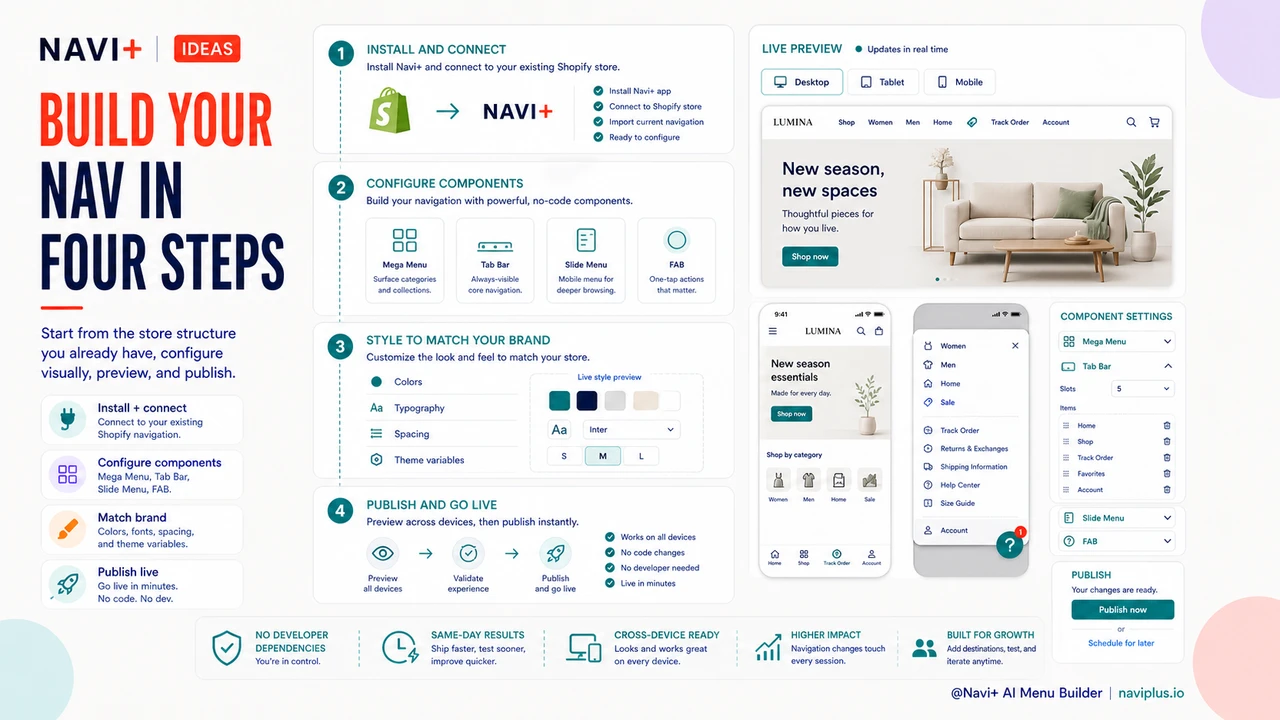
The typical setup path for a new Navi+ store follows four steps that any store owner can complete in a single afternoon:
Step 1 — Install and connect. Install Navi+ from the Shopify App Store. The app connects to your store's existing navigation structure automatically — you don't start from scratch, you start from what's already there.
Step 2 — Configure your menu components. Use the visual builder to set up whichever components you need: Mega Menu for desktop, Tab Bar for mobile, Slide Menu for complex category structures, FAB for promotional shortcuts. Each component has its own settings panel with live preview.
Step 3 — Style to match your brand. Set colors, fonts, and spacing to match your brand guidelines. Navi+ reads your theme's existing style variables where possible, so the default styling often requires minimal adjustment.
Step 4 — Publish. Your updated navigation is live. No developer review, no deployment pipeline, no testing environment. What you see in the preview is what your customers see.
Changes after launch follow the same pattern. When you want to add a new category to your Mega Menu for a seasonal campaign, you do it yourself in the Navi+ admin — in minutes, not days.
| Task | Custom Developer Build | Navi+ AI Menu Builder |
|---|---|---|
| Initial navigation setup | 2–4 weeks, $1,500–$7,500 | Same day, no development cost |
| Add new category for a campaign | Schedule developer, 1–3 day wait | Self-service, live in minutes |
| Adjust mobile navigation layout | Developer engagement required | Visual admin, no code |
| Update after Shopify theme change | Developer review required | Managed by Navi+ automatically |
| Test changes before publishing | Staging environment needed | Live preview in admin |
Speed and Independence as a Competitive Advantage
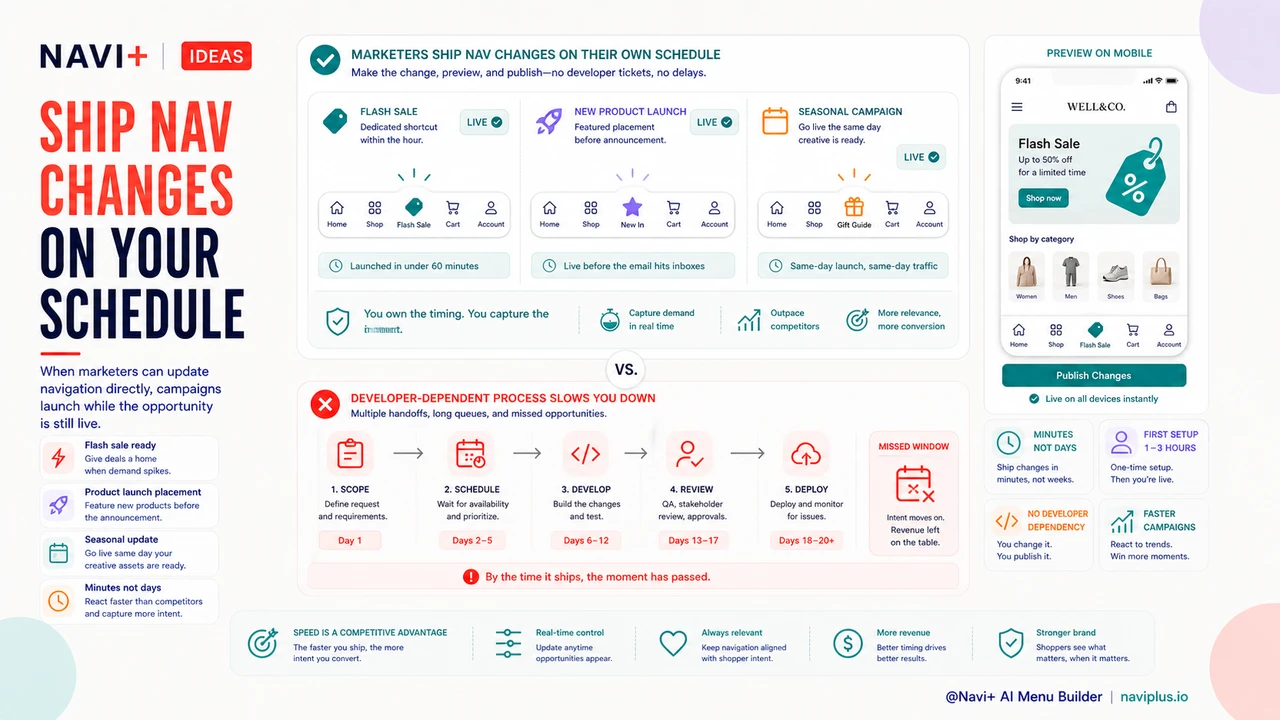
There's a commercial argument for no-code navigation beyond cost savings: speed of iteration. Stores that can make their own navigation changes respond faster to market conditions. A flash sale can have dedicated navigation pointing to the sale collection within the hour of deciding to run it. A new product launch can have featured navigation placement before the launch announcement goes out. A seasonal campaign can go live with updated navigation the same day the creative assets are ready.
Stores that depend on developers for navigation changes operate on a different timeline. By the time the change is scoped, scheduled, developed, reviewed, and deployed, the window for maximum impact has often passed. The ability to ship navigation changes yourself, on your own schedule, is a practical operational advantage that compounds over the lifetime of your store.
Navi+ installs in minutes. The first configuration session typically takes one to three hours. After that, every navigation change you make is measured in minutes rather than days.
Try it free — no code, no developer needed
Install in minutes on Shopify, WordPress, or any website.