


The Seasonal Navigation Cost That Compounds
Most e-commerce stores update their navigation at least 3–4 times per year: a spring refresh, a summer sale configuration, a holiday season setup, and a post-holiday clearance update. Each of these updates — adding a gift guide link, inserting a seasonal collection in the top navigation, adding a banner to the Slide Menu, adjusting the Tab Bar to feature holiday categories — typically requires a developer change if the navigation is managed through Shopify theme code.
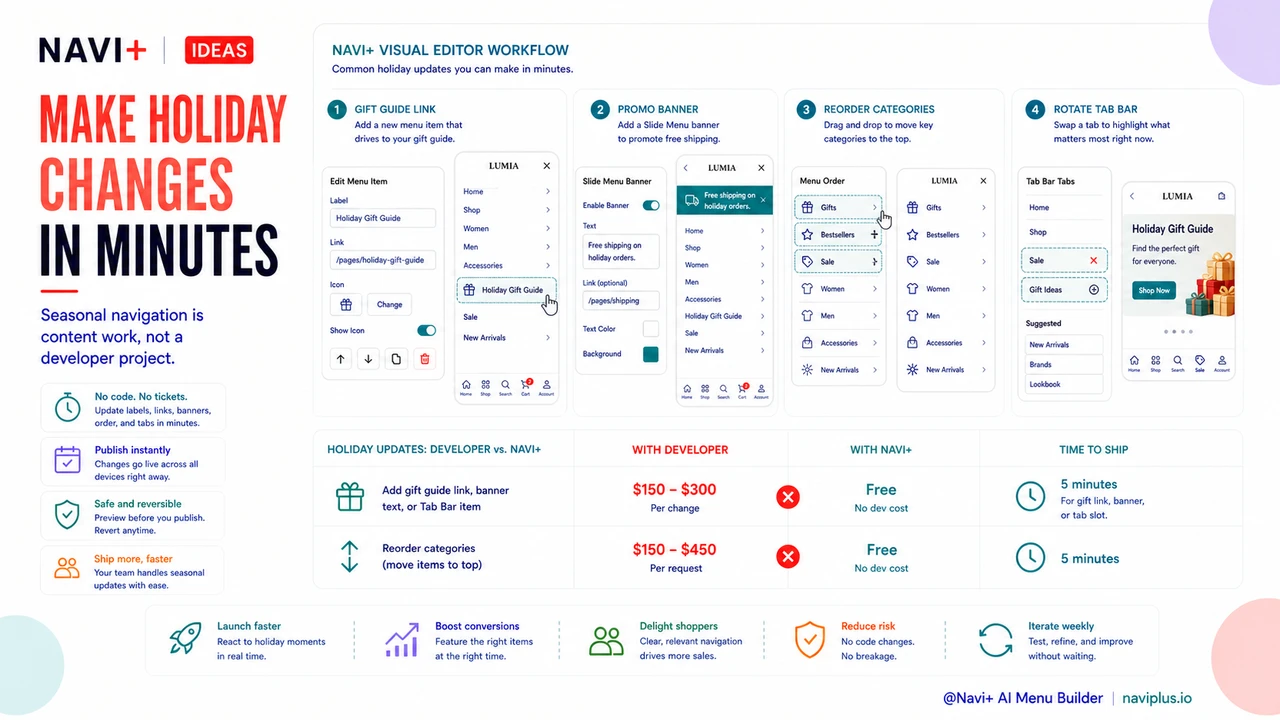
At $75–150 per developer hour and 1–3 hours per navigation update, the recurring cost of seasonal navigation management adds up to $900–1,800 per year in developer fees alone — before accounting for turnaround time, the revision cycles that happen when the first implementation doesn't match the marketing team's vision, and the opportunity cost of waiting 2–5 business days for a navigation change to go live during a week when holiday traffic is peaking. Stores that manage seasonal navigation in-house through a visual navigation editor eliminate this cost entirely, freeing the budget for inventory, advertising, or other growth investments.
"Before Navi+, every holiday navigation update was a project. Write a brief, wait for the developer to schedule it, review the implementation, request revisions, wait again. By the time the changes were live, we'd already missed a week of Black Friday traffic. Last year, I made all our holiday navigation changes myself in about 90 minutes — gift guide links, promotional banners in the slide menu, seasonal category reordering. It was live the same day I thought of it. The developer time we would have spent on that we put toward the post-holiday email campaign instead."
— A Navi+ customer, home décor brand
What Seasonal Navigation Updates Actually Involve
Understanding what seasonal navigation changes require in practice clarifies why self-management is feasible for any store operator with product knowledge:
Gift guide and holiday collection links. Adding a "Holiday Gift Guide" or "Christmas Gifts" link to the Slide Menu or Tab Bar is a content change — it's the same operation as adding any new navigation item. It requires knowing the destination URL (the collection page the link should point to) and the label text. No design expertise is needed; the visual consistency is provided by the navigation component's existing style. A store operator who manages their catalog can manage this change in minutes.
Promotional banners within the navigation. Navi+'s Slide Menu supports custom HTML banner sections that can display promotional messages — "Free shipping on all holiday orders," "Last shipping day: Dec 20" — at the top or bottom of the menu. Updating these banners is a text editing task: open the Slide Menu editor, update the banner text, save. It takes the same skill level as editing a product description.
Category reordering for seasonal emphasis. During holiday periods, gift categories, bestseller lists, and seasonal collections should appear first in navigation to match the intent of holiday traffic. Reordering navigation items in Navi+ is drag-and-drop. A store operator can reorder the entire Slide Menu hierarchy in under five minutes, without any code change.
Tab Bar slot rotation for peak periods. During Black Friday, the Tab Bar slot typically used for "New Arrivals" might be temporarily reassigned to "Sale" or "Gift Ideas." In Navi+, Tab Bar items are individually configurable — each slot's label, icon, and destination can be changed independently. A seasonal rotation and a post-season reversal are each a few minutes of configuration, not a developer project.
| Seasonal Update Type | With Developer | With Navi+ (Self-Managed) |
|---|---|---|
| Add gift guide link | $150–300, 2–5 day wait | Free, 5 minutes |
| Add promotional banner in menu | $150–300, 2–5 day wait | Free, 5 minutes |
| Reorder categories for holiday emphasis | $150–450, 2–5 day wait | Free, 5 minutes |
| Rotate Tab Bar slots for sale period | $150–300, 2–5 day wait | Free, 5 minutes |
Planning the Seasonal Navigation Calendar
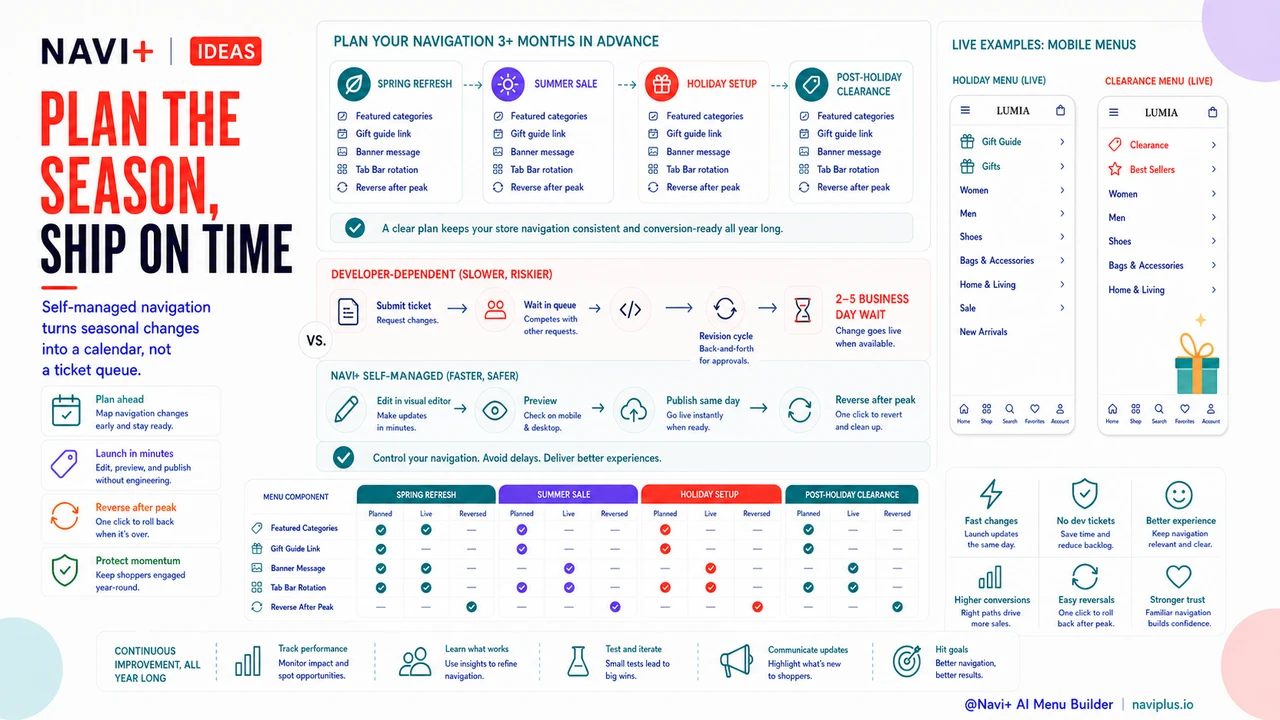
The additional benefit of self-managed seasonal navigation is that it enables a planned seasonal calendar rather than reactive updates. With developer-dependent navigation, seasonal changes are made one at a time as they're needed, because each change has a lead time cost. With self-managed navigation, it's practical to plan the entire seasonal navigation calendar three months in advance — identifying which categories to feature, when to add holiday-specific links, what banner messaging to use during each promotional period, and when to reverse the seasonal changes after peak season — and execute each update on exactly the right day. The speed of self-management makes planning worthwhile in a way that developer-dependent navigation does not.
Try it free — no code, no developer needed
Install in minutes on Shopify, WordPress, or any website.