

The Problem
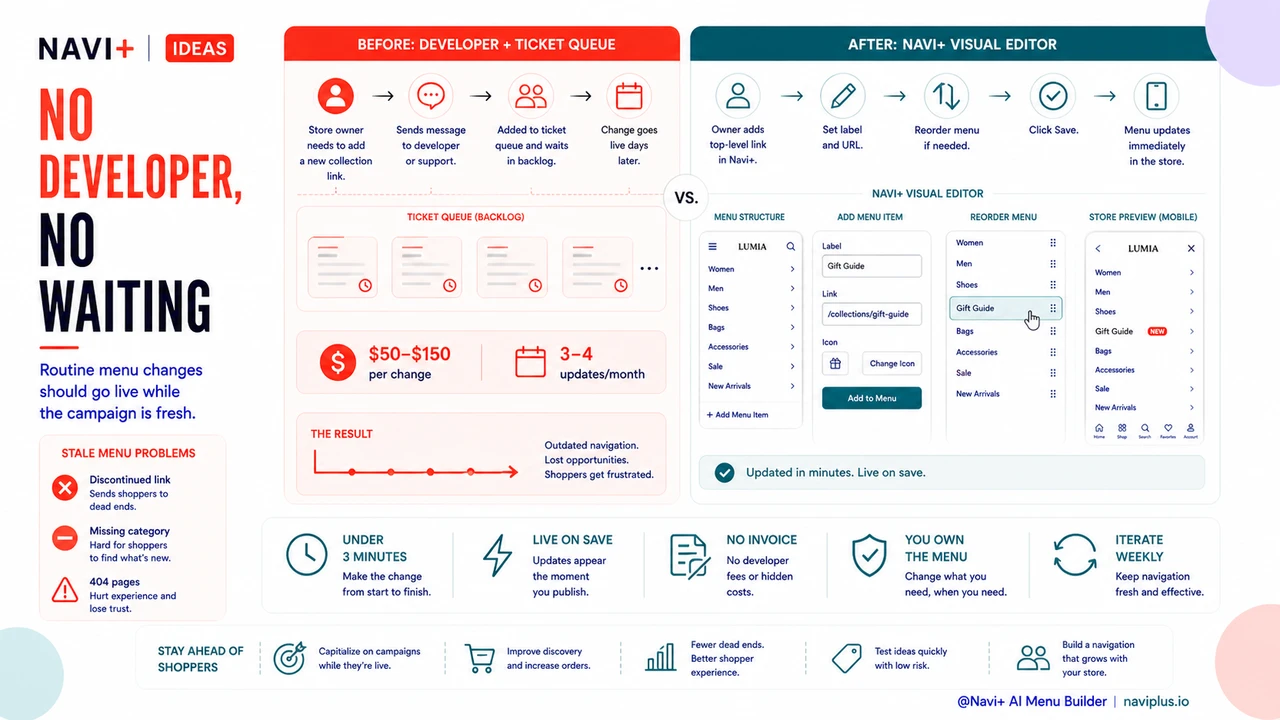
You launch a new collection on Tuesday morning. The link needs to go in the top-level navigation — right there, where customers will see it. So you write the message to your developer: "Hey, can you add a 'Summer 2025' link to the main menu, under Collections?" Then you wait. Maybe you get a reply that afternoon, maybe the next day. There's a ticket, a queue, a backlog. The change goes live Thursday — by which time you've lost two days of prime traffic hitting your store with no way to find the new collection.
This isn't a one-time inconvenience. It's the rhythm of running a store where navigation is locked behind someone else's calendar. Every seasonal swap, every promotional link, every "we stopped selling this, remove it from the menu" moment — each one costs you time you don't have and money you shouldn't be spending. A typical agency charges $50–150 for a minor content change. At three or four menu updates a month, that's a recurring line item for work that should take three minutes.
And the customer-facing cost is just as real. Customers open the menu, see a link to a category you discontinued six months ago, click it, and land on an empty page or a 404. Or they don't see the new category you just launched because nobody's gotten around to adding it yet. A stale menu is a trust problem — it signals that nobody's minding the store.
"I was paying my developer $80 every time I needed to rename a menu item or add a seasonal link. It felt ridiculous. I knew the change would take five minutes if I could just do it myself — but I couldn't touch the theme without breaking something."
— A Navi+ customer
Developer dependency costs more than the invoice
The hourly rate on the invoice is only part of the cost. The real damage is everything that happens in the gap between when you need a change and when it goes live:
- Promotional windows close. You planned a flash sale for the weekend. The "Sale" link wasn't in the menu in time. The banner was live but nobody navigated to the page because the menu didn't point there.
- SEO signals get delayed. A new category that isn't linked from your navigation is effectively invisible to crawlers until it is. Weeks without a menu link means weeks of delayed indexing.
- You stop experimenting. When every change has a cost and a wait time, you start second-guessing small improvements. Is it worth filing a ticket just to reorder two menu items? So you don't. The menu stays the same while your store evolves around it.
- Momentum dies in execution. You had a good idea for a "Best Sellers" shortcut in the navigation. You wrote it down, sent the message, never followed up because it got buried. Three months later the idea is still not live.
- Vendor lock-in grows. The more your menu is tied to your developer's custom theme code, the harder it becomes to switch developers, try a new theme, or move platforms. You become dependent, and dependency is expensive.
How Navi+ solves this
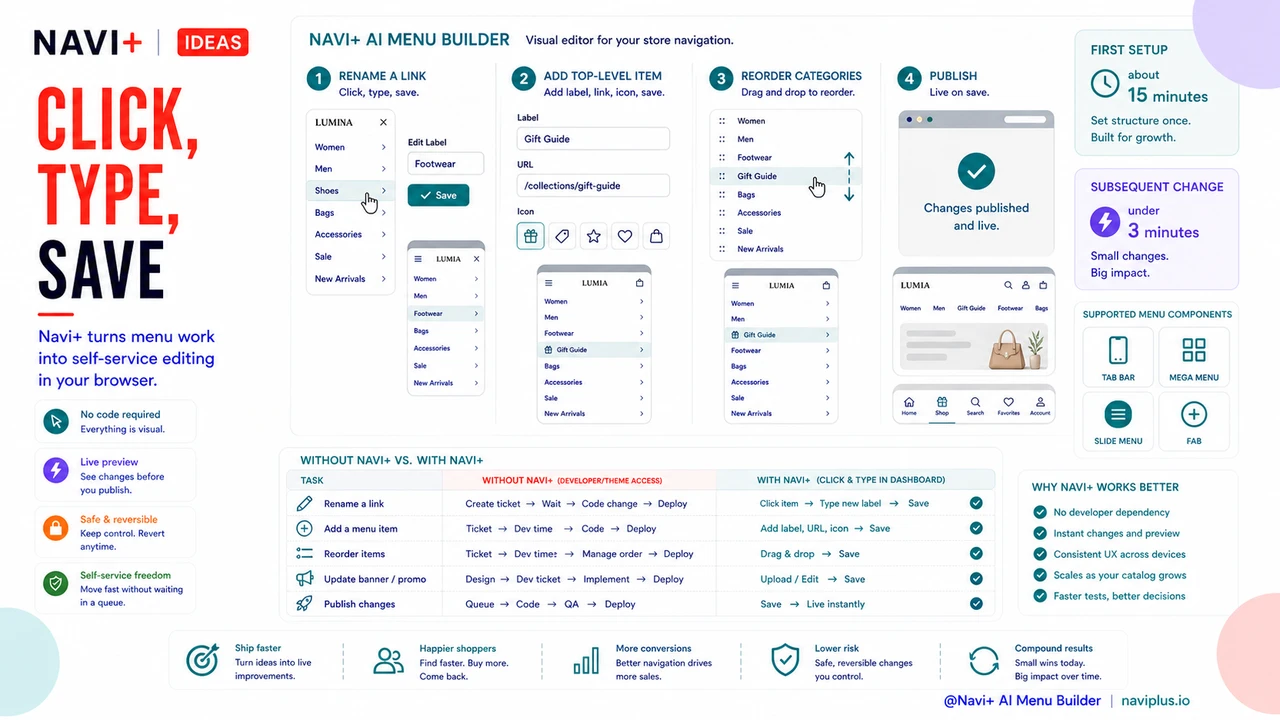
Navi+ gives you a visual, drag-and-drop menu editor that runs entirely in your browser. You log into the Navi+ dashboard, select your menu, and make changes directly — no access to theme files, no code, no developer involvement. Rename a link: click, type, save. Add a new top-level item: drag a block in, set the label and URL, save. Reorder your categories: drag them into the order you want.
The changes go live the moment you save. There's no deployment step, no cache-clearing ritual, no "it might take a few minutes to propagate." You save, you refresh your store, the menu is updated.
Navi+ supports all the menu types you'd actually want to run: a Tab Bar for mobile bottom navigation, a Mega Menu with columns, images, and promotional banners for desktop, a Mobile Menu for off-canvas navigation, and a Floating Button (floating action button) for persistent quick-access links. You can have different menus active on different pages or different devices — all configured through the same dashboard, all editable by you without filing a ticket.
Setup takes about fifteen minutes the first time. After that, every subsequent change is self-serve. You own the menu. You update it on your schedule.
| Feature | Default / Without Navi+ | With Navi+ |
|---|---|---|
| Add or rename a menu item | ✗ Requires developer or theme access | ✓ Click and type in the dashboard |
| Time to make a change go live | Hours to days (developer queue) | ✓ Under 3 minutes, live on save |
| Cost per routine menu update | $50–150 per change (agency rate) | ✓ Included in your plan, no extra charge |
| Run seasonal or promotional links | ✗ Requires coordination and lead time | ✓ Turn on/off yourself, any time |
| Reorder menu structure | ✗ Code edit required | ✓ Drag and drop in the editor |
| Menu survives a theme switch | ✗ Menu config is lost, rebuild required | ✓ Menu lives in Navi+, not the theme |
What you get after switching
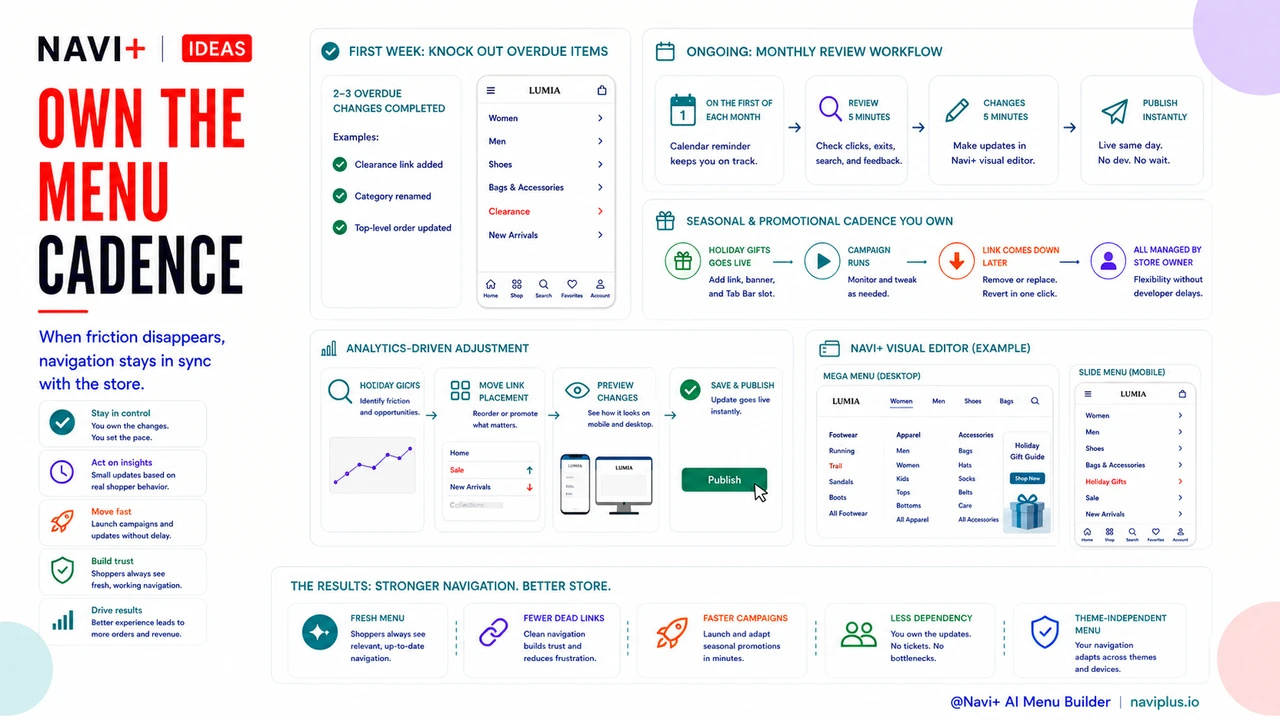
Within the first week of using Navi+, most store owners make two or three changes they'd been putting off for months — because the friction was simply gone. A "Clearance" link that needed to go in the navigation. A category rename that was always slightly wrong. A reordering of the top-level items to match how customers actually browse.
Over time, the compounding effect is significant. You start running properly timed promotional menus around events — a "Holiday Gifts" section that goes up in November and comes down in January, managed entirely by you, on your schedule. You A/B test link placement by watching your analytics after a change, then adjusting the next day. You respond to what's working instead of waiting for a developer to implement what you think might work.
A practical tip: once you're set up in Navi+, keep a recurring note or calendar event for the first of each month to review your menu. Does every link still go somewhere relevant? Are there new categories that should be promoted? Is there a seasonal moment coming up that should appear in navigation? The review takes five minutes. The changes take another five. That's the cadence that keeps navigation in sync with your store.
Try it free — no code, no developer needed
Install in minutes on Shopify, WordPress, or any website.