


The Plugin Sprawl Problem
Shopify's app ecosystem is one of the platform's greatest strengths — and one of its most expensive traps. Because adding functionality is as easy as installing an app, most store owners solve each navigation-related problem with a separate tool. A sticky menu app for one problem, a mobile bottom bar app for another, a search overlay app for a third. Over time, the app stack grows — and with it, the monthly bill.
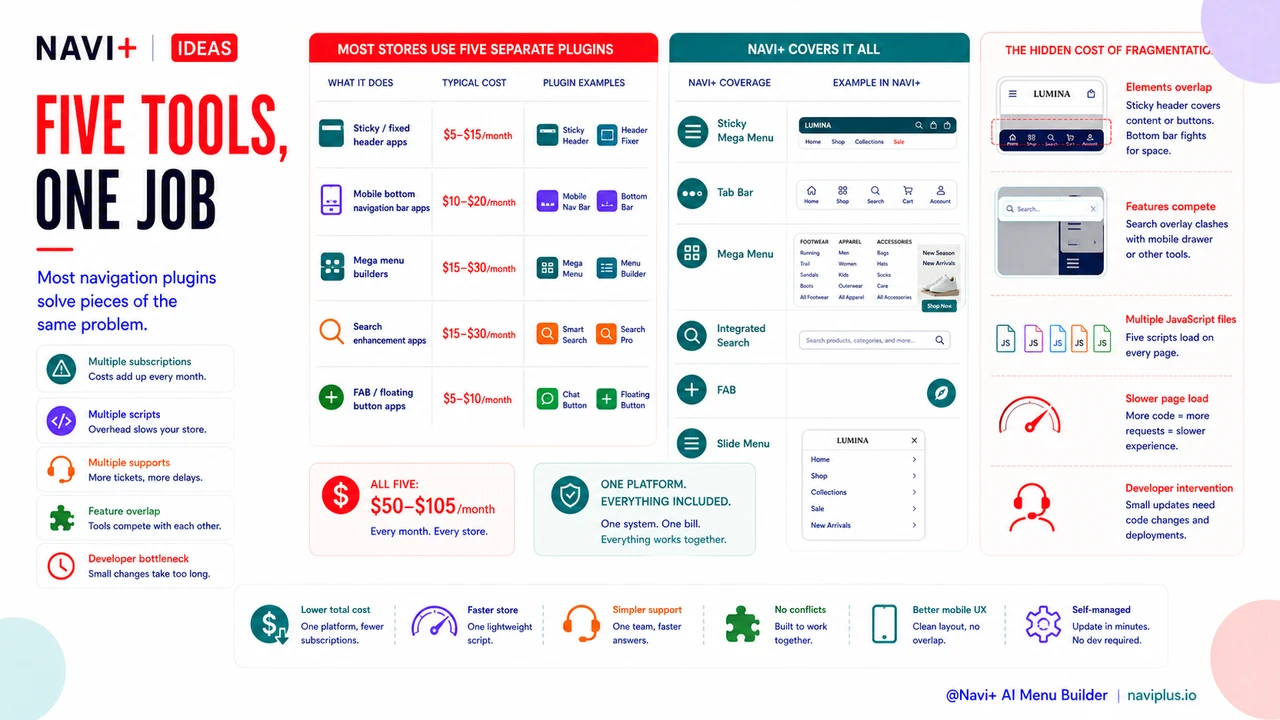
The cumulative cost of this approach is rarely examined as a single line item. But when you add up what the average Shopify store pays for navigation-adjacent functionality across separate apps, the number is typically $60–$120 per month before counting the time cost of managing multiple dashboards, troubleshooting conflicts between apps, and keeping each tool updated when Shopify releases theme changes.
Beyond the financial cost, there's a hidden technical cost: multiple apps touching navigation often conflict. One app's sticky header might overlap with another app's bottom bar. A search overlay might break when a mobile menu drawer is also active. Resolving these conflicts often requires developer intervention — adding cost that doesn't show up in the app subscription line.
"We were paying for a sticky menu app, a mobile navigation bar app, and a mega menu builder separately. They didn't play well together — we had z-index conflicts that took a developer two days to diagnose. When we switched to Navi+, we got all three in one tool, the conflicts disappeared, and we cut our navigation tool spend significantly."
— A Navi+ customer, specialty retailer
What Navigation-Related Plugins Stores Typically Pay For
To understand where consolidation saves money, it helps to inventory what the average store is actually buying. Navigation functionality in Shopify stores typically spans several discrete app categories, each solving one part of the same problem:
- Sticky / fixed header apps — Keep the main navigation visible while users scroll. Typical cost: $5–$15/month. These apps do one thing and one thing only, so the cost-per-feature ratio is poor.
- Mobile bottom navigation bar apps — Add a Tab Bar or bottom navigation on mobile devices. Typical cost: $10–$20/month. Often purchased after a store owner notices poor mobile session metrics.
- Mega menu builders — Enable image-rich, multi-column dropdown menus on desktop. Typical cost: $15–$30/month. Usually the most feature-rich of the navigation category, but frequently conflicts with sticky header apps.
- Search enhancement apps — Predictive search overlays, instant search bars, search results formatting. Typical cost: $15–$30/month. Often added to a navigation bar slot or triggered from navigation elements.
- FAB / floating button apps — Floating action buttons for promotions, WhatsApp links, or back-to-top functionality. Typical cost: $5–$10/month.
A store that has installed all five of these categories is paying $50–$105 per month — before troubleshooting costs — to cover navigation functionality that Navi+ AI Menu Builder provides as a single integrated product.
What Consolidation Actually Means in Practice
Navi+ AI Menu Builder includes each of these navigation capabilities in a single, integrated tool designed so that all components work together without conflict:
The Sticky Mega Menu handles both the mega menu content structure and the sticky behavior in one component — no separate sticky app needed, and no risk of two apps fighting over the header. The Tab Bar provides the mobile bottom navigation with full icon and label customization — no separate mobile bar app required. The Slide Menu covers the drawer navigation use case for stores with complex category structures. The FAB handles floating promotional buttons. The integrated Search component enables smart search experiences from within the menu system.
Because all components share the same codebase and are designed to coexist, there are no z-index conflicts, no competing JavaScript, and no double-loading of resources that slow your store's performance.
| Navigation Function | Typical Separate App Cost | Navi+ Coverage |
|---|---|---|
| Sticky header / fixed navigation | $5–15/month | Included in Sticky Mega Menu |
| Mobile Tab Bar / bottom navigation | $10–20/month | Included as Tab Bar |
| Mega menu builder | $15–30/month | Included as Mega Menu |
| Floating action button | $5–10/month | Included as FAB |
| Drawer / slide menu | $8–15/month | Included as Slide Menu |
The Real Cost Reduction
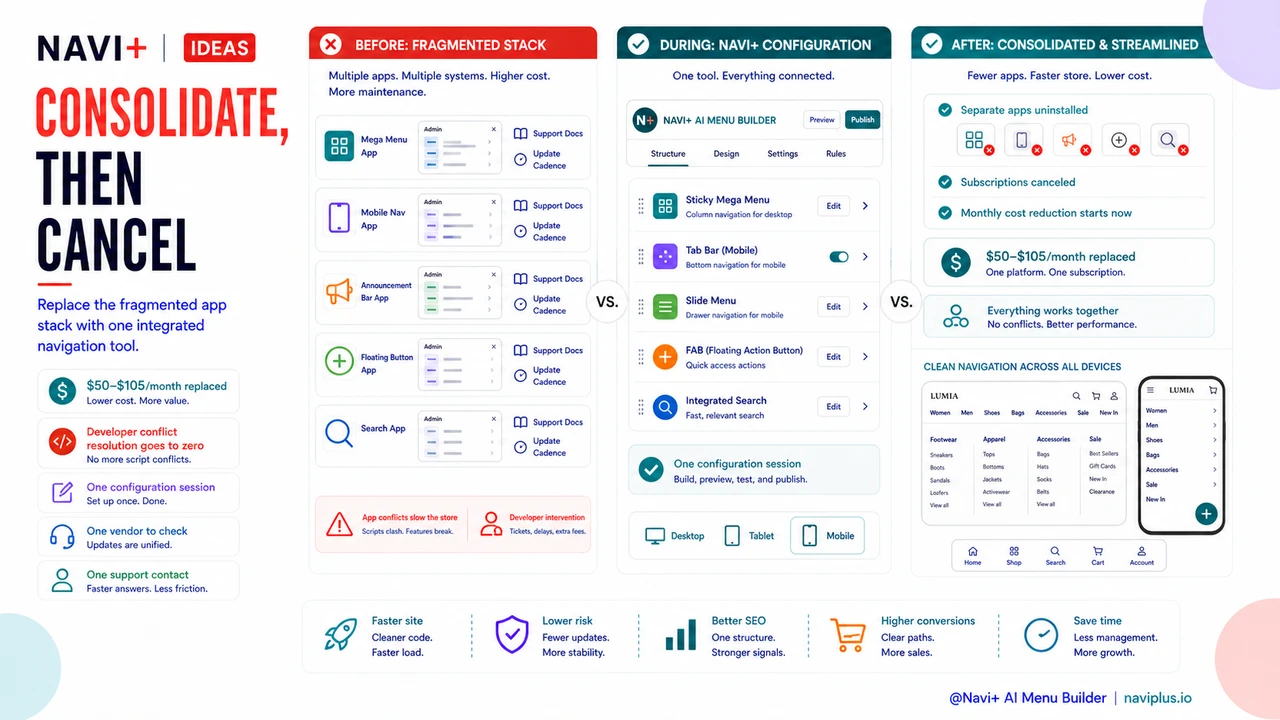
The direct subscription savings are meaningful — replacing $50–$105 in monthly app spend with a single Navi+ subscription makes a clear financial case. But the less visible savings are often just as significant: developer time for conflict resolution goes to zero, onboarding new team members onto the navigation stack is simpler, and when Shopify releases theme updates you have one vendor to check against rather than five.
For store owners who manage their shop themselves, there's also a cognitive cost to maintaining five separate admin interfaces. Each app has its own settings panel, its own support documentation, and its own update cadence. Consolidating to one tool means one interface, one documentation set, and one support contact when something needs attention.
Navi+ installs in minutes. The transition from a fragmented app stack to a single navigation tool typically takes one configuration session — after which the separate apps can be uninstalled, their subscriptions canceled, and the monthly cost reduction begins immediately.
Try it free — no code, no developer needed
Install in minutes on Shopify, WordPress, or any website.