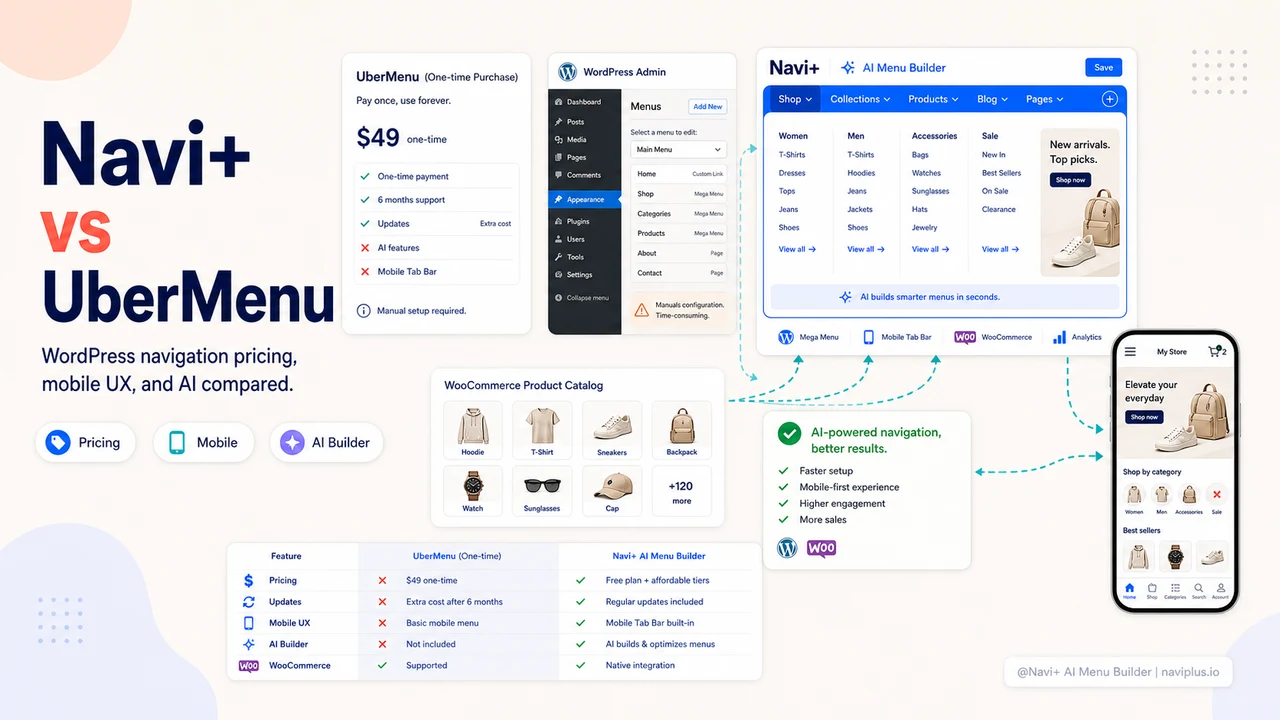
UberMenu is one of the most powerful premium mega menu plugins for WordPress, known for its extensive layout options and deep theme compatibility. Navi+ is a newer AI-powered navigation builder with Tab Bar support, cross-platform capability, and a significantly simpler setup. Here’s how they compare.
TL;DR — Quick Verdict
UberMenu is feature-rich but designed for power users who want maximum desktop layout control. If you prioritize mobile navigation (Tab Bar), AI-driven setup, or cross-platform use (Shopify + WP), Navi+ delivers what UberMenu doesn’t.
Bottom line: UberMenu excels at complex desktop mega menus. Navi+ excels at mobile-first ecommerce navigation with less setup time.
What Is UberMenu?
UberMenu (by Sevenspark) is a premium WordPress mega menu plugin sold as a one-time purchase (~$26) on CodeCanyon. It offers extensive layout customization, CSS animations, dynamic content via widgets, and supports most popular WordPress themes and page builders.
What UberMenu does well:
- Extensive mega menu layout options
- Deep theme and page builder compatibility
- CSS animations and transitions
- Supports dynamic content and widgets
- One-time purchase (no subscription)
- Large library of styling options
Where it falls short:
- No Tab Bar / Bottom Navigation for mobile
- No FAB (Floating Action Button)
- No AI-powered menu generation
- WordPress-only — no Shopify support
- Steeper learning curve than visual-first editors
- No Smart Publish (per-device or per-URL rules)
- Paid only — no free tier
What Is Navi+?
Navi+ offers five menu types (Tab Bar, Mega Menu, Mobile Menu, Floating Button, Icon Menu), runs on WordPress/WooCommerce and Shopify, and includes an AI engine that builds your menu structure from your catalog in seconds.
Feature-by-Feature Comparison
| Feature | Navi+ | UberMenu |
|---|---|---|
| Tab Bar / Bottom Navigation | ✓ | ✗ |
| Mega Menu (multi-column + images) | ✓ | ✓ |
| Slide Menu / Drawer | ✓ | ~ |
| FAB / Floating Action Button | ✓ | ✗ |
| Grid Menu | ✓ | ✗ |
| Sticky Navigation | ✓ | ✓ |
| Visual Drag & Drop Editor | ✓ | ✓ |
| AI Menu Generation | ✓ | ✗ |
| AI Design Suggestions | ✓ | ✗ |
| Custom CSS | ✓ | ✓ |
| CSS Animations & Transitions | ✓ | ✓ |
| Mobile-Responsive Preview | ✓ | ~ |
| Multi-Language (9+ langs) | ✓ | ~ |
| Smart Publish (device/URL filter) | ✓ | ✗ |
| Dark Mode Support | ✓ | ~ |
| CDN-Delivered Assets | ✓ | ✗ |
| Zero Page Speed Impact | ✓ | ~ |
| Works on Shopify | ✓ | ✗ |
| Works on WordPress/WooCommerce | ✓ | ✓ |
| Free Plan Available | ✓ | ✗ (paid only) |
Mobile Navigation: The Core Difference
Like most WP mega menu plugins, UberMenu was designed primarily for desktop. On mobile, the plugin adapts the mega menu into a mobile-friendly accordion or flyout, but there is no Tab Bar / Bottom Navigation option.
This is a significant gap for ecommerce stores. Over 70% of shoppers browse on mobile, and a persistent Tab Bar at the bottom of the screen fundamentally changes engagement — it keeps your most important categories always visible, without needing to open any menu at all.
Navi’s Tab Bar is a native-app-style bottom bar that loads on mobile automatically. Paired with the FAB button for “Sale” or other high-priority links, it gives your WooCommerce store the kind of mobile UX that Amazon and large retailers use.
Setup and Learning Curve
UberMenu is powerful but has a learning curve. The settings panel is extensive, and getting the exact layout you want often requires tweaking custom CSS classes and understanding UberMenu’s grid system. For non-developers, this can be intimidating.
Navi+’s editor is a dedicated visual interface with a live preview. The AI takes care of the structure — you just confirm and publish. Most stores have a working menu live in under 30 minutes, even with no technical knowledge.
Pricing Model
UberMenu is a one-time purchase (~$26) for a single site license. Updates for a year are included; after that, renewals are optional but needed for major WP version compatibility updates.
Navi+ offers a free plan and paid subscriptions. The subscription model means you always get the latest features (including new AI capabilities) without manual updates.
When to Choose Each
Choose UberMenu if:
- You’re building a complex WordPress site with intricate desktop mega menus
- You want full layout control and are comfortable with advanced CSS
- Your audience is primarily desktop
- You prefer a one-time purchase model
Choose Navi+ if:
- Your WooCommerce store has significant mobile traffic
- You want Tab Bar and/or FAB navigation for mobile
- You want AI to handle menu structure generation
- You also need the menu on Shopify
- You want a simpler, faster setup without deep technical knowledge
Quick Feature Comparison Matrix
| Feature | Navi+ | UberMenu |
|---|---|---|
| Desktop Mega Menu | ✅ Multi-column, images, badges | ✅ Basic / Standard |
| Mobile Tab Bar (Bottom Nav) | ✅ Yes (App-like thumb zone) | ❌ No |
| Mobile Drawer Replacement | ✅ Multi-level drill down | ⚠️ Basic list / theme default |
| AI Menu Design / Auto-Build | ✅ Yes | ❌ No |
| Multi-language Support | ✅ Native 9 languages | ⚠️ Limited |
| Shopify App Store Rating | ⭐ 5.0 (38+ reviews) | 4.4 – 4.8★ |
| Theme Compatibility | 100% (Horizon, Dawn, 331+ themes) | Depends on theme |
| Free Plan Available | ✅ Yes (No forced branding) | Varies |
Explore the topics
This guide links out to focused articles — dive deeper on each.