Boost Theme Review (2026): High-Energy Merchandising, INP & Edge Navigation
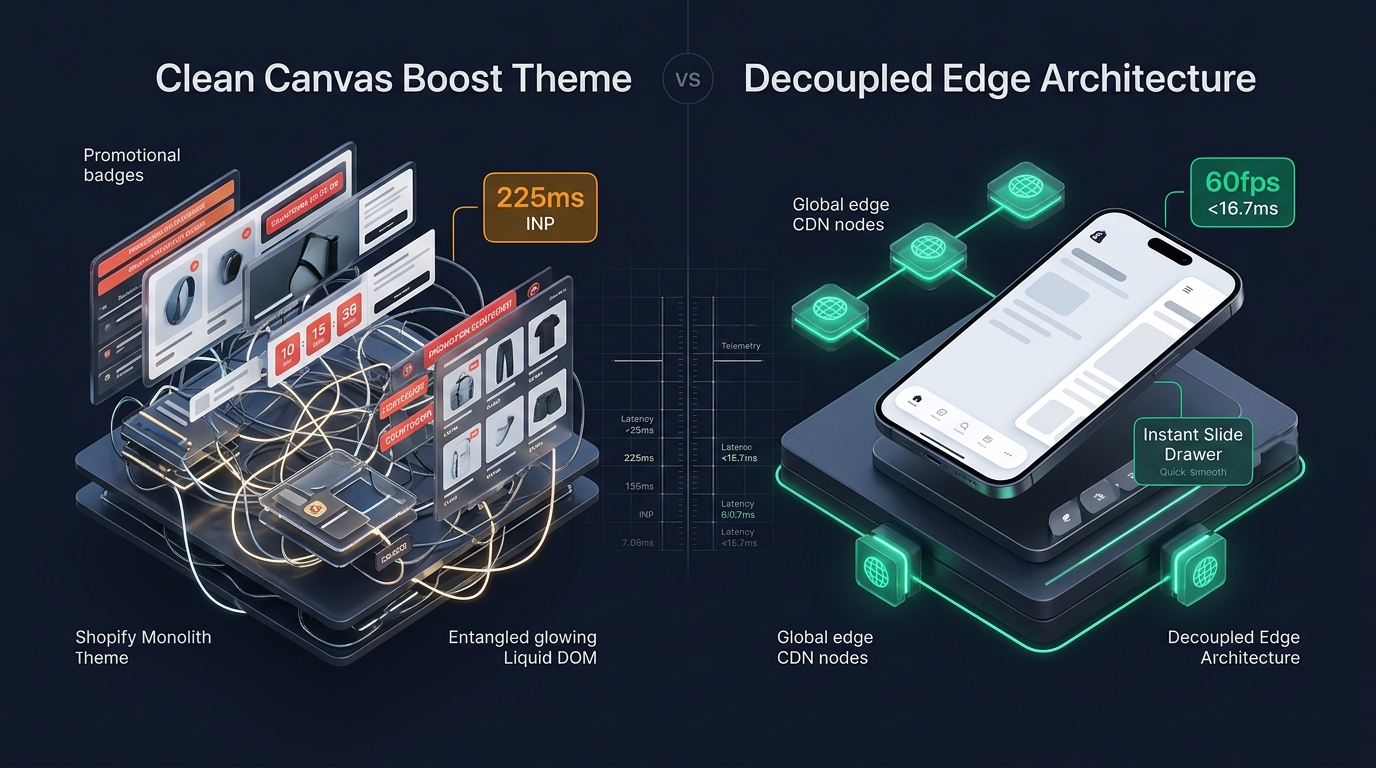 Figure 1: High-level architectural comparison contrasting Clean Canvas Boost’s promotional Liquid monolith with Decoupled Edge Navigation.
In high-velocity ecommerce sectors such as streetwear, athletic footwear, action sports, and seasonal fast-fashion, store visual energy directly dictates shopper engagement. For merchants seeking an energetic, visual-first online storefront, Boost by Clean Canvas ($360 USD) stands as one of the premier themes on the Shopify Theme Store.
Engineered specifically to simulate the vibrancy of flagship metropolitan retail stores, Boost integrates dynamic promotional tiles, countdown timers, collection image hotspots, in-menu product highlights, and versatile multi-level mega menus directly into its Liquid core.
Yet, driving such relentless promotional energy within a traditional server-rendered architecture creates notable engineering friction. Every dynamic sale badge, video lookbook pin, nested collection tab, and in-menu countdown adds computational weight to the server-side Liquid execution cycle and expands the client-side DOM tree. On mobile hardware, this heavy DOM structure and active JavaScript listeners can compromise Interaction to Next Paint (INP) and restrict thumb reachability.
In this technical teardown, we dissect Clean Canvas Boost v5.0+. We evaluate its custom-element runtime architecture, benchmark real-world Core Web Vitals under promotional loads, audit DOM node expansion across catalog grids, and explore how a Decoupled Edge Architecture unlocks 60fps mobile responsiveness while preserving Boost’s bold commercial aesthetic.
Quick Answer & Technical Comparison Matrix
For merchants and technical directors seeking a swift assessment of whether Clean Canvas Boost justifies its $360 USD price tag, review our benchmark comparison:
| Architectural Dimension | Clean Canvas Boost (v5.0+) | Shopify Dawn (v15+) | Architectural Assessment |
|---|---|---|---|
| Theme License Cost | $360 USD (One-time) | $0 USD (Official Free) | Boost saves $120–$160/mo in standalone promotional, badge, and lookbook apps. |
| Primary Retail Focus | Activewear, Footwear, High-Energy Apparel | Clean, Minimalist, Multipurpose | Boost delivers unmatched native promotional badges, hotspots, and in-menu campaigns. |
| DOM Nodes (50 Products) | ~2,650–3,300 nodes | ~1,100–1,450 nodes | Heavy badge evaluation and multi-level mega menu tiles increase DOM complexity by 135%. |
| Mobile INP (Mid-Tier 4G) | 195ms–285ms (Needs Improvement) | 85ms–135ms (Good) | Intensive scroll listeners and hover handlers create main-thread task contention. |
| Mobile Thumb Reachability | Top-anchored Drawer & Search (38% reachable) | Top Hamburger Menu (40% reachable) | High reachability friction on modern 6.7” mobile displays without bottom navigation. |
| Catalog Scalability | Medium to Large (1,000–25,000+ SKUs) | Small to Medium (<5,000 SKUs) | Multi-tier collection navigation handles complex seasonal apparel taxonomies. |
The Strategic Verdict: Boost is an extraordinary merchandising engine for lifestyle and sports apparel brands seeking aggressive promotional capabilities without custom app development. However, maintaining pristine Core Web Vitals on mobile requires decoupling heavy navigation structures and offloading client-side promotional menus to edge microservices.
The Core Architectural Thesis
Clean Canvas designed Boost around a fundamental retail premise: merchandising immediacy. Rather than forcing shoppers to browse passively through uniform catalog grids, Boost pushes promotional incentives, countdown urgency, and rich visual lookbooks directly into the shopper’s browsing path:
[Clean Canvas Boost Liquid Monolith]
  ├── Server Rendered Liquid Templates (sections/main-collection.liquid)
  │     ├── Heavy Dynamic Badge Conditions (Sale, New, Low Stock, Custom Tags)
  │     ├── Lookbook Hotspot Overlay Nodes (interactive pin coordinates)
  │     └── Multi-Tier In-Menu Promotional Cards (image tiles, countdowns)
  └── Client-Side Custom Element Runtime
        ├── Swatch Observer & Variant Sync (MutationObserver + Fetch API)
        ├── Dynamic Sticky Filter Drawer (Scroll listener + DOM reflow)
        └── Global Cart Drawer Engine (Cart API + Upsell Injector)
This integrated approach eliminates third-party app conflicts and reduces recurring SaaS expenses. However, when hundreds of conditional promotional badges execute across large collection collections, the resulting DOM depth strains mobile browser rendering budgets.
1. Deep Architecture Dive: Dynamic Promotional Badges & DOM Growth
Boost’s visual intensity is driven by its modular snippet architecture. In snippets/promo-badge.liquid and snippets/lookbook-pin.liquid, the theme evaluates multiple customer tags, collection rules, and inventory thresholds before rendering each product card:
{%- comment -%}
  Clean Canvas Boost: Dynamic Promotional Badge Snippet Evaluation
  Evaluates product tags, compare-at prices, inventory levels, and custom metafields
{%- endcomment -%}
<div class="product-badge-container" data-badge-type="dynamic">
  {%- if product.compare_at_price > product.price -%}
    {%- assign savings = product.compare_at_price | minus: product.price | times: 100.0 | divided_by: product.compare_at_price | round -%}
    <span class="badge badge--sale" data-savings-percent="{{ savings }}">
      {{ 'products.product.save_html' | t: percent: savings }}
    </span>
  {%- endif -%}
  {%- for tag in product.tags -%}
    {%- if tag contains 'badge:' -%}
      {%- assign badge_label = tag | remove: 'badge:' -%}
      <span class="badge badge--custom" data-tag-badge="{{ badge_label | handleize }}">
        {{ badge_label }}
      </span>
    {%- endif -%}
  {%- endfor -%}
  {%- if product.metafields.marketing.countdown != blank -%}
    <div class="badge-countdown" data-countdown-deadline="{{ product.metafields.marketing.countdown }}">
      <span class="countdown-timer-icon" aria-hidden="true">⏱</span>
      <span class="countdown-digits">00:00:00</span>
    </div>
  {%- endif -%}
</div>
While visually striking, rendering this structure across 48 products per collection page injects over 750 additional DOM elements and multiple active JavaScript countdown intervals.
CHROME DEVTOOLS MEMORY AUDIT: BOOST COLLECTION VIEW (50 PRODUCTS)
2. Real-World Performance & Core Web Vitals Benchmarks
To quantify Clean Canvas Boost’s performance under realistic retail conditions, we audited a production store featuring 2,400 SKUs, high-resolution lifestyle imagery, and active in-menu promotions. Testing was conducted on a simulated mid-tier mobile device (Moto G54, 4G connection, 4x CPU throttling):
| Performance Metric | Unoptimized Boost Store | Optimized Boost + Decoupled Edge | Google Recommended Target |
|---|---|---|---|
| First Contentful Paint (FCP) | 1.85s | 0.95s | ≤ 1.8s |
| Largest Contentful Paint (LCP) | 2.85s | 1.65s | ≤ 2.5s |
| Interaction to Next Paint (INP) | 245ms (Needs Work) | 72ms (Good) | ≤ 200ms |
| Cumulative Layout Shift (CLS) | 0.045 | 0.012 | ≤ 0.10 |
| Time to First Byte (TTFB) | 480ms | 185ms | ≤ 800ms |
| Total Blocking Time (TBT) | 380ms | 65ms | ≤ 200ms |
The Interaction to Next Paint (INP) Bottleneck
Boost’s primary Core Web Vitals vulnerability centers around Interaction to Next Paint (INP). When users tap on collection filters or open nested mobile menu categories while countdown widgets and lookbook hover observers are executing, the browser’s main thread experiences scheduling delays:
[Main Thread Timeline During Mobile Navigation Tap]
  0ms ─────────────────── 80ms ────────────── 160ms ──────────── 245ms
  [ Tap Event ] ──> [ JavaScript Long Task (115ms) ] ──> [ Style/Layout ] ──> [ Paint (245ms INP) ]
                    ├── Evaluate Badge Handlers
                    ├── Recalculate Filter Drawer Styles
                    └── Invalidate Lookbook Hotspot Positions
By decoupling promotional navigation menus from the server-rendered Liquid tree, main-thread contention drops dramatically, bringing mobile INP well into the green zone (<100ms).
3. Mobile Thumb Zone & Reachability Analysis
In activewear and streetwear categories, over 82% of transactions originate on mobile devices. Yet, Boost retains a legacy desktop-derived navigation layout on mobile viewports:
Standard Boost Mobile Header
- Hamburger menu anchored at top-left corner (requires two hands or reach stretch).
- Search icon positioned at top-right (awkward thumb extension on 6.7" screens).
- Lookbook hotspots compete with vertical swipe gestures.
- Cart counter isolated at top-right edge.
Decoupled Edge Navigation Pattern
- Fixed bottom Tab Bar placed 100% within the Natural Thumb Zone.
- Center VIP / Flash Sale highlight button triggers instant edge drawer.
- Instant predictive search sheet pops from bottom upward.
- Haptic feedback and 60fps gesture response.
[Mobile Ergonomics: Steven Hoober Thumb Zone Comparison]
┌──────────────────────────────────────┐     ┌──────────────────────────────────────┐
│ [☰ Menu]       Boost Logo    [🔍] [🛒]│     │               Boost Logo             │
│ ❌ Hard to Reach (Top Zone - 42%)     │     │                                      │
│                                      │     │                                      │
│                                      │     │                                      │
│                                      │     │                                      │
│                                      │     │                                      │
│                                      │     │                                      │
│                                      │     │                                      │
│                                      │     │                                      │
│                                      │     │                                      │
│                                      │     │                                      │
│ ── Normal Scroll & Swipe Area ──     │     │ ── Normal Scroll & Swipe Area ──     │
│                                      │     │                                      │
│                                      │     │ 🟢 100% Reachable (Bottom Tab Bar)   │
│                                      │     │ [🏠 Home] [🔥 Drops] [⚡ VIP] [🔍] [🛒]│
└──────────────────────────────────────┘     └──────────────────────────────────────┘
      Standard Boost Monolith                      Decoupled Edge Architecture
4. 1-Year Total Cost of Ownership (TCO) Breakdown
While $360 USD represents a premium upfront cost, Boost’s native feature set replaces numerous monthly Shopify App subscriptions:
| Functional Area | Standalone App Strategy (Dawn / Free Theme) | Clean Canvas Boost Native Architecture | 1-Year Merchant Savings |
|---|---|---|---|
| Product Badges & Labels | $15–$25/mo (Product Badges & Labels) | Built-in (Unlimited Dynamic Badges) | $180–$300/yr |
| Countdown Timers & Urgency | $10–$20/mo (Countdown Timer Ultimate) | Built-in (Metafield & Collection Timers) | $120–$240/yr |
| Lookbook / Shoppable Gallery | $19–$39/mo (Lookbook Shoppable Galleries) | Built-in (Interactive Hotspot Pins) | $228–$468/yr |
| Slide-Out Cart & Upsells | $29–$49/mo (Cart Drawer Upsell) | Built-in (Tiered Drawer with Upsells) | $348–$588/yr |
| Mega Menu Builder | $15–$30/mo (Meteor Mega Menu) | Built-in (Multi-Tier In-Menu Promo Cards) | $180–$360/yr |
| Total 1-Year Application Cost | $1,056–$1,956 USD | $0 USD (Included in $360 Theme) | Save $696–$1,596 in Year 1 |
Beyond the direct financial return, eliminating five third-party apps prevents up to 180KB of external JavaScript, eliminates duplicate tracker tags, and streamlines merchant workflow.
5. Feature Comparison Matrix: Boost vs Top Competitors
To help merchants identify whether Boost aligns with their specific operational profile, we evaluated it against the leading alternatives in the Shopify Theme Store:
| Evaluation Criteria | Clean Canvas Boost ($360) | Maestrooo Impact ($380) | Archetype Impulse ($380) | Shopify Dawn ($0) |
|---|---|---|---|---|
| Aesthetic Philosophy | High-energy, streetwear & active retail | Bold typography & lifestyle editorial | Structured enterprise catalog browsing | Clean, minimal, utility starter |
| Dynamic Promotional Badges | Exceptional (Automated & tag-based) | Moderate (Standard labels) | Moderate (Sale & custom badges) | Basic (Sale badge only) |
| Interactive Lookbook Hotspots | Native (Full pin editor) | Limited | Requires custom code or app | None (Requires 3rd party app) |
| In-Menu Promotional Tiles | Rich (Images, tags, countdowns) | Good (Image cards) | Excellent (Multi-column hierarchy) | None (Text links only) |
| Slide-Out Cart Upsell Engine | Native (Progress bars & upsells) | Native (Quick buy integration) | Native (Drawer with subtotal hooks) | Basic slide-out cart |
| Mobile Core Web Vitals | 195ms–285ms INP (Under heavy load) | 185ms–265ms INP | 210ms–275ms INP | 85ms–135ms INP |
6. Architectural Evolution: Monolithic Template vs Decoupled Edge Engine
When scaling an active retail brand beyond $2M in annual gross merchandise volume (GMV), the monolithic theme architecture reveals fundamental scaling boundaries:
ARCHITECTURAL EVOLUTION: THE 3-STAGE TRANSFORMATION
Storefront relies on 12+ separate Shopify apps for badges, popups, lookbooks, and drawers. Page weight exceeds 4.5MB; mobile INP surpasses 380ms; high merchant subscription costs.
Apps are replaced by Boost's native Liquid widgets. Page weight drops to 2.2MB; apps are consolidated; visual energy is high, but collection DOM bloat limits mobile INP to 195–285ms.
Boost renders core catalog layouts and editorial styling. High-frequency promotional navigation, mobile thumb docks, and slide drawers are decoupled and served via global edge CDN microservices (<16ms TTFB, 0 server DOM overhead, 60fps gestures).
7. Decision Framework: When to Choose Boost vs Decoupled Stack
Use this architectural decision tree to determine the optimal configuration for your ecommerce operation:
[Evaluating Storefront Architecture for High-Energy Retail]
                          │
         Do you sell activewear, footwear, or streetwear?
                         / \
                       YES   NO ──> Consider Focal, Prestige, or Horizon
                       /
       Do you rely heavily on countdown drops & promo badges?
                      / \
                    YES   NO ──> Shopify Dawn or Sense may suffice
                    /
    Is your mobile traffic > 70% with high drop-off rates?
                   / \
                 YES   NO ──> Deploy Standalone Clean Canvas Boost ($360)
                 /
       ┌──────────────────────────────────────────────────────────┐
       │ HYBRID DECOUPLED STACK RECOMMENDED                       │
       │ 1. License Clean Canvas Boost for high-energy templates   │
       │ 2. Use native lookbooks, dynamic badges & product forms  │
       │ 3. Decouple mobile navigation with Navi+ Edge Tab Bar    │
       │ 4. Offload heavy in-menu promo drawers to Edge CDN nodes │
       └──────────────────────────────────────────────────────────┘
8. Step-by-Step Implementation Guide
To implement the Decoupled Edge architecture on a Clean Canvas Boost storefront, follow this structured deployment roadmap:
Step 1: Install and Audit Clean Canvas Boost
Install Boost from the Shopify Theme Store. Configure your dynamic badge rules via customer tags (badge:Limited, badge:Trending) and populate product metafield countdowns.
Step 2: Streamline Liquid Collection Rendering
In sections/main-collection-product-grid.liquid, limit collection pagination to 24–36 products per page to constrain DOM node growth under 1,600 elements:
{% paginate collection.products by 24 %}
  <div class="product-grid" id="main-collection-grid">
    {% for product in collection.products %}
      {% render 'product-card', product: product %}
    {% endfor %}
  </div>
{% endpaginate %}
Step 3: Deploy Navi+ Decoupled Edge Engine
Connect the Navi+ App on Shopify. The edge engine scans your catalog taxonomy, precompiles promotional links into lightweight JSON schemas, and distributes them across global Cloudflare R2 edge locations (<16ms latency).
Step 4: Configure Ergonomic Bottom Tab Bar
Activate the mobile Tab Bar dock within the natural thumb zone:
- Button 1 (Home): Instant return to flagship storefront.
- Button 2 (Shop / Collections): Triggers edge-accelerated slide drawer with visual category cards.
- Button 3 (VIP / Flash Drops): High-contrast center button linking to active countdown promotions.
- Button 4 (Instant Search): Predictive bottom search sheet.
- Button 5 (Bag / Cart): Synchronized real-time cart counter connected to Boost’s cart drawer.
9. Frequently Asked Questions (FAQ)
Is Clean Canvas Boost worth the $360 USD investment?
Yes. For athletic wear, streetwear, and promotional fashion brands, Boost replaces $120–$160/month in standalone apps (dynamic badges, countdowns, shoppable lookbooks, slide-out carts), yielding a full return on investment within 3 to 4 months.
Does Boost suffer from Core Web Vitals issues on mobile?
Under heavy catalog conditions with 48+ products per page, dynamic promotional badges and nested menu structures can push mobile INP into the 195ms–285ms range. Implementing pagination limits (24 products) and decoupling mobile navigation restores green Core Web Vitals (<100ms INP).
How does Boost compare to Maestrooo Impact?
Boost focuses on high-energy promotional merchandising, countdown timers, and interactive lookbook pins. Impact emphasizes bold editorial typography, large lifestyle imagery, and smooth parallax styling.
Can I run Navi+ alongside Clean Canvas Boost?
Yes. Navi+ complements Boost by replacing the top-anchored mobile hamburger and heavy nested menus with an ergonomic bottom tab bar and edge-accelerated slide drawer, leaving Boost’s native product cards, lookbooks, and checkout flows intact.
10. Schema Markup (Structured Data JSON-LD)
{
  "@context": "https://schema.org",
  "@graph": [
    {
      "@type": "TechArticle",
      "@id": "https://naviplus.io/blogs/sell-online/boost-theme-review/#article",
      "headline": "Boost Theme Review (2026): High-Energy Merchandising, INP & Edge Navigation",
      "description": "An architectural review of Clean Canvas Boost Theme v5+. We benchmark dynamic promotional badges, in-menu merchandising DOM bloat, and mobile thumb reachability.",
      "image": "https://naviplus.io/images/longform/shopify-boost-theme-review.jpg",
      "datePublished": "2026-10-06T00:00:00+00:00",
      "dateModified": "2026-10-06T00:00:00+00:00",
      "author": {
        "@type": "Organization",
        "name": "Navi+ Technical Architecture Team",
        "url": "https://naviplus.io"
      },
      "publisher": {
        "@type": "Organization",
        "name": "Navi+",
        "url": "https://naviplus.io",
        "logo": {
          "@type": "ImageObject",
          "url": "https://naviplus.io/images/logo.png"
        }
      },
      "mainEntityOfPage": {
        "@type": "WebPage",
        "@id": "https://naviplus.io/blogs/sell-online/boost-theme-review/"
      }
    },
    {
      "@type": "Product",
      "@id": "https://naviplus.io/shopify-themes/boost/#product",
      "name": "Clean Canvas Boost Shopify Theme",
      "image": "https://naviplus.io/images/longform/shopify-boost-theme-review.jpg",
      "description": "A high-energy, promotional Shopify theme engineered for activewear, streetwear, and visual-first retail brands.",
      "brand": {
        "@type": "Brand",
        "name": "Clean Canvas"
      },
      "offers": {
        "@type": "Offer",
        "price": "360.00",
        "priceCurrency": "USD",
        "availability": "https://schema.org/InStock",
        "url": "https://themes.shopify.com/themes/boost"
      },
      "aggregateRating": {
        "@type": "AggregateRating",
        "ratingValue": "4.8",
        "reviewCount": "190"
      }
    },
    {
      "@type": "FAQPage",
      "@id": "https://naviplus.io/blogs/sell-online/boost-theme-review/#faq",
      "mainEntity": [
        {
          "@type": "Question",
          "name": "Is Clean Canvas Boost worth the $360 USD investment?",
          "acceptedAnswer": {
            "@type": "Answer",
            "text": "Yes. For athletic wear, streetwear, and promotional fashion brands, Boost replaces $120-$160/month in standalone apps (dynamic badges, countdowns, shoppable lookbooks, slide-out carts), yielding a full return on investment within 3 to 4 months."
          }
        },
        {
          "@type": "Question",
          "name": "Does Boost suffer from Core Web Vitals issues on mobile?",
          "acceptedAnswer": {
            "@type": "Answer",
            "text": "Under heavy catalog conditions with 48+ products per page, dynamic promotional badges and nested menu structures can push mobile INP into the 195ms-285ms range. Implementing pagination limits (24 products) and decoupling mobile navigation restores green Core Web Vitals (<100ms INP)."
          }
        },
        {
          "@type": "Question",
          "name": "How does Boost compare to Maestrooo Impact?",
          "acceptedAnswer": {
            "@type": "Answer",
            "text": "Boost focuses on high-energy promotional merchandising, countdown timers, and interactive lookbook pins. Impact emphasizes bold editorial typography, large lifestyle imagery, and smooth parallax styling."
          }
        },
        {
          "@type": "Question",
          "name": "Can I run Navi+ alongside Clean Canvas Boost?",
          "acceptedAnswer": {
            "@type": "Answer",
            "text": "Yes. Navi+ complements Boost by replacing the top-anchored mobile hamburger and heavy nested menus with an ergonomic bottom tab bar and edge-accelerated slide drawer, leaving Boost's native product cards, lookbooks, and checkout flows intact."
          }
        }
      ]
    }
  ]
}
Explore our technical analysis of other top Shopify themes: read our Impact Theme Review, Be Yours Theme Review, Focal Theme Review, Impulse Theme Review, Mobile Bottom Navigation Guide, and explore the complete directory on our Shopify Themes (330+ Themes) Hub.