Most e-commerce conversion optimization strategies treat cart abandonment as an inevitable failure that must be remediated after the fact. Marketing teams pour substantial budgets into automated email drip campaigns, SMS retargeting, and aggressive exit-intent popups. Yet across global e-commerce, the documented baseline cart abandonment rate consistently hovers at 70.19% according to the Baymard Institute’s multi-year meta-analysis—spiking above 80% on mobile devices.
When technical teams analyze session recordings of abandoning visitors, a stark pattern emerges: shoppers rarely abandon because of spontaneous disinterest. Instead, abandonment is triggered by on-site information foraging failure. A shopper places an item into the cart, encounters a moment of doubt regarding shipping timelines, return policies, or payment security, and attempts to locate reassurance. If the storefront’s navigation forces them to navigate away, lose their place in the funnel, or hunt through a monolithic 50-link mega menu, the session breaks down. Navigation is not merely a browsing directory; it is the primary architectural mechanism for pre-emptive cart recovery.
- The 48% Hidden Cost Threshold: Unexpected shipping costs, taxes, and fees represent the single largest cause of cart abandonment (48% of all drop-offs per Baymard). Navigational architectures that defer cost estimation to the final payment screen trigger severe conversion shocks.
- The Policy Redirection Anti-Pattern: Standard themes route return policy inquiries to external static pages (`/pages/returns`), causing 14–22% of mobile shoppers to desynchronize their session or fail to return to the active checkout drawer.
- Enclosed Checkout Architecture: Suppressing standard exploratory headers in favor of an enclosed checkout layout with contextual reassurance modals eliminates distraction leaks and protects the high-intent transaction funnel.
Architectural Comparison: Cart Retention Models
Before examining user psychology, we must contrast how different storefront navigational architectures handle shopper hesitation during the checkout phase:
| Architecture Dimension | Open Leaky Navigation (Default Theme) | Post-Exit Chasing (Emails & Popups) | Enclosed Recovery Navigation |
|---|---|---|---|
| Intervention Timing | Passive (Ignores shopper doubt) | Reactive (Hours or days after exit) | Pre-Emptive (At point of hesitation) |
| Checkout Header Layout | Full mega menu (50+ exit links) | N/A (User already left) | Enclosed (Logo + Reassurance triggers) |
| Policy Access Mechanism | Full page reload (/pages/returns) |
External link in email | Contextual slideout sheet / modal |
| Mobile Cart Accessibility | Top header icon (Reach strain) | SMS notification deep-link | Persistent bottom anchor (Thumb zone) |
| Cart State Synchronization | Prone to desync on browser ‘Back’ | Session dependent | Zero-latency local / Edge state |
| Average Conversion Recovery | 0% (Baseline leak) | 4% to 9% (Low email open rates) | Significant drop-off reduction |
| User Experience Friction | High (Disorientation on exit) | High (Intrusive popups, spam feel) | Seamless (Continuous shopping flow) |
The Three Architectural Pillars of Cart Recovery Navigation
Preventing cart drop-off requires structuring navigation around the real behavioral patterns of hesitant shoppers:
Pillar 1: The Post-Add-to-Cart Information Foraging Loop
User testing reveals that adding an item to the cart is rarely the final step before payment. Rather, it marks the beginning of the validation loop. Shoppers frequently view 3 to 4 secondary content areas before committing their credit card:
- Shipping delivery timelines and free shipping thresholds.
- Return windows, restocking fees, and return shipping label policies.
- Warranty coverage, product authenticity, or security verification.
In monolithic theme setups, clicking any of these links in the cart drawer redirects the browser to a standard static page. The customer is forced out of the checkout funnel. If they return using the browser’s back button, cached form states may wipe out, or the cart drawer remains closed, requiring re-engagement.
Architecturally sound recovery navigation handles this loop via in-situ contextual drawers. When a user taps “Shipping & Returns” inside the cart drawer, an overlay sheet slides over the cart without altering the underlying URL or DOM state. The customer gets their answer in under two seconds and remains one tap away from the checkout button.
Pillar 2: Ergonomic Cart Accessibility on Mobile Viewports
Mobile commerce currently accounts for over 70% of e-commerce traffic, yet suffers an abandonment surcharge of 10%–15% compared to desktop. A significant contributor is physical touch ergonomics.
On modern smartphones with 6.1-inch to 6.7-inch displays, the standard cart icon is positioned at the top-right corner of the header. When a shopper scrolls down a 3,500px long product description or related collection feed, accessing their cart requires:
- Scrolling all the way back to the top of the page, or
- Performing an awkward two-handed grip shift to reach the upper corner.
A recovery-focused navigation system deploys a persistent floating cart anchor or bottom tab bar trigger. Located firmly within Steven Hoober’s Natural Thumb Zone (the bottom 30% of the screen), this persistent trigger displays a live item counter and subtotal, ensuring the path to purchase is always within reach regardless of scroll depth.
Pillar 3: The One-Way Valve of Enclosed Checkout
The traditional marketing funnel assumes that shoppers should always have total freedom of navigation. However, inside the checkout perimeter (from /cart to /checkouts/), exploratory navigation is actively harmful.
When a customer enters the checkout funnel, their intent has shifted from discovery to execution. Providing a full header navigation bar with dropdown menus, sale banners, and social links creates fatal exit ramps:
- A shopper reviewing shipping options notices a “Final Sale” link in the header.
- They click away to browse discounted items, intending to come back.
- They get distracted, receive a notification, and never complete the original high-intent purchase.
High-performance e-commerce architecture implements an enclosed checkout:
- Suppress the global header, mega menus, and search bar.
- Retain only the brand logo (linking back to cart or home), a clear breadcrumb trail, and security reassurance modals.
- Any secondary inquiries (such as customer support live chat or FAQ) open in non-navigational lightboxes rather than opening new pages.
Code Inspection: The Theme Cart Drawer Antipattern
To diagnose why traditional Shopify cart drawers leak revenue, we must examine the Liquid markup typical of standard themes (such as Dawn or Sense):
{%- comment -%}
  MONOLITHIC THEME CODE: snippets/cart-drawer.liquid
  Antipattern: Hard links navigating away from checkout, lacking contextual reassurance.
{%- endcomment -%}

<div id="CartDrawer" class="cart-drawer drawer">
  <div class="drawer__header">
    <h2 class="drawer__heading">{{ 'sections.cart.title' | t }}</h2>
    <button type="button" class="drawer__close" onclick="this.closest('cart-drawer').close()">
      {% render 'icon-close' %}
    </button>
  </div>

  <div class="drawer__inner">
    <div class="cart-drawer__items">
      {%- for item in cart.items -%}
        <div class="cart-item" id="CartItem-{{ item.index }}">
          <img src="{{ item.image | image_url: width: 150 }}" alt="{{ item.title | escape }}">
          <div class="cart-item__details">
            <a href="{{ item.url }}">{{ item.product.title | escape }}</a>
            <span class="price">{{ item.final_line_price | money }}</span>
          </div>
        </div>
      {%- endfor -%}
    </div>

    <div class="drawer__footer">
      <div class="cart-drawer__totals">
        <h3>{{ 'sections.cart.subtotal' | t }}: {{ cart.total_price | money }}</h3>
      </div>

      {%- comment -%}
        CRITICAL FLAW: Hard anchor tags that trigger full page navigation.
        Shoppers clicking these exit the cart and frequently abandon.
      {%- endcomment -%}
      <div class="cart-drawer__links">
        <a href="/policies/shipping-policy" class="link--text">Shipping calculated at checkout</a>
        <a href="/policies/refund-policy" class="link--text">30-day return policy</a>
      </div>

      <button type="submit" id="CartDrawer-Checkout" class="cart__checkout-button button" name="checkout">
        {{ 'sections.cart.checkout' | t }}
      </button>
    </div>
  </div>
</div>
The Architectural Failure
- Uncalibrated Exit Links: The links
/policies/shipping-policyand/policies/refund-policyare plain anchor tags. When clicked on mobile, they trigger a full document reload, unmounting the cart drawer and dumping the user onto a lengthy legal policy page. - Missing Progress Thresholds: The subtotal display lacks real-time gamification (e.g. “Add $15 more for Free Express Shipping”). Without clear navigational indicators of savings, shoppers hesitate at the shipping fee calculation stage.
- Absence of Immediate Reassurance: Trust badges, payment options, and security certificates are placed below the fold or omitted entirely, forcing users to seek reassurance elsewhere on the storefront.
Visual Architecture: Leaky Navigation Funnel vs. Enclosed Recovery Architecture
The diagram below contrasts the leaky exploratory checkout model with an enclosed, reassurance-driven recovery architecture:
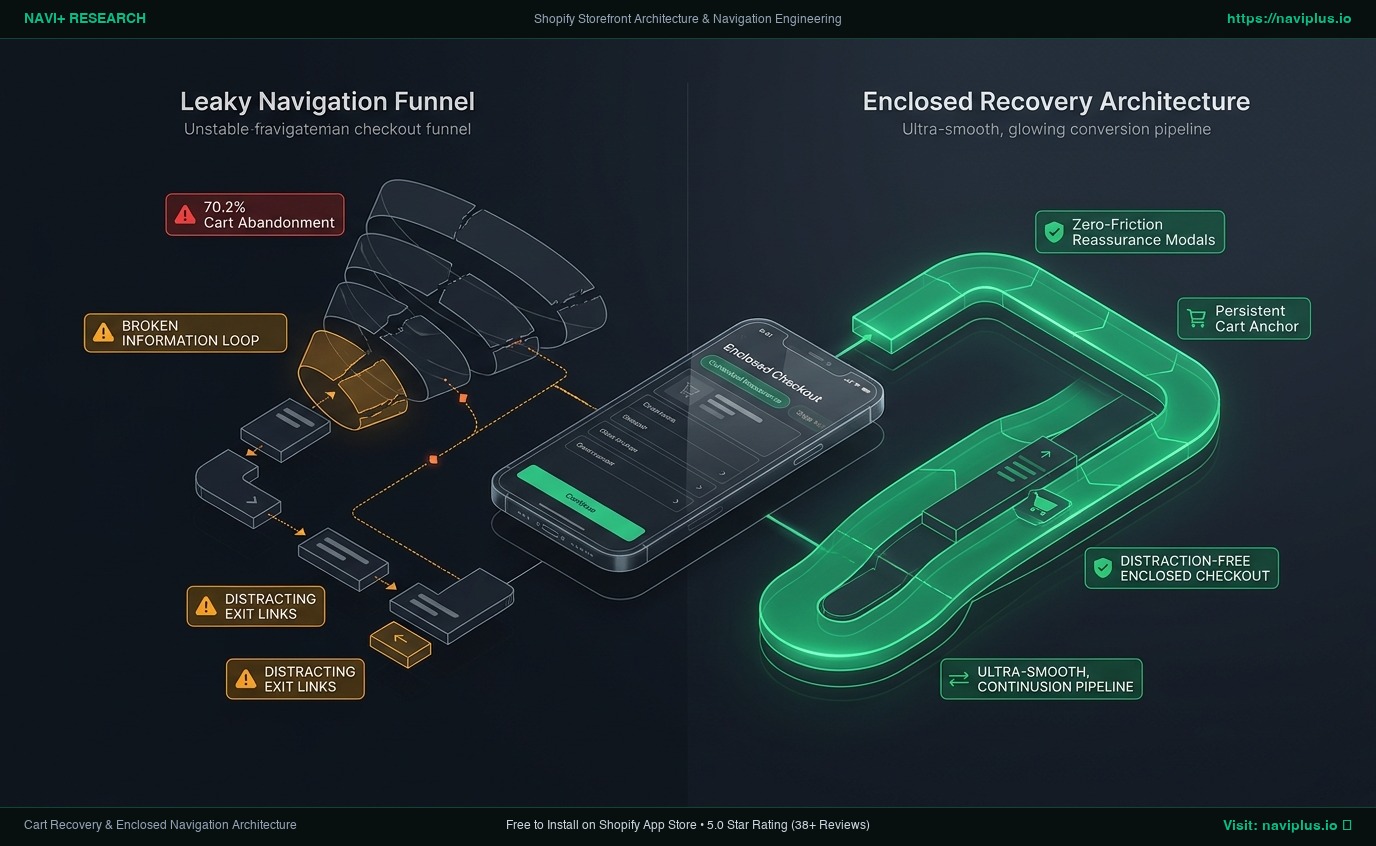
In the enclosed recovery architecture:
- Adding to cart immediately anchors a persistent state in the client runtime without reloading the page.
- Policy and shipping inquiries are intercepted by asynchronous JSON-driven drawers that slide over the cart view.
- When the user proceeds to checkout, exploratory headers are automatically suppressed, focusing 100% of user attention on completing the payment form.
Mobile vs. Desktop Divergence: Adapting the Cart Container
Cart recovery navigation must adapt to the physical constraints of different hardware form factors:
[Desktop Architecture]                           [Mobile Viewport Architecture]
  Slideout Drawer (420px fixed width)              Full-width Bottom Sheet (Modal swipe)
  Hover-triggered cart preview                     Persistent Floating Thumb-Zone Bar
  Flyout reassurance tooltips                      Modal slide-over for policy inspection
  Multi-column layout with upsells                 Single-column linear checkout flow
On desktop, screen real estate allows for rich visual sidebars where cross-sells, warranty checkboxes, and shipping estimators can live side-by-side without crowding the checkout button.
On mobile, vertical space is extremely constrained. A standard slideout drawer covering only 80% of the screen can cause accidental background taps that dismiss the cart. The optimal mobile pattern is a full-width bottom sheet that snaps to 90% viewport height, providing clear drag-down gestures and placing the primary checkout call-to-action directly beneath the natural thumb sweep.
Mandatory Engineering Trade-offs
Designing cart navigation requires balancing immediate conversion defense against catalog discovery and average order value (AOV):
[Permissive Open Navigation]  <------------------->  [Balanced Contextual Model]  <------------------->  [Strict Enclosed Funnel]
  Full menus everywhere                              Drawers with modal policies                          Zero external links
  Maximizes multi-item browsing                      Preserves momentum + trust                           Maximizes single-order velocity
  High abandonment risk (75%+)                       Optimal for 90% of stores                            May reduce secondary browsing
| Strategy Vector | Open Permissive Navigation | Aggressive Post-Exit Popups | Enclosed Recovery Navigation (Navi+) |
|---|---|---|---|
| Impact on Cart Abandonment | Negative (Encourages exits) | Marginally positive (+3–5%) | Highly positive (Stops drop-off) |
| Brand Perception | Neutral (Standard retail) | Negative (Perceived as spammy) | High (Professional, frictionless) |
| Mobile Thumb Ergonomics | Poor (Upper corner icon) | Annoying (Hard-to-close modals) | Optimal (Bottom anchor placement) |
| Multi-Item Exploration | High (Easy to keep shopping) | Interrupted by modal traps | Balanced (Quick return to catalog) |
| Implementation Complexity | Zero (Theme default) | Low (Third-party JS widget) | Medium (Architecture coordination) |
Merchant Decision Framework: Cart Navigation by Catalog & AOV
Not every store should configure their cart navigation identically. Use this matrix to determine your optimal architecture:
High AOV (> $200)   │  Quadrant 2: Reassurance Heavy        Quadrant 4: Luxury Concierge
                    │  - In-drawer warranty & financing      - Dedicated VIP support triggers
                    │  - Detailed policy slideout sheets     - Enclosed white-glove checkout
                    ├──────────────────────────────────────────────────────────────────────────
Low AOV (< $50)     │  Quadrant 1: Fast Frictionless         Quadrant 3: Gamified Threshold
                    │  - 1-click Express Checkout anchor     - Sticky free shipping progress bar
                    │  - Bottom tab bar sticky trigger       - Contextual 1-click add-on items
                    └──────────────────────────────────────────────────────────────────────────
                                Low SKU (< 50)                      High SKU (500+)
- Low AOV + Low SKU (Fast Frictionless): Eliminate all intermediate steps. Use a sticky bottom bar with an immediate checkout trigger to minimize deliberation.
- High AOV + Low SKU (Reassurance Heavy): The primary hurdle is risk aversion. Embed financing calculators (Klarna/Affirm), trust badges, and comprehensive warranty modals directly inside the cart drawer.
- Low AOV + High SKU (Gamified Threshold): Shoppers frequently abandon when order values fail to meet free shipping minimums. Implement dynamic threshold progress bars in the cart navigation that guide users back to relevant low-cost accessories.
- High AOV + High SKU (Luxury Concierge): Protect order value by providing direct contextual live chat access inside the cart, paired with strict checkout enclosure to eliminate distraction.
The Navi+ Architectural Approach
Navi+ approaches cart recovery not through intrusive popups, but through ergonomic navigation placement and edge-delivered micro-drawers:
- Persistent Floating Bottom Cart Bar: Navi+ allows merchants to deploy a lightweight, thumb-accessible cart trigger across mobile viewports, ensuring the cart is never more than 16ms away from user interaction.
- Sub-25KB Decoupled Delivery: Cart indicators, badges, and contextual navigation layers load asynchronously via Cloudflare R2 Edge CDN, adding zero render-blocking weight to the critical path.
- Zero Layout Shift (0.00 CLS): Floating triggers and sticky tab bar anchors utilize hard-coded CSS custom properties and layout containment, preventing visual jumpiness during page scroll.
- Built for Shopify Compliant: Integrates seamlessly with Shopify’s native AJAX Cart API (
/cart.js) and Checkout Extensibility without injecting heavy tracking scripts or conflicting with checkout security.
5-Step Cart Navigation Implementation Checklist
- Audit Mobile Thumb Reachability: Ensure your cart trigger is accessible within the bottom third of the mobile screen.
- Replace Hard Policy Links with Modals: Convert links to Shipping, Returns, and Size Guides inside the cart drawer to non-reloading contextual sheets.
- Implement Dynamic Free Shipping Guidance: Show a visual progress bar indicating exact currency amounts remaining to unlock free delivery.
- Enclose the Checkout Perimeter: Verify that checkout pages suppress the global header, mega menus, and search bars.
- Test Session Recovery on Browser ‘Back’: Simulate a customer clicking back from external pages to confirm cart contents and state remain fully synchronized.
Frequently Asked Questions
Why do post-exit recovery emails have diminishing returns?
Cart abandonment emails only reach shoppers who have already entered their email address (typically less than 20–30% of abandoning traffic). Furthermore, average open rates hover around 35–45%, meaning over 80% of abandoned shoppers never see the message. In contrast, on-site recovery navigation operates on 100% of hesitant visitors while their purchase intent is at its peak.
Should I completely remove the main menu on the cart page?
On a dedicated /cart page, retaining a simplified header (logo, back-to-shopping breadcrumb, customer service link) is acceptable. However, inside the formal multi-step checkout (/checkouts/), removing all exploratory navigation is a validated industry standard that significantly reduces exit leakage.
Does a persistent bottom cart bar interfere with mobile Add-to-Cart buttons?
Only if poorly coded. Professional navigation frameworks allow merchants to configure CSS offset padding or automatically dock bottom tab bars when a product page’s sticky Add-to-Cart button enters the viewport, preventing UI overlap.
Primary Usability & Technical References
- Baymard Institute (2024–2026): 49 Cart & Checkout Usability Guidelines & Benchmark Studies. Baymard.com
- Shopify Developer Documentation: Cart API Reference & Checkout Extensibility Guidelines. Shopify.dev
- Steven Hoober (4ourth Mobile): How Do Users Really Hold Mobile Devices? Empirical research into mobile ergonomics and thumb reach.
- Nielsen Norman Group: Information Foraging and Scent in Digital Shopping Cart Design. NN/g Research Library.
- Adobe Digital Insights: Mobile Commerce Conversion Gap & Viewport Friction Reports.
Explore the topics
This guide links out to focused articles — dive deeper on each.