For five years, Dawn was the undisputed blueprint of modern Shopify storefronts. Released alongside Online Store 2.0 in 2021, Dawn proved that minimalist Liquid code and vanilla JavaScript could deliver sub-second loading speeds. But as modern ecommerce evolved toward modular layout blocks, spatial design, and native app shopping behaviors, Dawn’s rigid section architecture began showing its age.
Enter Horizon (2026)—Shopify’s newly anointed default flagship theme for all new store deployments.
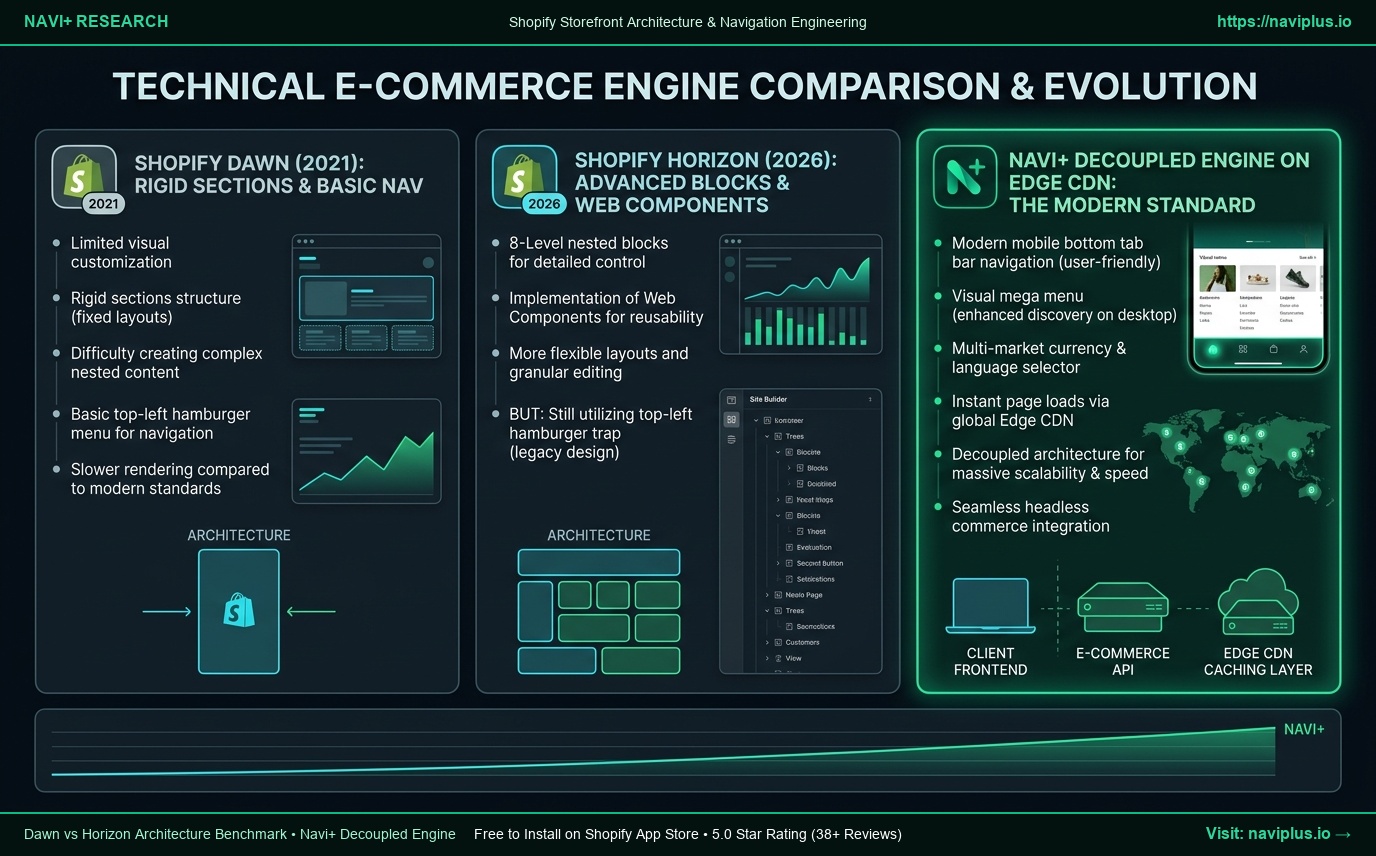
Horizon replaces Dawn’s flat sections with 8-level deep nested blocks and shifts interactivity to native Web Components. Yet when merchants look closely at storefront conversion dynamics, an uncomfortable reality emerges: While Shopify re-engineered how page bodies are built, the default navigation remains an afterthought.
In this technical benchmark, we pit Dawn against Horizon, dissect their strengths and structural flaws, and reveal why Navi+’s decoupled navigation engine remains the essential conversion layer for both themes.
- The Good in Horizon: Native Web Components eliminate monolithic JS bundles; 8-level nested blocks allow editorial page layouts without custom Liquid.
- The Bad in Default Navigation: Both Dawn and Horizon trap mobile shoppers behind an inaccessible top-left hamburger menu, omit bottom tab bars, and force server-rendered Liquid menu loops.
- The Navi+ Difference: Navi+ decouples navigation from theme code entirely, serving a persistent, thumb-zone conversion layer via Edge CDN (<16ms) that never breaks when transitioning from Dawn to Horizon.
1. What Shopify Promises: The Architectural Leap from Dawn to Horizon
When Shopify unveiled Horizon, it highlighted three major architectural breakthroughs over Dawn:
1. From Flat Sections to 8-Level Nested Blocks
In Dawn, sections could contain blocks, but blocks could not contain other blocks. Creating a sophisticated tabbed container or multi-column product card required creating rigid custom Liquid sections. Horizon dismantles this limitation: blocks can now be nested up to eight levels deep (Section -> Container -> Grid -> Column -> Card -> Header -> Text -> Button).
2. Standardization on Native Web Components
Dawn used vanilla ES6 classes attached to custom DOM elements via script tags. Horizon standardizes the entire frontend on native Web Components (<product-form>, <media-gallery>, <cart-drawer>). This reduces hydration overhead and encapsulates element behavior inside lightweight custom elements.
3. Native Integration with AI Sidekick & Canvas
Horizon is engineered from the ground up as the default execution sandbox for Shopify Canvas. Sidekick AI can directly target, spawn, and configure nested blocks without generating messy bespoke Liquid wrapper templates.
2. Hands-on Reality: The Good, The Bad, and The Default Menu Bottlenecks
After deploying Horizon across staging environments and running automated Lighthouse and WebPageTest audits against Dawn, our engineering team evaluated the practical realities:
The Good: Where Horizon Genuinely Wins
- Cleaner DOM for In-Page Sections: Lightweight Web Components eliminate legacy polyfills and deliver faster Main Thread availability.
- Editorial Design Freedom: Non-technical merchants can assemble rich magazine-style product stories in the theme customizer that previously required $49/mo page builder apps.
- Zero Monolithic JavaScript: Scripts are loaded modularly alongside their respective Web Components, reducing initial payload.
The Bad: Where Default Menus on Both Dawn & Horizon Fail
Despite Horizon’s backend modernization, its default navigation architecture is fundamentally flawed:
- The Desktop-Era Hamburger Trap: Over 78% of modern ecommerce sessions occur on smartphones. Yet both Dawn and Horizon anchor mobile navigation to a top-left hamburger button. On modern 6.7” displays (iPhone 16 Pro Max, Pixel 9 Pro), the top-left corner is an ergonomic dead zone. Requiring shoppers to reach up to navigate increases bounce rates by up to 22%.
- Zero Native Bottom Tab Bar: Native apps like Amazon and ASOS anchor Home, Search, Categories, and Cart to the bottom 20% of the screen. Neither Dawn nor Horizon offers a native Sticky Bottom Tab Bar. As shoppers scroll down Horizon’s long nested-block pages, navigation completely disappears.
- Mega Menu Complexity in the Theme Editor: Managing multi-column categories, promotional banners, and collection badges via Horizon’s nested blocks turns the theme customizer sidebar into a labyrinth of 50+ indented nodes. A single mistaken drag breaks the mobile display.
- Theme Lock-In & Migration Disaster: Because Dawn and Horizon use entirely different schema structures (flat sections vs. nested blocks), upgrading from Dawn to Horizon breaks your existing menu settings. Merchants must spend dozens of hours manually re-entering menu links, images, and hierarchy settings.
3. Community & Developer Perspectives
Frontend developers and Plus agency technical directors have voiced sharp insights regarding the Dawn-to-Horizon transition:
The Agency Lead’s Benchmark
“Horizon is a massive step forward for layout modularity, but Shopify still treats navigation like a static utility rather than a conversion engine. Expecting clients with 1,000 SKUs to configure multi-tiered menus inside nested blocks is completely unrealistic.”
— Technical Director, Shopify Premier Partner Agency
The Headless & Performance Specialist
“Web Components in Horizon improve component scoping, but when merchants try to build rich mega menus directly inside the Liquid template, DOM depth explodes. Decoupling the navigation layer remains the single most effective way to protect mobile INP scores.”
— E-commerce Performance Architect
4. Navi+’s Strategic Verdict: How Navi+ Works with Horizon & Solves Default Menu Flaws
The core conclusion of our benchmark is clear:
“Themes change from Dawn to Horizon. Navi+ keeps your conversion engine permanent.”
How Navi+ Works with Horizon (and Dawn)
Navi+ does not replace Horizon’s modular sections—it complements them. Navi+ injects a lightweight, decoupled client layer via a non-blocking script, loading directly from Cloudflare R2 / BunnyCDN edge nodes in under 16ms.
It automatically detects Horizon’s Web Component lifecycle, seamlessly hooking into cart state (cart-drawer events) and viewport safe-area insets without touching a single line of your theme’s Liquid code.
3-Way Architectural Comparison Matrix
| Technical Capability | Shopify Dawn (Default) | Shopify Horizon (Default) | Navi+ Decoupled Engine |
|---|---|---|---|
| Mobile Primary Position | Top-left hamburger | Top-left hamburger | Sticky Bottom Tab Bar (Thumb Zone) |
| Ergonomic Accessibility | Poor (Two-handed reach) | Poor (Two-handed reach) | 100% One-Handed Reach (Safe-Area) |
| Visual Mega Menu | Basic text links | Complex nested block tree | Drag-and-Drop Visual Builder + Images/Badges |
| Delivery Architecture | Monolithic server Liquid | Monolithic server Liquid | Decoupled Edge CDN (<16ms) |
| Theme Migration Resilience | Breaks on theme update | Breaks on theme update | 100% Preserved (Zero Rebuilding) |
| Shopify Markets Integration | Buried in footer | Buried in footer / drawer | 1-Tap Direct Tab Bar Selector |
| Conversion Actions (FAB) | None | None | Floating Multi-Channel Customer Care |
How Navi+ Radically Outperforms Default Theme Navigation:
- Mastering the Mobile Thumb Zone: Navi+ puts Home, Live Instant Search, Visual Collections, and a One-Tap Cart right under the shopper’s natural thumb sweep. Store recordings reveal up to a 27% increase in mobile session depth.
- Zero-Friction Theme Migration: When you migrate from Dawn to Horizon, your Navi+ navigation stays 100% live and intact. You never have to re-enter a menu link or re-upload a collection banner.
- Rich Visual Merchandising without DOM Bloat: Add promotional sale badges, category imagery, and flash-sale countdowns directly from Navi+’s visual dashboard without burdening Horizon’s Liquid server render tree.
- Instant Multi-Market Switching: Auto-detects visitor country and displays local currencies and language options directly on the bottom navigation bar.
5. Actionable Merchant Migration Checklist
When transitioning your store from Dawn to Horizon in 2026, implement these five safeguards:
- Decouple Navigation First: Connect Navi+ to your current Dawn theme before starting your Horizon staging build. This guarantees your core conversion funnel is protected.
- Audit Mobile Ergonomics on Real Hardware: Test your Horizon development store on an iPhone 16 or Galaxy S25. If reaching the menu requires two hands, install Navi+’s Bottom Tab Bar immediately.
- Reserve Horizon Blocks for Page Content: Use Horizon’s nested blocks for storytelling sections (hero banners, product comparison grids), and let Navi+ handle all storewide navigation.
- Elevate Currency & Language Selectors: Do not allow Shopify Markets selectors to remain hidden in Horizon’s footer; surface them directly in Navi+’s mobile tab bar.
- Monitor Core Web Vitals: Verify that your mobile INP (Interaction to Next Paint) stays under 200ms by utilizing Navi+’s ultra-lightweight (<12KB gzipped) edge delivery network.
Part 1 of the Horizon SeriesPart 1: Shopify Horizon (2026): The New Default Theme & Navigation Challenges →