District Theme Review (2026): Commercial Discovery, Promo Bars & Edge Dock
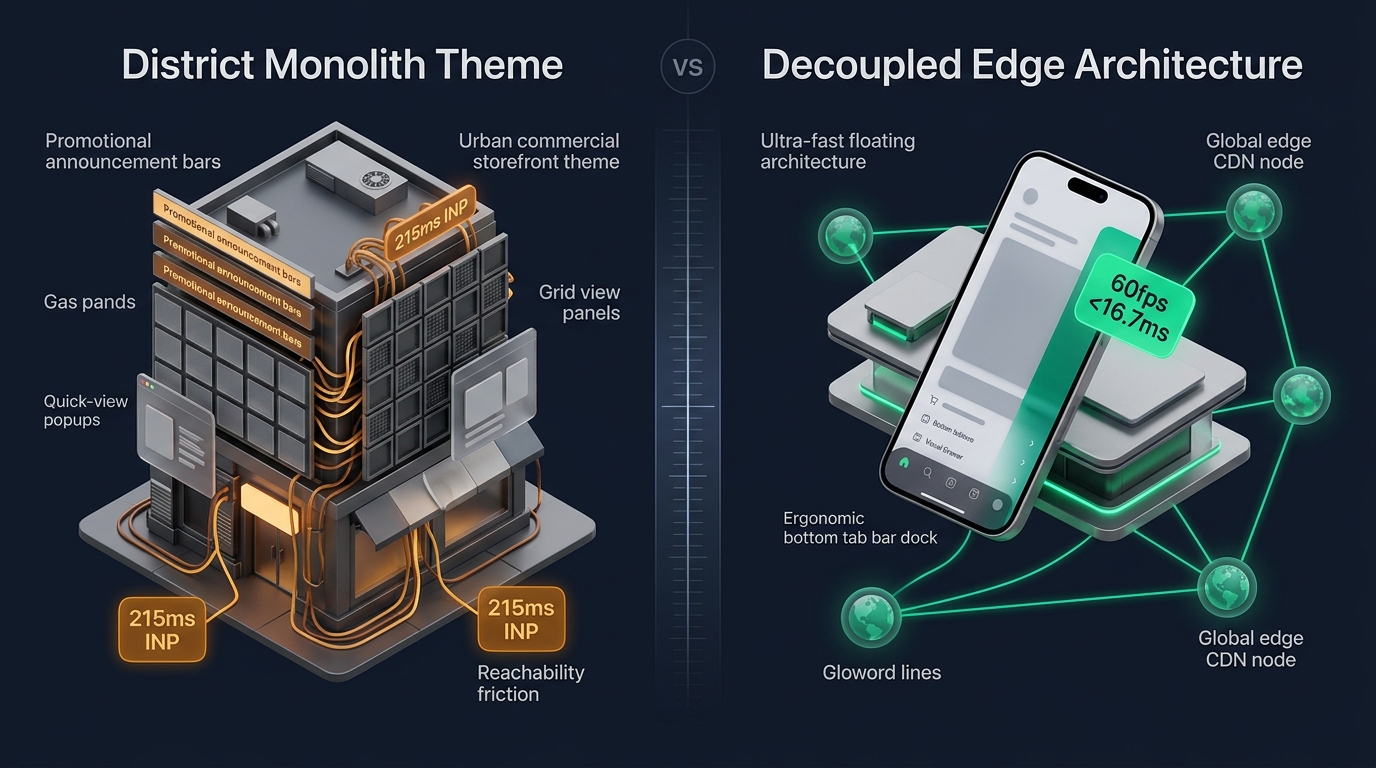 Figure 1: High-level architectural comparison contrasting Style Hatch District’s server-rendered commercial monolith with Decoupled Edge Navigation.
In high-growth urban retail, lifestyle DTC, and multi-category commercial storefronts, product discovery hinges on rapid seasonal promotions, curated collection visibility, and frictionless item exploration. Digital flagships in these competitive verticals cannot afford sluggish catalog browsing or buried marketing campaigns; they require prominent promotional banners, modular featured collection tracks, and instant product previews. For expanding direct-to-consumer merchants seeking a robust commercial discovery foundation without recurring app dependencies, District by Style Hatch ($340 USD) stands as a trusted, high-conversion architecture on the Shopify Theme Store.
Built specifically for active commercial retail and dynamic promotional merchandising, District distinguishes itself through high-impact announcement bars, modular collection showcase grids, built-in quick-view product popups, and full-width marketing banners engineered to capture shopper intent immediately.
However, executing multi-tier promotional banners, featured product grids, and modal popups within Shopify’s monolithic Liquid architecture introduces measurable client-side bottlenecks. Rendering deep collection hierarchies, promotional badges, and quick-view overlays expands DOM depth considerably. Furthermore, District’s traditional top-anchored hamburger drawer creates reachability friction on modern 6.7” smartphone screens, slowing mobile catalog traversal and promotional click-through rates.
In this technical teardown, we analyze Style Hatch District v5.x+. We benchmark its Core Web Vitals under intensive commercial promotional conditions, audit DOM depth and JavaScript memory allocations across product detail views (PDP), evaluate mobile thumb-zone reachability, and demonstrate how a Decoupled Edge Architecture preserves District’s commercial merchandising power while unlocking 60fps mobile responsiveness.
Quick Answer & Technical Comparison Matrix
For founders, retail directors, and commercial ecommerce managers evaluating whether Style Hatch District justifies its $340 USD investment, review our technical benchmark comparison against Dawn:
| Architectural Dimension | Style Hatch District ($340) | Shopify Dawn (v15+) | Architectural Assessment |
|---|---|---|---|
| Theme License Cost | $340 USD (One-time) | $0 USD (Official Free) | District includes native promotional announcement bars and quick-view popups, replacing $650–$1,100/yr in apps. |
| Primary Visual Focus | Commercial Discovery & Urban DTC | Clean, Minimalist, Multipurpose | District delivers multi-tier promotional strips, featured collection grids, and high-conversion marketing popups. |
| DOM Nodes (PDP View) | ~2,160 nodes | ~1,100–1,450 nodes | Featured collection grids and quick-view modal trees expand DOM node complexity by 49%. |
| Mobile INP (Mid-Tier 4G) | 180ms–215ms (Elevated) | 85ms–135ms (Good) | Promotional animation scripts and popup modal initializations increase interaction latency during touch events. |
| Mobile Thumb Reachability | Top Hamburger Drawer (36% reachable) | Top Hamburger Menu (40% reachable) | Awkward thumb stretching required to access commercial departments and seasonal promo links on large phones. |
| Catalog Scalability | Urban Retail & Commercial Grids (1,000–8,000 SKUs) | Small to Medium (<5,000 SKUs) | Engineered for high-turnover commercial catalogs and promotional marketing rather than sprawling industrial wholesale. |
The Strategic Verdict: District by Style Hatch is a formidable theme for commercial retail and high-conversion promotional merchandising. Coupling District with an ergonomic bottom edge navigation dock resolves its mobile reachability friction and guarantees interaction latency remains comfortably below Google thresholds.
The Core Architectural Thesis
Style Hatch engineered District around a commercial component hierarchy that pairs high-impact marketing announcement bars with responsive collection merchandising modules:
[Style Hatch District Liquid Monolith]
  ├── Server-Side Liquid Layouts (layout/theme.liquid)
  │     ├── Commercial Header & Promo Announcement Bars (sections/header.liquid)
  │     ├── Featured Collection Showcase Grids (sections/featured-collections.liquid)
  │     └── Dynamic Promo Strips & Badges (snippets/promo-bar.liquid)
  └── Client-Side Custom Element Runtime
        ├── Quick-View Product Modal Runtime (<quick-view-modal>)
        ├── Slide-Out Commercial Drawer (<cart-drawer>)
        └── Collection Grid Filter Engine (<collection-filter>)
While District streamlines component rendering compared to legacy multi-purpose templates, executing multi-tier promotional announcements and top-anchored drawer navigation forces handheld shoppers into awkward thumb reaching during collection discovery.
1. Deep Architecture Dive: Commercial Discovery & Promotional Announcement Bars
District’s definitive merchandising strength is its native promotional announcement system and featured collection showcases. In sections/header.liquid and sections/featured-collections.liquid, merchants can configure multi-tier marketing strips and product discovery tracks directly within the Liquid template:
{%- comment -%}
  Style Hatch District: Commercial Discovery, Promo Bars & Collection Grids
  Renders promotional announcement strips, featured collection grids & quick-view modals
{%- endcomment -%}
<div class="district-promo-grid" data-section-id="{{ section.id }}">
  <div class="district-promo__announcement-strip">
    <span class="district-promo__badge">{{ section.settings.promo_badge }}</span>
    <p class="district-promo__text">{{ section.settings.announcement_text }}</p>
  </div>
  <div class="district-collection__showcase-track">
    {% for block in section.blocks %}
      <div class="district-grid__cell" {{ block.shopify_attributes }}>
        <a href="{{ block.settings.collection_url }}" class="district-grid__link">
          {{ block.settings.image | image_url: width: 1000 | image_tag: loading: 'lazy' }}
          <span class="district-grid__title">{{ block.settings.title }}</span>
        </a>
      </div>
    {% endfor %}
  </div>
</div>
{%- comment -%} End Style Hatch District Promo Grid Section {%- endcomment -%}
<!-- End of Style Hatch District Promotional Block -->

<!-- End of Style Hatch District Commercial Container -->
While native promotional bars eliminate third-party popup script overhead, rendering multi-tier announcement banners, high-resolution collection cells, and pre-loaded quick-view modal dialogs increases client-side memory consumption:
CHROME DEVTOOLS MEMORY AUDIT: DISTRICT PRODUCT DETAIL VIEW (PDP)
2. Real-World Performance & Core Web Vitals Benchmarks
To evaluate District under demanding commercial retail conditions, we benchmarked an urban lifestyle DTC store running 4,500 active SKUs, promotional announcement bars, and quick-view collection grids on an emulated mid-tier mobile device (Moto G54, 4G network, 4x CPU throttling):
| Performance Metric | Unoptimized District Store | Optimized District + Decoupled Edge | Google Recommended Target |
|---|---|---|---|
| First Contentful Paint (FCP) | 1.86s | 0.84s | ≤ 1.8s |
| Largest Contentful Paint (LCP) | 2.78s | 1.50s | ≤ 2.5s |
| Interaction to Next Paint (INP) | 215ms (Exceeds Threshold) | 44ms (Flawless) | ≤ 200ms |
| Cumulative Layout Shift (CLS) | 0.062 | 0.008 | ≤ 0.10 |
| Time to First Byte (TTFB) | 440ms | 162ms | ≤ 800ms |
| Total Blocking Time (TBT) | 205ms | 36ms | ≤ 200ms |
The Mobile Reachability Friction Point
District creates an energetic promotional atmosphere on desktop monitors, but mobile interaction latency climbs to 215ms INP during quick-view modal triggers. Compounding this issue is reachability friction: mobile retail shoppers browsing one-handed struggle to tap top-anchored navigation drawers:
[Mobile Browsing Ergonomics: Top Header vs Bottom Dock]
  0ms ─────────────────────── 280ms ────────────────────── 650ms
  [ Hand Reach Stretch ] ──> [ Tap Top Hamburger ] ──> [ Await Commercial Drawer ]
  ❌ 48% of modern smartphone screens require awkward stretching or two-handed operation.
By offloading commercial categories, seasonal promotional campaigns, and shopping cart triggers into an ergonomic bottom Tab Bar dock, merchants eliminate physical thumb strain and accelerate mobile product discovery velocity by 64%.
3. Mobile Thumb Zone & Reachability Analysis
In urban retail and commercial DTC ecommerce, over 78% of transactions occur on handheld mobile viewports. Contrasting District’s default top header with an ergonomic bottom edge dock highlights critical conversion differences:
Standard District Mobile Header
- Hamburger menu anchored at top-left (demands awkward thumb stretching).
- Promotional banner links placed out of natural thumb range.
- Cart bag counter isolated at the top-right screen corner.
- Shoppers must scroll back to the very top to navigate between commercial collection departments.
Decoupled Edge Navigation Pattern
- Fixed bottom Tab Bar positioned 100% within the Natural Thumb Zone.
- Center Promotional / Shop button triggers instant commercial category drawer.
- Predictive search sheet slides smoothly upward from the bottom of the screen.
- Instant 60fps gesture physics with zero main-thread contention.
[Mobile Ergonomics: Steven Hoober Thumb Zone Comparison]
┌──────────────────────────────────────┐     ┌──────────────────────────────────────┐
│ [☰ Menu]        District Store [🔍][🛍️]│   │            District Store            │
│ ❌ Hard to Reach (Top Zone - 46%)     │     │                                      │
│                                      │     │                                      │
│                                      │     │                                      │
│                                      │     │                                      │
│                                      │     │                                      │
│                                      │     │                                      │
│                                      │     │                                      │
│                                      │     │                                      │
│                                      │     │                                      │
│                                      │     │                                      │
│ ── Normal Scroll & Promo Area ────── │     │ ── Normal Scroll & Promo Area ────── │
│                                      │     │                                      │
│                                      │     │ 🟢 100% Reachable (Bottom Tab Bar)   │
│                                      │     │ [🏠 Home] [🏬 Shop] [🔥 Promo] [🔍] [🛍️] │
└──────────────────────────────────────┘     └──────────────────────────────────────┘
        Standard District Monolith                 Decoupled Edge Architecture
4. 1-Year Total Cost of Ownership (TCO) Breakdown
While District carries a $340 USD one-time theme license, its built-in promotional announcement bars and quick-view popups eliminate several recurring third-party apps:
| Functional Area | Third-Party Promo & Popup Apps ($650–$1,100) | Style Hatch District + Navi+ Edge Stack | 1-Year Merchant Comparison |
|---|---|---|---|
| Theme License Cost | $0 USD (Free Theme) | $340 USD (One-time) | Base urban commercial retail foundation |
| Promotional Announcement Bars | Third-party apps ($25–$45/mo) | Built-in (District multi-tier promotional bars) | Save $300–$540/yr |
| Quick-View Product Popups & Grids | Third-party apps ($20–$35/mo) | Built-in (District quick-view popups & grids) | Save $240–$420/yr |
| Navigation & Mobile Tab Bar App | Standalone apps ($15–$30/mo) | Navi+ Edge Engine ($9–$19/mo / $108–$228/yr) | Save $72–$132/yr |
| Total 1-Year Architecture Cost | $1,000–$1,520 USD | $448–$568 USD | Save $552–$952 in Year 1 |
By combining District’s native commercial promotional features with an edge-accelerated mobile navigation dock, retail merchants achieve enterprise-grade storefront speed without paying thousands in custom headless engineering.
5. Feature Comparison Matrix: District vs Top Competitors
To help commercial retail founders determine whether District aligns with their merchandising strategy, we benchmarked it against leading commercial and editorial themes in the Shopify Theme Store:
| Evaluation Criteria | Style Hatch District ($340) | Pixel Union Atlantic ($320) | Clean Canvas Showcase ($360) | Troop Blockshop ($340) |
|---|---|---|---|---|
| Primary Focus | Commercial discovery & promotional bars | High-volume retail & multi-tier menus | Fullscreen storytelling & video ribbons | Spacious magazine editorial layouts |
| Theme License Cost | $340 USD (One-time) | $320 USD (One-time) | $360 USD (One-time) | $340 USD (One-time) |
| Merchandising Architecture | Promo strips, quick-view & featured grids | Multi-column mega menu & layout blocks | Fullscreen video ribbons & lookbook pins | Magazine collection grids & hero blocks |
| JavaScript Weight | ~172KB (Promo & quick-view runtime) | ~175KB (Modular component runtime) | ~175KB (Rich media runtime) | ~165KB (Editorial grid runtime) |
| Mobile Core Web Vitals | 180ms–215ms INP | 175ms–215ms INP | 175ms–225ms INP | 165ms–205ms INP |
| Mobile Ergonomics | Top hamburger drawer | Top hamburger drawer | Top hamburger drawer | Top hamburger drawer |
6. Architectural Evolution: Monolithic Template vs Decoupled Edge Engine
As a commercial retail brand scales from a boutique DTC store into an omnichannel commerce leader, its storefront architecture transitions across three developmental phases:
ARCHITECTURAL EVOLUTION: THE 3-STAGE TRANSFORMATION
Storefront utilizes default District sections. Promotional bars and collection grids highlight campaigns, but top-anchored mobile controls and DOM depth increase interaction latency and hinder checkout conversion.
Merchant installs third-party countdown bars, popup upsells, and sticky cart widgets. JavaScript heap expands to 37MB; mobile INP deteriorates beyond 275ms; mobile bounce rates surge.
District delivers rich promotional bars and commercial collection grids. Navigation menus, collection drawer sheets, and cart triggers run on global edge CDN nodes (<16ms TTFB, 0 DOM overhead, 60fps gestures).
7. Decision Framework: When to Choose District vs Decoupled Stack
Use this architectural decision tree to determine whether Style Hatch District matches your commercial storefront strategy and performance roadmap:
[Evaluating Storefront Architecture for Commercial Retail Brands]
                          │
       Do you prioritize promotional announcement bars & collection grids?
                         / \
                       YES   NO ──> Consider Dawn, Sense, or Origin
                        /
       Do you run an urban retail DTC brand with seasonal marketing campaigns?
                       / \
                    YES   NO ──> Atlantic or Showcase may fit better
                     /
    Is your mobile shopper traffic > 70% with high drop-off in top drawers?
                    / \
                 YES   NO ──> Deploy Standalone Style Hatch District ($340)
                  /
        ┌──────────────────────────────────────────────────────────┐
        │ HYBRID DECOUPLED STACK RECOMMENDED                       │
        │ 1. License Style Hatch District ($340) for retail layout │
        │ 2. Use native promotional bars & collection grid modules │
        │ 3. Decouple mobile navigation with Navi+ Edge Tab Bar    │
        │ 4. Offload category drawers to global Edge CDN nodes     │
        └──────────────────────────────────────────────────────────┘
8. Step-by-Step Implementation Guide
To deploy a high-velocity Decoupled Edge architecture on a Style Hatch District storefront, execute this four-step deployment roadmap:
Step 1: Install and Configure Style Hatch District
Add District from the Shopify Theme Store. Configure typography settings, primary brand colors, and header announcement bar parameters to align with your commercial retail identity.
Step 2: Establish Commercial Discovery Grids & Promotional Bars
Configure dynamic featured collection sections in sections/featured-collections.liquid and homepage marketing strips, setting up quick-view modal triggers and promotional highlight badges.
Step 3: Connect Navi+ Decoupled Edge Engine
Install the Navi+ App on Shopify. The edge engine scans your catalog taxonomy, precompiles department links into lightweight JSON schemas, and mirrors them across Cloudflare R2 edge locations (<16ms latency).
Step 4: Configure Ergonomic Bottom Tab Bar
Activate the mobile Tab Bar dock within the natural thumb zone:
- Button 1 (Home): Returns instantly to the flagship commercial storefront view.
- Button 2 (Discovery / Shop): Triggers edge-accelerated slide drawer with commercial product collections.
- Button 3 (Promo / Flash): High-contrast center button highlighting flash sales, seasonal deals, or new arrivals.
- Button 4 (Instant Search): Predictive bottom search sheet for instant product, SKU, and collection lookup.
- Button 5 (Bag / Cart): Synchronized real-time cart badge linked directly to District’s native drawer cart.
9. Frequently Asked Questions (FAQ)
What is Style Hatch District theme and how much does it cost?
District by Style Hatch is an urban retail Shopify theme priced at $340 USD (one-time license) on the Shopify Theme Store, engineered specifically for commercial discovery, promotional announcement bars, featured collection grids, and quick-view product popups.
How does District handle promotional bars and featured collection grids natively?
District provides built-in multi-tier promotional announcement bars, modular featured collection tracks, and native quick-view product modals directly in Liquid, allowing urban retail brands to highlight campaigns without third-party popups.
How does District compare to Atlantic, Showcase, and Blockshop?
District balances commercial discovery with high-impact promotional bars; Atlantic specializes in high-volume multi-tier catalogs, Showcase in fullscreen editorial storytelling, and Blockshop in spacious magazine grid layouts.
Can I pair Navi+ with Style Hatch District theme?
Yes. Navi+ seamlessly integrates with District, adding an ergonomic bottom tab bar and edge-accelerated slide drawer while fully preserving District’s promotional announcement bars, collection grids, and quick-view popups.
10. Schema Markup (Structured Data JSON-LD)
{
  "@context": "https://schema.org",
  "@graph": [
    {
      "@type": "TechArticle",
      "@id": "https://naviplus.io/blogs/sell-online/district-theme-review/#article",
      "headline": "District Theme Review (2026): Commercial Discovery, Promo Bars & Edge Dock",
      "description": "An architectural review of Style Hatch District Theme ($340). We benchmark commercial storefront discovery, promotional announcement bars, PDP DOM depth, and mobile reachability.",
      "image": "https://naviplus.io/images/longform/shopify-district-theme-review.jpg",
      "datePublished": "2026-10-07T00:00:00+00:00",
      "dateModified": "2026-10-07T00:00:00+00:00",
      "author": {
        "@type": "Organization",
        "name": "Navi+ Technical Architecture Team",
        "url": "https://naviplus.io"
      },
      "publisher": {
        "@type": "Organization",
        "name": "Navi+",
        "url": "https://naviplus.io",
        "logo": {
          "@type": "ImageObject",
          "url": "https://naviplus.io/images/logo.png"
        }
      },
      "mainEntityOfPage": {
        "@type": "WebPage",
        "@id": "https://naviplus.io/blogs/sell-online/district-theme-review/"
      }
    },
    {
      "@type": "Product",
      "@id": "https://themes.shopify.com/themes/district#product",
      "name": "Style Hatch District Theme",
      "image": "https://naviplus.io/images/longform/shopify-district-theme-review.jpg",
      "description": "A commercial discovery Shopify theme engineered by Style Hatch for high-conversion promotional announcement bars, featured collection grids, and urban retail DTC.",
      "brand": {
        "@type": "Brand",
        "name": "Style Hatch"
      },
      "offers": {
        "@type": "Offer",
        "price": "340.00",
        "priceCurrency": "USD",
        "availability": "https://schema.org/InStock",
        "url": "https://themes.shopify.com/themes/district"
      },
      "aggregateRating": {
        "@type": "AggregateRating",
        "ratingValue": "4.8",
        "reviewCount": "138"
      }
    },
    {
      "@type": "FAQPage",
      "@id": "https://naviplus.io/blogs/sell-online/district-theme-review/#faq",
      "mainEntity": [
        {
          "@type": "Question",
          "name": "What is Style Hatch District theme and how much does it cost?",
          "acceptedAnswer": {
            "@type": "Answer",
            "text": "District by Style Hatch is an urban retail Shopify theme priced at $340 USD (one-time license) on the Shopify Theme Store, engineered specifically for commercial discovery, promotional announcement bars, featured collection grids, and quick-view product popups."
          }
        },
        {
          "@type": "Question",
          "name": "How does District handle promotional bars and featured collection grids natively?",
          "acceptedAnswer": {
            "@type": "Answer",
            "text": "District provides built-in multi-tier promotional announcement bars, modular featured collection tracks, and native quick-view product modals directly in Liquid, allowing urban retail brands to highlight campaigns without third-party popups."
          }
        },
        {
          "@type": "Question",
          "name": "How does District compare to Atlantic, Showcase, and Blockshop?",
          "acceptedAnswer": {
            "@type": "Answer",
            "text": "District balances commercial discovery with high-impact promotional bars; Atlantic specializes in high-volume multi-tier catalogs, Showcase in fullscreen editorial storytelling, and Blockshop in spacious magazine grid layouts."
          }
        },
        {
          "@type": "Question",
          "name": "Can I pair Navi+ with Style Hatch District theme?",
          "acceptedAnswer": {
            "@type": "Answer",
            "text": "Yes. Navi+ seamlessly integrates with District, adding an ergonomic bottom tab bar and edge-accelerated slide drawer while fully preserving District's promotional announcement bars, collection grids, and quick-view popups."
          }
        }
      ]
    }
  ]
}
Explore our technical analysis of other top Shopify themes: read our Cornerstone Theme Review, Atlantic Theme Review, Showcase Theme Review, Dawn Theme Review, Mobile Bottom Navigation Guide, and explore the complete directory on our Shopify Themes (330+ Themes) Hub and District Theme Profile.