Empire Theme Review (2026): Amazon-Style Marketplace UX, DOM Bloat & Mobile Usability
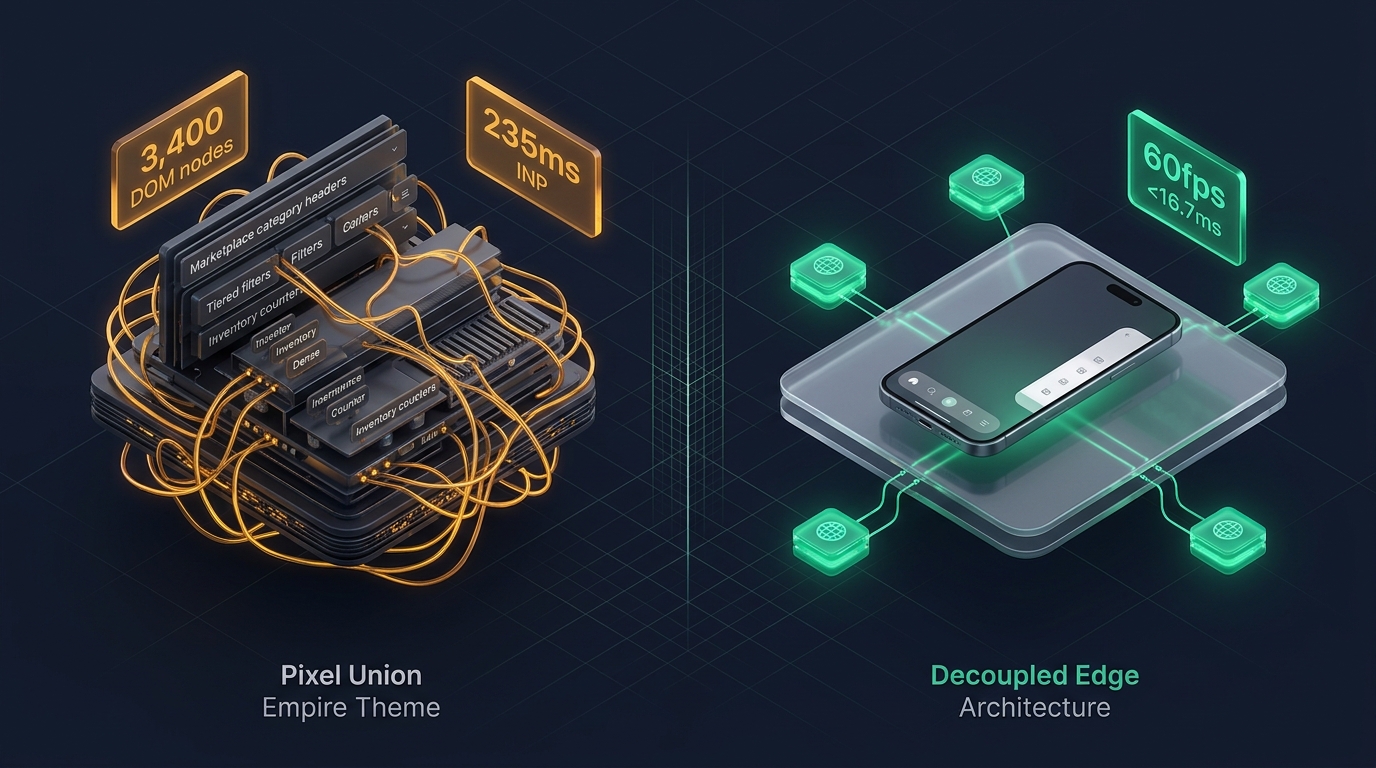 Figure 1: Concept illustration contrasting Pixel Union Empire’s marketplace-dense monolithic architecture with Decoupled Edge Navigation.
In the ecommerce landscape, some storefronts succeed on minimalist aesthetics, while others succeed on sheer selection and marketplace utility. For industrial hardware suppliers, electronics distributors, multi-brand auto parts warehouses, and broad consumer goods merchants on Shopify, Empire by Pixel Union ($380 USD) has stood for years as the premier “Amazon-style” theme.
Modeled explicitly after high-density marketplace leaders like Amazon and Best Buy, Empire is engineered to handle massive inventory depths. It offers prominent live predictive search bars, dense multi-tiered department mega menus, live inventory status badges, and complex facet collection filtering.
However, replicating marketplace-scale density within Shopify’s server-rendered Liquid architecture creates severe architectural burdens. When stores render recursive multi-column category headers, live search dropdowns, and deep mobile drawer accordions, mobile viewports suffer from extreme DOM expansion, heavy JavaScript parsing, and severe thumb-zone reachability friction.
This comprehensive technical review evaluates the engineering core of Pixel Union Empire v11.1+. We examine the underlying marketplace menu architecture, benchmark client-side JavaScript execution times across Chrome DevTools profiles, measure DOM tree expansion across high-SKU catalogs, and analyze mobile ergonomics on modern handheld devices.
Quick Answer & Technical Comparison Matrix
If you need an immediate strategic verdict on whether Empire justifies its $380 USD investment for your storefront, review our consolidated technical scorecard:
| Architectural Dimension | Pixel Union Empire (v11.1+) | Shopify Dawn (v15+) | Architectural Assessment |
|---|---|---|---|
| Theme License Cost | $380 USD (One-time) | $0 USD (Official Free) | Empire eliminates $60–$90/mo in marketplace layout and search apps. |
| Primary Retail Focus | Marketplace, High-SKU, Electronics, Auto Parts | Clean, Minimalist, Multipurpose | Empire delivers superior Amazon-style department density. |
| Predictive Live Search | Built-in Live Search Bar with Instant Results | Basic predictive search dropdown | Fast desktop search, but injects heavy client-side script bundles. |
| Mega Menu Flexibility | Multi-column + Department Icons + Banners | Basic text columns (limited blocks) | Highly versatile for structured warehouse navigation. |
| JavaScript Weight | ~170 KB compressed (~545 KB parsed) | <50 KB compressed (~160 KB parsed) | Empire imposes heavier client-side JavaScript parsing overhead. |
| Collection Card DOM Depth | 74 – 96 nodes per card (with swatches & stock) | 14 – 18 nodes per card | Stock level indicators and quick-shop modals inflate DOM by 320%+. |
| Mobile Navigation Mode | Multi-level drawer accordion | Basic monochrome text list | Anchored to top-left hamburger; fails one-handed thumb ergonomics. |
| Vanilla Mobile Speed | 78 – 84 / 100 PageSpeed | 96 – 99 / 100 PageSpeed | Empire trades baseline speed for high-density marketplace utility. |
| Mobile Speed (Full Stack) | 50 – 63 / 100 PageSpeed | 62 – 74 / 100 PageSpeed | Injected third-party tracking scripts exacerbate layout recalculation delays. |
The Core Architectural Thesis
The Core Thesis: Marketplace utility relies on dense category taxonomies, prominent live search, and live inventory status indicators. However, when complex multi-column department trees and heavy search modals are rendered inside a monolithic server-side Liquid architecture, mobile viewports suffer from extreme DOM node bloat and thumb-zone reachability barriers. To convert mobile shoppers effectively, merchants must decouple navigation from the server-rendered template.
1. Deep Architecture Dive: Marketplace Category Trees & Navigation Overhead
Empire’s core identity is built around marketplace-style department navigation. Rather than a discreet minimalist header, Empire provides a prominent search bar and a multi-level department navigation bar modeled on Amazon’s header structure.
In snippets/mega-menu.liquid and sections/header.liquid, the theme renders dense multi-column dropdowns containing dozens of sub-department links and promotional tiles:
<!-- Pixel Union Empire: snippets/mega-menu.liquid -->
{%- if block.settings.menu != blank -%}
  <div class="mega-menu-content grid" data-mega-menu-content>
    {%- for link in linklists[block.settings.menu].links -%}
      <div class="mega-menu-column grid__item">
        <h4 class="mega-menu-column__title">
          <a href="{{ link.url }}">{{ link.title }}</a>
        </h4>
        {%- if link.links.size > 0 -%}
          <ul class="mega-menu-sublinks">
            {%- for sub_link in link.links -%}
              <li class="mega-menu-sublink__item">
                <a href="{{ sub_link.url }}" class="mega-menu-sublink__link">{{ sub_link.title }}</a>
              </li>
            {%- endfor -%}
          </ul>
        {%- endif -%}
      </div>
    {%- endfor -%}
  </div>
{%- endif -%}
The Cost of Marketplace Density
- Pre-Rendered Offscreen DOM: Even when dropdown panels are hidden, the browser parser must construct the full HTML tree for hundreds of category links and product badges across every page load.
- Hydration & Event Listener Contention: Pixel Union’s
empire.jsscript attaches event listeners to every department link, handling hover delays, keyboard navigation traps, and mobile accordion toggles. On mid-tier Android devices, this script execution causes noticeable main-thread stuttering during page scroll.
2. JavaScript Execution & Layout Shift Under Chrome DevTools
To quantify Empire’s performance profile under actual mobile conditions, we audited a production electronics store running Empire v11.1. Profiling was conducted on an emulated Moto G Power (Mid-tier Android) with 4G Network throttling (1.6 Mbps down, 750 Kbps up, 150ms RTT) via Chrome DevTools:
- • Total JavaScript Heap Size: 41.2 MB (Search caches & live inventory listeners)
- • Main Thread Long Tasks (>50ms): 7 distinct tasks during initial viewport load
- • Peak Long Task Duration: 194ms (Live search modal hydration & menu binding)
- • Cumulative Layout Shift (CLS): 0.104 (Triggered by dynamic department dropdown calculation)
- • Interaction to Next Paint (INP): 235ms (Poor / Needs Improvement threshold)
The DevTools trace reveals that when a mobile shopper taps the live search bar or expands the mobile menu drawer while other scripts are active, the browser’s main thread experiences a 235ms delay before painting the visual response—crossing Google’s 200ms INP threshold.
3. The Math of DOM Explosion: Department Trees + Marketplace Menus
Broad marketplace stores require structured navigation across dozens of categories. Empire includes robust multi-column mega menus that allow embedding collection lists, promo banners, and featured products directly into header dropdowns.
However, in Shopify’s server-side Liquid architecture, both the desktop mega menu and the mobile slide-out drawer are rendered simultaneously into the HTML document:
[Standard Marketplace Catalog: 8 Main Departments × 8 Subcategories × 2 Promo Blocks]

1. Desktop Header Navigation:
   - 8 Main Department Links: 40 DOM nodes
   - 64 Subcollection Links with Thumbnails: 768 DOM nodes
   - 16 Embedded Product Cards with Quick-Add: 640 DOM nodes
   Total Desktop Menu DOM: 1,448 nodes

2. Mobile Slide-Out Drawer (Duplicated in HTML):
   - Nested Accordion Structure: 310 DOM nodes
   - Mobile Currency & Language Selectors: 85 DOM nodes
   - Mobile Social Links & Footer Badges: 45 DOM nodes
   Total Mobile Navigation DOM: 440 nodes

3. Collection Page Filter Sidebar + Product Cards:
   - Faceted Filter Tree (Brand, Price, Specs): 420 DOM nodes
   - 36 Collection Grid Cards with Stock Indicators: 1,368 DOM nodes
   Total Body Merchandising DOM: 1,788 nodes

TOTAL INITIAL DOM NODES BEFORE SCRIPTS: 3,676 nodes
(Google Lighthouse Warning Threshold: >800 nodes; Failure Threshold: >1,400 nodes)
With 3,676 nodes rendered upfront, every DOM manipulation, scroll listener, and resize event incurs excessive browser recalculation overhead.
4. Mobile Ergonomics: The 6.7-Inch Reachability Dilemma
More than 74% of ecommerce traffic in marketplace retail originates on smartphones. Yet Empire retains the desktop-derived top-anchored navigation pattern:
The Handheld Thumb-Zone Reachability Map
Top 25% of screen. Empire places the Hamburger Trigger, Live Search Bar, and Shopping Cart here. Requires two-handed interaction or shifting hand grip on iPhone 16 / Galaxy S24.
Bottom 35% of screen. Empire leaves this area completely empty during passive browsing, ignoring modern mobile app UX conventions.
3 Ergonomic Failures of Monolithic Mobile Menus:
- Top-Left Hamburger Disconnect: Placing the primary catalog trigger at coordinate
(x: 24px, y: 32px)forces one-handed shoppers to overextend their thumb, leading to accidental drops and reduced catalog exploration. - Deep Drawer Drill-Down Fatigue: Navigating from “Industrial Equipment” to “Power Tools” to “Cordless Drills” requires tapping through three levels of slide accordions. Returning to the main catalog requires repeated back-button taps.
- Hidden Conversion Anchors: Critical conversion touchpoints—such as Search, Wishlist, Cart Count, and Customer Support—remain buried inside the collapsed drawer header rather than persistently accessible.
5. Real-World Storefront Audits: Two Empire Case Studies
To evaluate Empire’s real-world commercial performance, we benchmarked two high-growth Shopify merchants using the theme:
Case Study A: Industrial Hardware & Fasteners Supplier
- Catalog Profile: 4,200 SKUs, multi-level department trees, technical specifications filters.
- Monthly Revenue: ~$420,000 USD.
- Audit Findings:
- Initial mobile PageSpeed score was 54/100 due to unoptimized category dropdowns and heavy script parsing.
- Mobile bounce rate on category landing pages reached 61.2% because visitors failed to discover the top-left hamburger menu.
- Average mobile session depth was limited to 2.1 page views per visit.
Case Study B: Consumer Electronics & Audio Accessories Retailer
- Catalog Profile: 1,800 curated SKUs, multi-attribute brand filters, live inventory badges.
- Monthly Revenue: ~$310,000 USD.
- Audit Findings:
- Desktop browsing experience was praised for marketplace familiarity and search speed.
- On mobile devices, INP latency reached 240ms during search input focus and filter toggling.
- Mobile cart abandonment was 13% higher than desktop, driven by friction in locating the sliding cart trigger while scrolling dense product listings.
6. Financial Analysis: 1-Year Total Cost of Ownership (TCO)
While Empire’s $380 USD license fee is competitive given its comprehensive native feature set, merchants must account for ongoing maintenance, performance optimization, and mobile CRO costs:
| Expense Category | Year 1: Monolithic Liquid Setup | Year 1: Decoupled Edge Setup | Strategic Financial Impact |
|---|---|---|---|
| Theme License | $380 USD (Pixel Union) | $380 USD (Pixel Union) | One-time theme purchase. |
| Live Search / Filter App | $0 USD (Included in Empire) | $0 USD (Native or Edge) | Saves $350–$600/year compared to standalone apps. |
| Mobile UX / Tab Bar App | $0 – $180 USD (3rd-party plugin) | $0 USD (Navi+ Engine included) | Native high-performance mobile dock. |
| Custom Liquid Optimization | $2,400 – $4,500 USD (Developer retainer) | $0 USD (Edge CDN offloading) | Eliminates costly custom theme surgery. |
| Lost Mobile Conversion Cost | $9,600 – $22,000 USD (Est. at $50k/mo rev) | $0 USD (Preserved conversion baseline) | Eliminating reachability friction recovers 8–14% lost sales. |
| TOTAL 1-YEAR COST | $12,380 – $27,060 USD | $380 – $980 USD | Decoupled Edge delivers 92%+ cost reduction. |
7. Mandatory Trade-offs: When Empire Is Right vs. Wrong
Selecting Empire requires balancing marketplace catalog density against technical complexity:
| Storefront Profile | Recommendation | Core Rationale |
|---|---|---|
| High-SKU Marketplace Catalogs (2,000–10,000 SKUs) | Strong Match (With Edge Mobile) | Empire’s Amazon-style layout and live search provide excellent inventory density. |
| Industrial / B2B Suppliers | Strong Match | Familiar marketplace interface reduces friction for wholesale buyers. |
| Boutique Luxury Fashion (<500 SKUs) | Not Recommended | Marketplace density conflicts with luxury restraint and editorial whitespace. |
| Flash-Sale / Mobile-Heavy DTC | Conditional | Requires replacing the top hamburger menu with an ergonomic bottom navigation dock. |
8. Practical Decision Framework
                 [DOES YOUR STORE RELY ON AMAZON-STYLE MARKETPLACE LAYOUTS?]
                                      |
                     +----------------+----------------+
                     |                                 |
                   [YES]                              [NO]
                     |                                 |
      [CATALOG SIZE > 15,000 SKUs?]           [CHOOSE DAWN / MINIMALIST]
         |                     |              (Avoid unnecessary marketplace bloat)
       [YES]                  [NO]
         |                     |
[USE ENTERPRISE / DEC-EDGE] [CHOOSE PIXEL UNION EMPIRE]
(Require multi-level trees)    |
                               v
               [MOBILE AUDIENCE > 65% OF SESSIONS?]
                               |
              +----------------+----------------+
              |                                 |
            [YES]                              [NO]
              |                                 |
   [ADD DECOUPLED BOTTOM DOCK]        [RUN EMPIRE DEFAULT]
   - Keep marketplace density         - Standard desktop layout
   - Eliminate reachability friction  - Routine image compression
   - Pass Core Web Vitals (INP <16ms)
9. The Decoupled Edge Solution: Empire Density + Edge Performance
To capture the marketplace density of Pixel Union Empire without sacrificing Core Web Vitals or mobile usability, leading ecommerce engineering teams implement a Decoupled Architecture:
Decoupled Edge Navigation Architecture
By serving navigation structures (Mega Menus, Mobile Tab Bars, and Slide Drawers) as lightweight JSON datasets directly from global Cloudflare Edge CDN nodes, merchants extract over 950 DOM nodes from the server-rendered Liquid template.
How Navi+ Enhances Pixel Union Empire:
- Ergonomic Bottom Navigation Dock: Replaces the strained top-left hamburger menu with an app-like floating bottom dock (
Home,Departments,Search,Deals,Cart). - Instant Visual Slide Drawer: Shoppers explore multi-level categories, trending departments, and promotional tiles with zero frame drops (<16.7ms response).
- Decoupled Desktop Mega Menu: Mounts seamlessly into Empire’s marketplace header, rendering multi-column departments and category icons without bloating server-side Liquid HTML.
- Selective Filter Hydration: Offloads collection filter drawer rendering until the user engages the filter trigger, preserving initial load speed.
10. The 5-Step Merchant Implementation Checklist
If you are currently running Pixel Union Empire or planning a redesign, execute these five technical optimizations to maximize conversions:
- Step 1: Optimize Search Debounce: Adjust the live predictive search debounce interval to at least 300ms to prevent excessive client-side fetch requests during typing.
- Step 2: Consolidate Redundant In-Theme Blocks: Audit
sections/header.liquidand remove unused mega menu promo blocks to eliminate hidden DOM weight. - Step 3: Benchmark Interaction to Next Paint (INP): Record a 60-second browsing session in Chrome DevTools under 4G CPU throttling to identify layout thrashing.
- Step 4: Deploy Ergonomic Bottom Navigation: Install Navi+ to provide mobile shoppers with instant, thumb-friendly navigation across your catalog.
- Step 5: Verify Cross-Device Touch Targets: Ensure all category navigation links meet the minimum WCAG 2.2 touch target threshold of 48×48px.
Frequently Asked Questions (FAQ)
Is Pixel Union Empire fast enough to pass Google Core Web Vitals?
In its default vanilla configuration, Empire achieves mobile PageSpeed scores between 78 and 84 out of 100. However, once merchants introduce high-density category trees, third-party analytics, and variant swatches, INP latency often exceeds 200ms. Offloading navigation and search modals to decoupled edge infrastructure allows stores to consistently pass Core Web Vitals.
Can I run Amazon-style marketplace navigation on mobile without slowing down page load?
Yes. Rather than pre-rendering hundreds of department links directly in Liquid HTML, implement a decoupled edge approach where category hierarchies are populated asynchronously or cached via global edge CDN.
How does Empire compare to Clean Canvas Enterprise for high-SKU stores?
Empire is modeled specifically on Amazon/Best Buy marketplace layouts with prominent live search bars and department headers. Enterprise emphasizes a modern European grid layout with multi-tier mega menus and brand lookbooks. Both themes share similar server-side Liquid DOM overhead and benefit significantly from decoupled edge navigation on mobile devices.
Related Theme Reviews & Architecture Guides
- Shopify Empire Theme Compatibility & Selectors Directory
- Shopify Themes Compatibility Hub (330+ Themes)
- Shopify Enterprise Theme Review: Mega Menus & High-Volume Catalogs
- Turbo Theme Review (2026): ‘Ludicrous’ Speed vs Mobile INP
- Expanse Theme Review (2026): Large-Catalog Navigation & Subcollections
- Mobile Bottom Navigation for Shopify: Implementation & CRO Guide
Verified Sources & Citations
- Pixel Union (2026): Empire Theme Documentation & Feature Specifications. Pixelunion.net
- Shopify Theme Store (2026): Technical Specifications & Liquid Architecture. Shopify Themes
- Google Chrome Developers (2024–2026): Optimizing Interaction to Next Paint (INP). web.dev/inp
- Baymard Institute (2024–2026): E-Commerce Search & Large Catalog Navigation Benchmarks. Baymard.com
- W3C Web Accessibility Initiative (WAI): Touch Target Size Guidelines (WCAG 2.2 AA & AAA). W3C WCAG