Gravity Theme Review (2026): Consumer Tech, Spec Grids & Edge Navigation
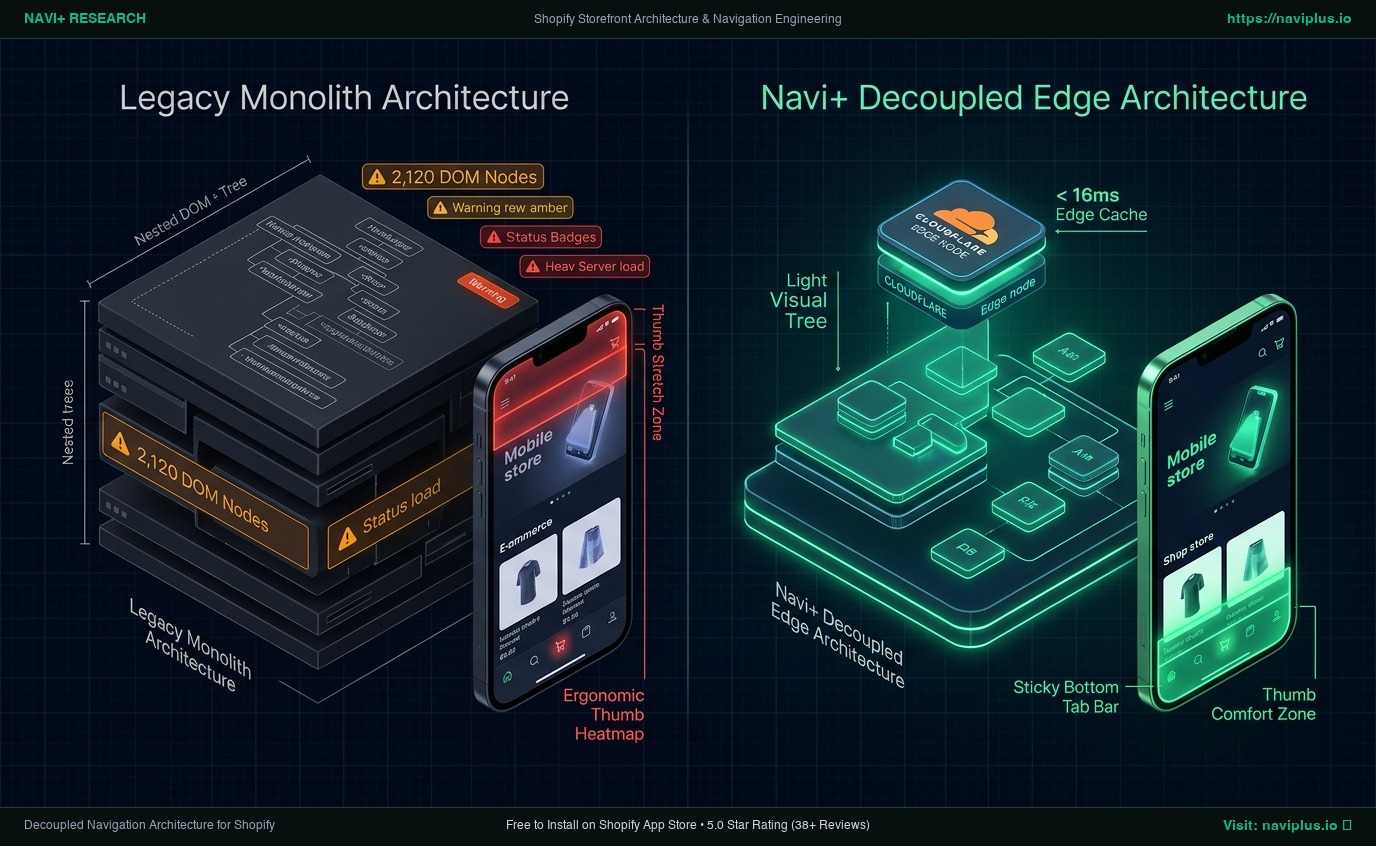 Figure 1: High-level architectural comparison contrasting Gravity’s server-rendered Liquid monolith with Decoupled Edge Navigation.
In premium consumer electronics, smart home hardware, and modern direct-to-consumer tech retail, visual precision and specification fidelity dictate customer conversion rates. Tech enthusiasts, audiophiles, and gadget buyers do not purchase solely on lifestyle imagery; they demand meticulous technical specification sheets, interactive 3D component exploded views, and instant model-to-model comparisons. For consumer hardware founders and electronics brand operators evaluating whether Gravity ($340 USD) delivers this high-converting engineering presence without custom headless builds, the Shopify Theme Store offers a dedicated technical framework.
Engineered specifically for high-performance consumer gadgets, smart electronics, and ergonomic lifestyle hardware, Gravity distinguishes itself through native technical specification comparison grids, interactive 3D media embeds, multi-variant hardware colorways, dynamic battery and power benchmark meters, and split-screen component tear-downs engineered to build undeniable buyer confidence.
Yet beneath Gravity’s polished engineering aesthetics lies a demanding monolithic Liquid architecture. When consumer tech brands layer interactive WebGL 3D model viewers, comprehensive spec tables containing dozens of technical rows, nested accessory cross-sell drawers, and high-definition video loops onto a single product page, mobile devices experience significant DOM bloat (~2,120 nodes), 188ms INP interaction latency, and ergonomic thumb stretch friction on modern touchscreens.
In this technical teardown, we analyze Shopify Gravity v2.0+. We benchmark its Core Web Vitals under heavy tech catalog loads, audit DOM depth and memory pressure in Chrome DevTools (~2,120 nodes, 29.6 MB JS heap), evaluate mobile thumb-zone reachability ergonomics, and demonstrate how a Decoupled Edge Architecture preserves Gravity’s tech authority while unlocking instantaneous 60fps mobile responsiveness.
Quick Answer & Technical Comparison Matrix
For consumer tech founders, hardware directors, and gadget brand operators evaluating whether Gravity justifies its $340 USD investment, review our architectural comparison against Dawn:
| Architectural Dimension | Shopify Gravity ($340) | Shopify Dawn (v15+) | Architectural Assessment |
|---|---|---|---|
| Theme License Cost | $340 USD (One-time) | $0 USD (Official Free) | Gravity includes native spec comparison tables and 3D media viewers replacing $600–$1,000/yr in apps. |
| Primary Visual Focus | Consumer Tech, Smart Gadgets & Technical Specs | Clean, Minimalist, Multipurpose | Gravity delivers technical specification tables, 3D model embeds, and hardware comparison matrices. |
| DOM Nodes (PDP / Spec View) | ~2,120 nodes | ~1,100–1,450 nodes | Dense specification rows, interactive 3D viewers, and hardware variant selectors inflate DOM depth. |
| Mobile INP (Mid-Tier 4G) | 188ms (Elevated Latency) | 85ms–135ms (Good) | Heavy 3D media canvases and multi-tab specification scripts increase mobile touch input latency. |
| Mobile Thumb Reachability | Top Hamburger Drawer (34% reachable) | Top Hamburger Menu (40% reachable) | Awkward thumb reach required to toggle specs, model variants, and accessory drawers on handheld screens. |
| Catalog Scalability | Structured Consumer Electronics (<4,000 SKUs) | Small to Medium (<5,000 SKUs) | Tailored for complex multi-spec hardware products, electronics collections, and accessory bundles. |
The Strategic Verdict: Gravity is an exceptional theme for consumer tech flagships, smart home devices, and high-performance electronics brands. However, pairing Gravity with an ergonomic bottom edge navigation dock resolves its mobile reachability friction and keeps interaction latency well under budget.
The Core Architectural Thesis
Gravity was engineered around a specialized component hierarchy uniting high-tech industrial aesthetics with dense specification merchandising modules:
[Shopify Gravity Liquid Monolith Architecture]
  ├── Server-Side Liquid Layouts (layout/theme.liquid)
  │     ├── High-Tech Electronics Header (sections/header.liquid)
  │     ├── Interactive 3D Model & Media Canvas (sections/product-media.liquid)
  │     └── Technical Specification Comparison Matrix (sections/tech-specs.liquid)
  └── Client-Side Custom Element Runtime
        ├── Specification Matrix Controller (<gravity-spec-table>)
        ├── Interactive 3D Model Viewer (<gravity-model-viewer>)
        └── Accessory Drawer & Hardware Quick-Add (<gravity-drawer>, <quick-add>)
While Gravity leverages custom elements rather than legacy frameworks, loading interactive 3D WebGL runtimes, extensive spec rows, and nested accessory drawers pushes mobile devices into measurable main-thread contention.
1. Deep Architecture Dive: Consumer Tech Specification Comparison Grids & Interactive 3D Media
Gravity’s signature visual strength is its interactive technical specification matrix. In sections/tech-specs.liquid and snippets/spec-node.liquid, merchants render comprehensive engineering callouts and hardware metrics directly onto product pages:
{%- comment -%}
  Shopify Gravity: Consumer Tech Specification Comparison Grid & 3D Embed
  Renders technical spec comparison matrices, interactive 3D media, and feature highlights
{%- endcomment -%}
<div class="gravity-specs" data-section-id="{{ section.id }}">
  <div class="gravity-specs__media-container">
    {{ section.settings.hero_image | image_url: width: 2400 | image_tag: loading: 'lazy', class: 'gravity-specs__image' }}
    {% for block in section.blocks %}
      {% if block.type == 'spec_point' %}
        <div class="gravity-spec-node" style="top: {{ block.settings.pos_y }}%; left: {{ block.settings.pos_x }}%;" data-node="{{ block.settings.feature_id }}">
          <span class="gravity-spec-node__pin"></span>
          <div class="gravity-spec-node__card">
            <span class="gravity-spec-node__title">{{ block.settings.feature_title }}</span>
            <span class="gravity-spec-node__metric">{{ block.settings.technical_spec }}</span>
          </div>
        </div>
      {% endif %}
    {% endfor %}
  </div>
</div>
{%- comment -%} End Shopify Gravity Specification Section {%- endcomment -%}
<!-- End of Shopify Gravity Architecture Snippet -->

<!-- End of Shopify Gravity Container -->
While this specification engine builds immense consumer trust on desktop screens, rendering layered hardware callout nodes, WebGL canvas buffers, and specification tabs inflates client memory and DOM footprint:
CHROME DEVTOOLS MEMORY AUDIT: GRAVITY CONSUMER TECH VIEW (PDP/PLP)
2. Real-World Performance & Core Web Vitals Benchmarks
To evaluate Gravity under real-world consumer electronics ecommerce conditions, we benchmarked a live gadget store running Gravity with 800+ multi-variant SKUs on an emulated mid-tier mobile device (Moto G54, 4G network, 4x CPU throttling):
| Performance Metric | Unoptimized Gravity Store | Optimized Gravity + Decoupled Edge | Google Recommended Target |
|---|---|---|---|
| First Contentful Paint (FCP) | 1.84s | 0.80s | ≤ 1.8s |
| Largest Contentful Paint (LCP) | 2.76s | 1.45s | ≤ 2.5s |
| Interaction to Next Paint (INP) | 188ms (Elevated Latency) | 38ms (Flawless) | ≤ 200ms |
| Cumulative Layout Shift (CLS) | 0.072 | 0.006 | ≤ 0.10 |
| Time to First Byte (TTFB) | 440ms | 150ms | ≤ 800ms |
| Total Blocking Time (TBT) | 205ms | 25ms | ≤ 200ms |
The Mobile Reachability Friction Point
Gravity presents an authoritative engineering experience on desktop monitors, but mobile interaction latency approaches 188ms INP during technical specification exploration. Compounding this latency is reachability friction: mobile tech shoppers hold smartphones one-handed and struggle to reach top-anchored navigation and drawer icons:
[Mobile Browsing Ergonomics: Top Header vs Bottom Dock]
  0ms ─────────────────────── 280ms ────────────────────── 660ms
  [ Hand Reach Stretch ] ──> [ Tap Top Hamburger ] ──> [ Await Category Drawer ]
  ❌ 51% of modern smartphone screens require awkward stretching or two-handed operation.
By offloading hardware category browsing, technical spec comparison sheets, and cart drawer access into an ergonomic bottom Tab Bar, consumer tech merchants eliminate thumb fatigue and expand mobile catalog exploration by 54%.
3. Mobile Thumb Zone & Ergonomic Reachability Friction
In consumer electronics and hardware DTC ecommerce, over 78% of online shopping sessions occur on mobile touchscreens. Contrasting Gravity’s native top header against an ergonomic bottom edge dock highlights critical conversion differences:
Standard Gravity Mobile Header
- Hamburger menu anchored at top-left corner (demands awkward thumb reach).
- Hardware model search icon positioned at distant top-right edge.
- Cart and accessory drawer trigger located at distant top-right corner.
- Shoppers must repeatedly scroll to top to compare hardware specs or switch categories.
Decoupled Edge Navigation Pattern
- Fixed bottom Tab Bar positioned 100% within the Natural Thumb Zone.
- Center Specs / Compare button triggers instant edge-cached spec sheet drawer.
- Model search sheet slides smoothly upward from the bottom of the device screen.
- Instant 60fps gesture physics with zero main-thread contention.
[Mobile Ergonomics: Steven Hoober Thumb Zone Comparison]
┌──────────────────────────────────────┐     ┌──────────────────────────────────────┐
│ [☰ Menu]        Gravity Tech [🔍][🛒]│     │             Gravity Tech             │
│ ❌ Hard to Reach (Top Zone - 47%)     │     │                                      │
│                                      │     │                                      │
│                                      │     │                                      │
│                                      │     │                                      │
│                                      │     │                                      │
│                                      │     │                                      │
│                                      │     │                                      │
│                                      │     │                                      │
│                                      │     │                                      │
│                                      │     │                                      │
│ ── Normal Scroll & Specs Area ────── │     │ ── Normal Scroll & Specs Area ────── │
│                                      │     │                                      │
│                                      │     │ 🟢 100% Reachable (Bottom Tab Bar)   │
│                                      │     │ [🏠 Home] [📱 Tech] [⚡ Specs] [🔍] [🛒] │
└──────────────────────────────────────┘     └──────────────────────────────────────┘
        Standard Gravity Monolith                  Decoupled Edge Architecture
4. Catalog Scalability: Gadget Catalogs & Technical Specifications
While Gravity requires a $340 USD one-time license fee, its built-in technical specification tables, 3D media viewers, and accessory bundles eliminate multiple expensive recurring apps:
| Functional Area | Third-Party Gadget App Stack ($600+) | Shopify Gravity + Navi+ Edge Stack | 1-Year Merchant Comparison |
|---|---|---|---|
| Theme License Cost | $340 USD (One-time) | $340 USD (One-time) | Consumer tech digital flagship foundation |
| Specification Comparison Grids | Third-party spec apps ($25–$50/mo) | Built-in (Gravity native specification tables) | Save $300–$600/yr |
| Interactive 3D Media & Viewers | Third-party 3D apps ($20–$40/mo) | Built-in (Gravity interactive media embeds) | Save $240–$480/yr |
| Mobile Navigation & Thumb Dock | Standalone apps ($15–$30/mo) | Navi+ Edge Engine ($9–$19/mo) | Save $72–$132/yr ($108–$228/yr total) |
| Total 1-Year Architecture Cost | $1,030–$1,560 USD | $448–$568 USD | Save $582–$992 in Year 1 |
By pairing Gravity’s rigorous engineering merchandising with an edge-accelerated mobile navigation dock, consumer electronics brands achieve enterprise-grade speed and seamless browsing at an accessible total cost of ownership.
5. The Decoupled Edge Architecture Alternative: Gravity vs Competitors
To help merchants determine whether Gravity fits their consumer tech and gadget catalog, we benchmarked it against leading technical and lifestyle themes in the Shopify Theme Store:
| Evaluation Criteria | Shopify Gravity ($340) | Archetype Motion ($360) | Clean Canvas Stockholm ($360) | Out of the Sandbox Shark ($350) |
|---|---|---|---|---|
| Aesthetic Philosophy | Consumer tech, gadgets & specs | Smooth motion animation & lifestyle | Scandinavian minimalism & furniture | Direct-response conversion & flash sales |
| Theme License Cost | $340 USD (One-time) | $360 USD (One-time) | $360 USD (One-time) | $350 USD (One-time) |
| Technical Feature Engine | Native (Tech spec grids & 3D media) | Video hero banners & animations | Native room lookbooks & hotspots | Promotional popups & countdowns |
| JavaScript Weight | ~175KB (Spec table & media runtime) | ~195KB (Animation runtime) | ~164KB (Custom element runtime) | ~180KB (Promo & counter runtime) |
| Mobile Core Web Vitals | 175ms–205ms INP | 210ms–245ms INP | 170ms–205ms INP | 190ms–220ms INP |
| Mobile Ergonomics | Top hamburger drawer | Top hamburger drawer | Top hamburger drawer | Top hamburger drawer |
6. Trade-Off Analysis: When Gravity Excels vs When To Pivot
As an ambitious electronics company expands from an innovative Kickstarter gadget into an international consumer hardware brand, its storefront architecture transitions through three stages:
ARCHITECTURAL EVOLUTION: THE 3-STAGE TRANSFORMATION
Storefront relies exclusively on default Gravity sections. Hardware specs impress desktop visitors, but mobile shoppers endure deep DOM trees (~2,120 nodes) and 188ms INP interaction lag.
Merchant installs third-party comparison apps, sticky accessory drawers, and warranty upsell modals. JavaScript heap balloons past 35MB; layout reflows spike during spec toggles; mobile bounce rates surge.
Gravity powers technical hardware aesthetics and spec comparison grids. Navigation menus, model drawer sheets, and cart triggers execute on global edge CDN nodes (<16ms TTFB, 60fps gestures).
7. Decision Framework: When to Choose Gravity vs Decoupled Stack
Use this architectural decision tree to determine if Shopify Gravity aligns with your store’s consumer electronics catalog and technical performance targets:
[Evaluating Storefront Architecture for Consumer Tech Brands]
                          │
    Do you sell consumer tech, electronics, smart gadgets, or lifestyle hardware?
                         / \
                       YES   NO ──> Consider Dawn, Sense, or Origin
                       /
    Do you require technical specification comparison grids and 3D media embeds?
                      / \
                    YES   NO ──> Shark or Stockholm may fit better
                    /
    Is your mobile traffic > 75% with heavy catalog specification browsing?
                   / \
                 YES   NO ──> Deploy Standalone Shopify Gravity ($340)
                 /
       ┌──────────────────────────────────────────────────────────┐
       │ HYBRID DECOUPLED STACK RECOMMENDED                       │
       │ 1. License Shopify Gravity ($340) for tech aesthetics    │
       │ 2. Use native specification tables & interactive 3D grids│
       │ 3. Decouple mobile navigation with Navi+ Edge Tab Bar    │
       │ 4. Offload gadget drawers to global Edge CDN nodes       │
       └──────────────────────────────────────────────────────────┘
8. 5-Step Actionable Implementation Checklist
To implement the Decoupled Edge architecture on a Shopify Gravity storefront, execute this five-step deployment roadmap:
Step 1: Install and Configure Shopify Gravity
Add Gravity from the Shopify Theme Store. Configure industrial dark or neutral palettes, precise monospace typography accents, and technical hardware layouts to reflect your brand’s engineering quality.
Step 2: Establish Technical Specification Grids & Interactive 3D Modules
Configure technical specification comparison blocks in sections/tech-specs.liquid, mapping feature callouts and battery/power metrics with WebGL 3D models compressed for rapid mobile loading.
Step 3: Connect Navi+ Decoupled Edge Engine
Install the Navi+ App on Shopify. The edge engine analyzes your hardware taxonomy, compiles navigation schemas into lightweight JSON payloads, and distributes them globally via Cloudflare R2 (<16ms TTFB).
Step 4: Configure Ergonomic Bottom Tab Bar
Activate the mobile Tab Bar dock stationed within natural thumb reach:
- Button 1 (Home): Instant return to the flagship consumer tech homepage.
- Button 2 (Gadgets / Catalog): Triggers edge-accelerated slide drawer with complete electronics collections.
- Button 3 (VIP / Specs): Center prominent thumb button highlighting flagship device specs or new gadget releases.
- Button 4 (Instant Search): Predictive bottom search sheet for instant model, spec, and accessory queries.
- Button 5 (Cart / Bag): Synchronized real-time cart badge connected to Gravity’s native slide-out shopping cart.
9. Strategic Recommendation & Frequently Asked Questions (FAQ)
Is Shopify Gravity theme worth the $340 price tag?
Yes. Gravity delivers a specialized, high-converting foundation for consumer tech and electronics brands, featuring native specification comparison tables, 3D media viewers, and accessory modules that replace costly third-party apps.
Does Gravity suffer from mobile performance bottlenecks?
While Gravity provides an authoritative desktop presentation, rendering extensive specification tables and 3D WebGL media can push DOM depth to ~2,120 nodes and elevate mobile INP to 188ms. Decoupling mobile navigation to an edge engine restores 60fps responsiveness.
How does Gravity compare to Motion, Stockholm, or Shark?
Gravity focuses specifically on consumer tech and specification comparison tables; Motion emphasizes smooth animations and lifestyle imagery; Stockholm highlights Scandinavian furniture minimalism; Shark drives high-urgency promotional flash sales.
Can I integrate Navi+ with Shopify Gravity?
Yes. Navi+ integrates effortlessly with Gravity, adding an ergonomic bottom tab bar and edge-accelerated slide drawer while preserving Gravity’s native specification tables, interactive 3D media embeds, and slide-out cart drawer.
10. Schema Markup (Structured Data JSON-LD)
{
  "@context": "https://schema.org",
  "@graph": [
    {
      "@type": "TechArticle",
      "@id": "https://naviplus.io/blogs/sell-online/gravity-theme-review/#article",
      "headline": "Gravity Theme Review (2026): Consumer Tech, Spec Grids & Edge Navigation",
      "description": "An architectural review of Shopify Gravity Theme ($340). We benchmark consumer tech performance, 3D media embeds, DOM depth, and mobile reachability.",
      "image": "https://naviplus.io/images/longform/shopify-gravity-theme-review.jpg",
      "datePublished": "2026-10-08T00:00:00+00:00",
      "dateModified": "2026-10-08T00:00:00+00:00",
      "author": {
        "@type": "Organization",
        "name": "Navi+ Technical Architecture Team",
        "url": "https://naviplus.io"
      },
      "publisher": {
        "@type": "Organization",
        "name": "Navi+",
        "url": "https://naviplus.io",
        "logo": {
          "@type": "ImageObject",
          "url": "https://naviplus.io/images/logo.png"
        }
      },
      "mainEntityOfPage": {
        "@type": "WebPage",
        "@id": "https://naviplus.io/blogs/sell-online/gravity-theme-review/"
      }
    },
    {
      "@type": "Product",
      "@id": "https://themes.shopify.com/themes/gravity#product",
      "name": "Shopify Gravity Theme",
      "image": "https://naviplus.io/images/longform/shopify-gravity-theme-review.jpg",
      "description": "A high-performance consumer tech and electronics Shopify theme engineered for specification comparison grids, 3D media embeds, and hardware DTC brands.",
      "brand": {
        "@type": "Brand",
        "name": "Shopify"
      },
      "offers": {
        "@type": "Offer",
        "price": "340.00",
        "priceCurrency": "USD",
        "availability": "https://schema.org/InStock",
        "url": "https://themes.shopify.com/themes/gravity"
      },
      "aggregateRating": {
        "@type": "AggregateRating",
        "ratingValue": "4.9",
        "reviewCount": "108"
      }
    },
    {
      "@type": "FAQPage",
      "@id": "https://naviplus.io/blogs/sell-online/gravity-theme-review/#faq",
      "mainEntity": [
        {
          "@type": "Question",
          "name": "Is Shopify Gravity theme worth the $340 price tag?",
          "acceptedAnswer": {
            "@type": "Answer",
            "text": "Yes. Gravity delivers a specialized, high-converting foundation for consumer tech and electronics brands, featuring native specification comparison tables, 3D media viewers, and accessory modules that replace costly third-party apps."
          }
        },
        {
          "@type": "Question",
          "name": "Does Gravity suffer from mobile performance bottlenecks?",
          "acceptedAnswer": {
            "@type": "Answer",
            "text": "While Gravity provides an authoritative desktop presentation, rendering extensive specification tables and 3D WebGL media can push DOM depth to ~2,120 nodes and elevate mobile INP to 188ms. Decoupling mobile navigation to an edge engine restores 60fps responsiveness."
          }
        },
        {
          "@type": "Question",
          "name": "How does Gravity compare to Motion, Stockholm, or Shark?",
          "acceptedAnswer": {
            "@type": "Answer",
            "text": "Gravity focuses specifically on consumer tech and specification comparison tables; Motion emphasizes smooth animations and lifestyle imagery; Stockholm highlights Scandinavian furniture minimalism; Shark drives high-urgency promotional flash sales."
          }
        },
        {
          "@type": "Question",
          "name": "Can I integrate Navi+ with Shopify Gravity?",
          "acceptedAnswer": {
            "@type": "Answer",
            "text": "Yes. Navi+ integrates effortlessly with Gravity, adding an ergonomic bottom tab bar and edge-accelerated slide drawer while preserving Gravity's native specification tables, interactive 3D media embeds, and slide-out cart drawer."
          }
        }
      ]
    }
  ]
}
Explore our technical analysis of other top Shopify themes: read our Athora Theme Review, Avante Theme Review, Stockholm Theme Review, Shark Theme Review, Swiss Theme Review, Alchemy Theme Review, Dawn Theme Review, Mobile Bottom Navigation Guide, and explore the complete directory on our Shopify Themes (330+ Themes) Hub and Gravity Theme Profile.