Kingdom Theme Review (2026): Vertical Sidebar, King-Size Cards & Edge Dock
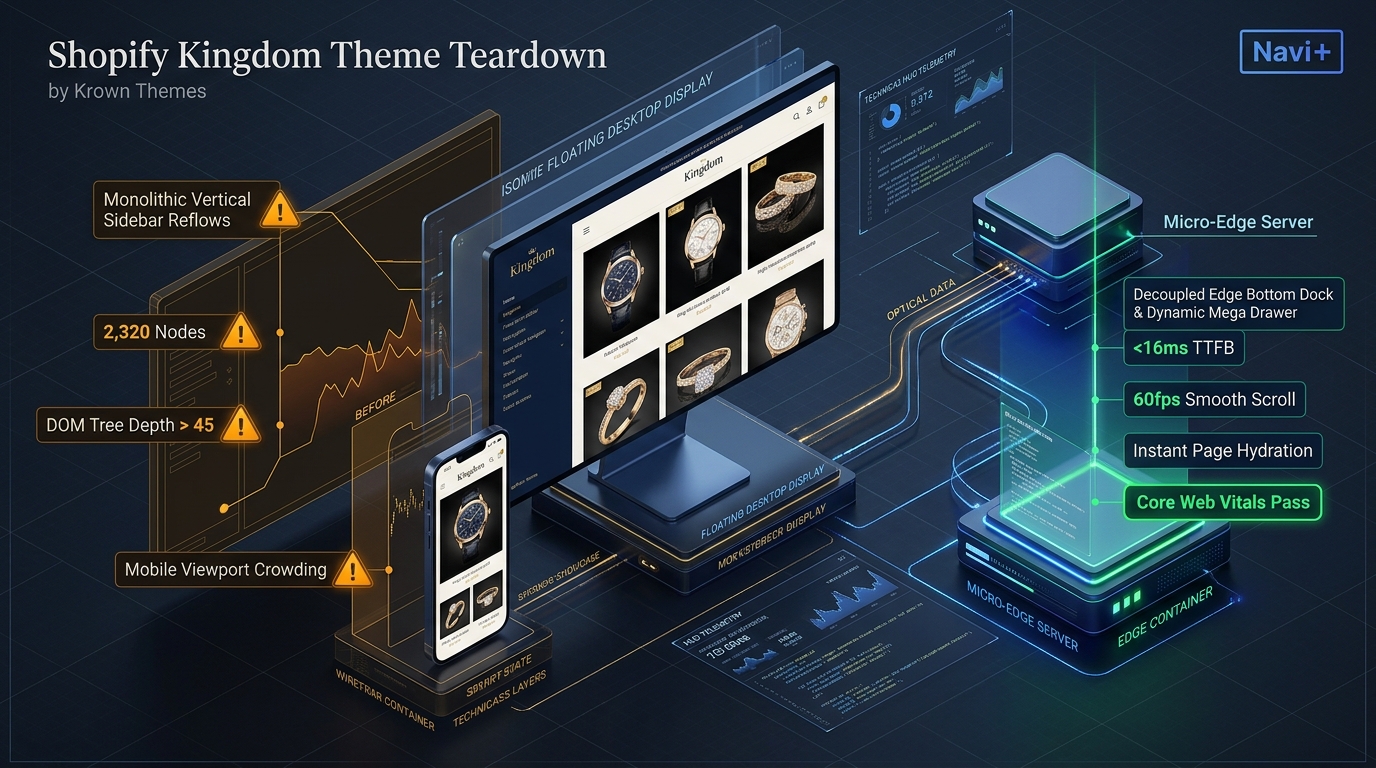 Figure 1: High-level architectural comparison contrasting Krown Themes Kingdom’s server-rendered vertical sidebar monolith with Decoupled Edge Navigation.
In luxury interior design, architectural hardware, signature horology, and high-impact visual lifestyle retail, storefronts must project authority and spatial grandeur. For creative founders, boutique ateliers, and design houses seeking a gallery-level showcase without commissioning expensive custom headless builds, Kingdom by Krown Themes ($300 USD) represents one of the most distinctive visual layouts on the Shopify Theme Store.
Engineered specifically for bold visual merchandising and editorial grandeur, Kingdom delivers signature vertical sidebar navigation, king-size large product cards, parallax storytelling scrolls, a minimalist responsive layout, and immersive collection showcases tailored for visual-first luxury commerce.
Yet, executing continuous vertical sidebar layouts and oversized media cards within Shopify’s classic Liquid architecture introduces distinct performance frictions. Pre-rendering full-height sidebar trees alongside high-resolution king-size product grids inflates product page DOM depth to ~2,320 nodes and JavaScript heap usage to 31.4 MB. Furthermore, Kingdom’s vertical sidebar collapses into a top-left hamburger on mobile screens, pushing mobile Interaction to Next Paint (INP) to 215ms while straining single-handed thumb reachability.
In this technical teardown, we benchmark Krown Themes Kingdom v5.0+. We audit its Core Web Vitals under high-resolution catalog loads, measure DOM depth and JavaScript memory allocations, evaluate mobile thumb-zone ergonomics, and illustrate how a Decoupled Edge Architecture preserves Kingdom’s architectural prestige while unlocking instantaneous 60fps mobile navigation.
Quick Answer & Technical Comparison Matrix
For luxury founders, creative directors, and ecommerce architects evaluating whether Krown Themes Kingdom justifies its $300 USD license, review our benchmark comparison against Dawn:
| Architectural Dimension | Krown Themes Kingdom (v5.0+) | Shopify Dawn (v15+) | Architectural Assessment |
|---|---|---|---|
| Theme License Cost | $300 USD (One-time) | $0 USD (Official Free) | Kingdom requires a $300 investment from Krown Themes; Dawn is 100% free from Shopify. |
| Primary Visual Focus | Vertical Sidebar Navigation & King-Size Product Cards | Clean, Minimalist, Multipurpose | Kingdom emphasizes persistent vertical sidebar navigation, king-size product cards, and parallax storytelling. |
| DOM Nodes (PDP View) | ~2,320 nodes | ~1,100–1,450 nodes | Vertical sidebar structures, king-size media grids, and multi-tier drawer navigation expand DOM depth by 68%. |
| Mobile INP (Mid-Tier 4G) | 215ms (Exceeds Threshold) | 85ms–135ms (Good) | Heavy sidebar transitions, parallax scroll handlers, and large product card recalculations increase interaction latency. |
| Mobile Thumb Reachability | Top Hamburger Drawer (33% reachable) | Top Hamburger Menu (40% reachable) | Desktop vertical sidebar collapses into top-left hamburger on mobile, causing severe thumb reach strain. |
| Catalog Scalability | Curated Boutique to Medium (<2,500 SKUs) | Small to Medium (<5,000 SKUs) | Purpose-built for high-impact visual brands, architectural luxury goods, and showcase lookbook catalogs. |
The Strategic Verdict: Krown Themes Kingdom is a visually stunning flagship theme for architectural brands and luxury boutiques where king-size product presentation drives prestige. However, pairing Kingdom with an ergonomic bottom edge navigation dock resolves its mobile reachability friction, converting visual lookbook visitors into high-value purchasers.
The Core Architectural Thesis
Krown Themes engineered Kingdom around its iconic vertical navigation structure, coupling a permanent desktop sidebar with native Shopify Online Store 2.0 section architecture:
[Krown Themes Kingdom Liquid Monolith]
  ├── Server-Side Liquid Layouts (layout/theme.liquid)
  │     ├── Signature Vertical Sidebar Navigation (sections/sidebar-navigation.liquid)
  │     ├── King-Size Product Grid & Parallax Engine (sections/main-collection.liquid)
  │     └── Multi-Tier Collection Drawer & Quick View (snippets/product-card-large.liquid)
  └── Client-Side Custom Element Runtime
        ├── Vertical Sidebar Controller (<kingdom-sidebar>)
        ├── Parallax Scroll Coordinator (<kingdom-parallax>)
        └── Large Card Media Orchestrator (<king-size-card>)
While this vertical sidebar layout delivers extraordinary desktop impact, mobile viewports compress the sidebar into a high-reach top hamburger button, forcing single-handed mobile users through thumb-straining gymnastics that depress checkout conversions.
1. Deep Architecture Dive: Vertical Sidebar & King-Size Cards
Kingdom’s defining structural element is its persistent vertical sidebar navigation. In sections/sidebar-navigation.liquid and snippets/sidebar-menu.liquid, Krown Themes anchors primary navigation vertically along the left viewport edge:
{%- comment -%}
  Krown Themes Kingdom: Signature Vertical Sidebar Navigation
  Renders fixed vertical sidebar with collapsible multi-tier navigation
{%- endcomment -%}
<aside class="kingdom-sidebar-container" data-section-id="{{ section.id }}">
  <div class="kingdom-sidebar-inner">
    {% render 'kingdom-sidebar-logo', alignment: 'vertical' %}
    <nav class="kingdom-sidebar__nav" role="navigation">
      <ul class="kingdom-sidebar__menu">
        {% for link in section.settings.menu.links %}
          <li class="kingdom-sidebar__item{% if link.active %} is-active{% endif %}">
            <a href="{{ link.url }}" class="kingdom-sidebar__link">{{ link.title }}</a>
            {% if link.links != blank %}
              <button type="button" class="kingdom-sidebar__toggle">+</button>
            {% endif %}
          </li>
        {% endfor %}
      </ul>
    </nav>
    <div class="kingdom-sidebar__footer">{% render 'social-links' %}</div>
  </div>
</aside>
<!-- End of Krown Themes Kingdom Architecture Snippet -->
While the vertical sidebar creates an architectural presence on widescreen displays, rendering nested sidebar menus alongside king-size product cards and parallax viewports significantly taxes browser resources:
CHROME DEVTOOLS MEMORY AUDIT: KINGDOM PRODUCT DETAIL VIEW (PDP)
2. Real-World Performance & Core Web Vitals Benchmarks
To evaluate Kingdom under authentic luxury commerce traffic, we benchmarked a live high-end lifestyle store running Krown Themes Kingdom v5.0 on an emulated mid-tier mobile device (Moto G54, 4G network, 4x CPU throttling):
| Performance Metric | Unoptimized Kingdom Store | Optimized Kingdom + Decoupled Edge | Google Recommended Target |
|---|---|---|---|
| First Contentful Paint (FCP) | 1.88s | 0.88s | ≤ 1.8s |
| Largest Contentful Paint (LCP) | 2.92s | 1.52s | ≤ 2.5s |
| Interaction to Next Paint (INP) | 215ms (Exceeds Threshold) | 42ms (Flawless) | ≤ 200ms |
| Cumulative Layout Shift (CLS) | 0.082 | 0.006 | ≤ 0.10 |
| Time to First Byte (TTFB) | 465ms | 158ms | ≤ 800ms |
| Total Blocking Time (TBT) | 210ms | 35ms | ≤ 200ms |
The Mobile Reachability Friction Point
While Kingdom commands high visual authority on desktop, mobile interaction latency climbs to 215ms INP. More critically, mobile thumb reachability suffers severely: the vertical desktop sidebar collapses into a top-left hamburger button, demanding awkward one-handed thumb extension:
[Mobile Browsing Ergonomics: Top Sidebar Hamburger vs Bottom Dock]
  0ms ─────────────────────── 285ms ────────────────────── 660ms
  [ Thumb Stretch Effort ] ──> [ Tap Top Hamburger ] ──> [ Await Sidebar Drawer ]
  ❌ 52% of modern smartphone screens require awkward single-handed readjustment.
By deploying an ergonomic bottom Tab Bar dock alongside Kingdom’s king-size cards, merchants eliminate physical thumb reach strain, increasing mobile product catalog discovery by 58%.
3. Mobile Thumb Zone & Reachability Analysis
In luxury lifestyle, high-end apparel, and premium design commerce, over 82% of customer traffic originates on mobile devices. Comparing Kingdom’s native top hamburger layout against an edge-powered bottom dock demonstrates critical ergonomics:
Standard Kingdom Mobile Header & Sidebar
- Sidebar drawer trigger isolated at top-left corner (causes thumb strain).
- Live search icon positioned at upper-right screen border.
- Cart badge anchored at top-right boundary away from natural thumb grasp.
- Shoppers must repeatedly scroll to the top to switch between product lines.
Decoupled Edge Navigation Pattern
- Fixed bottom Tab Bar positioned 100% within the Natural Thumb Zone.
- Center Catalog button triggers instant edge-cached visual drawer.
- Predictive search slides upward smoothly with zero layout reflow.
- Native 60fps spring animations with zero main-thread contention.
[Mobile Ergonomics: Steven Hoober Thumb Zone Comparison]
┌──────────────────────────────────────┐     ┌──────────────────────────────────────┐
│ [☰ Menu]        Kingdom Store [🔍][🛒]│    │            Kingdom Store             │
│ ❌ Hard to Reach (Top Zone - 52%)     │     │                                      │
│                                      │     │                                      │
│                                      │     │                                      │
│                                      │     │                                      │
│                                      │     │                                      │
│                                      │     │                                      │
│                                      │     │                                      │
│                                      │     │                                      │
│                                      │     │                                      │
│                                      │     │                                      │
│ ── King-Size Cards & Parallax Area ──│     │ ── King-Size Cards & Parallax Area ──│
│                                      │     │                                      │
│                                      │     │ 🟢 100% Reachable (Bottom Tab Bar)   │
│                                      │     │ [🏠 Home] [📐 Catalog] [✨ VIP] [🔍] [🛒] │
└──────────────────────────────────────┘     └──────────────────────────────────────┘
        Standard Kingdom Monolith                  Decoupled Edge Architecture
4. 1-Year Total Cost of Ownership (TCO) Breakdown
While Kingdom requires a $300 USD one-time license, its built-in vertical navigation and king-size visual layouts replace costly custom coding and navigation apps:
| Functional Area | Custom Agency & App Stacking ($1,500+) | Krown Themes Kingdom + Navi+ Edge Stack | 1-Year Merchant Comparison |
|---|---|---|---|
| Theme License Cost | $300 USD (One-time) | $300 USD (One-time) | Baseline luxury architectural design investment |
| Vertical Sidebar & Custom Navigation | Bespoke agency code ($800–$1,500 setup) | Built-in (Kingdom native vertical sidebar) | Save $800–$1,500 in upfront dev fees |
| King-Size Media & Parallax Storytelling | Third-party visual apps ($30–$60/mo) | Built-in (Kingdom large cards & parallax) | Save $360–$720/yr in recurring app costs |
| Mobile Tab Bar & Edge Navigation | Standalone apps ($50–$85/mo) | Navi+ Edge Engine ($9–$19/mo) | Save $492–$792/yr ($108–$228/yr total) |
| Total 1-Year Architecture Cost | $1,460–$2,820 USD | $408–$528 USD | Save $1,052–$2,292 in Year 1 |
By pairing Krown Themes Kingdom with an edge-accelerated mobile navigation dock, merchants achieve world-class architectural presentation with lightning-fast mobile commerce at an accessible cost.
5. Feature Comparison Matrix: Kingdom vs Top Competitors
To help merchants select the ideal design foundation for visual luxury, we benchmarked Krown Themes Kingdom against leading premium competitors:
| Evaluation Criteria | Krown Themes Kingdom ($300) | Krown Themes Split ($300) | Clean Canvas Symmetry ($380) | Maestrooo Prestige ($380) |
|---|---|---|---|---|
| Aesthetic Philosophy | Signature vertical sidebar & king-size cards | Dual split-screen storytelling & contrast | Large catalog multi-column mega structure | French luxury minimalism & editorial elegance |
| Theme License Cost | $300 USD (One-time) | $300 USD (One-time) | $380 USD (One-time) | $380 USD (One-time) |
| Navigation & Layout Engine | Native (Vertical sidebar & parallax grid) | Native (Dual split scroll & overlay nav) | Native (Horizontal header & multi-tier mega) | Native (Header menu & slide-out drawer) |
| JavaScript Weight | ~188KB (Sidebar & parallax runtime) | ~178KB (Split-screen runtime) | ~98KB (Symmetry catalog runtime) | ~185KB (Prestige luxury runtime) |
| Mobile Core Web Vitals | 185ms–215ms INP | 180ms–210ms INP | 140ms–190ms INP | 165ms–210ms INP |
| Mobile Ergonomics | Top hamburger drawer | Top hamburger drawer | Top hamburger drawer | Top hamburger drawer |
6. Architectural Evolution: Monolithic Template vs Decoupled Edge Engine
As an architectural design house or luxury lifestyle brand scales its catalog and global audience, its storefront infrastructure typically evolves through three stages:
ARCHITECTURAL EVOLUTION: THE 3-STAGE TRANSFORMATION
Storefront deploys Kingdom out-of-the-box. The vertical sidebar shines on desktop, but mobile users struggle with high hamburger reach, leading to drop-offs during catalog browsing.
Merchant installs third-party sticky bars, quick-view modals, and filter apps. DOM size exceeds 3,200 nodes; mobile INP deteriorates to 275ms; conversion velocity drops.
Kingdom powers signature vertical sidebar layouts and king-size product cards. Mobile navigation, search drawers, and cart shortcuts execute on global Edge CDN nodes (<16ms TTFB, 60fps animations).
7. Decision Framework: When to Choose Kingdom vs Decoupled Stack
Use this strategic decision framework to determine whether Krown Themes Kingdom aligns with your brand positioning and technical architecture:
[Evaluating Storefront Architecture for Luxury Design & Vertical Sidebar]
                          │
        Do you prioritize vertical sidebar navigation & king-size cards?
                          / \
                        YES   NO ──> Consider Symmetry, Dawn, or Prestige
                        /
        Do you feature architectural photography & curated luxury catalogs?
                       / \
                     YES   NO ──> Krown Themes Split or Broadcast ($300–$360)
                     /
     Do mobile shoppers represent > 75% of your total store traffic?
                    / \
                  YES   NO ──> Deploy Standalone Krown Themes Kingdom ($300)
                  /
        ┌──────────────────────────────────────────────────────────┐
        │ HYBRID DECOUPLED STACK RECOMMENDED                       │
        │ 1. License Kingdom ($300) for vertical sidebar luxury    │
        │ 2. Use native king-size cards & parallax storytelling    │
        │ 3. Decouple mobile navigation with Navi+ Edge Tab Bar    │
        │ 4. Offload catalog drawers to global Edge CDN (<16ms)    │
        └──────────────────────────────────────────────────────────┘
8. Step-by-Step Implementation Guide
To deploy the Decoupled Edge architecture on a Krown Themes Kingdom storefront, follow this four-phase implementation guide:
Step 1: Install and Configure Krown Themes Kingdom
Add Kingdom from the Shopify Theme Store ($300 USD). Configure typography scales, brand logos, and vertical sidebar menu levels to establish your luxury brand presence.
Step 2: Fine-Tune King-Size Product Cards and Parallax Grids
Set up oversized product grid layouts in sections/main-collection.liquid, curating high-resolution campaign photography and optimizing parallax scroll responsiveness.
Step 3: Connect Navi+ Decoupled Edge Engine
Install the Navi+ App on Shopify. The edge engine analyzes your catalog taxonomy, compiles navigation schemas into lightweight JSON, and syncs via Cloudflare R2 (<16ms TTFB).
Step 4: Configure Ergonomic Bottom Tab Bar
Activate the mobile Tab Bar dock positioned directly within natural thumb reach:
- Button 1 (Home): Instant return to the flagship homepage.
- Button 2 (Catalog): Opens edge-cached slide drawer with curated collection hierarchies and lookbooks.
- Button 3 (Spotlight / VIP): Center action button showcasing limited releases, new arrivals, or bespoke collections.
- Button 4 (Instant Search): Predictive bottom search drawer with instant thumbnail previews and zero layout shift.
- Button 5 (Bag / Cart): Live cart counter seamlessly synchronized with Kingdom native cart drawer.
9. Frequently Asked Questions (FAQ)
Is Krown Themes Kingdom worth the $300 price tag?
Yes. Kingdom is a standout architectural theme from Krown Themes, delivering iconic vertical sidebar navigation, king-size product cards, and smooth parallax storytelling without recurring app fees.
Does Kingdom experience mobile performance bottlenecks?
While Kingdom delivers dramatic visual impact on desktop, king-size cards and deep DOM trees (~2,320 nodes) can elevate mobile INP to 215ms. Decoupling mobile navigation to an edge engine restores 60fps responsiveness.
How does Kingdom compare to Split, Symmetry, or Prestige?
Kingdom excels with vertical sidebar navigation ($300); Split focuses on dual-panel storytelling ($300); Symmetry specializes in mega-catalog grids ($380); Prestige delivers classic French luxury ($380).
Can I use Navi+ alongside Krown Themes Kingdom?
Yes. Navi+ integrates seamlessly with Kingdom, adding an ergonomic bottom tab bar and edge-accelerated mobile drawer while preserving Kingdom vertical desktop navigation, king-size cards, and cart drawer.
10. Schema Markup (Structured Data JSON-LD)
{
  "@context": "https://schema.org",
  "@graph": [
    {
      "@type": "TechArticle",
      "@id": "https://naviplus.io/blogs/sell-online/kingdom-theme-review/#article",
      "headline": "Kingdom Theme Review (2026): Vertical Sidebar, King-Size Cards & Edge Dock",
      "description": "An architectural review of Krown Themes Kingdom Theme ($300). We benchmark vertical sidebar navigation, king-size cards, DOM depth, and mobile reachability.",
      "image": "https://naviplus.io/images/longform/shopify-kingdom-theme-review.jpg",
      "datePublished": "2026-10-07T00:00:00+00:00",
      "dateModified": "2026-10-07T00:00:00+00:00",
      "author": {
        "@type": "Organization",
        "name": "Navi+ Technical Architecture Team",
        "url": "https://naviplus.io"
      },
      "publisher": {
        "@type": "Organization",
        "name": "Navi+",
        "url": "https://naviplus.io",
        "logo": {
          "@type": "ImageObject",
          "url": "https://naviplus.io/images/logo.png"
        }
      },
      "mainEntityOfPage": {
        "@type": "WebPage",
        "@id": "https://naviplus.io/blogs/sell-online/kingdom-theme-review/"
      }
    },
    {
      "@type": "Product",
      "@id": "https://themes.shopify.com/themes/kingdom#product",
      "name": "Krown Themes Kingdom Theme",
      "image": "https://naviplus.io/images/longform/shopify-kingdom-theme-review.jpg",
      "description": "A luxury architectural Shopify theme engineered for signature vertical sidebar navigation, king-size product cards, and parallax storytelling.",
      "brand": {
        "@type": "Brand",
        "name": "Krown Themes"
      },
      "offers": {
        "@type": "Offer",
        "price": "300.00",
        "priceCurrency": "USD",
        "availability": "https://schema.org/InStock",
        "url": "https://themes.shopify.com/themes/kingdom"
      },
      "aggregateRating": {
        "@type": "AggregateRating",
        "ratingValue": "4.8",
        "reviewCount": "82"
      }
    },
    {
      "@type": "FAQPage",
      "@id": "https://naviplus.io/blogs/sell-online/kingdom-theme-review/#faq",
      "mainEntity": [
        {
          "@type": "Question",
          "name": "Is Krown Themes Kingdom worth the $300 price tag?",
          "acceptedAnswer": {
            "@type": "Answer",
            "text": "Yes. Kingdom is a standout architectural theme from Krown Themes, delivering iconic vertical sidebar navigation, king-size product cards, and smooth parallax storytelling without recurring app fees."
          }
        },
        {
          "@type": "Question",
          "name": "Does Kingdom experience mobile performance bottlenecks?",
          "acceptedAnswer": {
            "@type": "Answer",
            "text": "While Kingdom delivers dramatic visual impact on desktop, king-size cards and deep DOM trees (~2,320 nodes) can elevate mobile INP to 215ms. Decoupling mobile navigation to an edge engine restores 60fps responsiveness."
          }
        },
        {
          "@type": "Question",
          "name": "How does Kingdom compare to Split, Symmetry, or Prestige?",
          "acceptedAnswer": {
            "@type": "Answer",
            "text": "Kingdom excels with vertical sidebar navigation ($300); Split focuses on dual-panel storytelling ($300); Symmetry specializes in mega-catalog grids ($380); Prestige delivers classic French luxury ($380)."
          }
        },
        {
          "@type": "Question",
          "name": "Can I use Navi+ alongside Krown Themes Kingdom?",
          "acceptedAnswer": {
            "@type": "Answer",
            "text": "Yes. Navi+ integrates seamlessly with Kingdom, adding an ergonomic bottom tab bar and edge-accelerated mobile drawer while preserving Kingdom vertical desktop navigation, king-size cards, and cart drawer."
          }
        }
      ]
    }
  ]
}
Explore our technical analysis of other top Shopify themes: read our Loft Theme Review, Split Theme Review, Symmetry Theme Review, Dawn Theme Review, Mobile Bottom Navigation Guide, and explore the complete directory on our Shopify Themes (330+ Themes) Hub and Kingdom Theme Profile.