The release of Shopify Canvas on October 1, 2026, marks the beginning of an era where spatial AI interfaces redefine storefront design. But as our preceding nine technical deep-dives have demonstrated, early innovation often arrives with significant operational friction.
If you are a store founder, marketing director, or agency developer, you face a critical strategic decision: Should you adopt Shopify Canvas right now, or wait until the platform matures?
In this final pillar of our Shopify Canvas series, we provide an objective, actionable decision framework to guide your team.
- Adopt Now: New stores launching on Dawn, single-product brands, and temporary marketing campaign landing pages.
- Wait & Monitor: Large-catalog merchants (500+ SKUs), multi-language stores using Shopify Markets, and brands heavily reliant on third-party app blocks.
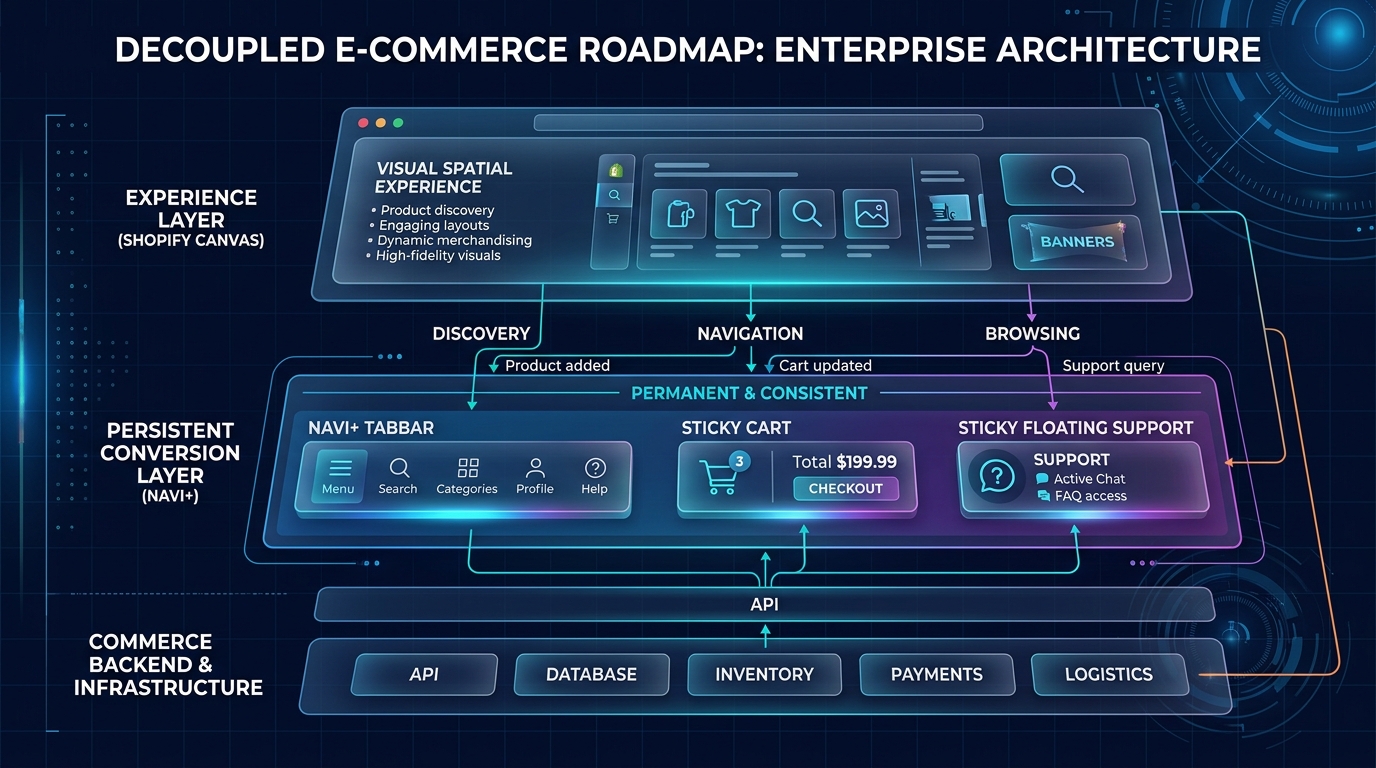
- The Unchanging Pillar: Regardless of your theme or builder, your mobile navigation must remain decoupled, fast, and thumb-accessible via Navi+.
Part of the Topic HubExplore the Shopify Canvas Spotlight Hub with all 10 technical deep-dives →
1. What Shopify Promises
Shopify envisions a future where every merchant builds bespoke storefronts without technical barriers:
- Total design autonomy without hiring expensive freelance developers.
- An intelligent co-pilot (Sidekick) that handles complex Liquid and CSS generation behind the scenes.
- A single, cohesive workflow that unifies layout creation, product merchandising, and responsive design.
2. Hands-on Reality & Technical Evaluation
After testing Canvas across dozens of scenarios, our synthesis is clear: Canvas is an outstanding visual tool for isolated layout experiments, but a high-risk choice for complex, mission-critical storefronts.
The Merchant Decision Matrix
| Store Profile | Immediate Adoption Viability | Primary Risk / Constraint | Recommended Action |
|---|---|---|---|
| New Brand / Startup | HIGH (Green) | Low technical debt; runs standard Dawn theme. | Use Canvas to build custom hero sections and brand stories quickly without app costs. |
| DTC Brand Running Promotions | MODERATE (Yellow) | Need landing pages; cannot embed review widgets. | Build temporary campaign landing pages in Canvas on draft themes. |
| High-Volume Store (1,000+ SKUs) | LOW (Red) | Complex navigation, deep category trees, high risk of theme update breakage. | Wait. Rely on standard theme sections and specialized menu builders like Navi+. |
| Cross-Border / Multi-Language Store | LOW (Red) | Hardcoded string issues; lack of Shopify Markets section targeting. | Wait. Early Access does not adequately support localized translation workflows. |
3. Community & Industry Reactions
The consensus across seasoned ecommerce professionals is remarkably unified:
The Industry Consensus
“Canvas represents where Shopify will be in two years. Today, it’s a brilliant beta that you should experiment with on draft themes, but you’d be reckless to replace your primary production theme with it before BFCM.”
— Ecommerce CTO & Shopify Plus Veteran
Leading agencies agree that the smart play for Q4 2026 is cautious experimentation on dedicated promotional pages, rather than full-store overhauls.
4. Navi+’s Strategic Verdict & Architecture Impact
The most important takeaway from the launch of Shopify Canvas is this: Trends in page layout come and go, but the ergonomics of human thumbs never change.
Whether you design your store on an infinite spatial canvas, code custom Liquid by hand, or build on a headless Next.js framework:
- Your shoppers will still browse with one thumb on a 6.7-inch glass screen.
- They will still demand an instant, frictionless way to search your catalog, switch categories, and open their cart.
- A gorgeous Canvas visual layout is useless if visitors cannot easily navigate your store.
Does This Replace Navi+? How Navi+ Powers Your Conversion Engine
Shopify Canvas CANNOT replace Navi+, creating the ideal complementary stack:
- Canvas builds the page body; Navi+ guides the customer journey: Canvas designs the visual aesthetic of your content, while Navi+ provides persistent, high-converting navigation that guides shoppers through your catalog to checkout.
- Why Navi+ gives your store the winning edge:
- The decoupled two-tier architecture: The content layer inside the page changes with creative campaigns via Canvas, while the navigation layer remains rock-solid on high-performance CDN edge nodes.
- Maximizes Customer LTV and Average Order Value (AOV): With multi-column Mega Menus, promotional badges, and category tabs, shoppers discover relevant product lines in fewer taps.
- Future-proof across all platform releases: When Shopify releases future updates to Canvas or Horizon, your store navigation never breaks or requires redevelopment.
- 5-minute zero-code deployment: Install directly from the Shopify App Store and launch professional mobile tab bars and desktop mega menus with no developer overhead.
5. Actionable Merchant Preparation Checklist
To position your store for success as Shopify’s spatial design tools evolve:
- Conduct a Theme Audit: Verify whether your current theme is eligible for Canvas (Dawn/Horizon) and evaluate your dependence on third-party app blocks.
- Set Up a Staging / Draft Sandbox: Never enable Canvas on your live published theme. Always duplicate your theme and conduct tests in isolation.
- Decouple Your Navigation Stack: Install Navi+ from the Shopify App Store to ensure your core mobile navigation remains permanently immune to theme changes and updates.
- Establish Clear Prompt Guidelines: If your team uses Sidekick, train them with structured prompt templates (specifying mobile breakpoints, image aspect ratios, and semantic markup).
- Bookmark the Navi+ Canvas Hub: Keep our Shopify Canvas Spotlight Hub bookmarked for ongoing updates, benchmark tests, and new feature breakdowns as Shopify rolls out updates to Canvas.
Series CompleteReturn to the Master Shopify Canvas Spotlight Hub to explore all 10 technical guides →