For nearly a decade, merchants seeking custom landing pages without coding have turned to visual page builders like PageFly, Shogun, and GemPages. These apps built massive businesses by filling the creative void left by Shopify’s rigid default theme editor.
With the launch of Shopify Canvas, Shopify has built a freeform, AI-driven visual editor directly into the core platform. Does this make third-party page builders obsolete, or do established builders still hold the upper hand?
Here is a comprehensive head-to-head comparison across pricing, page speed, customization freedom, and ecosystem compatibility.
- Shopify Canvas: Free and built-in, but limited to basic themes, lacks app block support, and breaks theme updates.
- Traditional Page Builders (PageFly/Shogun): Expensive ($24–$99+/mo) and heavy on page speed, but offer rich pre-built templates, CRM integrations, and advanced animation tools.
- The Missing Element: Neither page builders nor Canvas solve mobile thumb-zone navigation—making a dedicated tool like Navi+ essential regardless of builder choice.
Part of the Topic HubExplore the Shopify Canvas Spotlight Hub with all 10 technical deep-dives →
1. What Shopify Promises
Shopify presents Canvas as a complete, native democratization of storefront design:
- Free inclusion on all Shopify plans (saving merchants hundreds in monthly app subscriptions).
- Real-time AI code generation that produces native Liquid and CSS without external iframes or heavy runtime JavaScript.
- Total freedom from rigid layout constraints, making external page builders unnecessary for standard customization.
2. Hands-on Reality & Technical Evaluation
We built an identical high-converting product landing page across Shopify Canvas, PageFly, and Shogun. Here is how they compared in our test lab:
| Feature Dimension | Shopify Canvas | PageFly | Shogun |
|---|---|---|---|
| Cost | Free (Included) | $24 – $99+/month | $39 – $149+/month |
| Creation Method | Natural Language AI Prompt + Spatial Drag | Drag-and-drop Visual Tree | Drag-and-drop Visual Tree |
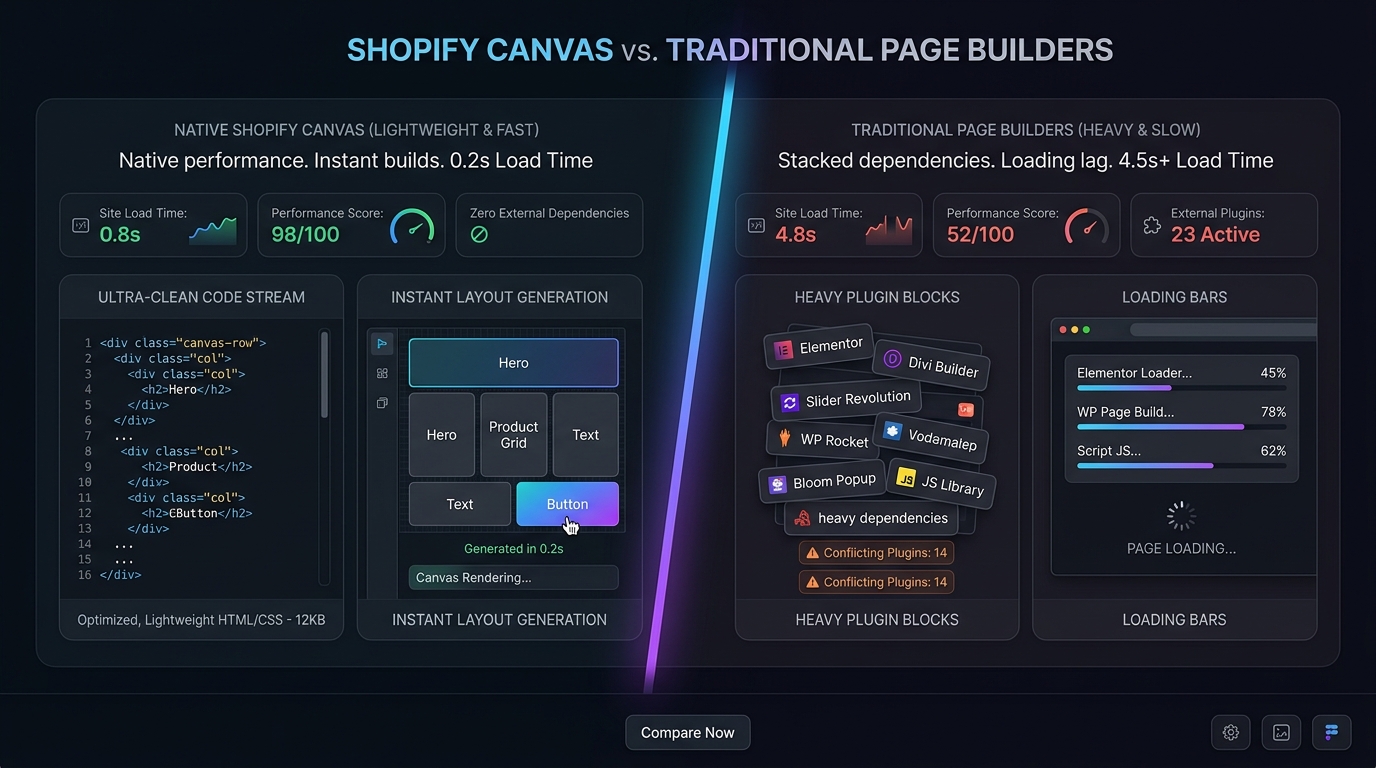
| Speed Overhead | Minimal (Clean Liquid/CSS) | High (Heavy JS bundles) | High (Heavy JS bundles) |
| App Blocks Support | ❌ No | ✅ Yes (Full Support) | ✅ Yes (Full Support) |
| Pre-built Templates | ❌ None (Prompt from scratch) | ✅ 100+ Conversion Templates | ✅ 70+ Conversion Templates |
| Theme Update Impact | ⚠️ Severely breaks updates | ✅ Minimal (Independent pages) | ✅ Minimal (Independent pages) |
| Mobile Thumb Nav | ❌ Not included | ❌ Not included | ❌ Not included |
The Speed vs. Convenience Tradeoff
- Canvas wins decisively on initial loading performance. Because Sidekick compiles static Liquid and CSS directly into the theme, there are no heavy external script bundles to slow down the browser.
- PageFly and Shogun win decisively on workflow convenience and app integrations. If you need a section containing an Instagram feed, a Judge.me review carousel, and an interactive size chart, you can assemble it in PageFly in 5 minutes. In Canvas, you simply cannot do it today.
3. Community & Industry Reactions
The launch has sparked spirited debate across merchant forums:
The Bootstrapped Merchant View
“I pay $49 a month just for PageFly to run two landing pages. If Shopify Canvas lets me prompt those sections for free with zero JS bloat, I will cancel my subscription the moment third-party themes are supported.”
— DTC Store Founder (Reddit r/shopify)
The Page Builder Agency View
Agencies point out that until Canvas offers team collaboration permissions, pre-built high-converting template libraries, and A/B split testing, enterprise brands will continue paying for specialized landing page software.
4. Navi+’s Strategic Verdict & Architecture Impact
Regardless of whether you choose Shopify Canvas, PageFly, or Shogun, all page-building tools share the exact same structural flaw:
The “Body-Only” Limitation
Page builders and Canvas design the body content of a page (heroes, features, galleries). But when a shopper lands on a mobile device, their conversion behavior is dictated by how easily they can:
- Tap back to the homepage.
- Search products with instant live search suggestions.
- Access their shopping cart in one tap without scrolling to the top.
- Browse product categories with their thumb.
Does This Replace Navi+? How Navi+ Powers Your Conversion Engine
Neither Shopify Canvas nor PageFly / Shogun can replace Navi+. Page builders are designed for page bodies, while Navi+ is a dedicated conversion navigation engine:
- Using page builders or Canvas for navigation is a common mistake: Page builders construct menus by loading heavy script bundles that cause scroll stuttering and fail to adapt to modern mobile screen hardware notches.
- Why Navi+ gives your store the winning edge:
- Significant cost savings: Instead of paying –/month for bloated page builder apps just to attempt a makeshift menu, Navi+ offers generous free and specialized plans tailored specifically for navigation.
- Native app tab bar experience: Brings an Instagram- and Amazon-grade bottom tab bar to Shopify, keeping your top 4–5 conversion touchpoints pinned across every product, article, and collection page.
- Zero page speed penalty: While page builders load hundreds of kilobytes of heavy libraries that degrade Lighthouse scores, Navi+ loads in under 12KB gzipped from global edge CDN nodes.
- Consistent experience across all landing pages: Regardless of whether a landing page is built with Canvas, Shogun, or PageFly, Navi+ delivers a unified, conversion-optimized navigation path to checkout.
5. Actionable Merchant Preparation Checklist
To decide between Shopify Canvas and established page builders:
- Calculate Your App Spend: If you are paying $30–$100/month for a builder just to create basic visual sections on a Dawn-based theme, test Canvas on a draft theme to see if it meets your needs.
- Audit App Block Needs: If your pages depend on reviews, subscription widgets, or cross-sell apps living inside the custom layout, stick with PageFly or Shogun for now.
- Decouple Your Navigation: Never attempt to build site navigation inside a page builder. Use Navi+ to deploy a persistent, high-speed Mobile Tab Bar and Mega Menu that works across every page.
- Benchmark Core Web Vitals: If you migrate from PageFly to Canvas, run Google PageSpeed Insights before and after to quantify your speed gains.
- Keep Template Backups: If canceling an external builder, ensure you save your copy and visual assets before closing the account.
Next in the SeriesPart 7: Shopify Canvas Mobile UX: Can AI Really Solve Thumb Navigation? →