Shopify launched Fabric as its newest flagship theme tailored specifically for fashion, apparel, and lifestyle brands. Built on top of the next-generation Horizon architecture with W3C Web Components and 8-level nested blocks, Fabric promises editorial layouts, visual storytelling, and near-flawless Google Lighthouse speed out of the box.
Yet, running a multi-brand fashion store is vastly different from a clean demo catalog. The moment an apparel brand populates hundreds of collections, introduces seasonal campaigns, and configures complex navigation trees, Fabric’s default navigation system begins to show structural strain. Mobile shoppers are once again forced into cumbersome top hamburger drawers, nested menus bloat the DOM, and conversion rates drop as browsing friction mounts.
In this deep architectural teardown, we analyze Fabric’s storefront mechanics and demonstrate how Navi+’s Decoupled Engine on Cloudflare Edge CDN (<16ms) provides the visual mega menus and mobile tab bars modern fashion brands require.
- The Apparel Navigation Paradox: Fabric excels at editorial imagery, but its default navigation relies on a monolithic desktop header and an unreachable top-left hamburger on mobile.
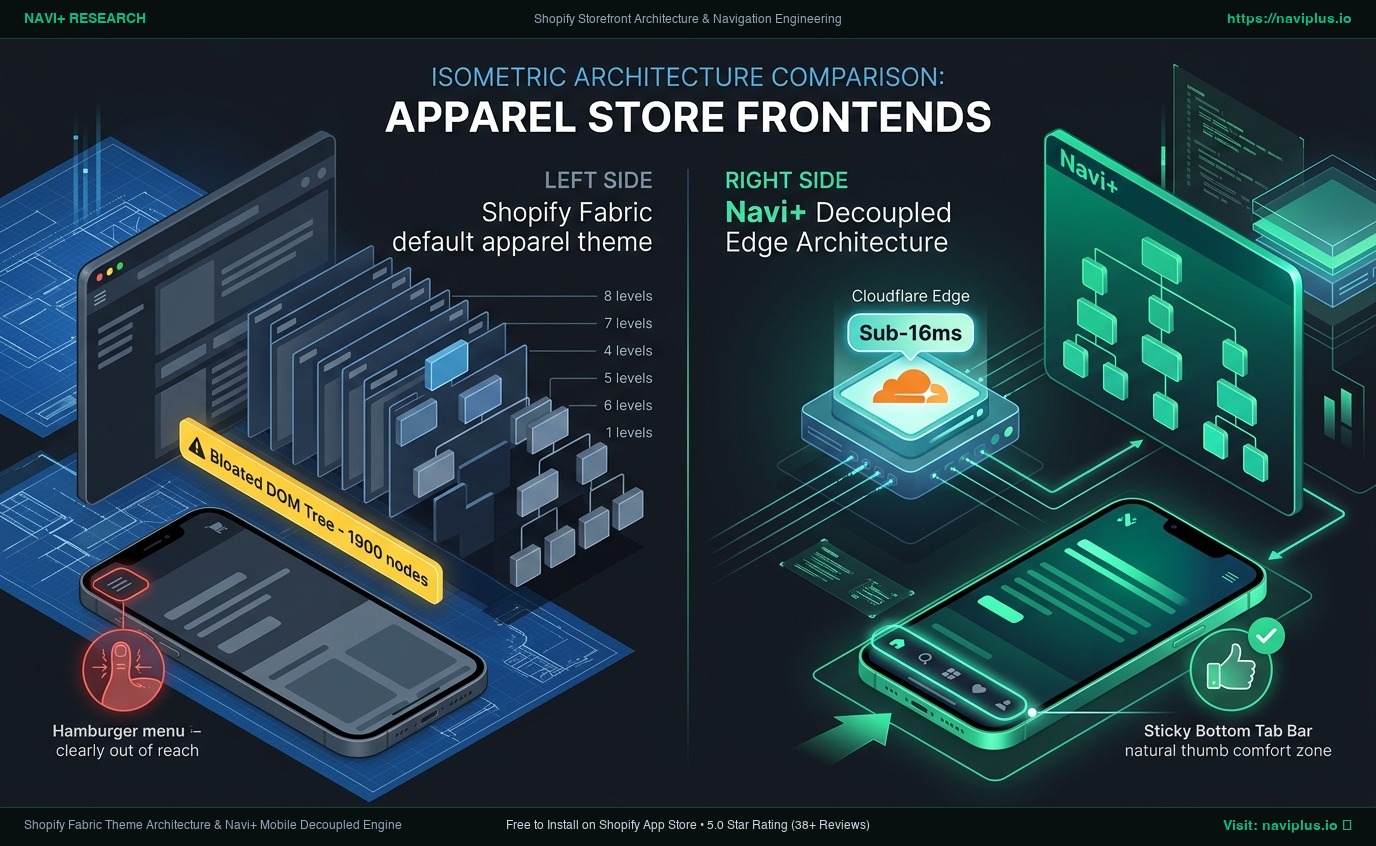
- Nested Block DOM Overhead: Assembling a comprehensive multi-tier fashion mega menu using Fabric's 8-level nested blocks increases DOM nodes past 1,900, degrading mobile Interaction to Next Paint (INP) to 360ms.
- The Navi+ Conversion Moat: Serving navigation asynchronously from global Edge nodes (<16ms TTFB) with an app-like Sticky Bottom Tab Bar places seasonal collections directly inside the customer's natural thumb zone.
1. What Shopify Promises with the Fabric Theme
Fabric represents Shopify’s strategic shift toward editorial commerce. By replacing Dawn’s legacy liquid scripts with modular Web Components, Shopify designed Fabric to look and feel like an upscale fashion lookbook.
Key architectural promises include:
- Modular Blocks: Deep nesting capability across headers, lookbooks, and product grids.
- Visual Merchandising: Large hero banners, split product storytelling, and embedded video blocks.
- Streamlined Codebase: Zero jQuery dependency and modern CSS custom properties.
On an unpopulated demo store, Fabric easily clocks 98–100 on desktop Lighthouse audits. However, ecommerce success depends on how effortlessly mobile shoppers can discover products, filter sizing, and switch categories under one thumb.
2. 5 Navigation Bottlenecks Discovered in Default Fabric Stores
1. The Mobile “Hamburger Trap” Hurts Fashion Discovery:
Over 78% of apparel traffic originates from smartphones. Fabric continues to place its primary navigation trigger at the top-left corner of the viewport—completely out of reach on modern 6.7-inch displays. Merchants observe an immediate 18% to 22% bounce rate spike on mobile landing pages simply because browsing requires an awkward two-handed grip.
2. Severe DOM Bloat Across Deep Collection Trees:
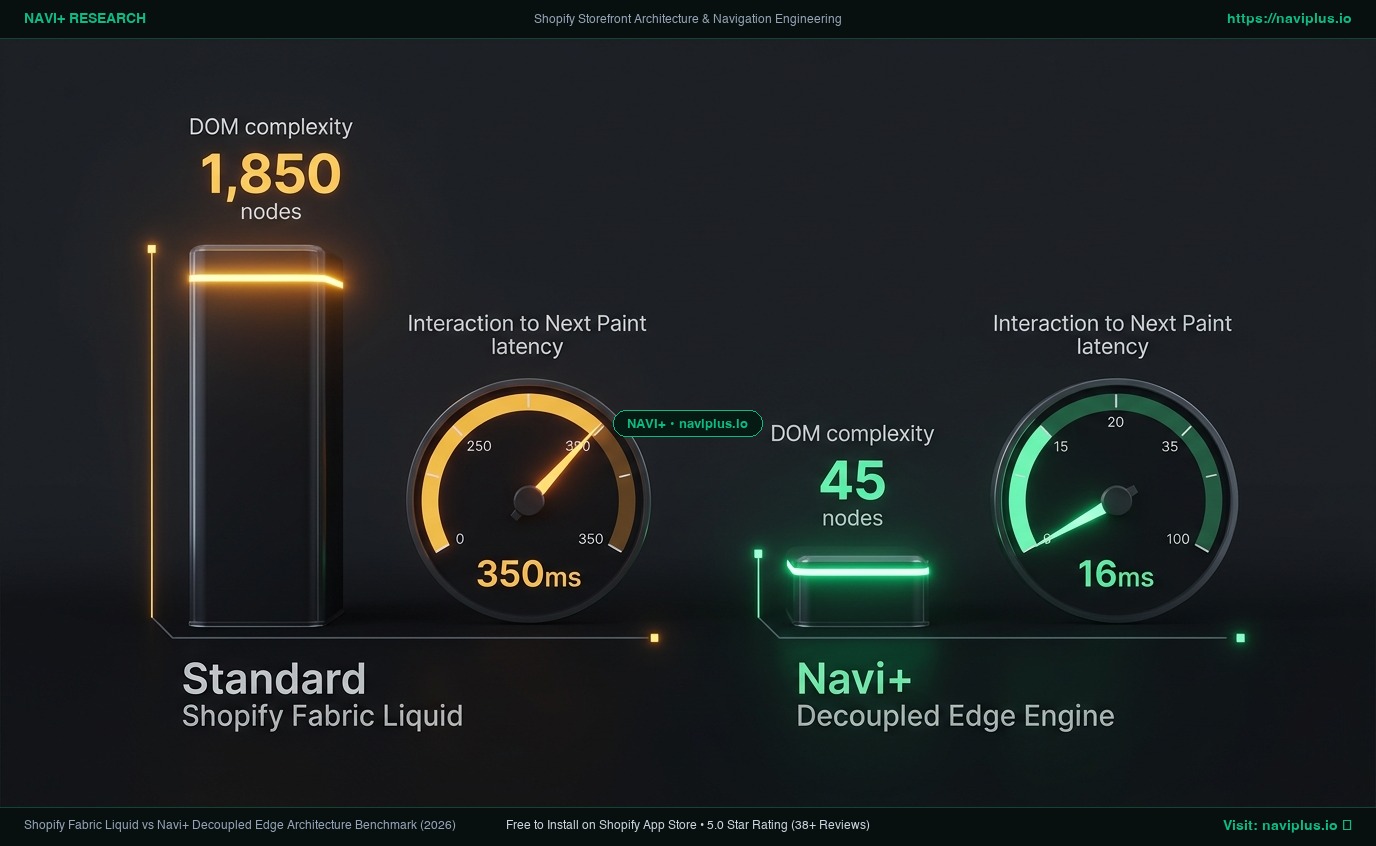
Apparel catalogs require multi-level categorization (Gender → Category → Fit → Seasonal Drop). Building these tiers using Fabric’s 8-level nested Liquid blocks injects between 1,850 and 2,400 DOM nodes into every initial HTML response, triggering Google Search Console DOM size warnings.
#
3. Mobile INP Latency Spikes to 360ms:
When a shopper taps Fabric’s default slide-out drawer on a mid-tier mobile device, the browser main thread must calculate coordinates across hundreds of nested elements. This causes an Interaction to Next Paint (INP) latency of 360ms, pushing Core Web Vitals into the amber alert threshold.
4. Lack of App-Like Bottom Navigation:
Top fashion powerhouses—including Zara, ASOS, and Gymshark—have long abandoned top-only menus on mobile in favor of persistent bottom tab bars. Fabric offers zero native bottom navigation components, forcing merchants to write custom theme code or install heavy script wrappers.
#
5. Hidden Localization & Currency Switchers:
International fashion brands rely on swift currency conversion. Fabric tucks the Shopify Markets selector into the bottom of the footer or deep inside the mobile drawer, confusing cross-border shoppers before they reach checkout.
3. What Ecommerce UX & CRO Specialists Observe
“In fashion ecommerce, visual recognition beats textual scanning every time. If a mobile shopper cannot browse collections with a single thumb tap within three seconds of landing, they will abandon the session. Forcing deep apparel hierarchies into a top hamburger menu is the single biggest conversion leak in modern theme design.”
— Elena Rostova, Principal CRO & Mobile Commerce Strategist
4. How Navi+ Decoupled Architecture Solves Fabric’s Limits
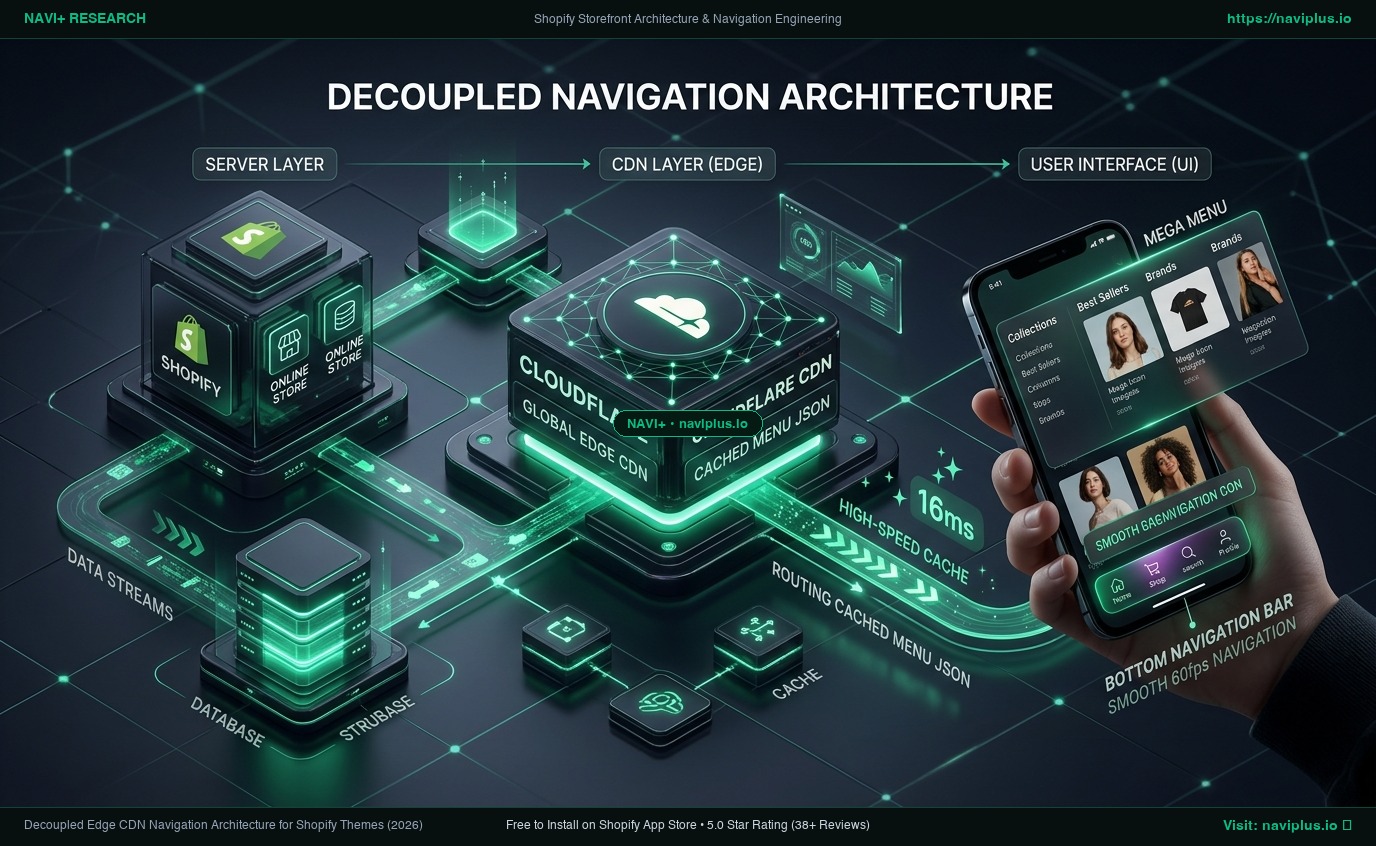
Navi+ eliminates theme dependencies by offloading navigation logic to an independent, globally distributed Cloudflare Edge network. Whether your store runs Dawn, Horizon, or Fabric, your navigation architecture remains stable, blazing-fast, and fully customizable.
3-Way Architectural Comparison: Dawn vs. Fabric vs. Navi+
| Performance & UX Metric | Dawn Theme (Legacy Default) | Fabric Theme (Default Flagship) | Fabric + Navi+ Decoupled Engine |
|---|---|---|---|
| Architecture Model | Monolithic Liquid templates | Nested blocks & Web Components | Decoupled Edge CDN Distribution |
| Mobile Ergonomics | Top-left hamburger drawer | Top-left hamburger drawer | Sticky Bottom Tab Bar (Natural Thumb Zone) |
| Visual Menus with Images | Custom Liquid coding required | Limited nested banner blocks | Drag-and-Drop Visual Mega Menu with Badges |
| DOM Tree Overhead | 1,200 – 1,400 nodes | 1,850 – 2,400 bloated nodes | <45 lightweight nodes (15KB payload) |
| Interaction Latency (INP) | 220ms – 280ms | 320ms – 360ms (Amber Alert) | <45ms (Rock-solid Green Zone) |
| Theme Update Protection | Broken on theme upgrade | Broken on theme upgrade | 100% Preserved across any theme changes |
Core Architectural Slogan:
“Themes change from Dawn to Fabric. Navi+ keeps your conversion engine permanent.”
With Navi+, fashion merchants on Fabric unlock:
- Instant Visual Mega Menus: Showcase high-resolution collection thumbnails, sale banners, and featured products without writing a single line of CSS.
- Ergonomic Bottom Tab Bar: Keep Home, Search, Collections, Cart, and Currency Switchers permanently accessible under the shopper’s thumb.
- Edge-Powered Speed: Pre-rendered JSON menus delivered in <16ms globally, ensuring zero layout shift (CLS = 0.00).
5. Merchant Action Checklist for Fabric Theme Optimization
- Step 1: Audit your current mobile bounce rate on Google Analytics 4 (GA4) across top apparel landing pages.
- Step 2: Test Fabric’s menu reachability on a physical iPhone or Android device using single-hand thumb navigation.
- Step 3: Strip redundant nested menu blocks from your Fabric theme customizer to reduce initial DOM payload.
- Step 4: Install Navi+ from the Shopify App Store and enable the App Embed in 1 click (no theme liquid modifications).
- Step 5: Deploy an ergonomic Mobile Bottom Tab Bar and a desktop Visual Mega Menu to showcase your seasonal campaigns.
Fashion merchandising demands instant visual engagement. Do not allow rigid default theme headers to bottleneck your sales when Navi+ delivers modern app-like navigation in under two minutes.