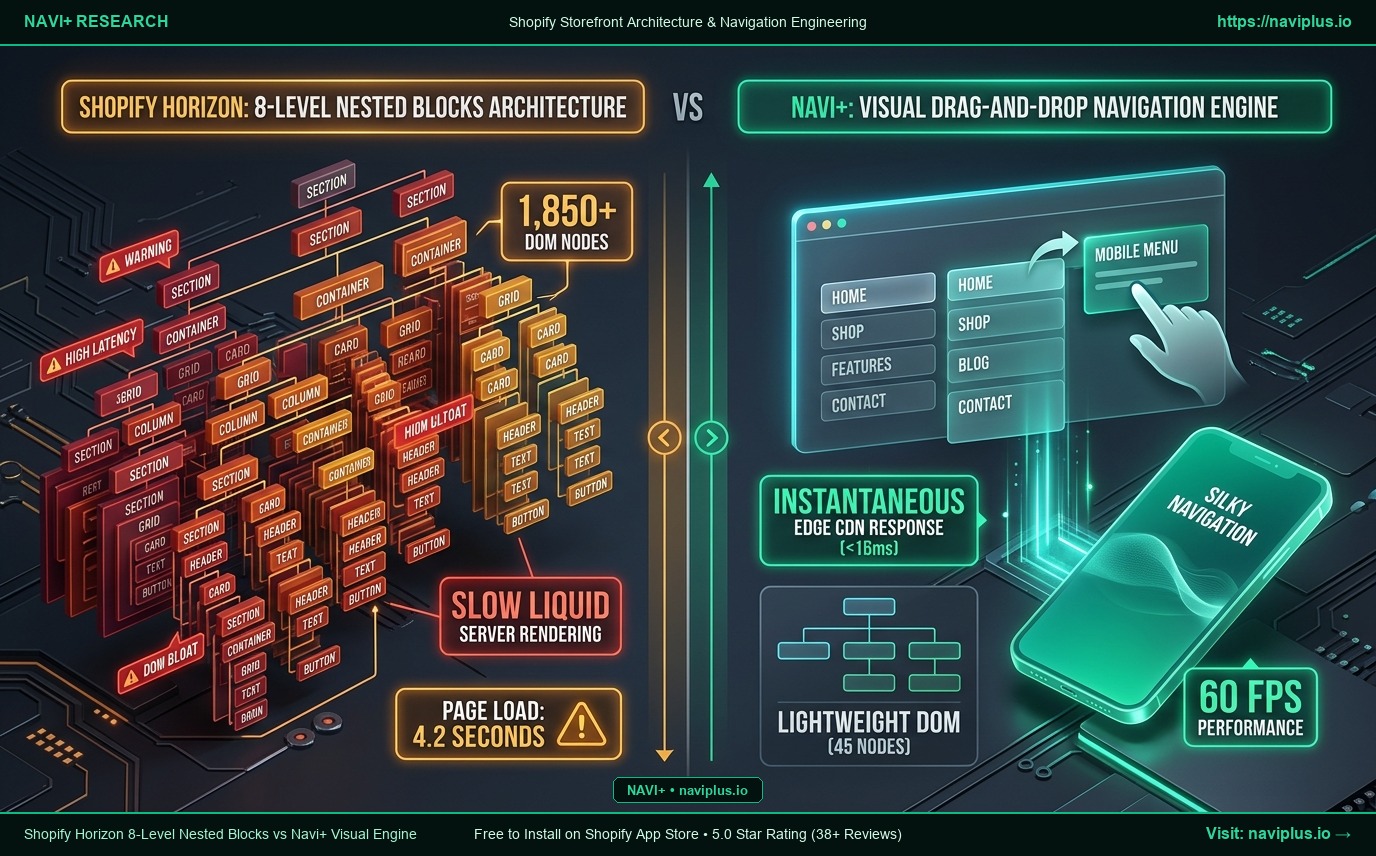
The crowning architectural achievement of Shopify’s Horizon theme is its 8-level deep nested blocks hierarchy. Unlike Dawn—which restricted merchants to flat, single-tier blocks inside sections—Horizon enables intricate structural trees: Section -> Container -> Grid -> Column -> Card -> Header -> Text -> Button.
For designing the body of a storefront (homepage narratives, rich lookbooks, or editorial collection showcases), this is a genuine breakthrough that eliminates the need for heavyweight third-party page builders. However, when developers and merchants attempt to use these nested blocks to construct header navigation and mega menus, a severe technical backlash occurs: DOM trees balloon to over 1,850 nodes, the Theme Editor grinds to a halt, and mobile menu frame rates plunge below 30fps.
In this technical breakdown, we analyze the architectural boundary between Horizon’s layout superpowers and its navigation pitfalls, revealing why Navi+’s decoupled visual drag-and-drop engine is the definitive answer for high-converting stores.
- Horizon's True Superpower: Enables modular, multi-column editorial storytelling directly inside the standard Shopify Theme Editor without custom Liquid code.
- The Navigation Pitfall: Forcing mega menus into 8-tier nested blocks generates over 1,850 bloated DOM nodes, spikes Liquid server rendering time (TTFB), and degrades mobile Interaction to Next Paint (INP) scores.
- The Navi+ Architectural Advantage: Crafts menus via an independent visual builder, distributing featherlight JSON payloads over Edge CDN (<16ms) with only 45 clean DOM nodes, delivering sustained 60fps performance on any device.
1. Shopify’s Vision: The 8-Level Recursive Revolution in Horizon
Before Horizon, Shopify storefront architecture was constrained by flat section schemas:
[Section]
  ├── [Block 1: Heading]
  ├── [Block 2: Image]
  └── [Block 3: Button]
Grouping elements into structured cards or responsive columns required developers to dive into custom Liquid files or rely on fragile CSS hacks.
Horizon rewrites the rules with a recursive component tree:
[Section: Multi-grid Layout]
  └── [Block: Parent Container]
        └── [Block: 3-Column Grid]
              └── [Block: Column Component]
                    └── [Block: Product Card]
                          ├── [Block: Header]
                          ├── [Block: Body Paragraph]
                          └── [Block: CTA Button]
This hierarchy empowers non-technical marketing teams to assemble sophisticated magazine-style layouts without writing a single line of backend code.
2. 5 Fatal Bottlenecks When Using Nested Blocks for Menus
While spectacular for page bodies, using nested blocks to construct Mega Menus or Mobile Drawers creates 5 critical performance and usability bottlenecks:
1. Massive DOM Tree Bloat (> 1,850 Nodes)
Every nested block level introduces wrapper elements, utility classes, and custom Web Component tags. A standard mega menu with 4 main categories, 3 sub-columns, and featured product cards easily pushes the header DOM count to 1,850 to 2,200 elements. Google Lighthouse recommends keeping total page DOM nodes under 800. A deeply nested header chokes mobile rendering pipelines before the shopper even scrolls down.
2. Severe INP (Interaction to Next Paint) Latency
Google’s Core Web Vitals benchmark real-world responsiveness via INP. When a mobile shopper taps the menu toggle, the browser’s main thread must execute complex layout recalculations across nested element trees. On mid-tier smartphones, opening a block-heavy menu can stall for 250ms to 400ms, triggering poor INP scores and driving impatient shoppers away.
3. Theme Editor Administrative Nightmare (> 60 Sub-Blocks)
Managing complex navigation inside nested blocks creates an endless sidebar list in the Shopify Theme Editor. Swapping out a single promotional badge requires clicking through six layers of parent blocks. One accidental drag-and-drop misplaced into the wrong node can dismantle the entire header layout.
4. Spiked Server-Side Liquid Execution (TTFB)
Shopify’s Liquid rendering engine must recursively traverse dozens of schema branches to output HTML for the header on every page request. This recursive overhead adds 120ms to 250ms of server latency (Time to First Byte - TTFB) across the entire store.
5. Fragile Mobile Responsive Adaptations
Nested blocks designed for desktop CSS Grid fail to collapse gracefully on 390px mobile screens. Sub-columns either compress into unreadable slivers or trigger horizontal scroll overflows, destroying navigational flow.
3. What Web Performance Engineers & Theme Architects Say
“Nested blocks are fantastic for replacing bloated page builders in your page body. But if you try to build a complex mega menu with them, you turn your header into an over-engineered mini-website. Keep your navigation structure clean, flat, and DOM-optimized.”
— Stefan Lindqvist, Head of Web Performance at Nordic Shopify Agency.
Leading frontend engineers agree: Navigation requires a specialized, decoupled data model—not a deeply nested HTML layout tree.
4. The Navi+ Solution: Decoupled Navigation for Pure 60fps Fluidity
Navi+ solves the navigation dilemma by decoupling the menu architecture entirely from the theme’s schema:
| Architectural Metric | Mega Menu via Horizon Nested Blocks | Navi+ Visual Drag-and-Drop Engine |
|---|---|---|
| Data Architecture | 8-tier recursive tree inside theme schema | Streamlined, optimized JSON payload |
| DOM Footprint | 1,850+ nodes (heavy & bloated) | Only 40 – 50 nodes (ultra-lightweight) |
| Response Speed (INP) | 200 – 400ms open latency | Instantaneous <16ms, silky 60fps animations |
| Merchant Admin UX | Deep nesting navigation in Theme Editor | Visual Drag-and-Drop Builder in isolated app admin |
| Mobile Ergonomics | Clunky responsive collapse | Sticky Mobile Bottom Tab Bar in thumb zone |
| Theme Independence | Lost when switching themes | 100% immune, instant migration across any theme |
Why Navi+ Outperforms Default Theme Blocks:
- Zero DOM Bloat: Navi+ renders only visible, active elements using a hyper-efficient virtual DOM approach. No superfluous wrapper elements, keeping your Google Lighthouse performance score between 95 and 100.
- Dedicated Visual Drag-and-Drop Builder: You don’t need to struggle with slow Theme Editor sidebars. Arrange multi-column mega menus, feature promotional banners, and attach badges in seconds using an intuitive visual canvas.
- Global Edge CDN Delivery: Menu configurations are compiled into tiny, compressed JSON payloads (<15KB) distributed across 300+ Cloudflare Edge nodes worldwide, guaranteeing instant access for global customers.
5. The Optimal Storefront Blueprint for 2026
To achieve maximum aesthetic flexibility without sacrificing mobile conversion, adopt this clear separation of concerns:
┌─────────────────────────────────────────────────────────────┐
│ 1. NAVIGATION & CONVERSION LAYER: Powered by NAVI+          │
│    • Mobile Bottom Tab Bar (instant thumb-zone accessibility)│
│    • Visual Mega Menus (ultra-light DOM, 60fps fluid UI)    │
│    • 1-Tap Shopify Markets Currency & Country Selector      │
└─────────────────────────────────────────────────────────────┘
                             ▲
                             │ Decoupled Architecture (Zero Theme Bloat)
                             ▼
┌─────────────────────────────────────────────────────────────┐
│ 2. PAGE BODY & CONTENT LAYER: Powered by HORIZON BLOCKS     │
│    • Rich 8-tier Nested Blocks for editorial storytelling   │
│    • Native Web Components (<product-form>, <cart-drawer>)  │
│    • High-impact visual grids, hero lookbooks, and media    │
└─────────────────────────────────────────────────────────────┘
- Deploy Horizon Blocks where they shine: Building editorial homepages, modular landing pages, and interactive product details.
- Entrust your entire navigation to Navi+: Safeguard mobile page speed, eliminate DOM bloat, and ensure that no matter how many times you tweak your theme, your conversion engine runs at full throttle.
The Guiding Principle:
“Don’t turn your navigation into dead weight. Let Horizon handle your page body storytelling, and let Navi+ lead shoppers straight to checkout.”