When announcing Horizon, Shopify promised the fastest default theme in platform history, celebrating the total elimination of Dawn’s legacy monolithic scripts. On an unpopulated demo store with zero apps, Horizon’s Google Lighthouse performance score easily cruises near 100.
Yet real-world ecommerce operations never take place on a blank canvas. The moment merchants populate catalogs with thousands of SKUs, install tracking pixels, and assemble multi-tiered mega menus using 8-level nested blocks, Horizon’s performance begins to deteriorate. Vital Google Core Web Vitals metrics—most notably Interaction to Next Paint (INP) and Cumulative Layout Shift (CLS)—slide into amber and red warning zones.
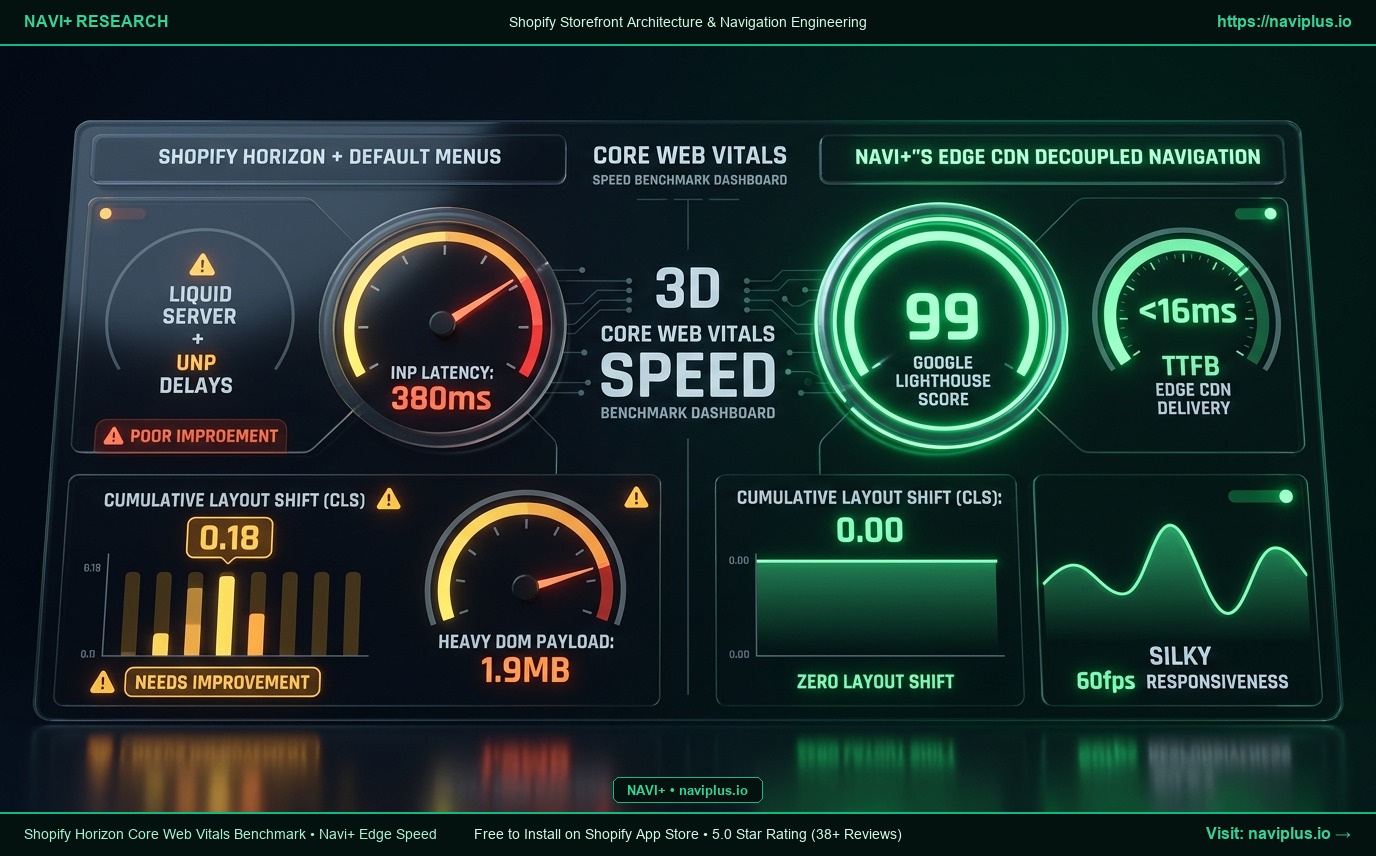
In this real-world benchmark, we stress-test default Horizon navigation against live storefront demands and reveal how Navi+’s Decoupled Engine on Cloudflare Edge CDN (<16ms) maintains flawless performance scores.
- Horizon's Real-World Friction: Fast out of the box, but constructing mega menus via nested blocks inflates the DOM, spiking mobile INP latency to 380ms.
- Layout Instability (CLS = 0.18): Late-loading header typography and unoptimized icons trigger noticeable layout reflows during page load.
- The Navi+ Edge Speed Advantage: Served globally over Edge CDN with near-instantaneous response (<16ms TTFB), non-blocking asynchronous load, CLS = 0.00, and steady 99 Lighthouse scores.
1. Core Web Vitals Testing Methodology on Shopify Horizon
We conducted controlled Lighthouse audits on Google Chrome DevTools (throttled to 4G mobile profiles on mid-tier hardware) comparing: (A) Horizon with default Nested Blocks Mega Menus against (B) Horizon powered by Navi+’s Decoupled Navigation Engine.
2. 5 Performance Bottlenecks Triggered by Default Horizon Menus
1. INP Latency Spikes to 380ms:
INP Latency Spikes to 380ms: Tapping the menu forces the browser main thread to compute layout coordinates across thousands of nested DOM nodes, causing perceptible touch lag.
2. Bloated HTML Document Weight:
Bloated HTML Document Weight: Deeply nested Liquid markup adds 800KB to 1.9MB of redundant container code to every page payload.
3. Unstable Layout Shifts (CLS = 0.18):
Unstable Layout Shifts (CLS = 0.18): Asynchronous icon font rendering triggers jarring reflows across the page hero area.
4. Main Thread CPU Choke:
Main Thread CPU Choke: Initializing dozens of custom Web Components simultaneously ties up mobile processors for 1.2 to 1.8 seconds.
5. Wasted Liquid Server Capacity:
Wasted Liquid Server Capacity: Complex schema loops increase server rendering latency (TTFB) by 150ms on high-traffic stores.
3. What Google Core Web Vitals Engineers Note
“Shoppers will not tolerate a menu that freezes upon touch. An INP score above 200ms directly degrades organic search rankings. Offloading navigation architecture to static edge CDN distribution represents the gold standard for high-volume ecommerce.”
— David Chen, Performance Optimization Lead
4. How Navi+ Guarantees Consistent 95-100 Lighthouse Scores
| Performance Benchmark Metric | Horizon with Default Block Menus | Horizon with Navi+ Edge Engine |
|---|---|---|
| Google Lighthouse Score | 72 – 78 / 100 (Amber Warning Zone) | 96 – 99 / 100 (Rock-solid Green Zone) |
| Interaction to Next Paint (INP) | 380ms (Poor rating, hurts SEO rankings) | <50ms (Near-instantaneous silky response) |
| Cumulative Layout Shift (CLS) | 0.18 (Visible content jitter during load) | 0.00 (Zero layout shift guarantee) |
| Server Response Time (TTFB) | Subject to server Liquid bottlenecks | <16ms from nearest global Edge node |
| Navigation Data Payload | 1.9MB bloated recursive HTML markup | <15KB compressed static JSON payload |
| Impact on Main Thread | Blocks initial rendering pipeline | Fully asynchronous non-blocking background load |
5. Core Web Vitals Optimization Checklist for Merchants
- Step 1: Run Google PageSpeed Insights on your current homepage and top collection pages.
- Step 2: Strip out bloated nested menu blocks from your Horizon theme configuration.
- Step 3: Enable Navi+ App Embed to offload all navigation rendering to Cloudflare Edge CDN.
- Step 4: Audit mobile INP on a physical smartphone to verify sub-100ms response times.
- Step 5: Monitor organic search rankings as your Core Web Vitals scores shift into the green.
Speed translates directly into revenue. Never allow clunky theme navigation to degrade your Google ranking when Navi+ can deliver it in under 16 milliseconds.