Shopify’s official adoption of W3C Web Components (<product-form>, <cart-drawer>, <header-drawer>) as the architectural foundation of Horizon marks a seismic shift in storefront engineering. By replacing monolithic JavaScript files with native browser Custom Elements APIs, Horizon achieves near-instant element initialization.
However, this radical shift has triggered an unintended crisis across the ecosystem: Thousands of legacy Shopify apps built for Dawn rely on traditional DOM manipulation and jQuery/ES6 scripts that now crash or fail to register custom Web Component events.
In this technical breakdown, we dissect Horizon’s Web Components mechanics, highlight the app collision risks, and explain why Navi+’s Decoupled Navigation Architecture guarantees 100% seamless compatibility without theme code pollution.
- Horizon's Breakthrough: Standardizes native browser elements via W3C Custom Elements, slashing initial JavaScript payload by 40% and isolating CSS cleanly.
- The Compatibility Trap: Legacy menu apps attempting direct DOM mutations inside header tags suffer script collisions and break during component lifecycle hydration.
- The Navi+ Advantage: Functions as an isolated decoupled service on global Edge CDN, communicating via standard native Custom Events with zero theme conflicts.
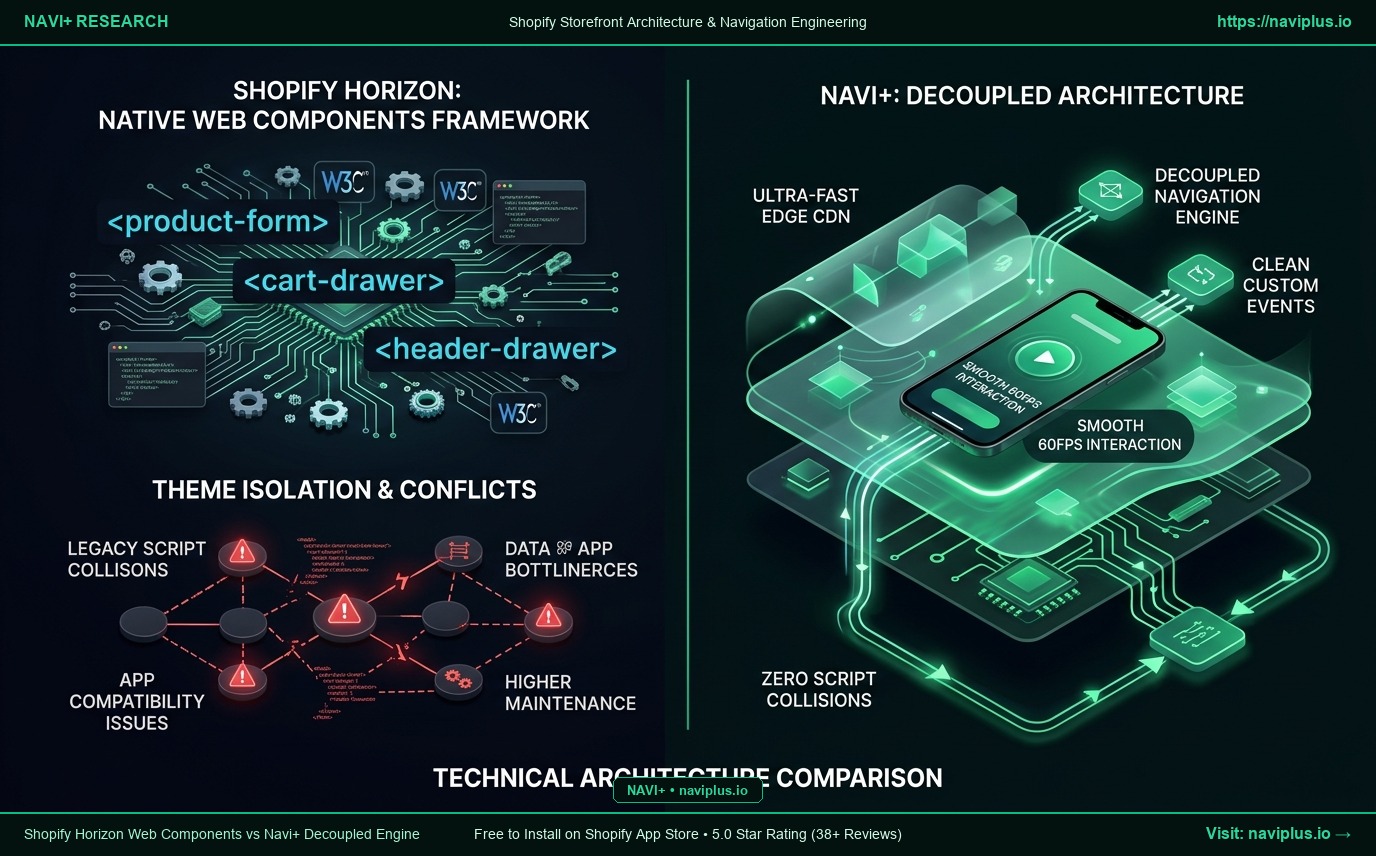
1. What Shopify Promises: Standardizing Storefronts via W3C Web Components
Horizon discards Dawn’s fragmented JavaScript approach. Each interactive block is encapsulated into a native Custom Element with a well-defined lifecycle (connectedCallback, disconnectedCallback), allowing the browser engine to optimize rendering pipelines.
2. 5 Fatal Technical Collisions for Traditional Navigation Apps
1. Shadow DOM & Scoped Styling Barriers:
Shadow DOM & Scoped Styling Barriers: Legacy menu scripts attempting to override theme header styling get blocked by scoped CSS encapsulation.
2. Hydration Lifecycle Mismatches:
Hydration Lifecycle Mismatches: External scripts attempting DOM manipulation before connectedCallback completes trigger fatal JavaScript exceptions.
3. Broken Cart Counter Events:
Broken Cart Counter Events: Horizon fires native CustomEvents (cart:update). Un-updated apps fail to listen, causing cart badges to show zero items.
4. Escalating Maintenance Overhead:
Escalating Maintenance Overhead: Merchants are forced to hire developers to rewrite custom Liquid injections for Horizon’s new element tags.
5. Fragile Error Boundaries:
Fragile Error Boundaries: An unhandled exception inside a theme Web Component can freeze user interactions across the entire header.
3. What Frontend Architects & Theme Specialists Warn
“Web Components are undeniably the future of the open web, but transition periods always break legacy scripts. The most robust navigation solutions never tamper with theme internals; they operate as decoupled, independent storefront layers.”
— Alena Rostova, Senior Frontend Architect
4. The Navi+ Solution: Native Compatibility via Decoupled Architecture
| Architectural Metric | Legacy Theme-Injected Navigation Apps | Navi+ Decoupled Engine |
|---|---|---|
| Integration Architecture | Injected into theme Liquid and DOM | Independent App Embed via global Edge CDN |
| Web Component Compatibility | Prone to hydration lifecycle errors | 100% native compatibility via standard CustomEvents |
| Cart Counter Synchronization | Requires custom theme snippet hacks | Automatic native cart:update listener |
| Upgrade Resilience | Breaks when Shopify updates theme schemas | Completely immune, zero theme file modifications |
| Script Loading Latency | Blocks initial HTML parse and render | <16ms TTFB non-blocking asynchronous load |
| Visual Customization | Constrained by theme CSS scope | Fully independent visual drag-and-drop canvas |
5. Merchant Verification Checklist for Horizon Storefronts
- Check 1: Verify navigation buttons do not inject rogue DOM wrappers inside Horizon custom elements.
- Check 2: Ensure cart counter badges update instantaneously when products are added.
- Check 3: Deploy Navi+ App Embed to isolate the conversion layer from theme Liquid code.
- Check 4: Confirm browser developer console is free from unhandled Web Component exceptions.
- Check 5: Perform A/B theme testing between Dawn and Horizon to confirm zero navigation breakage.
Storefront technologies evolve from ES6 scripts to Web Components. Navi+ ensures your navigation remains rock-solid and friction-free.