


Your Competitors Have Already Run Your UX Tests
Formal user research is valuable but expensive. A usability study with 10 participants typically costs $3,000–8,000 and takes 2–4 weeks to conduct and analyze. A/B testing navigation changes requires significant traffic volumes to produce statistically significant results and a testing infrastructure that most small stores don't have. Most store owners make navigation decisions based on intuition, which produces highly variable outcomes.
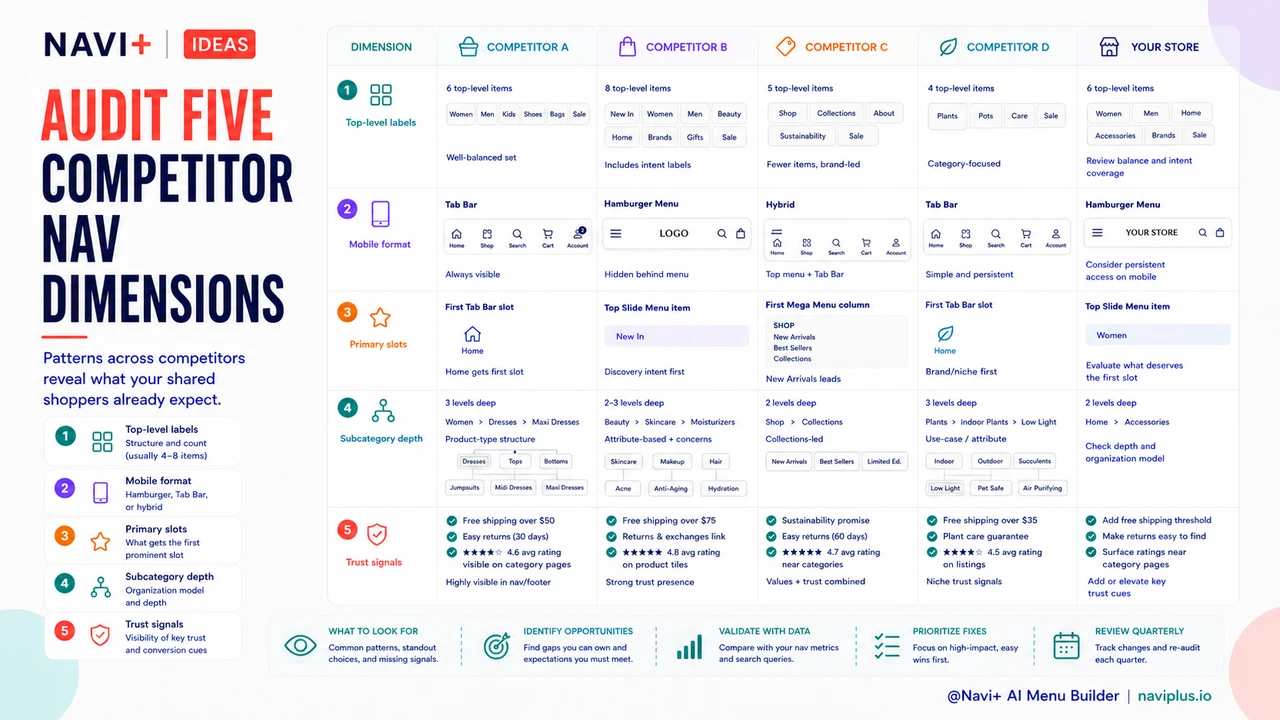
There's an alternative that costs two hours and zero dollars: auditing your competitors' navigation. Established competitors in your product category have collectively spent tens of thousands of dollars on user research, A/B testing, and customer feedback that has shaped their current navigation structure. Their navigation choices — which categories to show at the top level, what to call their bestseller links, how they handle mobile navigation, what they emphasize in their primary nav — are the result of iterative optimization against your shared customer audience. You can read those results by looking at what they've converged on.
"I spent two hours auditing the navigation of the five biggest stores in our niche — all of them had a 'Shop by Skin Type' top-level navigation entry. We had 'Browse Collections.' When we renamed and restructured our navigation to match the customer mental model that our competitors had clearly validated, we saw immediate improvements in navigation click-through on mobile. Sometimes the best UX research is just looking at what everyone successful in your space has figured out."
— A Navi+ customer, skincare brand
The Competitive Navigation Audit Framework
A productive competitive navigation audit examines five dimensions for each competitor:
1. Top-level category structure and count. Record every top-level navigation item for each competitor. Note the count (typically between 4 and 8 for successful stores) and the exact label wording. Look for patterns across competitors — if four out of five competitors in your space have a "Bestsellers" or "Most Popular" top-level link, that's strong evidence that your shared audience expects and uses bestseller navigation. If all competitors in your category use product-type labels ("Skincare," "Haircare," "Body") rather than use-case labels ("Morning Routine," "Anti-Aging," "Sensitive Skin"), the product-type structure is likely what your audience is already trained to navigate.
2. Mobile navigation format. On mobile, which format does each competitor use — hamburger menu, Tab Bar, or hybrid? The mobile navigation format represents a significant conversion-relevant decision that established competitors have usually optimized. If competitors with strong mobile performance (check their Alexa/SimilarWeb mobile vs. desktop traffic split) use Tab Bar navigation, that's evidence the Tab Bar format converts better in your category than hamburger navigation.
3. What they feature in primary navigation slots. What does each competitor put in their most prominent navigation position — the first Tab Bar slot, the top Slide Menu item, the first Mega Menu column? The most prominent navigation position is reserved for the highest-value destination. If all competitors feature "Sale" in their primary slot during Q4, that's a seasonal signal. If they feature "New Arrivals" consistently, that's an audience-behavior signal (your shared customers are browsing for new products, not specifically searching for known items).
4. Subcategory depth and organization. For each top-level category, how many subcategories does each competitor show? What grouping logic do they use? Competitors that have optimized their navigation have usually found the right level of subcategory depth — enough specificity to help customers narrow quickly, not so much that category selection itself becomes overwhelming. Note whether competitors use descriptive subcategory names ("Cotton T-Shirts," "Performance Tees") or attribute-based names ("Fabric," "Fit," "Style") — this tells you whether your audience prefers browsing by product type or by attribute.
5. Trust and conversion signals within navigation. Do competitors include trust signals near their navigation — free shipping thresholds in the header, return policy links in the Slide Menu, star ratings on category pages accessed from navigation? These signals are expensive to develop and A/B test; competitors who include them have likely validated their impact. Noting which trust signals appear in navigation across your competitor set identifies the signals your audience responds to without requiring your own testing investment.
| Audit Dimension | What to Record | What It Tells You |
|---|---|---|
| Top-level categories | Count, labels, order | Validated category structure for your audience |
| Mobile navigation format | Hamburger vs. Tab Bar | Which mobile format converts in your category |
| Primary navigation emphasis | Most prominent slots | Highest-value destinations for your audience |
| Subcategory depth | Levels, grouping logic | Optimal specificity for your product catalog type |
| Trust signals in navigation | Location, messaging | Pre-validated trust elements for your audience |
Applying Audit Findings Without Copying
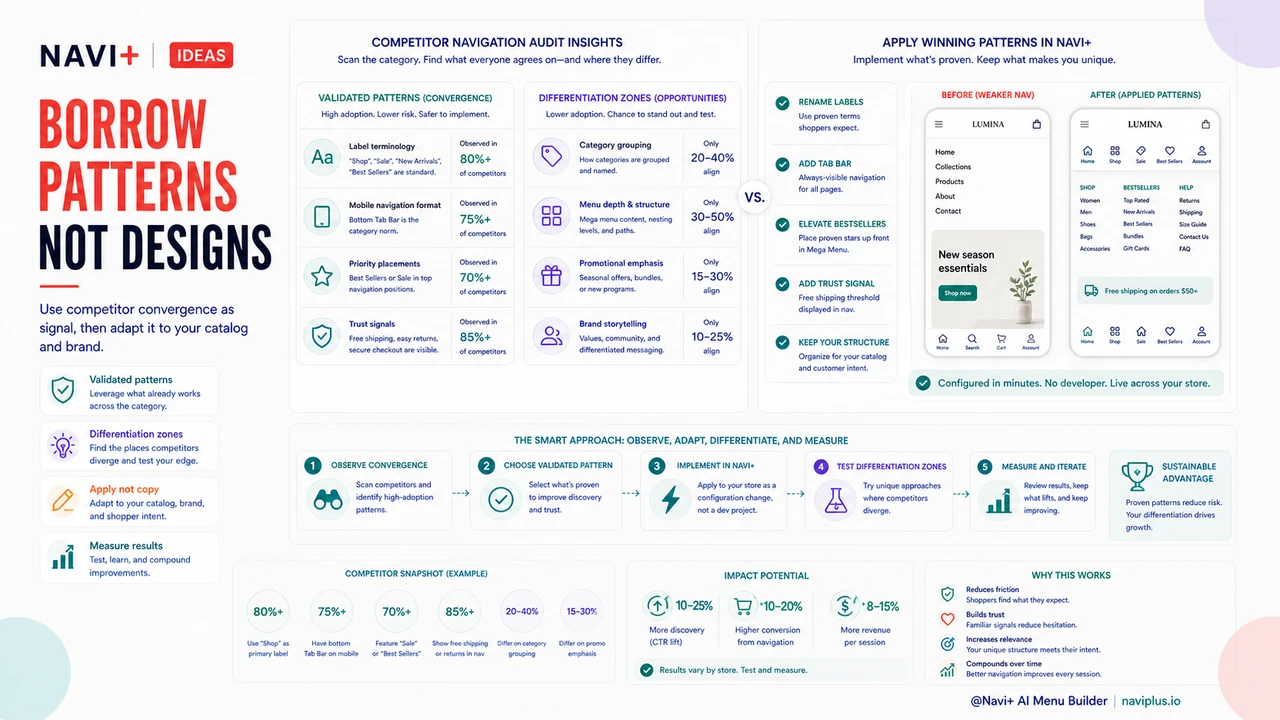
The goal of a competitive navigation audit is to identify validated patterns, not to replicate any competitor's navigation. Where competitors have converged on a common pattern — same label terminology, same mobile format, same type of featured content — that convergence is strong signal that the pattern is validated by your shared audience. Where competitors have diverged, you have differentiation opportunities: the space where you can test a different approach and measure whether it outperforms the category norm for your specific customer segment. A competitive navigation audit, followed by targeted implementation of validated patterns and deliberate experimentation in divergence zones, produces better navigation decisions per dollar spent than any other research approach available to a growing e-commerce store.
Try it free — no code, no developer needed
Install in minutes on Shopify, WordPress, or any website.