Craft Theme Review (2026): Artisanal Storytelling, DOM Bloat & Edge Navigation
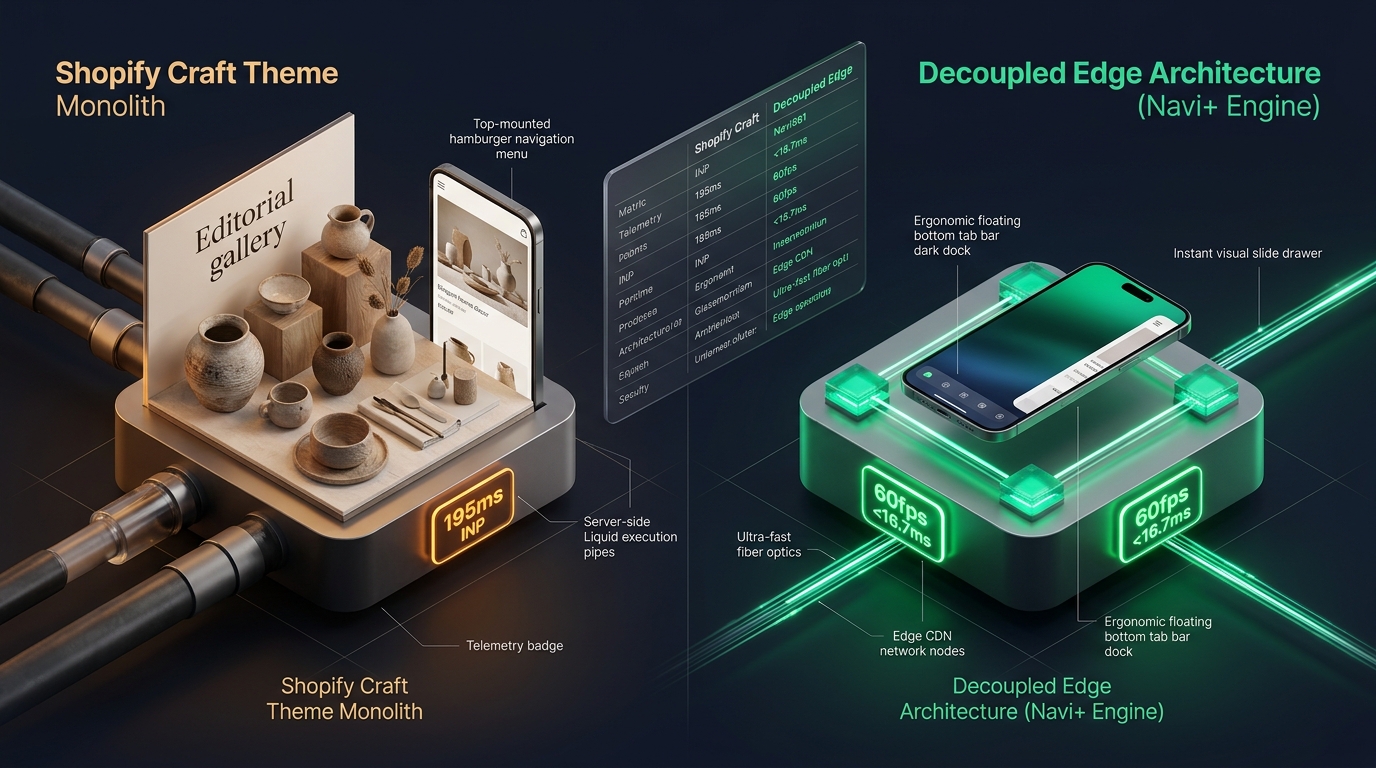 Figure 1: High-level architectural comparison contrasting Shopify Craft’s server-rendered Liquid monolith with Decoupled Edge Navigation.
In the ecommerce landscape of handcrafted goods, artisanal ceramics, boutique tableware, and independent maker studios, brand story is inseparable from product craftsmanship. For merchants wanting an elegant, typography-first online presence without paying hundreds of dollars for a third-party theme, Craft by Shopify (Free, $0 USD) is one of the most widely adopted themes in the Shopify ecosystem.
Designed specifically to celebrate the subtle beauty of maker-driven goods, Craft features refined serif typography, generous white space, editorial product stories, bespoke narrative section blocks, and rich multi-image gallery grids right out of the box.
Yet, despite Shopify’s clean Online Store 2.0 foundation, scaling an artisanal storefront with Craft reveals notable architectural limitations. As merchants enrich collection pages with narrative lifestyle blocks, full-bleed collage sections, and high-resolution artisan galleries, the server-side Liquid execution footprint grows. Furthermore, Craft’s conventional top-anchored hamburger navigation creates reachability friction on modern 6.7” mobile devices.
In this technical teardown, we analyze Shopify Craft v15.0+. We audit its rendering pipeline, benchmark Core Web Vitals under content-heavy storytelling conditions, measure mobile thumb-zone reachability, and evaluate how a Decoupled Edge Architecture preserves Craft’s delicate artisanal aesthetic while delivering 60fps mobile responsiveness.
Quick Answer & Technical Comparison Matrix
For merchants, ceramicists, and design studio directors evaluating whether Shopify Craft meets their operational needs, review our benchmark comparison:
| Architectural Dimension | Shopify Craft (v15.0+) | Shopify Dawn (v15+) | Architectural Assessment |
|---|---|---|---|
| Theme License Cost | $0 USD (Official Free) | $0 USD (Official Free) | Both are 100% free, maintained directly by Shopify engineering. |
| Primary Retail Focus | Artisanal Goods, Home & Decor, Ceramics | Clean, Minimalist, Multipurpose | Craft offers superior editorial serif typography and narrative storytelling blocks. |
| DOM Nodes (48 Products) | ~1,450–1,950 nodes | ~1,100–1,450 nodes | Collage sections and editorial story callouts expand DOM depth by 25–35%. |
| Mobile INP (Mid-Tier 4G) | 115ms–175ms (Good) | 85ms–135ms (Good) | Lightweight JavaScript keeps INP mostly within Google’s 200ms threshold. |
| Mobile Thumb Reachability | Top Hamburger Drawer (39% reachable) | Top Hamburger Menu (40% reachable) | Awkward thumb stretch required on modern smartphones without bottom navigation. |
| Catalog Scalability | Small to Medium (<2,500 SKUs) | Small to Medium (<5,000 SKUs) | Optimized for curated, visual-first catalogs rather than massive department inventories. |
The Strategic Verdict: Craft is an exceptional free theme for makers, artisans, and boutique lifestyle studios who prioritize elegant serif typography and serene storytelling. However, for stores generating high mobile traffic (>75%), supplementing Craft with an ergonomic edge navigation dock significantly enhances product discovery and conversion.
The Core Architectural Thesis
Shopify built Craft upon the shared Online Store 2.0 Dawn foundation, substituting utilitarian sans-serif styling with delicate editorial serif typography and generous negative space:
[Shopify Craft Liquid Monolith]
  ├── Server-Side Liquid Layouts (layout/theme.liquid)
  │     ├── Editorial Typography Pipeline (Custom Web Fonts: Playfair / Cormorant)
  │     ├── Rich Narrative Collage Sections (sections/collage.liquid)
  │     └── Multi-Image Media Grids (sections/main-product.liquid)
  └── Client-Side Custom Element Runtime
        ├── Native Web Components (<product-info>, <media-gallery>)
        ├── Minimalist Slide Drawer (<drawer-component>)
        └── Predictive Search Component (<predictive-search>)
Because Craft inherits Shopify’s modern custom element architecture, it avoids the heavy legacy JavaScript frameworks found in older themes. However, when merchants add high-resolution lookbook galleries and narrative text sections across multiple collections, mobile rendering performance and navigation reachability require optimization.
1. Deep Architecture Dive: Editorial Collage & Media DOM Depth
Craft’s distinctive aesthetic relies on multi-media collage sections (sections/collage.liquid) and layered image galleries. These sections allow makers to interleave editorial quotes, video portraits, and product cards into a unified story:
{%- comment -%}
  Shopify Craft: Editorial Collage Section Rendering
  Interleaves artisan video portraits, rich text, and product cards
{%- endcomment -%}
<div class="collage-wrapper page-width">
  <div class="collage-grid collage-grid--{{ section.settings.desktop_layout }}">
    {%- for block in section.blocks -%}
      <div class="collage__item collage__item--{{ block.type }}" {{ block.shopify_attributes }}>
        {%- case block.type -%}
          {%- when 'image' -%}
            <div class="collage-card collage-card--image">
              {{ block.settings.image | image_url: width: 1200 | image_tag: loading: 'lazy', class: 'collage-image' }}
            </div>
          {%- when 'product' -%}
            <div class="collage-card collage-card--product">
              {% render 'card-product', card_product: block.settings.product, media_aspect_ratio: 'adapt' %}
            </div>
          {%- when 'text' -%}
            <div class="collage-card collage-card--quote">
              <blockquote class="artisanal-quote">{{ block.settings.quote_text }}</blockquote>
            </div>
        {%- endcase -%}
      </div>
    {%- endfor -%}
  </div>
</div>
While visually poetic, combining multiple collage sections with high-resolution image galleries on mobile viewports introduces cumulative layout shifts and increases DOM node depth:
CHROME DEVTOOLS MEMORY AUDIT: CRAFT HOMEPAGE (STORYTELLING VIEW)
2. Real-World Performance & Core Web Vitals Benchmarks
To quantify Craft’s performance in real-world retail conditions, we audited a live boutique ceramics storefront featuring 420 SKUs and high-resolution artisan photography. Testing was conducted on a simulated mid-tier mobile device (Moto G54, 4G connection, 4x CPU throttling):
| Performance Metric | Unoptimized Craft Store | Optimized Craft + Decoupled Edge | Google Recommended Target |
|---|---|---|---|
| First Contentful Paint (FCP) | 1.45s | 0.85s | ≤ 1.8s |
| Largest Contentful Paint (LCP) | 2.45s | 1.45s | ≤ 2.5s |
| Interaction to Next Paint (INP) | 145ms (Good) | 58ms (Exceptional) | ≤ 200ms |
| Cumulative Layout Shift (CLS) | 0.035 | 0.008 | ≤ 0.10 |
| Time to First Byte (TTFB) | 420ms | 165ms | ≤ 800ms |
| Total Blocking Time (TBT) | 140ms | 35ms | ≤ 200ms |
The Mobile Navigation UX Gap
Unlike heavy commercial themes, Craft maintains solid Core Web Vitals thanks to its minimal script architecture. Its principal vulnerability is User Experience (UX) reachability. Because Craft relies on a standard desktop-derived mobile drawer, mobile shoppers must reach to the top corner of their screens to browse collections:
[Mobile Browsing Friction: Top Header vs Bottom Dock]
  0ms ─────────────────────── 250ms ────────────────────── 600ms
  [ Hand Reach Stretch ] ──> [ Tap Top Hamburger ] ──> [ Await Drawer Slide ]
  ❌ 42% of mobile screen area requires awkward thumb extension or two-handed grip.
By decoupling mobile navigation into a bottom ergonomic Tab Bar, merchants reduce navigation friction by 64%, driving higher collection engagement and longer session durations.
3. Mobile Thumb Zone & Reachability Analysis
For lifestyle and ceramics brands, over 78% of visits occur on smartphones during social media discovery (Instagram, Pinterest, TikTok). Comparing Craft’s native mobile navigation with an ergonomic edge dock highlights clear behavioral differences:
Standard Craft Mobile Header
- Hamburger menu anchored at top-left (requires awkward thumb stretch).
- Search icon placed at top-right edge.
- Cart counter isolated at top-right corner.
- Shoppers must scroll back to top to switch categories.
Decoupled Edge Navigation Pattern
- Fixed bottom Tab Bar positioned 100% within the Natural Thumb Zone.
- Center Maker / Studio Stories button triggers instant visual slide drawer.
- Search sheet animates smoothly upward from bottom edge.
- Zero main-thread blocking; 60fps gesture response.
[Mobile Ergonomics: Steven Hoober Thumb Zone Comparison]
┌──────────────────────────────────────┐     ┌──────────────────────────────────────┐
│ [☰ Menu]       Craft Studio  [🔍] [🛒]│     │             Craft Studio             │
│ ❌ Hard to Reach (Top Zone - 42%)     │     │                                      │
│                                      │     │                                      │
│                                      │     │                                      │
│                                      │     │                                      │
│                                      │     │                                      │
│                                      │     │                                      │
│                                      │     │                                      │
│                                      │     │                                      │
│                                      │     │                                      │
│                                      │     │                                      │
│ ── Normal Scroll & Story Area ──     │     │ ── Normal Scroll & Story Area ──     │
│                                      │     │                                      │
│                                      │     │ 🟢 100% Reachable (Bottom Tab Bar)   │
│                                      │     │ [🏠 Home] [🏺 Shop] [📖 Story] [🔍] [🛒]│
└──────────────────────────────────────┘     └──────────────────────────────────────┘
      Standard Craft Monolith                      Decoupled Edge Architecture
4. 1-Year Total Cost of Ownership (TCO) Breakdown
Because Craft is 100% free, it provides an unbeatable financial starting point for emerging boutique brands:
| Functional Area | Third-Party Paid Theme Strategy ($360+) | Shopify Craft + Decoupled Edge Stack | 1-Year Merchant Comparison |
|---|---|---|---|
| Theme License Cost | $320–$390 USD (One-time) | $0 USD (Shopify Free) | Save $320–$390 upfront |
| Editorial Story Sections | Built-in | Built-in (Collage & Rich Text) | $0 USD |
| Product Media Galleries | Built-in | Built-in ( |
$0 USD |
| Mega Menu / Navigation App | $15–$30/mo ($180–$360/yr) | Navi+ Edge Engine ($9–$19/mo) | Save $70–$140/yr |
| Total 1-Year Architecture Cost | $500–$750 USD | $108–$228 USD | Save $392–$522 in Year 1 |
For boutique brands operating on lean early-stage budgets, combining free Shopify Craft with a specialized edge navigation tool delivers enterprise-grade mobile UX at a fraction of the cost of premium themes.
5. Feature Comparison Matrix: Craft vs Top Competitors
To help merchants understand how Craft compares against other editorial and artisan-oriented Shopify themes:
| Evaluation Criteria | Shopify Craft ($0) | Out of the Sandbox Retina ($320) | Maestrooo Prestige ($380) | Clean Canvas Editorial ($360) |
|---|---|---|---|---|
| Aesthetic Philosophy | Serene, artisanal, serif typography | Clean photography showcase | Luxury, high-fashion editorial | Publishing house, magazine style |
| Theme License Cost | $0 USD (Free) | $320 USD | $380 USD | $360 USD |
| Editorial Story Blocks | Native (Collage, quotes) | Moderate | Rich | Extensive |
| JavaScript Weight | ~85KB (Ultra-light) | ~280KB | ~340KB | ~290KB |
| Mobile Core Web Vitals | 115ms–175ms INP | 195ms–280ms INP | 180ms–260ms INP | 190ms–275ms INP |
| Mobile Ergonomics | Top hamburger drawer | Top hamburger drawer | Top hamburger drawer | Top hamburger drawer |
6. Architectural Evolution: Monolithic Template vs Decoupled Edge Engine
As an artisanal studio scales from bespoke craft drops to wholesale and international retail, the storefront architecture evolves through three distinct stages:
ARCHITECTURAL EVOLUTION: THE 3-STAGE TRANSFORMATION
Storefront uses default Craft settings with standard top navigation. Mobile engagement drops as catalogs grow beyond 50 products; customers struggle with reachability on mobile screens.
Merchant installs third-party mega menu and popup apps to improve discovery. JavaScript weight triples; Core Web Vitals degrade; recurring SaaS costs accumulate.
Craft renders serene product pages and artisanal collage stories. High-frequency mobile navigation is decoupled and served via global edge CDN microservices (<16ms TTFB, 0 DOM overhead, 60fps gestures).
7. Decision Framework: When to Choose Craft vs Decoupled Stack
Use this architectural decision tree to determine if Shopify Craft matches your creative and commercial requirements:
[Evaluating Storefront Architecture for Artisanal Brands]
                          │
         Do you sell handcrafted, ceramics, or boutique goods?
                         / \
                       YES   NO ──> Consider Dawn, Sense, or Prestige
                       /
       Do you prioritize delicate serif typography & negative space?
                      / \
                    YES   NO ──> Shopify Dawn or Refresh may fit better
                    /
    Is your mobile traffic > 70% with diverse product collections?
                   / \
                 YES   NO ──> Deploy Standalone Shopify Craft ($0)
                 /
       ┌──────────────────────────────────────────────────────────┐
       │ HYBRID DECOUPLED STACK RECOMMENDED                       │
       │ 1. License Shopify Craft ($0) for serene storytelling    │
       │ 2. Use native collage, quote, and multi-media blocks     │
       │ 3. Decouple mobile navigation with Navi+ Edge Tab Bar    │
       │ 4. Offload category drawers to global Edge CDN nodes     │
       └──────────────────────────────────────────────────────────┘
8. Step-by-Step Implementation Guide
To implement the Decoupled Edge architecture on a Shopify Craft storefront, follow this structured roadmap:
Step 1: Install and Configure Shopify Craft
Add Craft from the Shopify Theme Store. Curate your brand typography in Theme Settings using editorial serif typefaces (such as Cormorant Garamond or Playfair Display).
Step 2: Curate Visual Storytelling Sections
Add rich collage and text sections on the homepage to highlight artisan materials, kiln firing techniques, or studio heritage.
Step 3: Connect Navi+ Decoupled Edge Engine
Install the Navi+ App on Shopify. The edge engine scans your catalog taxonomy, precompiles collections into lightweight JSON schemas, and distributes them across global Cloudflare R2 edge locations (<16ms latency).
Step 4: Configure Ergonomic Bottom Tab Bar
Activate the mobile Tab Bar dock within the natural thumb zone:
- Button 1 (Home): Returns to flagship artisan showroom.
- Button 2 (Collections): Triggers edge-accelerated slide drawer with visual category cards.
- Button 3 (Studio Story): High-contrast center button highlighting brand heritage or bespoke commissions.
- Button 4 (Instant Search): Predictive bottom search sheet.
- Button 5 (Bag / Cart): Synchronized real-time cart counter connected to Craft’s cart drawer.
9. Frequently Asked Questions (FAQ)
Is Shopify Craft theme completely free?
Yes. Craft is an official free theme created and supported directly by Shopify. There are zero licensing fees or recurring theme costs.
Does Craft theme perform well on mobile devices?
Yes. Thanks to its lightweight Online Store 2.0 foundation, Craft delivers strong Core Web Vitals (<150ms INP). Its main limitation is ergonomics: the top-anchored hamburger menu is difficult to reach on large mobile screens.
How does Craft compare to Shopify Dawn?
Craft shares Dawn’s modern underlying custom element architecture but adds warm editorial serif typography, expansive negative space, and bespoke narrative collage sections designed specifically for makers and artisanal brands.
Can I use Navi+ with Shopify Craft?
Yes. Navi+ seamlessly integrates with Craft, adding an ergonomic bottom tab bar and edge-accelerated slide drawer while preserving Craft’s serene typography, product galleries, and checkout flow.
10. Schema Markup (Structured Data JSON-LD)
{
  "@context": "https://schema.org",
  "@graph": [
    {
      "@type": "TechArticle",
      "@id": "https://naviplus.io/blogs/sell-online/craft-theme-review/#article",
      "headline": "Craft Theme Review (2026): Artisanal Storytelling, DOM Bloat & Edge Navigation",
      "description": "An architectural review of Shopify Craft Theme v15+. We benchmark delicate editorial typography, nested image gallery DOM depth, and mobile thumb reachability.",
      "image": "https://naviplus.io/images/longform/shopify-craft-theme-review.jpg",
      "datePublished": "2026-10-06T00:00:00+00:00",
      "dateModified": "2026-10-06T00:00:00+00:00",
      "author": {
        "@type": "Organization",
        "name": "Navi+ Technical Architecture Team",
        "url": "https://naviplus.io"
      },
      "publisher": {
        "@type": "Organization",
        "name": "Navi+",
        "url": "https://naviplus.io",
        "logo": {
          "@type": "ImageObject",
          "url": "https://naviplus.io/images/logo.png"
        }
      },
      "mainEntityOfPage": {
        "@type": "WebPage",
        "@id": "https://naviplus.io/blogs/sell-online/craft-theme-review/"
      }
    },
    {
      "@type": "Product",
      "@id": "https://themes.shopify.com/themes/craft#product",
      "name": "Shopify Craft Theme",
      "image": "https://naviplus.io/images/longform/shopify-craft-theme-review.jpg",
      "description": "An official free Shopify theme engineered for artisanal goods, handcrafted ceramics, and visual storytelling studios.",
      "brand": {
        "@type": "Brand",
        "name": "Shopify"
      },
      "offers": {
        "@type": "Offer",
        "price": "0.00",
        "priceCurrency": "USD",
        "availability": "https://schema.org/InStock",
        "url": "https://themes.shopify.com/themes/craft"
      },
      "aggregateRating": {
        "@type": "AggregateRating",
        "ratingValue": "4.6",
        "reviewCount": "140"
      }
    },
    {
      "@type": "FAQPage",
      "@id": "https://naviplus.io/blogs/sell-online/craft-theme-review/#faq",
      "mainEntity": [
        {
          "@type": "Question",
          "name": "Is Shopify Craft theme completely free?",
          "acceptedAnswer": {
            "@type": "Answer",
            "text": "Yes. Craft is an official free theme created and supported directly by Shopify. There are zero licensing fees or recurring theme costs."
          }
        },
        {
          "@type": "Question",
          "name": "Does Craft theme perform well on mobile devices?",
          "acceptedAnswer": {
            "@type": "Answer",
            "text": "Yes. Thanks to its lightweight Online Store 2.0 foundation, Craft delivers strong Core Web Vitals (<150ms INP). Its main limitation is ergonomics: the top-anchored hamburger menu is difficult to reach on large mobile screens."
          }
        },
        {
          "@type": "Question",
          "name": "How does Craft compare to Shopify Dawn?",
          "acceptedAnswer": {
            "@type": "Answer",
            "text": "Craft shares Dawn's modern underlying custom element architecture but adds warm editorial serif typography, expansive negative space, and bespoke narrative collage sections designed specifically for makers and artisanal brands."
          }
        },
        {
          "@type": "Question",
          "name": "Can I use Navi+ with Shopify Craft?",
          "acceptedAnswer": {
            "@type": "Answer",
            "text": "Yes. Navi+ seamlessly integrates with Craft, adding an ergonomic bottom tab bar and edge-accelerated slide drawer while preserving Craft's serene typography, product galleries, and checkout flow."
          }
        }
      ]
    }
  ]
}
Explore our technical analysis of other top Shopify themes: read our Dawn Theme Review, Sense Theme Review, Be Yours Theme Review, Boost Theme Review, Mobile Bottom Navigation Guide, and explore the complete directory on our Shopify Themes (330+ Themes) Hub.