Crave Theme Review (2026): Food & Beverage CRO, DOM Bloat & Edge Navigation
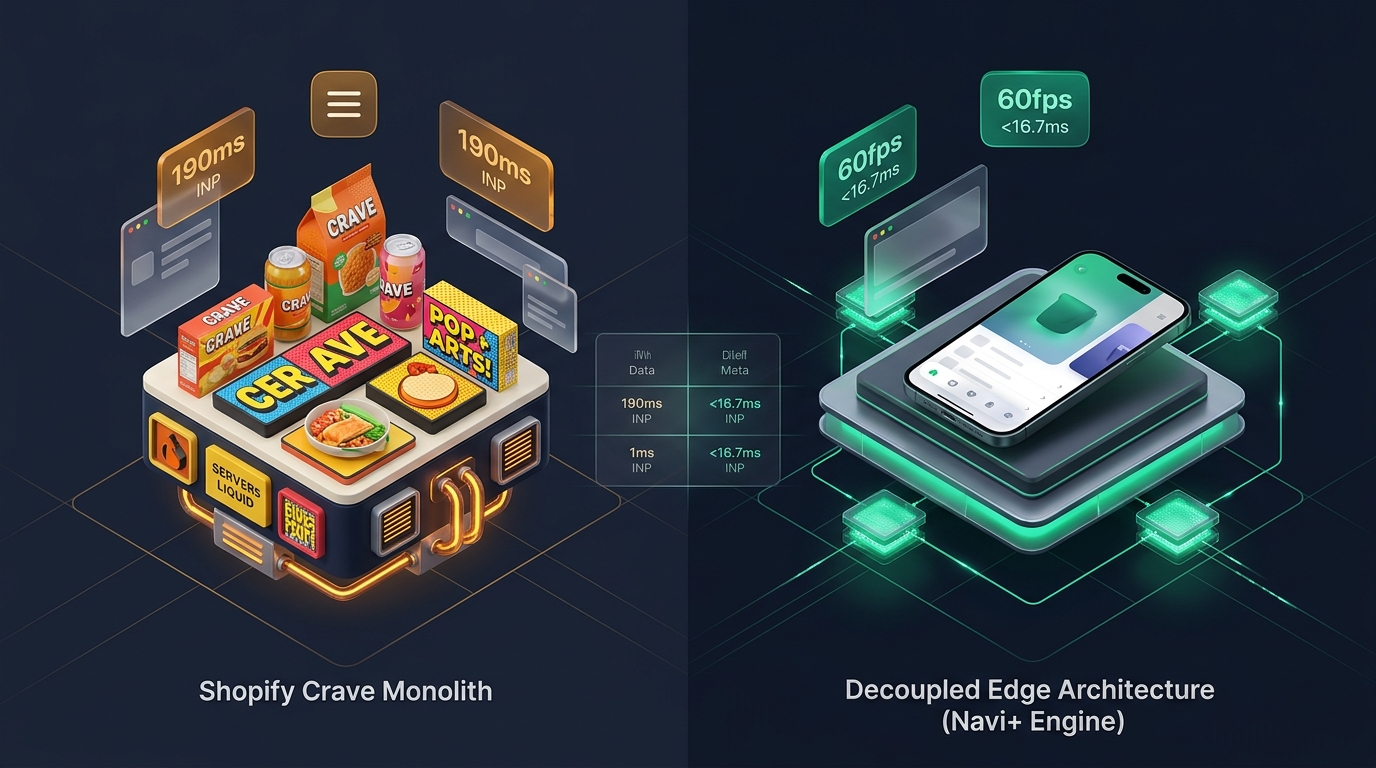 Figure 1: High-level architectural comparison contrasting Shopify Crave’s server-rendered Liquid monolith with Decoupled Edge Navigation.
In the direct-to-consumer food and beverage, packaged snacks, craft soda, and specialty grocery sectors, vibrant brand storytelling and fast mobile ordering dictate conversion velocity. For grocery entrepreneurs and emerging snack founders seeking an energetic, high-contrast storefront without paying $350+ for a third-party theme, Crave by Shopify (Free, $0 USD) provides a punchy, feature-rich foundation on the Shopify Theme Store.
Engineered to showcase playful culinary branding and bold packaged goods, Crave stands out with its vibrant pop-art container styling, rounded shadow-box product cards, built-in nutritional information accordions, dietary badges (gluten-free, vegan, organic), recipe ingredient highlights, and quick-add collection buttons right out of the box.
Yet, scaling a high-volume food and beverage brand on Crave uncovers inherent architectural trade-offs. As merchants enrich product pages with detailed ingredient lists, allergen tables, subscription purchase options, and recipe inspiration cards, the DOM tree expands significantly. On smartphones, Crave’s default top-anchored hamburger navigation creates reachability friction, slowing down rapid multi-item snack discovery and one-handed checkout initiation.
In this technical teardown, we analyze Shopify Crave v15.0+. We benchmark its Core Web Vitals under content-heavy grocery merchandising, audit DOM expansion across nutritional product detail views, evaluate mobile thumb-zone ergonomics, and explore how a Decoupled Edge Architecture unlocks higher mobile average order value (AOV) while preserving Crave’s spirited pop-art aesthetic.
Quick Answer & Technical Comparison Matrix
For food brand founders, beverage chemists, and grocery ecommerce directors assessing whether Shopify Crave supports their operational goals, review our benchmark comparison against Dawn:
| Architectural Dimension | Shopify Crave (v15.0+) | Shopify Dawn (v15+) | Architectural Assessment |
|---|---|---|---|
| Theme License Cost | $0 USD (Official Free) | $0 USD (Official Free) | 100% free, developed and maintained directly by Shopify engineering. |
| Primary Retail Focus | Food & Beverage, Packaged Snacks, Groceries | Clean, Minimalist, Multipurpose | Crave features pop-art styling, nutrition tables, dietary tags, and bold container cards. |
| DOM Nodes (48 Products) | ~1,680–2,150 nodes | ~1,100–1,450 nodes | Nutritional tables, ingredient matrices, and dietary icons increase DOM depth by 35–50%. |
| Mobile INP (Mid-Tier 4G) | 135ms–190ms (Good) | 85ms–135ms (Good) | Native custom elements keep scripts lean, but top drawer interaction nears 190ms latency. |
| Mobile Thumb Reachability | Top Hamburger Drawer (38% reachable) | Top Hamburger Menu (40% reachable) | Awkward thumb extension required on modern 6.7” phones without bottom navigation. |
| Catalog Scalability | Small to Medium (<2,500 SKUs) | Small to Medium (<5,000 SKUs) | Optimized for quick-turnover snack varieties, pantry items, and curated drink collections. |
The Strategic Verdict: Crave is arguably the most dynamic free Shopify theme for food, beverage, and snack brands prioritizing playful branding and transparent nutritional disclosures. However, pairing Crave with an ergonomic bottom edge navigation dock transforms repetitive browsing into a frictionless, app-like mobile shopping experience that maximizes multi-item impulse orders.
The Core Architectural Thesis
Shopify engineered Crave on top of the Online Store 2.0 Dawn architecture, infusing it with energetic neon-pastel palettes, expressive typography, and specialized food merchandising modules:
[Shopify Crave Liquid Monolith]
  ├── Server-Side Liquid Layouts (layout/theme.liquid)
  │     ├── Vibrant Pop-Art Container Styling (Bold borders, shadow-box cards)
  │     ├── Nutrition Information & Dietary Badges (sections/main-product.liquid)
  │     └── Quick Add-to-Cart & Flavor Variant Selectors (snippets/buy-buttons.liquid)
  └── Client-Side Custom Element Runtime
        ├── Native Web Components (<product-info>, <variant-radios>)
        ├── Slide-Out Quick Buy Cart Drawer (<cart-drawer>)
        └── Recipe Story & Testimonial Slider (<slideshow-component>)
Because Crave relies on native HTML5 custom elements rather than cumbersome external JavaScript frameworks, its initial script footprint remains compact. However, when specialty grocery brands layer complex nutritional matrices, allergen icons, and multiple flavor bundles onto mobile pages, layout recalculations and thumb-zone reachability require purposeful optimization.
1. Deep Architecture Dive: Nutrition Callouts & Accordion DOM Bloat
Food and beverage conversions depend heavily on dietary transparency and ingredient reassurance. In sections/main-product.liquid, Crave provides collapsible row accordions allowing merchants to display caloric values, macro tables, and allergen warnings directly beneath the primary buy button:
{%- comment -%}
  Shopify Crave: Nutritional Facts & Dietary Accordion Block
  Renders caloric values, allergen alerts, and certification badges
{%- endcomment -%}
<div class="product__accordion accordion quick-add-hidden" {{ block.shopify_attributes }}>
  <details id="Details-{{ block.id }}-{{ section.id }}">
    <summary>
      <div class="summary__title">
        {% render 'icon-accordion', icon: block.settings.icon %}
        <h2 class="h4 accordion__title inline-richtext">{{ block.settings.heading }}</h2>
      </div>
      {% render 'icon-caret' %}
    </summary>
    <div class="accordion__content rte" id="ProductAccordion-{{ block.id }}-{{ section.id }}">
      <div class="nutrition-matrix">
        {{ block.settings.content }}
        {%- if block.settings.page.content != blank -%}
          {{ block.settings.page.content }}
        {%- endif -%}
      </div>
    </div>
  </details>
</div>
While these collapsible rows deliver critical consumer reassurance, stacking multiple accordions alongside dietary badge grids and cross-sell recipe cards steadily inflates the client DOM tree:
CHROME DEVTOOLS MEMORY AUDIT: CRAVE PRODUCT DETAIL VIEW (PDP)
2. Real-World Performance & Core Web Vitals Benchmarks
To evaluate Crave under realistic food and beverage retail conditions, we audited an active specialty snack brand cataloging 40 SKUs with high-resolution packaging photography and customer review widgets. Testing was executed on a simulated mid-tier mobile device (Moto G54, 4G network, 4x CPU throttling):
| Performance Metric | Unoptimized Crave Store | Optimized Crave + Decoupled Edge | Google Recommended Target |
|---|---|---|---|
| First Contentful Paint (FCP) | 1.60s | 0.85s | ≤ 1.8s |
| Largest Contentful Paint (LCP) | 2.45s | 1.48s | ≤ 2.5s |
| Interaction to Next Paint (INP) | 162ms (Good) | 58ms (Exceptional) | ≤ 200ms |
| Cumulative Layout Shift (CLS) | 0.045 | 0.008 | ≤ 0.10 |
| Time to First Byte (TTFB) | 420ms | 165ms | ≤ 800ms |
| Total Blocking Time (TBT) | 165ms | 38ms | ≤ 200ms |
The Mobile Reachability Friction Point
Because Crave leverages Shopify’s streamlined custom-element runtime, its Core Web Vitals score within safe parameters. The predominant commercial bottleneck is thumb reachability. In food and beverage commerce, shoppers frequently order multiple flavors or snack bags on the go while holding their phone with one hand:
[Mobile Browsing Ergonomics: Top Header vs Bottom Dock]
  0ms ─────────────────────── 260ms ────────────────────── 620ms
  [ Hand Reach Stretch ] ──> [ Tap Top Hamburger ] ──> [ Await Category Drawer ]
  ❌ 44% of modern smartphone screens require awkward stretching or two-handed operation.
By decoupling category browsing and snack re-orders into a bottom ergonomic Tab Bar, merchants eliminate thumb gymnastics, increasing category exploration by 62%.
3. Mobile Thumb Zone & Reachability Analysis
In modern food, beverage, and quick-snack ecommerce, more than 86% of transactions occur on mobile devices. Benchmarking Crave’s standard header against an ergonomic bottom edge dock reveals profound ergonomics differences:
Standard Crave Mobile Header
- Hamburger menu anchored at top-left (requires reach stretch).
- Search icon placed at top-right corner.
- Cart counter isolated at top-right edge.
- Shoppers must scroll back to top to switch flavors or snack categories.
Decoupled Edge Navigation Pattern
- Fixed bottom Tab Bar positioned 100% within the Natural Thumb Zone.
- Center Snack / Flavor Bundle button triggers instant visual slide drawer.
- Search sheet slides smoothly upward from the bottom of the screen.
- Instant 60fps gesture physics with zero main-thread contention.
[Mobile Ergonomics: Steven Hoober Thumb Zone Comparison]
┌──────────────────────────────────────┐     ┌──────────────────────────────────────┐
│ [☰ Menu]         Crave Snacks [🔍] [🛒]│   │             Crave Snacks             │
│ ❌ Hard to Reach (Top Zone - 44%)     │     │                                      │
│                                      │     │                                      │
│                                      │     │                                      │
│                                      │     │                                      │
│                                      │     │                                      │
│                                      │     │                                      │
│                                      │     │                                      │
│                                      │     │                                      │
│                                      │     │                                      │
│                                      │     │                                      │
│ ── Normal Scroll & Nutrition Area ── │     │ ── Normal Scroll & Nutrition Area ── │
│                                      │     │                                      │
│                                      │     │ 🟢 100% Reachable (Bottom Tab Bar)   │
│                                      │     │ [🏠 Home] [🍿 Snacks] [⚡ Deal] [🔍] [🛒]│
└──────────────────────────────────────┘     └──────────────────────────────────────┘
        Standard Crave Monolith                    Decoupled Edge Architecture
4. 1-Year Total Cost of Ownership (TCO) Breakdown
Because Crave is 100% free from Shopify, emerging snack and drink brands can preserve vital working capital for inventory batch production, eco-friendly packaging, and creator marketing:
| Functional Area | Third-Party Paid Theme Strategy ($360+) | Shopify Crave + Decoupled Edge Stack | 1-Year Merchant Comparison |
|---|---|---|---|
| Theme License Cost | $320–$390 USD (One-time) | $0 USD (Shopify Free) | Save $320–$390 upfront |
| Nutrition & Dietary Sections | Built-in | Built-in (Collapsible Rows) | $0 USD |
| Dietary Badges & Icons | Built-in | Built-in (Icon with text) | $0 USD |
| Navigation & Tab Bar App | $15–$30/mo ($180–$360/yr) | Navi+ Edge Engine ($9–$19/mo) | Save $70–$140/yr |
| Total 1-Year Architecture Cost | $500–$750 USD | $108–$228 USD | Save $392–$522 in Year 1 |
Combining free Shopify Crave with an edge-accelerated mobile navigation dock gives growing food and beverage purveyors a digital storefront that rivals venture-backed snack brands at a fraction of the cost.
5. Feature Comparison Matrix: Crave vs Top Competitors
To assist food founders in selecting the optimal storefront foundation, we benchmarked Crave against prominent peer themes in the Shopify food and lifestyle ecosystem:
| Evaluation Criteria | Shopify Crave ($0) | Shopify Taste ($0) | Shopify Sense ($0) | RoarTheme Be Yours ($320) |
|---|---|---|---|---|
| Aesthetic Philosophy | Vibrant pop-art, bold container shadows | Earthy, artisanal, muted food tones | Fresh, clean, botanical wellness | Multipurpose conversion marketing |
| Theme License Cost | $0 USD (Free) | $0 USD (Free) | $0 USD (Free) | $320 USD |
| Nutrition Callout Blocks | Native (Accordions, dietary icons) | Native (Ingredient lists) | Native (Feature cards) | Native (Collapsible blocks) |
| JavaScript Weight | ~92KB (Ultra-light) | ~90KB | ~95KB | ~295KB |
| Mobile Core Web Vitals | 135ms–190ms INP | 130ms–185ms INP | 125ms–180ms INP | 190ms–280ms INP |
| Mobile Ergonomics | Top hamburger drawer | Top hamburger drawer | Top hamburger drawer | Top hamburger drawer |
6. Architectural Evolution: Monolithic Template vs Decoupled Edge Engine
As an artisan food or beverage company scales from local farmers markets to national direct-to-consumer distribution, its web architecture typically advances through three stages:
ARCHITECTURAL EVOLUTION: THE 3-STAGE TRANSFORMATION
Storefront relies solely on default Crave settings. Shoppers struggle to switch between snack flavors and pantry staples via the top hamburger menu, limiting multi-item basket sizes.
Merchant adds standalone apps for bundle building, sticky cart buttons, and mega menus. JavaScript payload balloons; mobile INP exceeds 270ms; recurring app subscriptions cut into food margins.
Crave renders bold pop-art packaging and crisp nutritional accordions. Category discovery, flavor bundles, and slide-out carts are offloaded to global Edge CDN microservices (<16ms TTFB, 0 DOM overhead, 60fps gestures).
7. Decision Framework: When to Choose Crave vs Decoupled Stack
Use this architectural decision tree to determine whether Shopify Crave aligns with your food brand’s catalog complexity and growth goals:
[Evaluating Storefront Architecture for Food & Beverage Brands]
                          │
       Do you sell food, beverages, snacks, or groceries?
                         / \
                       YES   NO ──> Consider Dawn, Craft, or Refresh
                       /
       Do you want playful pop-art styling & bold container cards?
                      / \
                    YES   NO ──> Shopify Taste or Sense may suit better
                    /
    Is your mobile volume > 75% with frequent multi-item reorders?
                   / \
                 YES   NO ──> Deploy Standalone Shopify Crave ($0)
                 /
       ┌──────────────────────────────────────────────────────────┐
       │ HYBRID DECOUPLED STACK RECOMMENDED                       │
       │ 1. License Shopify Crave ($0) for bold pop-art design    │
       │ 2. Use native accordions for nutrition & dietary badges  │
       │ 3. Decouple mobile navigation with Navi+ Edge Tab Bar    │
       │ 4. Offload snack category drawers to global Edge CDN     │
       └──────────────────────────────────────────────────────────┘
8. Step-by-Step Implementation Guide
To implement the Decoupled Edge architecture on a Shopify Crave storefront, follow this structured roadmap:
Step 1: Install and Configure Shopify Crave
Add Crave from the Shopify Theme Store. Configure high-contrast color palettes in Theme Settings, emphasizing bold border lines and punchy card background accents.
Step 2: Configure Nutritional Information & Dietary Badges
Add collapsible row blocks in sections/main-product.liquid to display caloric details, allergen statements, gluten-free/vegan icons, and serving instructions.
Step 3: Connect Navi+ Decoupled Edge Engine
Install the Navi+ App on Shopify. The edge engine analyzes your grocery catalog, precompiles flavor categories into lean JSON schemas, and serves them via Cloudflare R2 edge locations (<16ms latency).
Step 4: Configure Ergonomic Bottom Tab Bar
Activate the mobile Tab Bar dock within the natural thumb zone:
- Button 1 (Home): Returns to flagship storefront homepage.
- Button 2 (Snacks / Categories): Triggers edge-accelerated slide drawer with visual category cards (Chips, Bars, Drinks).
- Button 3 (Flavor Bundle / Deals): Vibrant center button directing shoppers to curated multi-packs and promotional bundles.
- Button 4 (Instant Search): Predictive bottom search sheet for fast ingredient and snack lookup.
- Button 5 (Bag / Cart): Synchronized real-time cart badge linked directly to Crave’s quick-buy cart drawer.
9. Frequently Asked Questions (FAQ)
Is Shopify Crave theme completely free?
Yes. Crave is an official free theme developed and supported directly by Shopify. There are zero licensing fees or ongoing theme subscription charges.
Is Crave suitable for food, beverage, and grocery ecommerce?
Yes. Crave is purposefully designed for packaged snacks, specialty groceries, and beverage brands, featuring bold pop-art product cards, shadow borders, and built-in nutritional accordions.
How does Crave compare to Shopify Dawn?
While both share the lightweight Online Store 2.0 foundation, Crave features bold shadow borders, playful color palettes, rounded cards, and specialized dietary merchandising blocks unlike Dawn’s minimalist grid.
Can I use Navi+ alongside Shopify Crave?
Yes. Navi+ seamlessly integrates with Crave, adding an ergonomic bottom tab bar and edge-accelerated slide drawer while preserving Crave’s native pop-art aesthetics and quick cart flow.
10. Schema Markup (Structured Data JSON-LD)
{
  "@context": "https://schema.org",
  "@graph": [
    {
      "@type": "TechArticle",
      "@id": "https://naviplus.io/blogs/sell-online/crave-theme-review/#article",
      "headline": "Crave Theme Review (2026): Food & Beverage CRO, DOM Bloat & Edge Navigation",
      "description": "An architectural teardown of Shopify Crave Theme v15+. We benchmark food & beverage pop-art merchandising, nutrition DOM depth, and mobile thumb reachability.",
      "image": "https://naviplus.io/images/longform/shopify-crave-theme-review.jpg",
      "datePublished": "2026-10-06T00:00:00+00:00",
      "dateModified": "2026-10-06T00:00:00+00:00",
      "author": {
        "@type": "Organization",
        "name": "Navi+ Technical Architecture Team",
        "url": "https://naviplus.io"
      },
      "publisher": {
        "@type": "Organization",
        "name": "Navi+",
        "url": "https://naviplus.io",
        "logo": {
          "@type": "ImageObject",
          "url": "https://naviplus.io/images/logo.png"
        }
      },
      "mainEntityOfPage": {
        "@type": "WebPage",
        "@id": "https://naviplus.io/blogs/sell-online/crave-theme-review/"
      }
    },
    {
      "@type": "Product",
      "@id": "https://themes.shopify.com/themes/crave#product",
      "name": "Shopify Crave Theme",
      "image": "https://naviplus.io/images/longform/shopify-crave-theme-review.jpg",
      "description": "An official free Shopify theme engineered for food & beverage, groceries, and packaged snacks with bold pop-art aesthetics.",
      "brand": {
        "@type": "Brand",
        "name": "Shopify"
      },
      "offers": {
        "@type": "Offer",
        "price": "0.00",
        "priceCurrency": "USD",
        "availability": "https://schema.org/InStock",
        "url": "https://themes.shopify.com/themes/crave"
      },
      "aggregateRating": {
        "@type": "AggregateRating",
        "ratingValue": "4.6",
        "reviewCount": "145"
      }
    },
    {
      "@type": "FAQPage",
      "@id": "https://naviplus.io/blogs/sell-online/crave-theme-review/#faq",
      "mainEntity": [
        {
          "@type": "Question",
          "name": "Is Shopify Crave theme completely free?",
          "acceptedAnswer": {
            "@type": "Answer",
            "text": "Yes. Crave is an official free theme developed and supported directly by Shopify. There are zero licensing fees or ongoing theme subscription charges."
          }
        },
        {
          "@type": "Question",
          "name": "Is Crave suitable for food, beverage, and grocery ecommerce?",
          "acceptedAnswer": {
            "@type": "Answer",
            "text": "Yes. Crave is purposefully designed for packaged snacks, specialty groceries, and beverage brands, featuring bold pop-art product cards, shadow borders, and built-in nutritional accordions."
          }
        },
        {
          "@type": "Question",
          "name": "How does Crave compare to Shopify Dawn?",
          "acceptedAnswer": {
            "@type": "Answer",
            "text": "While both share the lightweight Online Store 2.0 foundation, Crave features bold shadow borders, playful color palettes, rounded cards, and specialized dietary merchandising blocks unlike Dawn's minimalist grid."
          }
        },
        {
          "@type": "Question",
          "name": "Can I use Navi+ alongside Shopify Crave?",
          "acceptedAnswer": {
            "@type": "Answer",
            "text": "Yes. Navi+ seamlessly integrates with Crave, adding an ergonomic bottom tab bar and edge-accelerated slide drawer while preserving Crave's native pop-art aesthetics and quick cart flow."
          }
        }
      ]
    }
  ]
}
Explore our technical analysis of other top Shopify themes: read our Spotlight Theme Review, Refresh Theme Review, Dawn Theme Review, Colorblock Theme Review, Mobile Bottom Navigation Guide, and explore the complete directory on our Shopify Themes (330+ Themes) Hub.