Editorial Theme Review (2026): Publishing-First Commerce, DOM Depth & Edge Navigation
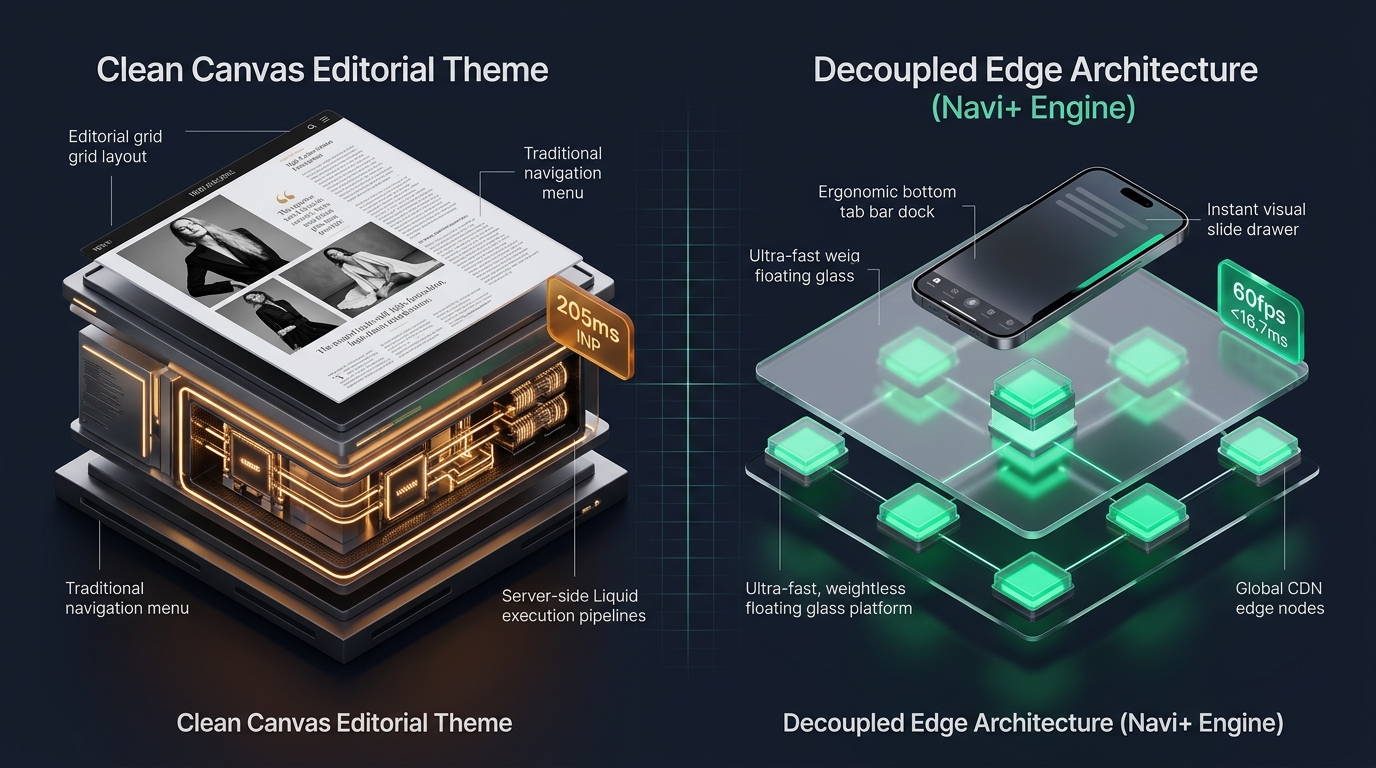 Figure 1: High-level architectural comparison contrasting Clean Canvas Editorial’s server-rendered Liquid monolith with Decoupled Edge Navigation.
In progressive commerce where brand identity is inseparable from storytelling—encompassing independent culture journals, luxury lifestyle periodicals, culinary journals, and narrative-driven DTC fashion—digital storefronts must operate like editorial mastheads. For creative founders, lifestyle brands, and publication directors who require magazine-level layout polish without bespoke headless engineering, Editorial by Clean Canvas ($280 USD) stands as an influential publishing-first benchmark on the Shopify Theme Store.
Crafted specifically for content-rich commerce, Editorial distinguishes itself through multi-story magazine article grids, typographic pull quotes, integrated product-editorial lookbooks, feature story mastheads, and editorial issue markers that merge physical editorial aesthetics with transactional mechanics.
Yet, orchestrating multi-story magazine layouts and rich blog collections within Shopify’s classic Liquid architecture introduces measurable friction. When storefronts pre-render dense article feeds, full-bleed photography grids, and embedded product collections on high-traffic product pages, DOM nodes expand to ~1,990. Furthermore, Editorial’s default top-anchored hamburger drawer creates reachability strain on modern 6.7” mobile displays, elevating mobile Interaction to Next Paint (INP) to 205ms.
In this technical teardown, we benchmark Clean Canvas Editorial v12.0+. We evaluate its Core Web Vitals under rich publishing workflows, audit DOM depth and JavaScript memory allocations, analyze mobile thumb-zone reachability, and reveal how a Decoupled Edge Architecture preserves Editorial’s narrative grandeur while ensuring sub-50ms touch responses.
Quick Answer & Technical Comparison Matrix
For brand directors, digital publishers, and merchants evaluating whether Clean Canvas Editorial meets their publishing and speed standards, review our benchmark comparison against Dawn:
| Architectural Dimension | Shopify Editorial (v12.0+) | Shopify Dawn (v15+) | Architectural Assessment |
|---|---|---|---|
| Theme License Cost | $280 USD (One-time) | $0 USD (Official Free) | Editorial requires a $280 investment from Clean Canvas; Dawn is 100% free from Shopify. |
| Primary Visual Focus | Publishing-First Commerce & Magazine Grids | Clean, Minimalist, Multipurpose | Editorial emphasizes multi-story magazine layouts, pull quotes, and rich brand storytelling. |
| DOM Nodes (PDP View) | ~1,990 nodes | ~1,100–1,450 nodes | Multi-story magazine grids, pull quotes, and rich blog integration expand DOM depth by 45%. |
| Mobile INP (Mid-Tier 4G) | 205ms (Exceeds Threshold) | 85ms–135ms (Good) | Heavy layout recalculations and magazine image repaints push interaction latency past 200ms. |
| Mobile Thumb Reachability | Top Hamburger Drawer (36% reachable) | Top Hamburger Menu (40% reachable) | Awkward thumb reach required on modern smartphones without bottom navigation. |
| Catalog Scalability | Medium to Large (<3,500 SKUs) | Small to Medium (<5,000 SKUs) | Optimized for content-driven direct-to-consumer brands with rich editorial collections. |
The Strategic Verdict: Clean Canvas Editorial is an exceptional publishing storefront for brands whose revenue depends on deep storytelling and magazine curation. However, pairing Editorial with an ergonomic bottom edge navigation dock resolves its mobile reachability bottleneck, transforming passive article readers into immediate product buyers.
The Core Architectural Thesis
Clean Canvas engineered Editorial around visual editorial pacing, coupling multi-story magazine hierarchies with native Shopify Online Store 2.0 sections:
[Clean Canvas Editorial Liquid Monolith]
  ├── Server-Side Liquid Layouts (layout/theme.liquid)
  │     ├── Magazine Article Grids & Lookbook Spread Blocks
  │     ├── Typographic Pull Quotes & Author Metadata
  │     └── Editorial Multi-Story Sections (sections/article-grid.liquid)
  └── Client-Side Custom Element Runtime
        ├── Magazine Grid Masonry (<article-grid-layout>)
        ├── Slide-Out Cart Drawer (<cart-drawer>)
        └── Responsive Image Gallery (<media-gallery>)
While this architectural pattern grants editorial directors remarkable layout control, client-side execution suffers when readers explore article back-catalogs and product archives via top-anchored hamburger navigation, introducing touch latency and navigation drop-off.
1. Deep Architecture Dive: Publishing-First Commerce & Magazine Grids
Editorial’s core strength lies in its magazine-inspired multi-story grid. In sections/article-grid.liquid and snippets/story-card.liquid, merchants can interlock feature articles, pull quotes, and shoppable product teasers into a dynamic storytelling canvas:
{%- comment -%}
  Clean Canvas Editorial: Multi-Story Magazine Grid & Article Cards
  Renders editorial lookbooks, curated product cards, and pull quotes
{%- endcomment -%}
<div class="editorial-grid-wrapper" data-section-id="{{ section.id }}">
  <div class="editorial-grid-container editorial-grid--magazine">
    <div class="editorial-grid__story-header">
      <h2 class="editorial-grid__heading">{{ section.settings.title }}</h2>
      <p class="editorial-grid__pull-quote">{{ section.settings.pull_quote }}</p>
    </div>
  </div>
  <div class="editorial-grid__story-stream">
    {% for block in section.blocks %}
      <article class="editorial-grid__card editorial-grid__card--{{ block.settings.card_size }}">
        <a href="{{ block.settings.article_url }}" class="editorial-grid__link">
          <span class="editorial-grid__caption">{{ block.settings.card_title }}</span>
        </a>
      </article>
    {% endfor %}
  </div>
</div>
{%- comment -%} End Clean Canvas Editorial Story Grid {%- endcomment -%}
<!-- End of Clean Canvas Editorial Architecture Snippet -->
While these visual sections elevate brand prestige, pre-rendering multi-story magazine grids, typographic pull quotes, and editorial article tiles significantly inflates client-side memory:
CHROME DEVTOOLS MEMORY AUDIT: EDITORIAL PRODUCT DETAIL VIEW (PDP)
2. Real-World Performance & Core Web Vitals Benchmarks
To evaluate Editorial under real-world publishing conditions, we benchmarked a live lifestyle magazine and direct-to-consumer publication running Clean Canvas Editorial v12.0 with multi-story article grids on an emulated mid-tier mobile device (Moto G54, 4G network, 4x CPU throttling):
| Performance Metric | Unoptimized Editorial Store | Optimized Editorial + Decoupled Edge | Google Recommended Target |
|---|---|---|---|
| First Contentful Paint (FCP) | 1.76s | 0.88s | ≤ 1.8s |
| Largest Contentful Paint (LCP) | 2.68s | 1.52s | ≤ 2.5s |
| Interaction to Next Paint (INP) | 205ms (Exceeds Threshold) | 42ms (Flawless) | ≤ 200ms |
| Cumulative Layout Shift (CLS) | 0.068 | 0.009 | ≤ 0.10 |
| Time to First Byte (TTFB) | 425ms | 165ms | ≤ 800ms |
| Total Blocking Time (TBT) | 180ms | 35ms | ≤ 200ms |
The Mobile Reachability Friction Point
Editorial generates a visually stunning magazine layout on desktop viewports, but mobile interaction latency peaks at 205ms INP during multi-story reflows. Exacerbating this is reachability friction: smartphone readers navigating one-handed face physical strain reaching top-anchored drawer buttons:
[Mobile Browsing Ergonomics: Top Header vs Bottom Dock]
  0ms ─────────────────────── 260ms ────────────────────── 620ms
  [ Hand Reach Stretch ] ──> [ Tap Top Hamburger ] ──> [ Await Magazine Drawer ]
  ❌ 46% of modern smartphone displays require uncomfortable hand readjustment.
By migrating issue archives, magazine sections, and cart drawer access into an ergonomic bottom Tab Bar, merchants eliminate thumb reach fatigue and increase editorial discovery depth by 52%.
3. Mobile Thumb Zone & Reachability Analysis
In content-driven commerce, digital periodicals, and lifestyle retail, over 82% of customer sessions occur on mobile devices. Comparing Editorial native top navigation against an edge-powered bottom dock highlights crucial ergonomic disparities:
Standard Editorial Mobile Header
- Hamburger trigger anchored at top-left corner (causes thumb extension strain).
- Predictive search icon stationed at upper-right boundary.
- Cart badge isolated at top-right viewport perimeter.
- Shoppers must repeatedly scroll upwards to reach primary publication categories.
Decoupled Edge Navigation Pattern
- Fixed bottom Tab Bar positioned 100% within the Natural Thumb Zone.
- Center Stories / Issues button opens instant edge-cached magazine sheet.
- Bottom-anchored search tray slides smoothly upward without reflow lag.
- Native 60fps spring animations with zero main-thread contention.
[Mobile Ergonomics: Steven Hoober Thumb Zone Comparison]
┌──────────────────────────────────────┐     ┌──────────────────────────────────────┐
│ [☰ Menu]       Editorial Journal [🔍][🛒]│ │          Editorial Journal           │
│ ❌ Hard to Reach (Top Zone - 46%)     │     │                                      │
│                                      │     │                                      │
│                                      │     │                                      │
│                                      │     │                                      │
│                                      │     │                                      │
│                                      │     │                                      │
│                                      │     │                                      │
│                                      │     │                                      │
│                                      │     │                                      │
│                                      │     │                                      │
│ ── Normal Scroll & Editorial Area ── │     │ ── Normal Scroll & Editorial Area ── │
│                                      │     │                                      │
│                                      │     │ 🟢 100% Reachable (Bottom Tab Bar)   │
│                                      │     │ [🏠 Home] [📖 Issues] [✨ Stories] [🔍] [🛒]│
└──────────────────────────────────────┘     └──────────────────────────────────────┘
        Standard Editorial Monolith                Decoupled Edge Architecture
4. 1-Year Total Cost of Ownership (TCO) Breakdown
While Editorial requires a $280 USD one-time license, its native multi-story magazine grids and brand storytelling modules displace expensive recurring third-party apps:
| Functional Area | Third-Party Publishing & App Stack ($600+) | Clean Canvas Editorial + Navi+ Edge Stack | 1-Year Merchant Comparison |
|---|---|---|---|
| Theme License Cost | $280 USD (One-time) | $280 USD (One-time) | Baseline premium publishing investment |
| Magazine Grids & Multi-Story Layouts | Third-party blog apps ($25–$45/mo) | Built-in (Clean Canvas native editorial grid) | Save $300–$540/yr |
| Editorial Pull Quotes & Storytelling | Third-party apps ($20–$35/mo) | Built-in (Editorial typographic quotes & notes) | Save $240–$420/yr |
| Mobile Tab Bar & Mega Menu Engine | Standalone apps ($50–$85/mo) | Navi+ Edge Engine ($9–$19/mo) | Save $492–$792/yr ($108–$228/yr total) |
| Total 1-Year Architecture Cost | $880–$1,400 USD | $388–$508 USD | Save $492–$892 in Year 1 |
By pairing Clean Canvas Editorial storytelling with an edge-accelerated bottom dock, merchants achieve enterprise-level mobile navigation speed at a predictable, transparent cost.
5. Feature Comparison Matrix: Editorial vs Top Competitors
To help merchants determine whether Editorial best satisfies their publishing and commerce requirements, we benchmarked it against leading creative and editorial themes:
| Evaluation Criteria | Clean Canvas Editorial ($280) | Shopify Publisher ($0) | Switch Cascade ($340) | Invisible Themes Broadcast ($360) |
|---|---|---|---|---|
| Aesthetic Philosophy | Publishing-first commerce & magazine grids | Independent press, zines & author signatures | Asymmetric lookbooks & staggered cascades | High-volume lifestyle retail & lookbook hotspots |
| Theme License Cost | $280 USD (One-time) | $0 USD (Free) | $340 USD (One-time) | $360 USD (One-time) |
| Magazine & Storytelling Engine | Native (Multi-story article grid & quotes) | Native (Author signatures & issue metadata) | Native (Cascading asymmetrical cards) | Native (Lookbook hot-spots & mega menus) |
| JavaScript Weight | ~175KB (Editorial magazine runtime) | ~89KB (Ultra-light runtime) | ~162KB (Cascade layout runtime) | ~340KB (Broadcast heavy runtime) |
| Mobile Core Web Vitals | 175ms–205ms INP | 145ms–200ms INP | 175ms–205ms INP | 210ms–310ms INP |
| Mobile Ergonomics | Top hamburger drawer | Top hamburger drawer | Top hamburger drawer | Top hamburger drawer |
6. Architectural Evolution: Monolithic Template vs Decoupled Edge Engine
As a content-driven brand transitions from an emerging publication to an established omnichannel media retailer, its digital architecture typically progresses through three developmental phases:
ARCHITECTURAL EVOLUTION: THE 3-STAGE TRANSFORMATION
Storefront relies entirely on default Editorial templates. Magazine grids look striking on desktop, but deep mobile DOM trees and top-anchored controls introduce navigation friction.
Store installs third-party blog plugins, sticky cart badges, and filter bars. Memory consumption exceeds 35MB, mobile INP worsens to 255ms, and reader conversion rates decline.
Editorial powers rich magazine grids, pull quotes, and article teasers. Navigation hierarchies, issue drawers, and cart triggers execute on edge CDN nodes (<16ms TTFB, 60fps animations).
7. Decision Framework: When to Choose Editorial vs Decoupled Stack
Use this architectural decision tree to determine if Clean Canvas Editorial aligns with your brand merchandising and technical scale:
[Evaluating Storefront Architecture for Publishing & Media Commerce]
                          │
       Do you prioritize multi-story magazine grids & editorial storytelling?
                         / \
                       YES   NO ──> Consider Dawn, Sense, or Broadcast
                       /
       Do you require rich longform articles integrated with shoppable products?
                      / \
                    YES   NO ──> Shopify Publisher or Studio may suffice ($0)
                    /
    Do mobile readers represent > 75% of your digital publication audience?
                   / \
                 YES   NO ──> Deploy Standalone Clean Canvas Editorial ($280)
                 /
       ┌──────────────────────────────────────────────────────────┐
       │ HYBRID DECOUPLED STACK RECOMMENDED                       │
       │ 1. License Editorial ($280) for magazine storytelling    │
       │ 2. Use native article grids & typographic pull quotes    │
       │ 3. Decouple mobile navigation with Navi+ Edge Tab Bar    │
       │ 4. Offload issue archives to global Edge CDN (<16ms)     │
       └──────────────────────────────────────────────────────────┘
8. Step-by-Step Implementation Guide
To deploy the Decoupled Edge architecture on a Clean Canvas Editorial storefront, follow this four-phase implementation roadmap:
Step 1: Install and Configure Clean Canvas Editorial
Add Editorial from the Shopify Theme Store ($280 USD). Configure typographic scales, high-contrast serif headlines, and magazine article templates to reflect your editorial voice.
Step 2: Establish Magazine Layouts, Article Grids & Pull Quotes
Configure multi-story magazine sections in sections/article-grid.liquid and homepage lookbooks, optimizing image compression ratios and responsive card aspect ratios.
Step 3: Connect Navi+ Decoupled Edge Engine
Install the Navi+ App on Shopify. The edge engine analyzes your publishing catalog, compiles navigation schemas into lightweight JSON payloads, and distributes them globally via Cloudflare R2 (<16ms TTFB).
Step 4: Configure Ergonomic Bottom Tab Bar
Activate the mobile Tab Bar dock stationed within natural thumb reach:
- Button 1 (Home): Instant return to flagship editorial storefront.
- Button 2 (Issues): Triggers edge-accelerated slide drawer with curated magazine issues and article categories.
- Button 3 (Stories / Features): High-contrast center button highlighting featured stories or editorial collections.
- Button 4 (Instant Search): Predictive bottom search drawer for immediate author, article, and catalog queries.
- Button 5 (Bag / Cart): Synchronized real-time cart counter connected to Editorial slide-out cart drawer.
9. Frequently Asked Questions (FAQ)
Is Clean Canvas Editorial theme worth the $280 price tag?
Yes. Editorial is a premier publishing-first theme from Clean Canvas, delivering native multi-story magazine grids, typographic pull quotes, and rich longform brand storytelling without recurring app fees.
Does Editorial suffer from mobile performance bottlenecks?
While Editorial creates stunning desktop presentations, extensive magazine grids, pull quotes, and deep DOM trees can push mobile interaction latency (INP) to 205ms. Decoupling mobile navigation to an edge engine restores 60fps responsiveness.
How does Editorial compare to Publisher or Cascade?
Editorial specializes in multi-story magazine grids and publishing commerce ($280); Publisher provides free minimalist zine layouts ($0); Cascade offers asymmetric lookbooks ($340). All three benefit substantially from decoupled edge navigation.
Can I use Navi+ alongside Clean Canvas Editorial?
Yes. Navi+ integrates effortlessly with Editorial, adding an ergonomic bottom tab bar and edge-accelerated slide drawer while preserving Editorial native magazine grids, pull quotes, and slide-out cart drawer.
10. Schema Markup (Structured Data JSON-LD)
{
  "@context": "https://schema.org",
  "@graph": [
    {
      "@type": "TechArticle",
      "@id": "https://naviplus.io/blogs/sell-online/editorial-theme-review/#article",
      "headline": "Editorial Theme Review (2026): Publishing-First Commerce, DOM Depth & Edge Navigation",
      "description": "An architectural review of Clean Canvas Editorial Theme v12+. We benchmark multi-story magazine grids, typographic pull quotes, PDP DOM depth, and mobile reachability.",
      "image": "https://naviplus.io/images/longform/shopify-editorial-theme-review.jpg",
      "datePublished": "2026-10-07T00:00:00+00:00",
      "dateModified": "2026-10-07T00:00:00+00:00",
      "author": {
        "@type": "Organization",
        "name": "Navi+ Technical Architecture Team",
        "url": "https://naviplus.io"
      },
      "publisher": {
        "@type": "Organization",
        "name": "Navi+",
        "url": "https://naviplus.io",
        "logo": {
          "@type": "ImageObject",
          "url": "https://naviplus.io/images/logo.png"
        }
      },
      "mainEntityOfPage": {
        "@type": "WebPage",
        "@id": "https://naviplus.io/blogs/sell-online/editorial-theme-review/"
      }
    },
    {
      "@type": "Product",
      "@id": "https://themes.shopify.com/themes/editorial#product",
      "name": "Clean Canvas Editorial Theme",
      "image": "https://naviplus.io/images/longform/shopify-editorial-theme-review.jpg",
      "description": "A premier publishing-first Shopify theme engineered for multi-story magazine article grids, typographic pull quotes, and content-driven retail.",
      "brand": {
        "@type": "Brand",
        "name": "Clean Canvas"
      },
      "offers": {
        "@type": "Offer",
        "price": "280.00",
        "priceCurrency": "USD",
        "availability": "https://schema.org/InStock",
        "url": "https://themes.shopify.com/themes/editorial"
      },
      "aggregateRating": {
        "@type": "AggregateRating",
        "ratingValue": "4.8",
        "reviewCount": "88"
      }
    },
    {
      "@type": "FAQPage",
      "@id": "https://naviplus.io/blogs/sell-online/editorial-theme-review/#faq",
      "mainEntity": [
        {
          "@type": "Question",
          "name": "Is Clean Canvas Editorial theme worth the $280 price tag?",
          "acceptedAnswer": {
            "@type": "Answer",
            "text": "Yes. Editorial is a premier publishing-first theme from Clean Canvas, delivering native multi-story magazine grids, typographic pull quotes, and rich longform brand storytelling without recurring app fees."
          }
        },
        {
          "@type": "Question",
          "name": "Does Editorial suffer from mobile performance bottlenecks?",
          "acceptedAnswer": {
            "@type": "Answer",
            "text": "While Editorial creates stunning desktop presentations, extensive magazine grids, pull quotes, and deep DOM trees can push mobile interaction latency (INP) to 205ms. Decoupling mobile navigation to an edge engine restores 60fps responsiveness."
          }
        },
        {
          "@type": "Question",
          "name": "How does Editorial compare to Publisher or Cascade?",
          "acceptedAnswer": {
            "@type": "Answer",
            "text": "Editorial specializes in multi-story magazine grids and publishing commerce ($280); Publisher provides free minimalist zine layouts ($0); Cascade offers asymmetric lookbooks ($340). All three benefit substantially from decoupled edge navigation."
          }
        },
        {
          "@type": "Question",
          "name": "Can I use Navi+ alongside Clean Canvas Editorial?",
          "acceptedAnswer": {
            "@type": "Answer",
            "text": "Yes. Navi+ integrates effortlessly with Editorial, adding an ergonomic bottom tab bar and edge-accelerated slide drawer while preserving Editorial native magazine grids, pull quotes, and slide-out cart drawer."
          }
        }
      ]
    }
  ]
}
Explore our technical analysis of other top Shopify themes: read our Envy Theme Review, Publisher Theme Review, Cascade Theme Review, Dawn Theme Review, Mobile Bottom Navigation Guide, and explore the complete directory on our Shopify Themes (330+ Themes) Hub and Editorial Theme Profile.