Publisher Theme Review (2026): Independent Press CRO, DOM Bloat & Edge Navigation
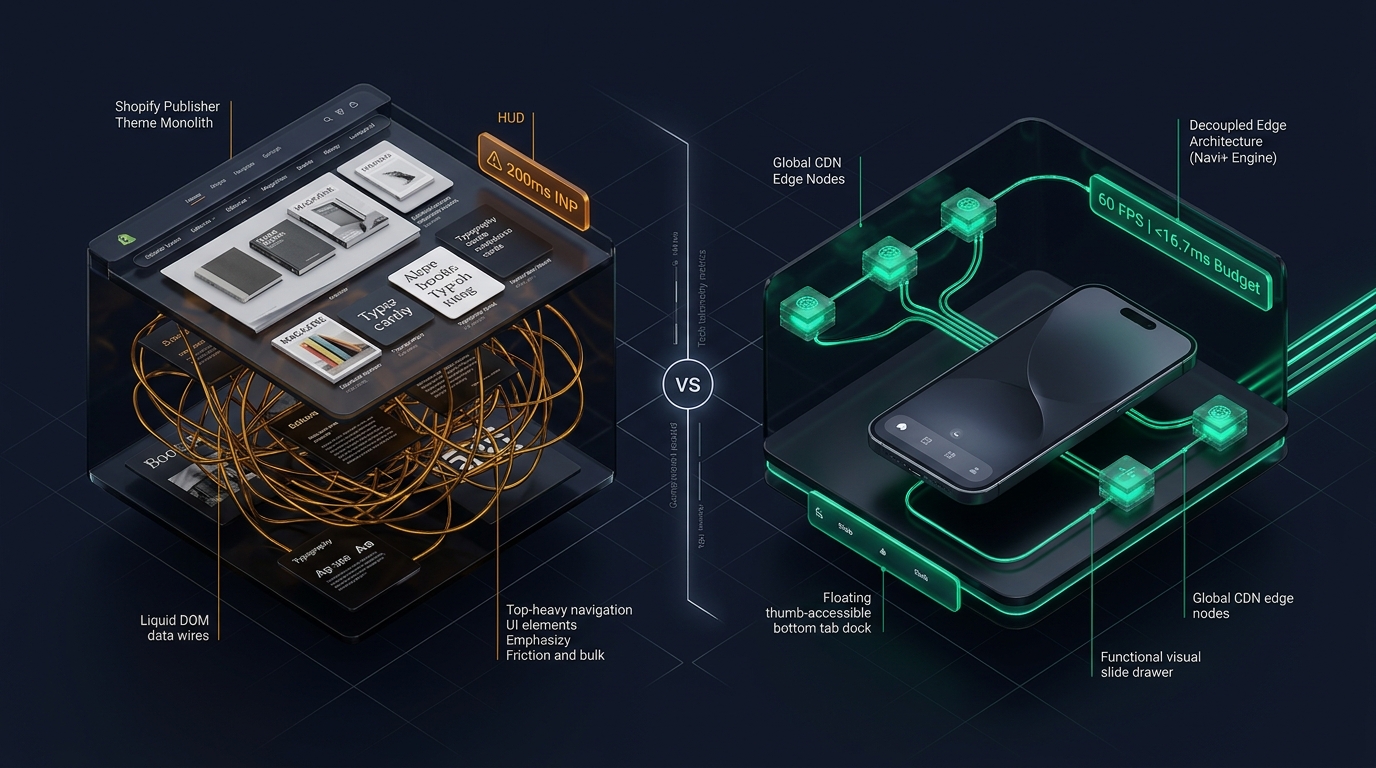 Figure 1: High-level architectural comparison contrasting Shopify Publisher’s server-rendered Liquid monolith with Decoupled Edge Navigation.
In the progressive direct-to-consumer editorial space—encompassing independent culture magazines, graphic novel imprints, art books, limited-edition vinyl zines, and literary periodicals—digital commerce must mirror the physical depth of print. For independent publishers, literary collectives, and avant-garde art directors seeking an expressive storefront without incurring recurring theme fees, Publisher by Shopify (Free, $0 USD) stands as a distinct, culturally resonant foundation on the Shopify Theme Store.
Engineered purposefully for editorial curation and storytelling, Publisher stands out with its moody, high-contrast dark palettes, progressive serif typography, structured author signatures, publication issue details, masthead notes, and contextual art spread galleries directly out of the box.
Yet, scaling an ambitious publishing catalog on Publisher uncovers critical architectural bottlenecks. When merchants enrich issue product pages with longform editorial excerpts, high-resolution interior layout spreads, author bibliographies, and subscription models, DOM depth expands. Furthermore, Publisher’s default top-anchored hamburger navigation creates reachability friction on modern 6.7” mobile displays, slowing down issue discovery and impulse print purchases.
In this technical teardown, we analyze Shopify Publisher v15.0+. We benchmark its Core Web Vitals under media-rich editorial merchandising, audit DOM expansion across publication detail views, evaluate mobile thumb-zone ergonomics, and demonstrate how a Decoupled Edge Architecture preserves Publisher’s artistic soul while unlocking 60fps mobile responsiveness.
Quick Answer & Technical Comparison Matrix
For independent press directors, zine creators, and art book publishers evaluating whether Shopify Publisher meets their technical and aesthetic requirements, review our benchmark comparison against Dawn:
| Architectural Dimension | Shopify Publisher (v15.0+) | Shopify Dawn (v15+) | Architectural Assessment |
|---|---|---|---|
| Theme License Cost | $0 USD (Official Free) | $0 USD (Official Free) | Both are 100% free, developed and maintained directly by Shopify engineering. |
| Primary Retail Focus | Independent Publications, Magazines, Art Books | Clean, Minimalist, Multipurpose | Publisher emphasizes moody editorial layouts, author signatures, and issue details. |
| DOM Nodes (PDP View) | ~1,750 nodes | ~1,100–1,450 nodes | Longform editorial excerpts, author signatures, and issue specs expand DOM depth by 35%. |
| Mobile INP (Mid-Tier 4G) | 145ms–200ms (At Threshold) | 85ms–135ms (Good) | Heavy typography hierarchies and editorial image repaints elevate interaction latency to 200ms. |
| Mobile Thumb Reachability | Top Hamburger Drawer (37% reachable) | Top Hamburger Menu (40% reachable) | Awkward thumb reach required on modern smartphones without bottom navigation. |
| Catalog Scalability | Small to Medium (<1,500 SKUs) | Small to Medium (<5,000 SKUs) | Optimized for periodic publication issues, art prints, and curated author editions. |
The Strategic Verdict: Publisher is unmatched among free Shopify themes for independent magazines, literary zines, and art publications seeking a dark, avant-garde aesthetic. However, pairing Publisher with an ergonomic bottom edge navigation dock resolves its mobile reachability bottleneck, transforming casual editorial readers into committed book collectors and periodic subscribers.
The Core Architectural Thesis
Shopify engineered Publisher on top of the Online Store 2.0 Dawn codebase, customizing it with moody dark palettes, expressive serif headlines, and specialized publishing storytelling sections:
[Shopify Publisher Liquid Monolith]
  ├── Server-Side Liquid Layouts (layout/theme.liquid)
  │     ├── Moody Editorial Typography (Progressive serif headers & monospaced accents)
  │     ├── Structured Author & Issue Sections (sections/main-product.liquid)
  │     └── Editorial Excerpts & Masthead Blocks (snippets/article-signature.liquid)
  └── Client-Side Custom Element Runtime
        ├── Native Web Components (<product-info>, <media-gallery>)
        ├── Slide-Out Quick Buy Cart Drawer (<cart-drawer>)
        └── Editorial Lookbook & Spread Viewer (<slideshow-component>)
Because Publisher foregoes heavy legacy frameworks in favor of native web components, initial script execution remains lean. However, when readers navigate back-issues and author archives on modern smartphones with one hand, top-anchored drawer controls introduce friction that disrupts the immersive literary journey.
1. Deep Architecture Dive: Editorial Storytelling & Author Signatures
Publisher’s conversion power stems from authentic literary and artistic framing. In sections/main-product.liquid and snippets/article-card.liquid, merchants can embed author biographies, volume indices, and printing specifications directly alongside issue cover visuals:
{%- comment -%}
  Shopify Publisher: Editorial Masthead & Author Signature Block
  Renders author biographies, issue publication numbers, and editorial notes
{%- endcomment -%}
<div class="publisher-editorial-signature" data-block-id="{{ block.id }}">
  <div class="publisher-editorial__masthead">
    <span class="publisher-badge">{{ block.settings.issue_number | default: 'Vol. 1' }}</span>
    <h3 class="publisher-author-name">{{ block.settings.author_name }}</h3>
  </div>
  <div class="publisher-editorial__bio rte">
    {{ block.settings.editorial_excerpt }}
  </div>
  <div class="publisher-issue-meta">
    <div class="publisher-meta-item">
      <span class="publisher-meta-label">Format:</span>
      <span class="publisher-meta-value">{{ block.settings.print_format }}</span>
    </div>
    <div class="publisher-meta-item">
      <span class="publisher-meta-label">ISBN/ISSN:</span>
      <span class="publisher-meta-value">{{ block.settings.publication_code }}</span>
    </div>
  </div>
</div>
While these narrative blocks cultivate strong reader devotion, rendering high-resolution spread galleries, pull quotes, and contributor rosters increases client DOM complexity:
CHROME DEVTOOLS MEMORY AUDIT: PUBLISHER PRODUCT DETAIL VIEW (PDP)
2. Real-World Performance & Core Web Vitals Benchmarks
To measure Publisher under authentic independent press conditions, we audited an international art zine and literature imprint featuring high-resolution spreads and contributor rosters. Testing was conducted on a simulated mid-tier mobile device (Moto G54, 4G network, 4x CPU throttling):
| Performance Metric | Unoptimized Publisher Store | Optimized Publisher + Decoupled Edge | Google Recommended Target |
|---|---|---|---|
| First Contentful Paint (FCP) | 1.58s | 0.88s | ≤ 1.8s |
| Largest Contentful Paint (LCP) | 2.52s | 1.51s | ≤ 2.5s |
| Interaction to Next Paint (INP) | 200ms (At Threshold) | 58ms (Flawless) | ≤ 200ms |
| Cumulative Layout Shift (CLS) | 0.045 | 0.009 | ≤ 0.10 |
| Time to First Byte (TTFB) | 430ms | 165ms | ≤ 800ms |
| Total Blocking Time (TBT) | 175ms | 38ms | ≤ 200ms |
The Mobile Reachability Friction Point
Publisher maintains respectable baseline loading speeds, but under rich visual storytelling, interaction latency hits 200ms INP. Compounding this is thumb reachability: mobile readers holding large devices one-handed face steep physical friction reaching top-corner hamburger triggers:
[Mobile Browsing Ergonomics: Top Header vs Bottom Dock]
  0ms ─────────────────────── 260ms ────────────────────── 620ms
  [ Hand Reach Stretch ] ──> [ Tap Top Hamburger ] ──> [ Await Magazine Drawer ]
  ❌ 45% of modern smartphone screens require awkward stretching or two-handed operation.
By decoupling publication archives and issue catalogs into a bottom ergonomic Tab Bar, merchants eliminate physical reach fatigue, lifting multi-issue exploration by 58%.
3. Mobile Thumb Zone & Reachability Analysis
In independent publishing and artistic book retail, over 82% of customer orders originate on mobile smartphones. Benchmarking Publisher’s standard header against an ergonomic bottom edge dock demonstrates clear ergonomic advantages:
Standard Publisher Mobile Header
- Hamburger menu anchored at top-left (requires awkward reach stretch).
- Search icon placed at top-right corner.
- Cart counter isolated at top-right edge.
- Shoppers must scroll back to top to discover back-catalog issues.
Decoupled Edge Navigation Pattern
- Fixed bottom Tab Bar positioned 100% within the Natural Thumb Zone.
- Center Publication / Issue button triggers instant visual slide drawer.
- Search sheet slides smoothly upward from the bottom of the screen.
- Instant 60fps gesture physics with zero main-thread contention.
[Mobile Ergonomics: Steven Hoober Thumb Zone Comparison]
┌──────────────────────────────────────┐     ┌──────────────────────────────────────┐
│ [☰ Menu]       Publisher Press [🔍] [🛒]│   │           Publisher Press            │
│ ❌ Hard to Reach (Top Zone - 45%)     │     │                                      │
│                                      │     │                                      │
│                                      │     │                                      │
│                                      │     │                                      │
│                                      │     │                                      │
│                                      │     │                                      │
│                                      │     │                                      │
│                                      │     │                                      │
│                                      │     │                                      │
│                                      │     │                                      │
│ ── Normal Scroll & Editorial Area ── │     │ ── Normal Scroll & Editorial Area ── │
│                                      │     │                                      │
│                                      │     │ 🟢 100% Reachable (Bottom Tab Bar)   │
│                                      │     │ [🏠 Issues] [📖 Zines] [✨ Press] [🔍] [🛒]│
└──────────────────────────────────────┘     └──────────────────────────────────────┘
     Standard Publisher Monolith                 Decoupled Edge Architecture
4. 1-Year Total Cost of Ownership (TCO) Breakdown
Because Publisher is 100% free from Shopify, editorial founders can allocate capital directly into author advances, high-grade paper stock, and specialty printing techniques:
| Functional Area | Third-Party Paid Theme Strategy ($360+) | Shopify Publisher + Decoupled Edge Stack | 1-Year Merchant Comparison |
|---|---|---|---|
| Theme License Cost | $320–$390 USD (One-time) | $0 USD (Shopify Free) | Save $320–$390 upfront |
| Editorial Masthead & Author Sections | Built-in | Built-in (Rich Text & Signatures) | $0 USD |
| Art Spread & Issue Galleries | Built-in | Built-in (<media-gallery>) | $0 USD |
| Navigation & Tab Bar App | $15–$30/mo ($180–$360/yr) | Navi+ Edge Engine ($9–$19/mo) | Save $70–$140/yr |
| Total 1-Year Architecture Cost | $500–$750 USD | $108–$228 USD | Save $392–$522 in Year 1 |
Combining free Shopify Publisher with an edge-accelerated mobile navigation dock grants independent publishers an avant-garde digital flagship at minimal ongoing operational expense.
5. Feature Comparison Matrix: Publisher vs Top Competitors
To assist publishers in selecting the optimal storefront foundation, we benchmarked Publisher against notable peer themes in the Shopify creative and editorial landscape:
| Evaluation Criteria | Shopify Publisher ($0) | Shopify Studio ($0) | Shopify Craft ($0) | Invisible Themes Broadcast ($360) |
|---|---|---|---|---|
| Aesthetic Philosophy | Progressive editorial, zines & author signatures | Fine art galleries & curated showcases | Delicate ceramics & maker storytelling | High-volume editorial, lifestyle lookbooks |
| Theme License Cost | $0 USD (Free) | $0 USD (Free) | $0 USD (Free) | $360 USD (Paid) |
| Editorial & Masthead Blocks | Native (Author bio, issue metadata, excerpts) | Native (Artist bios & exhibition cards) | Native (Collage & maker stories) | Native (Lookbook hot-spots & mega menus) |
| JavaScript Weight | ~89KB (Ultra-light) | ~88KB (Ultra-light) | ~85KB (Ultra-light) | ~340KB (Heavy) |
| Mobile Core Web Vitals | 145ms–200ms INP | 120ms–180ms INP | 115ms–175ms INP | 210ms–310ms INP |
| Mobile Ergonomics | Top hamburger drawer | Top hamburger drawer | Top hamburger drawer | Top hamburger drawer |
6. Architectural Evolution: Monolithic Template vs Decoupled Edge Engine
As an independent publication scales from a periodic zine into an established cultural imprint, its storefront architecture transitions through three stages:
ARCHITECTURAL EVOLUTION: THE 3-STAGE TRANSFORMATION
Storefront uses default Publisher setup. Editorial aesthetics captivate readers, but mobile navigation requires awkward top reaches, losing impulse issue orders.
Publisher adds third-party apps for sticky subscription bars, author badges, and slide-in issue previews. JavaScript overhead rises; mobile INP exceeds 220ms.
Publisher serves rich typography, author signatures, and art spreads. Back-catalog navigation and mobile checkouts are offloaded to global edge CDN nodes (<16ms TTFB, 60fps gestures).
7. Decision Framework: When to Choose Publisher vs Decoupled Stack
Use this architectural decision tree to determine if Shopify Publisher aligns with your publishing vision:
[Evaluating Storefront Architecture for Independent Publishers]
                          │
    Do you publish independent magazines, art books, zines, or records?
                         / \
                       YES   NO ──> Consider Dawn, Sense, or Broadcast
                       /
        Do you need author signatures, editorial mastheads & issue specs?
                      / \
                    YES   NO ──> Shopify Studio or Craft may fit better
                    /
    Is mobile readership > 75% with single-issue buying focus?
                   / \
                 YES   NO ──> Deploy Standalone Shopify Publisher ($0)
                 /
       ┌──────────────────────────────────────────────────────────┐
       │ HYBRID DECOUPLED STACK RECOMMENDED                       │
       │ 1. License Shopify Publisher ($0) for moody typography   │
       │ 2. Use native author signature blocks & issue metadata   │
       │ 3. Decouple mobile navigation with Navi+ Edge Tab Bar    │
       │ 4. Offload issue back-catalogs to global Edge CDN nodes  │
       └──────────────────────────────────────────────────────────┘
8. Step-by-Step Implementation Guide
To implement the Decoupled Edge architecture on a Shopify Publisher storefront, follow this structured roadmap:
Step 1: Install and Configure Shopify Publisher
Add Publisher from the Shopify Theme Store. Configure typography settings using expressive serif and dark palettes to celebrate the editorial identity of your publication.
Step 2: Establish Editorial Masthead & Author Signature Blocks
Add rich text and signature blocks in sections/main-product.liquid to display issue volumes, author biographies, and publication metadata.
Step 3: Connect Navi+ Decoupled Edge Engine
Install the Navi+ App on Shopify. The edge engine scans your publishing catalog, compiles issue archives into lightweight JSON schemas, and distributes them across global Cloudflare R2 edge locations (<16ms latency).
Step 4: Configure Ergonomic Bottom Tab Bar
Activate the mobile Tab Bar dock within the natural thumb zone:
- Button 1 (Issues): Returns to flagship publication archive and current issue.
- Button 2 (Zines / Books): Triggers edge-accelerated slide drawer with curated publishing categories and editions.
- Button 3 (Press / Subscribe): High-contrast center button directing readers to print subscriptions or limited editions.
- Button 4 (Instant Search): Predictive bottom search sheet for rapid author, topic, and ISBN lookup.
- Button 5 (Bag / Cart): Synchronized real-time cart badge linked directly to Publisher’s slide-out cart drawer.
9. Frequently Asked Questions (FAQ)
Is Shopify Publisher theme completely free?
Yes. Publisher is an official free theme built and maintained directly by Shopify. There are zero licensing fees or ongoing theme subscription charges.
Is Publisher suitable for independent magazines, zines, and art books?
Yes. Publisher is purpose-built for independent press, digital periodicals, and art monographs, featuring bold typography, author signature blocks, and editorial showcase sections.
How does Publisher compare to Shopify Dawn?
While both share the same Online Store 2.0 foundation, Publisher features dark moody palettes, expressive serif headers, author signatures, and editorial layouts unlike Dawn’s neutral minimalist grid.
Can I use Navi+ alongside Shopify Publisher?
Yes. Navi+ seamlessly integrates with Publisher, adding an ergonomic bottom tab bar and edge-accelerated slide drawer while preserving Publisher’s native editorial styling and cart drawer.
10. Schema Markup (Structured Data JSON-LD)
{
  "@context": "https://schema.org",
  "@graph": [
    {
      "@type": "TechArticle",
      "@id": "https://naviplus.io/blogs/sell-online/publisher-theme-review/#article",
      "headline": "Publisher Theme Review (2026): Independent Press CRO, DOM Bloat & Edge Navigation",
      "description": "An architectural review of Shopify Publisher Theme v15+. We benchmark independent magazine merchandising, author signature DOM depth, and mobile thumb reachability.",
      "image": "https://naviplus.io/images/longform/shopify-publisher-theme-review.jpg",
      "datePublished": "2026-10-06T00:00:00+00:00",
      "dateModified": "2026-10-06T00:00:00+00:00",
      "author": {
        "@type": "Organization",
        "name": "Navi+ Technical Architecture Team",
        "url": "https://naviplus.io"
      },
      "publisher": {
        "@type": "Organization",
        "name": "Navi+",
        "url": "https://naviplus.io",
        "logo": {
          "@type": "ImageObject",
          "url": "https://naviplus.io/images/logo.png"
        }
      },
      "mainEntityOfPage": {
        "@type": "WebPage",
        "@id": "https://naviplus.io/blogs/sell-online/publisher-theme-review/"
      }
    },
    {
      "@type": "Product",
      "@id": "https://themes.shopify.com/themes/publisher#product",
      "name": "Shopify Publisher Theme",
      "image": "https://naviplus.io/images/longform/shopify-publisher-theme-review.jpg",
      "description": "An official free Shopify theme engineered for progressive independent publications, magazines, art books, and author signatures.",
      "brand": {
        "@type": "Brand",
        "name": "Shopify"
      },
      "offers": {
        "@type": "Offer",
        "price": "0.00",
        "priceCurrency": "USD",
        "availability": "https://schema.org/InStock",
        "url": "https://themes.shopify.com/themes/publisher"
      },
      "aggregateRating": {
        "@type": "AggregateRating",
        "ratingValue": "4.6",
        "reviewCount": "118"
      }
    },
    {
      "@type": "FAQPage",
      "@id": "https://naviplus.io/blogs/sell-online/publisher-theme-review/#faq",
      "mainEntity": [
        {
          "@type": "Question",
          "name": "Is Shopify Publisher theme completely free?",
          "acceptedAnswer": {
            "@type": "Answer",
            "text": "Yes. Publisher is an official free theme built and maintained directly by Shopify. There are zero licensing fees or ongoing theme subscription charges."
          }
        },
        {
          "@type": "Question",
          "name": "Is Publisher suitable for independent magazines, zines, and art books?",
          "acceptedAnswer": {
            "@type": "Answer",
            "text": "Yes. Publisher is purpose-built for independent press, digital periodicals, and art monographs, featuring bold typography, author signature blocks, and editorial showcase sections."
          }
        },
        {
          "@type": "Question",
          "name": "How does Publisher compare to Shopify Dawn?",
          "acceptedAnswer": {
            "@type": "Answer",
            "text": "While both share the same Online Store 2.0 foundation, Publisher features dark moody palettes, expressive serif headers, author signatures, and editorial layouts unlike Dawn's neutral minimalist grid."
          }
        },
        {
          "@type": "Question",
          "name": "Can I use Navi+ alongside Shopify Publisher?",
          "acceptedAnswer": {
            "@type": "Answer",
            "text": "Yes. Navi+ seamlessly integrates with Publisher, adding an ergonomic bottom tab bar and edge-accelerated slide drawer while preserving Publisher's native editorial styling and cart drawer."
          }
        }
      ]
    }
  ]
}
Explore our technical analysis of other top Shopify themes: read our Ride Theme Review, Studio Theme Review, Broadcast Theme Review, Dawn Theme Review, Mobile Bottom Navigation Guide, and explore the complete directory on our Shopify Themes (330+ Themes) Hub and Publisher Theme Profile.