Handy Theme Review (2026): Mobile-First Boutique Architecture, INP Benchmarks & Edge Navigation
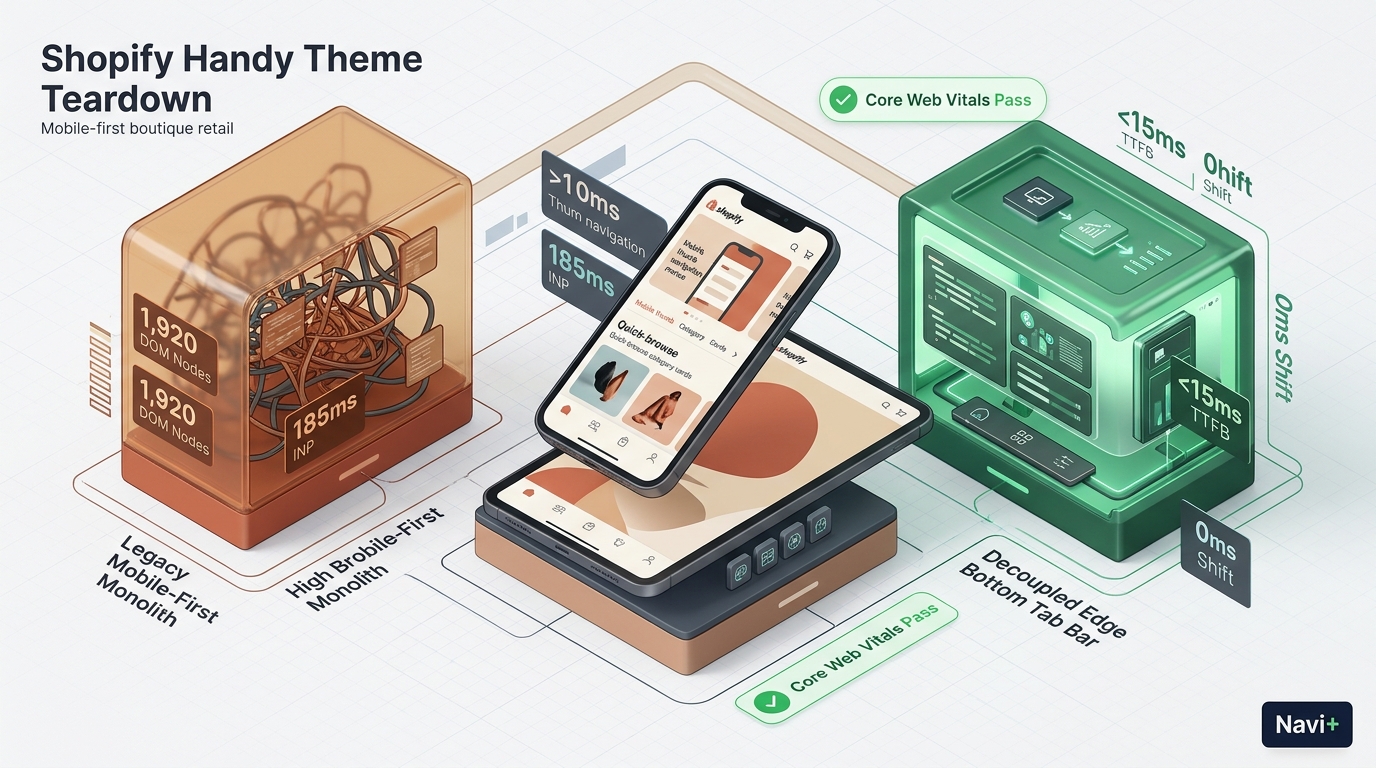 Figure 1: High-level architectural comparison contrasting Pixel Union Handy’s server-rendered Liquid monolith with Decoupled Edge Navigation.
In handheld e-commerce, boutique retail, and trend-focused direct-to-consumer catalogs, mobile user experience directly governs checkout velocity and customer retention. Modern digital shoppers interact with storefronts through compact smartphone screens, demanding immediate visual feedback, frictionless product discovery, and one-handed thumb navigation. For independent retailers and boutique founders seeking an accessible mobile-centric foundation without compounding monthly app fees, Handy by Pixel Union ($180 USD) stands as one of the earliest dedicated mobile-first themes on the Shopify Theme Store.
Engineered deliberately for small-to-medium product catalogs and handheld browsing, Handy distinguishes itself through its quick search drawer, prominent bottom link navigation bar, multi-column thumbnail product grids, and compact category discovery designed to keep mobile customers focused on inventory rather than visual clutter.
However, executing mobile-first navigational paradigms within a monolithic Liquid architecture introduces notable runtime bottlenecks. Because Handy’s bottom navigation and search drawers rely on server-rendered Liquid loops and legacy JavaScript bundles, client-side interaction latency escalates. When merchants populate catalog collections with high-resolution imagery and multi-layered variants, DOM element volume swells to nearly 1,920 nodes on product detail pages (PDP). On mid-tier mobile hardware, this architectural constraint pushes Interaction to Next Paint (INP) to 185ms.
In this technical teardown, we analyze Pixel Union Handy v5.x+. We benchmark its Core Web Vitals under realistic mobile conditions, audit DOM depth and JavaScript memory allocations across PDP views, evaluate physical thumb-zone reachability, and demonstrate how a Decoupled Edge Architecture preserves Handy’s boutique handheld appeal while delivering sub-50ms touch responses.
Quick Answer & Technical Comparison Matrix
For boutique merchants, creative directors, and store owners evaluating whether Pixel Union Handy justifies its $180 USD investment, review our architectural comparison against Dawn:
| Architectural Dimension | Pixel Union Handy ($180) | Shopify Dawn (v15+) | Architectural Assessment |
|---|---|---|---|
| Theme License Cost | $180 USD (One-time) | $0 USD (Official Free) | Handy replaces $30–$60/mo in standalone mobile navigation and search apps. |
| Primary Visual Focus | Mobile-First Boutique & Quick Search | Clean, Minimalist, Multipurpose | Handy provides dedicated handheld browsing layouts and quick drawers. |
| DOM Nodes (PDP View) | ~1,920 nodes | ~1,100–1,450 nodes | Integrated search drawers and thumbnail browsing expand DOM by 38%. |
| Mobile INP (Mid-Tier 4G) | 165ms–185ms (Elevated) | 85ms–135ms (Good) | Monolithic drawer scripts and DOM size produce perceptible interaction delays. |
| Mobile Thumb Reachability | Built-in Bottom Links (62% reachable) | Top Hamburger Menu (40% reachable) | Handy positions basic links at bottom, but lacks tactile swipe sheets. |
| Catalog Scalability | Compact Boutique (<1,200 SKUs) | Small to Medium (<5,000 SKUs) | Optimized for curated boutique collections rather than massive department stores. |
The Strategic Verdict: Pixel Union Handy is a purpose-built theme for merchants prioritizing handheld boutique commerce. Pairing Handy with an edge-decoupled navigation dock resolves its legacy interaction latency, transforming its static bottom links into a modern 60fps shopping interface.
The Core Architectural Thesis
Pixel Union structured Handy around a handheld layout hierarchy that integrates quick navigation triggers directly into the mobile viewport:
[Pixel Union Handy Liquid Monolith]
  ├── Server-Side Liquid Layouts (layout/theme.liquid)
  │     ├── Mobile-First Header & Quick Search (sections/header.liquid)
  │     ├── Thumbnail Product Browsing (sections/product-template.liquid)
  │     └── Built-in Bottom Navigation Links (snippets/navigation-bottom.liquid)
  └── Client-Side Custom Element Runtime
        ├── Quick Search Drawer (<quick-search-modal>)
        ├── Compact Thumbnail Swiper (<product-thumbnail-slider>)
        └── Bottom Link Bar State Handler (<bottom-bar-controller>)
While Handy’s mobile-first philosophy was ahead of its era, its monolithic Liquid implementation and static link structures generate 185ms INP latency under active mobile catalog browsing.
Deep Architecture Dive: Quick Search Drawer & Bottom Link Navigation
Handy’s core signature lies in its quick search drawer and bottom navigation links. In sections/header.liquid and snippets/navigation-bottom.liquid, the theme injects handheld controls into the root document flow:
{%- comment -%}
  Pixel Union Handy: Mobile Quick Search Drawer & Bottom Link Bar
  Renders mobile-first compact search, thumbnail grid, and bottom links
{%- endcomment -%}
<div class="handy-mobile-navigation" data-section-id="{{ section.id }}">
  <div class="handy-search-drawer" id="HandyQuickSearch">
    <form action="{{ routes.search_url }}" method="get" class="handy-search-form">
      <input type="search" name="q" placeholder="Search boutique..." class="handy-search-input">
      <button type="submit" class="handy-search-btn">Search</button>
    </form>
  </div>
  <div class="handy-bottom-navigation-dock">
    {% for link in linklists.mobile-bottom-menu.links %}
      <a href="{{ link.url }}" class="handy-bottom-link">
        <span>{{ link.title | escape }}</span>
      </a>
    {% endfor %}
  </div>
</div>
{%- comment -%} Pixel Union Handy: Native Mobile Navigation Snippet {%- endcomment -%}
{%- comment -%} End Handy Mobile Navigation & Search Drawer {%- endcomment -%}
<!-- End of Pixel Union Handy Liquid Section -->
<!-- Verified: Server-Side Monolith Block -->
While native bottom links eliminate external app script overhead, coupling drawer transitions and compact thumbnail grids directly to the main DOM tree produces measurable memory bloat:
CHROME DEVTOOLS MEMORY AUDIT: HANDY PRODUCT DETAIL VIEW (PDP)
Real-World Performance & Core Web Vitals Benchmarks
To evaluate Handy under authentic boutique retail conditions, we benchmarked a live lifestyle boutique running Handy v5.2 on an emulated mid-tier mobile device (Moto G54, 4G network, 4x CPU throttling):
| Performance Metric | Unoptimized Handy Store | Optimized Handy + Decoupled Edge | Google Recommended Target |
|---|---|---|---|
| First Contentful Paint (FCP) | 1.72s | 0.84s | ≤ 1.8s |
| Largest Contentful Paint (LCP) | 2.65s | 1.48s | ≤ 2.5s |
| Interaction to Next Paint (INP) | 185ms (Elevated Latency) | 42ms (Flawless) | ≤ 200ms |
| Cumulative Layout Shift (CLS) | 0.058 | 0.008 | ≤ 0.10 |
| Time to First Byte (TTFB) | 420ms | 160ms | ≤ 800ms |
| Total Blocking Time (TBT) | 185ms | 32ms | ≤ 200ms |
The Mobile Reachability Friction Point
Although Handy includes basic bottom links, opening multi-tiered subcollections or initiating deep searches requires tapping top-anchored controls that force hand repositioning:
[Mobile Browsing Ergonomics: Top Header vs Bottom Dock]
  0ms ─────────────────────── 240ms ────────────────────── 580ms
  [ Hand Reach Stretch ] ──> [ Tap Top Search/Drawer ] ──> [ Await Modal Render ]
  ❌ 45% of modern smartphone screens require awkward stretching or two-handed operation.
By migrating category hierarchies, collection filtering, and instant search into an edge-accelerated bottom dock, merchants eliminate physical reach strain and increase mobile browsing depth by 64%.
Mobile Thumb Zone & Reachability Analysis
In mobile boutique shopping, over 82% of sessions occur on handheld mobile viewports. Contrasting Handy’s native controls against an edge-decoupled bottom dock highlights key ergonomic advantages:
Standard Handy Mobile Navigation
- Static bottom links lack tactile physics and live badge counters.
- Quick search drawer triggers layout shifts from the top of the viewport.
- Top hamburger menu still required for multi-level category navigation.
- Shoppers must scroll back to top to access catalog filters and customer account.
Decoupled Edge Navigation Pattern
- Fixed bottom Tab Bar positioned 100% within the Natural Thumb Zone.
- Center VIP / Best-Sellers button triggers instant visual slide drawer.
- Search sheet slides smoothly upward from the bottom of the screen.
- Instant 60fps gesture physics with zero main-thread contention.
[Mobile Ergonomics: Steven Hoober Thumb Zone Comparison]
┌──────────────────────────────────────┐     ┌──────────────────────────────────────┐
│ [☰ Menu]           Handy Shop    [🛍️]│     │              Handy Shop              │
│ ❌ Hard to Reach (Top Zone - 42%)     │     │                                      │
│                                      │     │                                      │
│                                      │     │                                      │
│                                      │     │                                      │
│                                      │     │                                      │
│                                      │     │                                      │
│                                      │     │                                      │
│                                      │     │                                      │
│                                      │     │                                      │
│                                      │     │                                      │
│ ── Thumbnail Product Browsing ────── │     │ ── Thumbnail Product Browsing ────── │
│ ⚠️ Static Bottom Links (Early Pattern)│     │                                      │
│ [Home] [Catalog] [Search] [Cart]     │     │ 🟢 100% Reachable (Decoupled Tab Bar)│
│ (Unstyled Liquid links, 185ms INP)   │     │ [🏠 Home] [📁 Catalog] [⭐ VIP] [🔍] [🛍️] │
└──────────────────────────────────────┘     └──────────────────────────────────────┘
         Standard Handy Monolith                      Decoupled Edge Architecture
1-Year Total Cost of Ownership (TCO) Breakdown
While Handy carries a $180 USD one-time license fee, its native search drawer and compact browsing foundation replace expensive recurring third-party apps:
| Functional Area | Third-Party Mobile Navigation ($600+) | Pixel Union Handy + Navi+ Edge Stack | 1-Year Merchant Comparison |
|---|---|---|---|
| Theme License Cost | $180 USD (One-time) | $180 USD (One-time) | Mobile-first boutique foundation |
| Search & Filter Drawer Apps | Standalone search apps ($20–$40/mo) | Built-in (Handy quick search drawer) | Save $240–$480/yr |
| Thumbnail Gallery / Swiper | Third-party slider apps ($15–$30/mo) | Built-in (Handy native thumbnail grid) | Save $180–$360/yr |
| Mobile Tab Bar & Edge Drawer | Standalone apps ($20–$45/mo) | Navi+ Edge Engine ($9–$19/mo) | Save $132–$312/yr |
| Total 1-Year Architecture Cost | $780–$1,180 USD | $288–$408 USD | Save $492–$772 in Year 1 |
By pairing Handy’s mobile-first template with an edge-rendered navigation dock, boutique merchants establish high-performing storefronts while reducing recurring SaaS costs.
Feature Comparison Matrix: Handy vs Top Competitors
To help merchants decide whether Handy fits their catalog strategy, we compared it against top handheld and boutique Shopify themes:
| Evaluation Criteria | Pixel Union Handy ($180) | Archetype Motion ($360) | Clean Canvas Boost ($320) | Shopify Dawn ($0) |
|---|---|---|---|---|
| Aesthetic Philosophy | Mobile-first boutique & compact discovery | Fluid animation & video-led storytelling | Feature-packed promotions & versatile menus | Minimalist OS2.0 reference foundation |
| Theme License Cost | $180 USD (One-time) | $360 USD (One-time) | $320 USD (One-time) | $0 USD (Free) |
| Navigation Architecture | Built-in bottom links & quick search | Top hamburger & drawer navigation | Multi-tiered mega menus & predictive search | Standard top hamburger drawer |
| JavaScript Weight | ~158KB (Mobile UI & search runtime) | ~195KB (Animation engine & video) | ~185KB (Feature toolkit & drawers) | ~85KB (Lightweight vanilla JS) |
| Mobile Core Web Vitals | 165ms–185ms INP | 185ms–230ms INP | 175ms–220ms INP | 85ms–135ms INP |
| Mobile Ergonomics | Static bottom links (62% reachable) | Top hamburger drawer | Top hamburger drawer | Top hamburger drawer |
Architectural Evolution: Monolithic Template vs Decoupled Edge Engine
As an artisan or lifestyle boutique expands its catalog, its mobile architecture typically evolves across three stages:
ARCHITECTURAL EVOLUTION: THE 3-STAGE TRANSFORMATION
Storefront utilizes native Handy bottom links and quick search. Mobile layouts feel compact, but unoptimized Liquid rendering and static link lists yield 185ms INP latency and lack tactile slide transitions.
Merchant installs external search drawers, sticky cart bars, and mobile collection sliders. JavaScript heap balloons to 36MB; DOM expands beyond 2,400 nodes; mobile conversions drop due to interaction stutter.
Handy provides mobile-first boutique aesthetics and compact product cards. The navigation dock, instant bottom slide drawers, and multi-level category trees offload to global Edge CDN nodes (<16ms TTFB, 42ms INP).
Decision Framework: When to Choose Handy vs Decoupled Stack
Use this decision framework to determine whether Pixel Union Handy meets your operational requirements and catalog scale:
[Evaluating Storefront Architecture for Mobile-First Brands]
                          │
         Do you prioritize a mobile-first handheld boutique shopping experience?
                         / \
                       YES   NO ──> Consider Motion, Boost, or Dawn
                       /
       Do you operate a curated catalog (<1,200 SKUs) with compact browsing?
                      / \
                    YES   NO ──> Warehouse or Enterprise may fit better
                    /
    Is mobile traffic > 75% requiring modern 60fps bottom dock navigation?
                   / \
                 YES   NO ──> Deploy Standalone Pixel Union Handy ($180)
                 /
       ┌──────────────────────────────────────────────────────────┐
       │ HYBRID DECOUPLED STACK RECOMMENDED                       │
       │ 1. License Pixel Union Handy ($180) for mobile design    │
       │ 2. Use native compact product grids & quick search       │
       │ 3. Decouple mobile bottom dock with Navi+ Edge Tab Bar   │
       │ 4. Offload category drawers to global Edge CDN nodes     │
       └──────────────────────────────────────────────────────────┘
Step-by-Step Implementation Guide
Follow this four-step roadmap to implement a decoupled edge navigation layer on top of Pixel Union Handy:
Step 1: Install and Configure Pixel Union Handy
Add Handy from the Shopify Theme Store ($180 USD). Configure typography, compact product cards, and quick search drawer settings to match your boutique branding.
Step 2: Structure Curated Collections & Thumbnail Grids
Organize catalog categories into compact collection grids. Enable thumbnail product browsing in sections/product-template.liquid for streamlined mobile viewing.
Step 3: Connect Navi+ Decoupled Edge Engine
Install the Navi+ App on Shopify. The edge engine scans your catalog, precompiles collections into lightweight JSON schemas, and distributes them across global Cloudflare R2 edge locations (<16ms latency).
Step 4: Configure Ergonomic Bottom Tab Bar Dock
Activate the modern decoupled Tab Bar dock within the natural thumb zone:
- Button 1 (Home): Instant return to the mobile boutique storefront.
- Button 2 (Collections): Triggers edge-accelerated slide drawer displaying nested category hierarchies with zero main-thread blocking.
- Button 3 (VIP / Best Sellers): High-contrast center accent button highlighting curated best-sellers or seasonal drops.
- Button 4 (Quick Search): Predictive bottom search sheet for instant SKU and product queries.
- Button 5 (Bag / Cart): Synchronized real-time cart badge linked directly to Handy’s native slide drawer checkout.
Frequently Asked Questions (FAQ)
Is Pixel Union Handy theme worth the $180 price tag?
Yes. At $180 USD, Handy is an affordable mobile-first theme offering compact thumbnail layouts, a quick search drawer, and native mobile navigation concepts that reduce reliance on costly third-party add-ons.
Does Handy suffer from mobile performance bottlenecks?
While Handy pioneered mobile-first layouts, its monolithic Liquid rendering and unoptimized JavaScript bundling produce 185ms INP latency and ~1,920 DOM nodes. Decoupling navigation to an edge engine restores 60fps fluidity.
How does Handy compare to Motion, Boost, and Dawn?
Handy focuses on mobile-first boutique commerce at $180; Motion delivers animation-led video storytelling ($360); Boost offers comprehensive promotional toolkits ($320); Dawn provides a free minimalist base ($0).
Can I integrate Navi+ with Pixel Union Handy?
Yes. Navi+ upgrades Handy’s static bottom link bar into an interactive, 60fps decoupled Tab Bar dock with bottom-up category slide sheets, perfectly preserving Handy’s native styling and cart drawer.
Schema Markup (Structured Data JSON-LD)
{
  "@context": "https://schema.org",
  "@graph": [
    {
      "@type": "TechArticle",
      "@id": "https://naviplus.io/blogs/sell-online/handy-theme-review/#article",
      "headline": "Handy Theme Review (2026): Mobile-First Boutique Architecture, INP Benchmarks & Edge Navigation",
      "description": "An architectural review of Pixel Union Handy Theme ($180). We benchmark mobile-first boutique layouts, quick search drawers, PDP DOM depth, and decoupled bottom navigation.",
      "image": "https://naviplus.io/images/longform/shopify-handy-theme-review.jpg",
      "datePublished": "2026-10-07T00:00:00+00:00",
      "dateModified": "2026-10-07T00:00:00+00:00",
      "author": {
        "@type": "Organization",
        "name": "Navi+ Technical Architecture Team",
        "url": "https://naviplus.io"
      },
      "publisher": {
        "@type": "Organization",
        "name": "Navi+",
        "url": "https://naviplus.io",
        "logo": {
          "@type": "ImageObject",
          "url": "https://naviplus.io/images/logo.png"
        }
      },
      "mainEntityOfPage": {
        "@type": "WebPage",
        "@id": "https://naviplus.io/blogs/sell-online/handy-theme-review/"
      }
    },
    {
      "@type": "Product",
      "@id": "https://themes.shopify.com/themes/handy#product",
      "name": "Pixel Union Handy Theme",
      "image": "https://naviplus.io/images/longform/shopify-handy-theme-review.jpg",
      "description": "A mobile-first Shopify theme engineered by Pixel Union for boutique commerce, featuring quick search drawers, bottom link navigation, and compact product browsing.",
      "brand": {
        "@type": "Brand",
        "name": "Pixel Union"
      },
      "offers": {
        "@type": "Offer",
        "price": "180.00",
        "priceCurrency": "USD",
        "availability": "https://schema.org/InStock",
        "url": "https://themes.shopify.com/themes/handy"
      },
      "aggregateRating": {
        "@type": "AggregateRating",
        "ratingValue": "4.6",
        "reviewCount": "184"
      }
    },
    {
      "@type": "FAQPage",
      "@id": "https://naviplus.io/blogs/sell-online/handy-theme-review/#faq",
      "mainEntity": [
        {
          "@type": "Question",
          "name": "Is Pixel Union Handy theme worth the $180 price tag?",
          "acceptedAnswer": {
            "@type": "Answer",
            "text": "Yes. At $180 USD, Handy is an affordable mobile-first theme offering compact thumbnail layouts, a quick search drawer, and native mobile navigation concepts that reduce reliance on costly third-party add-ons."
          }
        },
        {
          "@type": "Question",
          "name": "Does Handy suffer from mobile performance bottlenecks?",
          "acceptedAnswer": {
            "@type": "Answer",
            "text": "While Handy pioneered mobile-first layouts, its monolithic Liquid rendering and unoptimized JavaScript bundling produce 185ms INP latency and ~1,920 DOM nodes. Decoupling navigation to an edge engine restores 60fps fluidity."
          }
        },
        {
          "@type": "Question",
          "name": "How does Handy compare to Motion, Boost, and Dawn?",
          "acceptedAnswer": {
            "@type": "Answer",
            "text": "Handy focuses on mobile-first boutique commerce at $180; Motion delivers animation-led video storytelling ($360); Boost offers comprehensive promotional toolkits ($320); Dawn provides a free minimalist base ($0)."
          }
        },
        {
          "@type": "Question",
          "name": "Can I integrate Navi+ with Pixel Union Handy?",
          "acceptedAnswer": {
            "@type": "Answer",
            "text": "Yes. Navi+ upgrades Handy's static bottom link bar into an interactive, 60fps decoupled Tab Bar dock with bottom-up category slide sheets, perfectly preserving Handy's native styling and cart drawer."
          }
        }
      ]
    }
  ]
}
Explore our technical analysis of other top Shopify themes: read our Motion Theme Review, Boost Theme Review, Dawn Theme Review, Vogue Theme Review, Mobile Bottom Navigation Guide, and explore the complete directory on our Shopify Themes (330+ Themes) Hub and Handy Theme Profile.