The Shopify app ecosystem is the lifeblood of modern direct-to-consumer commerce. From product reviews and customer loyalty widgets to sticky navigation bars and conversion popups, most high-growth stores rely on 10 to 25 distinct apps.
With the launch of Shopify Canvas, thousands of merchants are asking the same urgent question: Will Canvas break my existing apps?
In this article, we dissect the technical mechanics of how Canvas treats third-party apps, why Theme 2.0 App Blocks are currently locked out, and why decoupled CDN architectures remain unaffected.
- In-section App Blocks: Currently NOT supported inside Canvas-generated sections.
- Global App Embeds: Continue to run in the background (scripts injected via
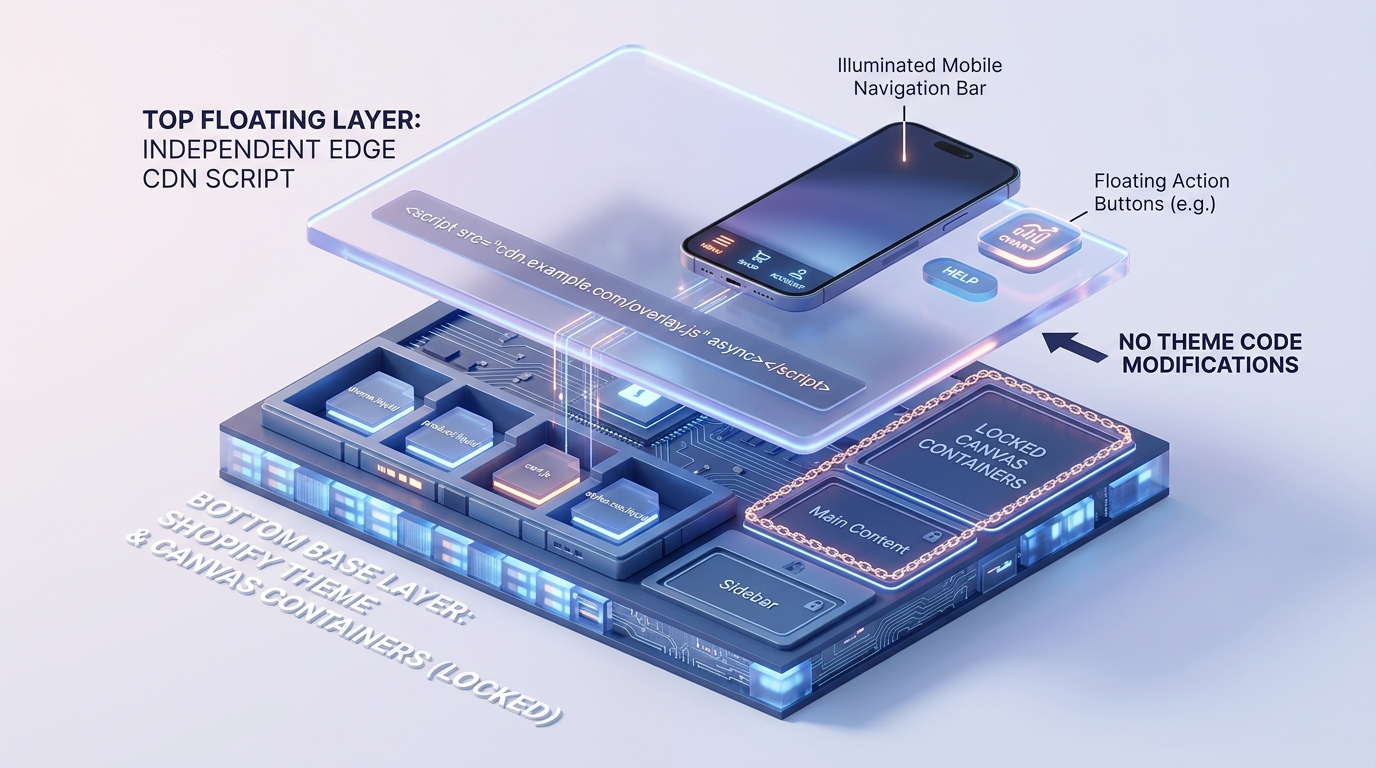
theme.liquid). - Decoupled CDN Apps (Navi+): Completely immune to Canvas conflicts because they render outside theme Liquid constraints.
Part of the Topic HubExplore the Shopify Canvas Spotlight Hub with all 10 technical deep-dives →
1. What Shopify Promises
Shopify’s high-level messaging positions Canvas as the future foundation for all storefront interaction:
- A unified canvas where layout, text, media, and functionality live in harmony.
- A seamless workflow where AI generates functional frontend components without sacrificing store stability.
- Gradual ecosystem expansion, with third-party app integration planned for subsequent release phases.
2. Hands-on Reality & Technical Evaluation
To understand what actually happens when apps meet Canvas, we categorized third-party Shopify apps into three distinct architectural models and tested each:
Category A: Theme 2.0 App Blocks (FAIL)
These are apps that render visual widgets inside specific page sections (e.g., Loox or Judge.me review carousels, Bold product options, Klaviyo embedded forms).
- Test Result: Inside the Canvas spatial editor, the “Add Block” interface only allows native primitive elements (text, image, shape, button). There is no hook to insert third-party App Blocks into a Canvas-generated container. If you want a review widget under your product hero, you must place it in a separate, traditional theme section below the Canvas block.
Category B: Theme App Embeds (PARTIAL)
These are apps configured in the Theme Customizer sidebar that inject scripts globally into the head or body (e.g., analytics tags, live chat bubbles).
- Test Result: Because these scripts attach to the global DOM via
{{ content_for_header }}, they still load. However, if your Canvas section uses custom CSS z-index layering or unusual stacking contexts, floating chat widgets can become visually obscured or misaligned.
Category C: Decoupled Edge / CDN Apps (SUCCESS)
These are modern applications (such as Navi+) that load lightweight assets from Cloudflare Edge networks and inject persistent UI components (bottom tab bars, sticky headers, mobile drawers) directly into the viewport.
- Test Result: Flawless operation. Because Navi+ does not depend on theme section hierarchies or internal Liquid loops, the navigation bar rendered cleanly above Canvas sections with zero styling interference.
3. Community & Industry Reactions
The ecosystem has expressed strong opinions regarding the initial exclusion of App Blocks:
App Developers Demand Parity
“We spent years migrating merchants away from legacy snippet injections to Theme 2.0 App Blocks. If Canvas doesn’t support App Blocks out of the box, it forces merchants into messy workarounds.”
— Ecosystem App Founder
Agencies Predict Hybrid Workflows
Leading Shopify agencies are already advising clients to adopt a “hybrid layout” strategy: using Canvas solely for static visual branding while keeping functional ecommerce widgets (reviews, sizing charts, navigation) in standardized theme blocks or decoupled app frameworks.
4. Navi+’s Strategic Verdict & Architecture Impact
The current state of Shopify Canvas validates our core design philosophy at Navi+: Critical ecommerce infrastructure must never be tightly coupled to volatile theme code.
When Shopify changes its editor paradigm (from Vintage themes to OS 2.0, and now to Canvas), stores whose navigation is hard-coded into theme templates face painful redesign cycles, broken CSS, and lost mobile revenue.
Does This Replace Navi+? How Navi+ Powers Your Conversion Engine
The short answer is an unequivocal NO. The isolation of Canvas from the Shopify App ecosystem makes Navi+ more essential than ever:
- Canvas isolates you from essential app blocks: You cannot drag and drop review widgets, live chat, or subscription blocks into Canvas containers.
- Why Navi+ gives your store the winning edge:
- Complete immunity to theme and app block conflicts: Navi+ operates as a decoupled edge script, completely independent of whether theme app blocks are supported or broken inside Canvas.
- Direct integration of conversion apps into navigation: Navi+ allows you to embed live cart badges, account drawers, instant search overlays, and multi-channel support buttons (WhatsApp, Messenger, Phone) directly inside the mobile Tab Bar.
- 100% compatibility across all Shopify themes: Navi+ has been rigorously battle-tested on over 2,000+ live stores across Dawn, Horizon, Prestige, Impact, Symmetry, Impulse, and Motion.
- Smart z-index and display hierarchy control: Automatically handles layering over product quick-views, popups, and sticky add-to-cart buttons without visual collision.
5. Actionable Merchant Preparation Checklist
To ensure your store’s app stack survives your transition to Shopify Canvas:
- Map Your App Types: Classify every installed app as an App Block, App Embed, or Independent Script.
- Isolate Conversion Widgets: Keep mission-critical widgets (reviews, subscriptions, upsells) in standard sections rather than forcing them into Canvas containers.
- Verify Z-Index Stacking: Inspect Canvas sections that use fixed positioning or high z-index layers to prevent them from hiding chat bubbles or floating badges.
- Deploy Navi+ for Navigation: Ensure your store’s header and mobile thumb navigation are powered by Navi+ so your menus stay active and accessible across all pages.
- Monitor Console Errors: Check your browser’s developer console for script conflicts when previewing Canvas-generated pages.
Next in the SeriesPart 5: Why Shopify Canvas Breaks Automatic Theme Updates →