One of the proudest engineering achievements of Shopify’s Online Store 2.0 was automated theme updates. For the first time, merchants could upgrade their theme to the latest release with a single click, preserving their settings without losing custom changes.
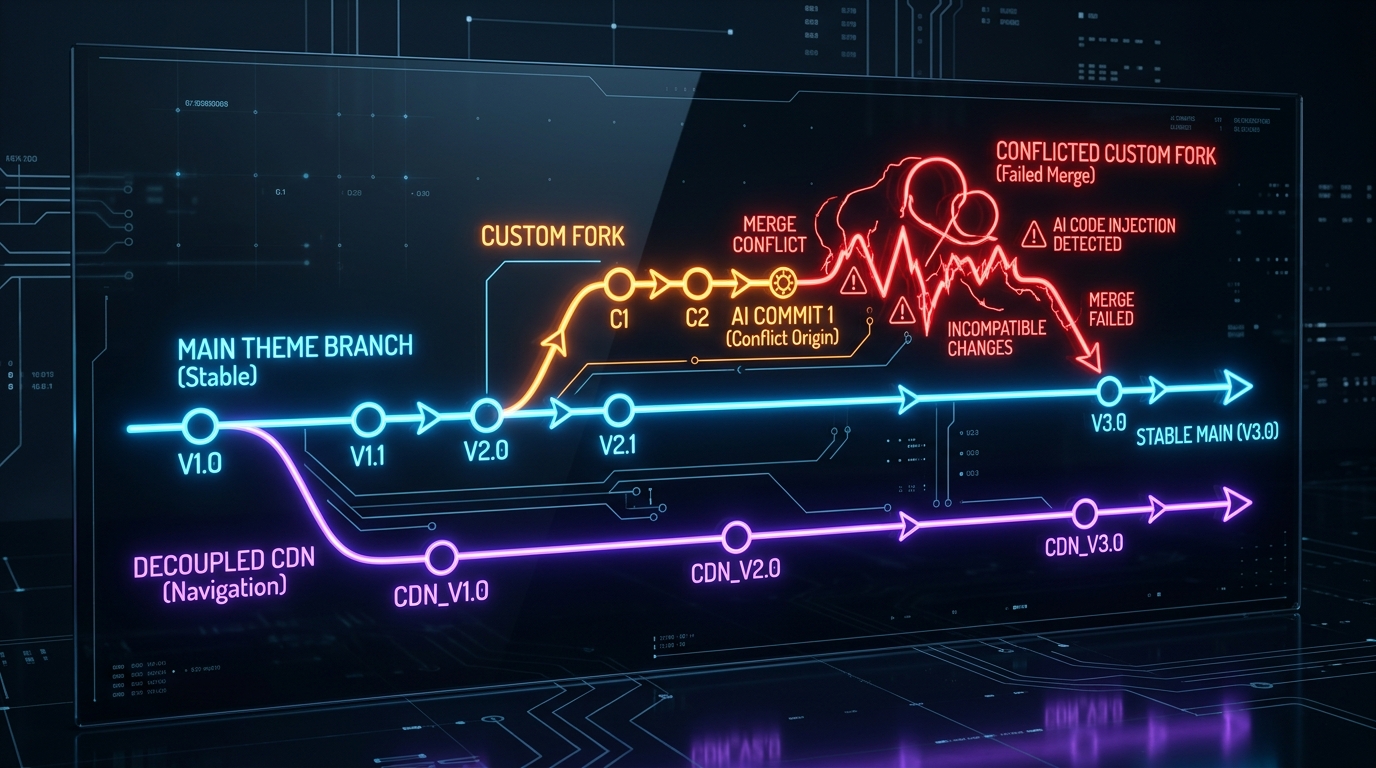
The arrival of Shopify Canvas disrupts this equilibrium. Because Sidekick AI generates custom Liquid files and directly injects markup into your theme structure, it effectively “forks” your theme repository.
In this guide, we explain the mechanics of theme forking, the technical risks involved, and how smart merchants maintain upgradeability.
- The core conflict: Canvas generates bespoke Liquid files and custom JSON schemas that automated theme diffing tools cannot safely reconcile.
- The consequence: Once modified via Canvas, your theme is excluded from one-click version upgrades.
- The solution: Keep custom logic decoupled using cloud-hosted apps and maintain strict Git branching.
Part of the Topic HubExplore the Shopify Canvas Spotlight Hub with all 10 technical deep-dives →
1. What Shopify Promises
Shopify presents Canvas as a completely native extension of the Shopify theme architecture:
- No external hosting required—everything is stored inside your Shopify theme.
- Clean Liquid and JSON templates created on the fly.
- Total merchant control over every line of code generated by Sidekick AI.
These statements are technically accurate: the files do live inside your theme. What Shopify’s marketing glosses over is what happens when the underlying base theme releases an update.
2. Hands-on Reality & Technical Evaluation
We conducted a direct upgrade test on a store running Shopify Dawn:
- Baseline Setup: We installed a fresh, unedited copy of Dawn v15.0.0. In the theme library, Shopify displayed the standard message: “Your theme is up to date.”
- Applying Canvas Modifications: We opened Canvas and prompted Sidekick to create two custom sections: an interactive product feature matrix and a promotional countdown hero banner.
- Inspecting File Changes: Sidekick created:
sections/canvas-hero-countdown.liquidsections/canvas-feature-matrix.liquid- Modified
config/settings_data.jsonto register the new section IDs.
- The Upgrade Test: When a newer minor release of Dawn became available, the one-click “Update” button displayed an alert: “This theme contains custom code modifications that cannot be automatically merged. Upgrading will reset custom sections to default.”
In short: you are faced with a painful choice—either miss out on future theme performance improvements and bug fixes, or manually re-build your Canvas sections on the new version.
3. Community & Industry Reactions
Theme developers and technical store owners have voiced major concerns:
The Maintenance Nightmare
“Merchants think AI code is magic until six months later when Shopify releases a critical checkout update or speed patch, and their theme breaks because AI generated 400 lines of custom CSS that conflicts with the update.”
— Senior Shopify Theme Engineer (GitHub Discussions)
The Agency Perspective
Agencies working on high-volume stores report that they are actively disallowing clients from using Canvas on production themes until Shopify introduces an isolated section sandbox or automated merge resolution.
4. Navi+’s Strategic Verdict & Architecture Impact
At Navi+, we built our entire architecture specifically to prevent theme update lock-in:
The Danger of Theme-Tethered Menus
When stores hard-code their navigation menus (Mega Menus, Tab Bars, Mobile Drawers) into theme files, every single theme update becomes an expensive, high-risk development project. Links break, CSS overflows, and mobile shoppers bounce.
Does This Replace Navi+? How Navi+ Powers Your Conversion Engine
Shopify Canvas CANNOT replace Navi+. In fact, Canvas is the primary reason you should decouple your navigation entirely from your theme:
- Canvas forks your theme into an isolated codebase: When Sidekick generates custom Liquid directly into your theme repository, you lose Shopify’s automated one-click theme update stream. If your navigation is hardcoded into the theme, every major theme update or security patch requires re-building your menus from scratch.
- Why Navi+ gives your store the winning edge:
- Protects your store from update breakage: Navi+ stores your entire navigation structure, icons, badges, and link mappings on independent Cloudflare CDN storage. When you update your theme from Dawn v15 to v16 or switch to a new theme, your Navi+ menus render immediately without missing a beat.
- Zero developer dependency: Marketing teams can launch flash sale banners, add seasonal Black Friday collections to Mega Menus, or reorder mobile tabs instantly from the Navi+ dashboard without touching code or causing merge conflicts.
- Decoupled presentation and conversion layers: Freely let AI Sidekick experiment with creative section layouts in Canvas without jeopardizing the stability of your core shopping cart and navigation paths.
- One-click version backup & rollback: Navi+ includes independent Version History for navigation, enabling instant rollbacks without touching theme code.
5. Actionable Merchant Preparation Checklist
To enjoy the creative benefits of Canvas without trapping your store in an un-updatable theme:
- Tag Canvas Themes Clearly: Name any theme modified with Canvas with a distinct prefix, such as
[Canvas-Fork] Dawn 2026. - Never Edit Master Themes Live: Always keep an untouched “Vanilla” copy of your base theme in your library as a fallback.
- Use Git Version Control: Connect your Shopify theme to a GitHub repository to track every commit made by Sidekick AI.
- Decouple Core Conversion Components: Power your navigation, search, and cart access via Navi+ so that your core conversion funnel never depends on theme files.
- Document Canvas Sections: Keep a changelog of all prompts and custom sections created in Canvas so they can be recreated quickly if you ever perform a clean theme reinstallation.
Next in the SeriesPart 6: Shopify Canvas vs PageFly, Shogun & GemPages: Head-to-Head Comparison →