Whenever a major commerce platform announces an AI-driven revolution, marketing headlines tend to overshadow engineering reality. Shopify Canvas is unquestionably an impressive technical feat, but the October 2026 Early Access release carries critical constraints that could disrupt your store operations if left unaddressed.
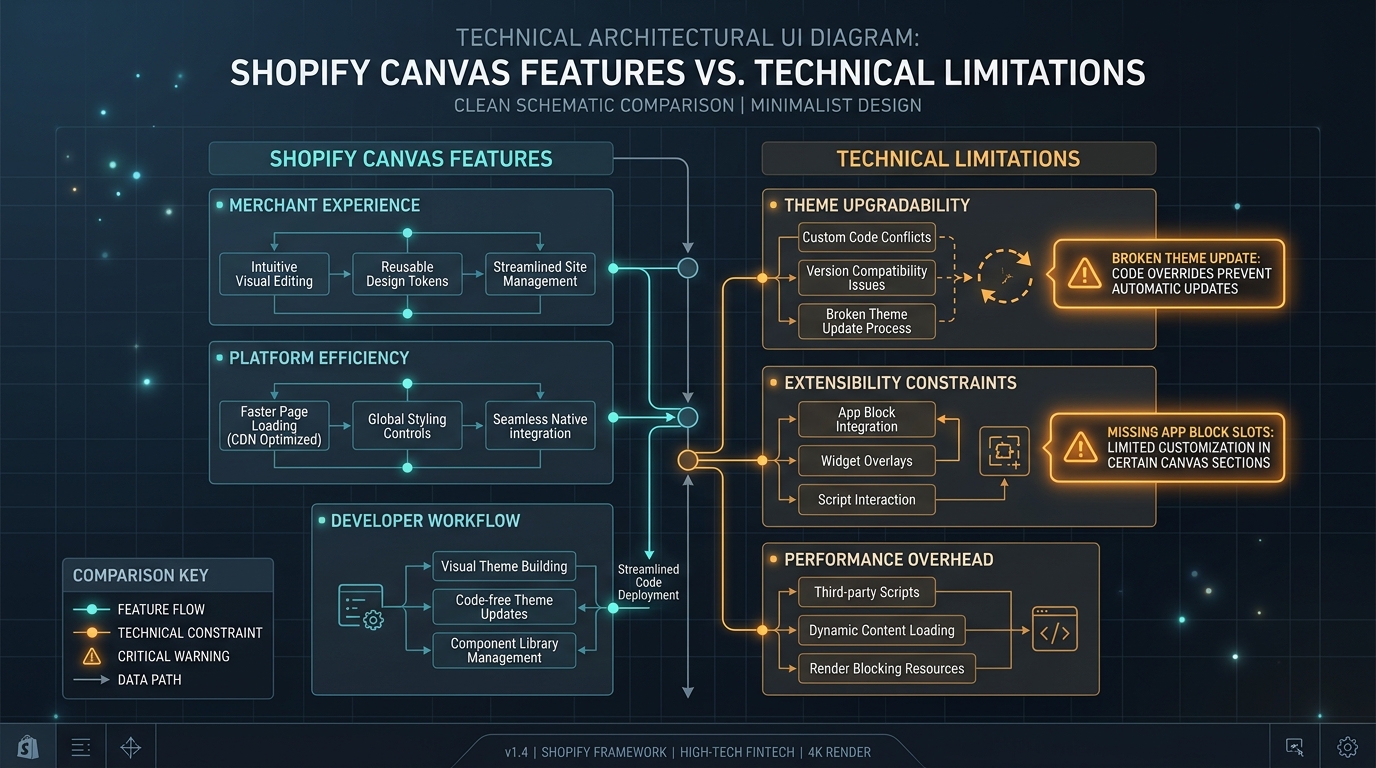
Here are the 5 biggest limitations of Shopify Canvas that every merchant and agency developer must know before touching their store theme.
- 1. No Third-Party Theme Support: Locked to first-party themes like Dawn; commercial Theme Store themes are unsupported.
- 2. App Blocks Disabled: Cannot embed marketing, review, or subscription app widgets inside Canvas sections.
- 3. Theme Updates Broken: AI code injection severs your theme from future automated updates.
- 4. Desktop-Only Editor: Cannot edit or prompt Canvas from an iPad or mobile device.
- 5. No Native Thumb Navigation: Lacks tools for persistent mobile tab bars or deep menu hierarchies.
Part of the Topic HubExplore the Shopify Canvas Spotlight Hub with all 10 technical deep-dives →
1. What Shopify Promises
Shopify’s public launch messaging highlights the boundless creative possibilities:
- “Total freedom to design without barriers.”
- “Sidekick translates your creative vision directly into native store code.”
- “An all-in-one spatial studio for the future of commerce.”
These statements suggest an all-encompassing design platform ready to replace every existing visual builder and theme editor.
2. Hands-on Reality & Technical Evaluation
When we stress-tested the Early Access release across diverse store setups, the technical boundaries became immediately obvious:
Limitation 1: Zero Third-Party Theme Store Compatibility
If your store runs on popular commercial themes like Prestige, Impact, Empire, or Symmetry, you cannot use Canvas. Attempting to activate Canvas on an unsupported theme throws a system prompt: “Canvas is currently optimized for Shopify-developed themes.”
Limitation 2: The App Block Void
Under Online Store 2.0, app developers provide “App Blocks” that merchants drag into sections. Inside Canvas, the App Block selector is missing. You cannot insert a Judge.me review carousel, a Klaviyo signup box, or a Recharge subscription widget into a Canvas container.
Limitation 3: The Forked Theme Trap
When Sidekick generates code, it writes new .liquid files directly into your theme repository. In doing so, it modifies theme schema and file linkages. As a result, the automated “Theme update available” button in Shopify Admin disappears or fails with a merge conflict.
Limitation 4: Desktop-Exclusive Editing
You cannot make quick changes on the go. Canvas requires a desktop viewport and mouse/trackpad controls; opening it on a mobile browser redirects you to the classic theme customizer.
Limitation 5: Shallow Mobile Navigation
While Canvas allows you to reposition body sections, it does not provide native controls for persistent thumb-zone navigation—the bottom-anchored menu pattern proven to drive 80%+ of mobile conversions.
3. Community & Industry Reactions
Feedback from technical Shopify communities has been swift and candid:
The App Developer Community
“Canvas in its current state completely sidesteps the App Block architecture we spent three years adopting for Theme 2.0. If merchants can’t put our widgets into Canvas sections, adoption will stall until Shopify bridges the gap.”
— Shopify App Developer (Shopify Dev Slack)
The Agency Perspective
“We manage dozens of Plus stores. We cannot recommend Canvas to any client with an active release cadence because it breaks automated theme upgrades and bypasses our GitHub CI/CD pipeline.”
— Technical Director, Shopify Plus Agency
4. Navi+’s Strategic Verdict & Architecture Impact
The current limitations of Shopify Canvas prove a fundamental truth in ecommerce: Layout design and navigation architecture are two completely different engineering problems.
Canvas is built to draw visual boxes on a page. But ecommerce navigation requires:
- Instant sub-second response times across 500+ product categories.
- Thumb-friendly ergonomic positioning (safe areas on notched mobile screens).
- Absolute independence from theme updates and code refactoring.
Does This Replace Navi+? How Navi+ Powers Your Conversion Engine
Shopify Canvas CANNOT replace Navi+. In fact, the 5 major limitations of Canvas highlight why Navi+ is an indispensable part of modern store architecture:
- Canvas breaks automated theme updates: When Sidekick injects custom code directly into your theme repository, automated one-click theme upgrades are disabled. If your navigation is tangled inside theme code, any required theme reset will wipe out your menu structure.
- Why Navi+ gives your store the winning edge:
- Complete architectural independence: Navi+ menus are deployed via high-speed Cloudflare R2 / BunnyCDN edge caching, decoupled from any theme Liquid code edited by Sidekick. Even if an AI prompt breaks your theme or forces a rollback, your navigation stays 100% functional.
- Overcomes the App Block void: While Canvas cannot embed app blocks, Navi+ lets you embed dynamic cart counters, account shortcuts, instant search, and contact channels directly into your bottom tab bar.
- Solves the thumb ergonomics Canvas ignores: Navi+ delivers a true native-app mobile experience with a thumb-zone Tab Bar hugging the bottom edge, driving up to a 27% increase in mobile session engagement.
- Zero theme restrictions: While Canvas is restricted to Dawn and Horizon, Navi+ works flawlessly across every commercial Shopify theme (Prestige, Impact, Symmetry, Impulse) and any custom headless storefront.
5. Actionable Merchant Preparation Checklist
If you still want to explore Canvas while mitigating these risks, implement these safeguards:
- Verify Your Theme Pedigree: Confirm you are running Dawn or Horizon before attempting to access Canvas.
- Audit App Block Dependencies: Identify which sections on your pages require third-party app widgets and keep those sections outside Canvas.
- Establish a Manual Versioning Routine: Download a
.zipbackup of your theme before every major Canvas editing session. - Deploy Decoupled Navigation: Protect your store’s primary conversion driver by powering your mobile navigation with Navi+.
- Set Realistic Expectations: Treat Canvas as an early creative sandbox for seasonal landing pages, not a complete replacement for your primary store infrastructure.
Next in the SeriesPart 4: Shopify Canvas and App Embeds: Why Your Apps Might Break →