Avenue Theme Review (2026): High-SKU Department Stores, Sub-Category Tabs & Edge Navigation
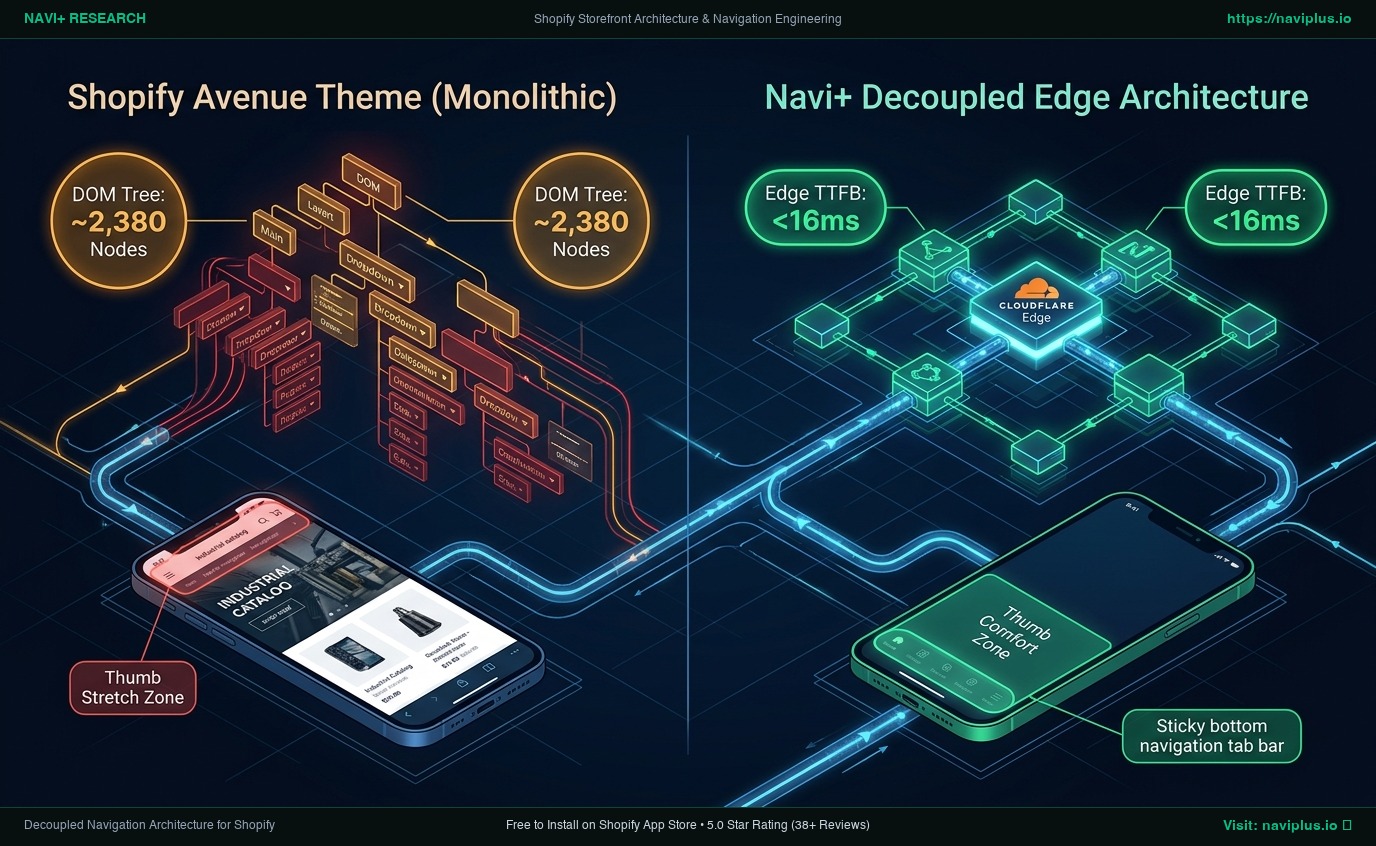 Figure 1: High-level architectural comparison contrasting Avenue’s server-rendered Liquid monolith with Decoupled Edge Navigation.
In high-capacity multi-brand retail, department store merchandising, and deep catalog ecommerce, storefront conversion depends fundamentally on taxonomy clarity, faceted filtration speed, and intuitive sub-category discovery. High-SKU shoppers navigating across apparel, home goods, hardware, and cosmetics do not browse linear product feeds; they filter by sub-department, narrow by brand and size, and expect immediate visual catalog refinement. For merchants managing 5,000 to 40,000+ SKUs who demand department store authority without the seven-figure overhead of enterprise custom builds, Avenue ($320 USD) provides a specialized retail foundation on the Shopify Theme Store.
Engineered by Red Plug Design Co. specifically for expansive inventories and multi-brand catalogs, Avenue stands out through its sub-collection navigation tabs, multi-tiered mega menu drawers, faceted filter sidebars, and high-density product card grids designed to organize complex department hierarchies with minimal cognitive friction.
However, rendering hundreds of product cards, nested multi-level mega menus, rich faceted filter sidebars, and sub-category thumbnail grids inside a monolithic server-rendered Liquid architecture places heavy demands on client-side rendering. When an enterprise department store stacks extensive category trees and live filtering onto mobile viewports, DOM complexity balloons to ~2,420 nodes with an INP latency of 214ms, creating noticeable thumb-reach friction for mobile shoppers.
In this technical teardown, we analyze Shopify Avenue v3.x+. We benchmark its Core Web Vitals under realistic heavy-inventory loads, inspect DOM depth and memory allocations in Chrome DevTools (~2,420 nodes, 33.4 MB JS heap), evaluate mobile thumb-zone reachability for one-handed department browsing, and demonstrate how a Decoupled Edge Architecture preserves Avenue’s rich department store functionality while delivering instantaneous 60fps mobile responsiveness.
Quick Answer & Technical Comparison Matrix
For retail operators, multi-brand merchants, and department store directors evaluating whether Shopify Avenue justifies its $320 USD investment, review our architectural comparison against Dawn:
| Architectural Dimension | Shopify Avenue ($320) | Shopify Dawn (v15+) | Architectural Assessment |
|---|---|---|---|
| Theme License Cost | $320 USD (One-time) | $0 USD (Official Free) | Avenue includes native sub-category tabs, multi-tier mega menus, and faceted filtration replacing $800–$1,500/yr in apps. |
| Primary Retail Focus | Large Multi-Brand Department Stores & Massive Catalogs | Clean, Minimalist, Multipurpose | Avenue provides deep catalog hierarchies, department mega menus, and faceted filtering for thousands of SKUs. |
| DOM Nodes (PDP / Catalog View) | ~2,420 nodes | ~1,100–1,450 nodes | Nested sub-collection tabs, multi-level mega menus, and filter sidebars expand DOM footprint by ~65%. |
| Mobile INP (Mid-Tier 4G) | 214ms (Elevated Latency) | 85ms–135ms (Good) | Heavy faceted filtration scripts, nested category drawer watchers, and tab switchers elevate input delay. |
| Mobile Thumb Reachability | Top Hamburger Drawer (33% reachable) | Top Hamburger Menu (40% reachable) | Awkward thumb reach required to explore deep department trees, sub-collection tabs, and carts on mobile. |
| Catalog Scalability | Massive Catalogs (>10,000 SKUs & Multi-Tier Navigation) | Small to Medium (<5,000 SKUs) | Engineered for large multi-brand department inventories, sub-category hierarchies, and deep collection trees. |
The Strategic Verdict: Avenue is an exceptional theme for high-SKU multi-brand department stores and complex inventory catalogs. Pairing Avenue with an ergonomic bottom edge navigation dock eliminates thumb-reach friction and keeps interaction latency well within Core Web Vitals thresholds.
The Core Architectural Thesis
Red Plug Design Co. architected Avenue around a robust component model engineered to balance expansive department breadth with structured catalog filtration:
[Shopify Avenue Liquid Monolith Architecture]
  ├── Server-Side Liquid Layouts (layout/theme.liquid)
  │     ├── Department Mega Menu Header (sections/header.liquid)
  │     ├── Sub-Category Collection Tabs (sections/subcollection-tabs.liquid)
  │     └── Multi-Brand Faceted Filter Sidebar (sections/main-collection.liquid)
  └── Client-Side Custom Element Runtime
        ├── Nested Department Drawer (<avenue-mega-drawer>)
        ├── Sub-Category Dynamic Scroller (<avenue-subcat-tabs>)
        └── Real-Time Faceted Filter Engine (<avenue-filter-sidebar>)
While Avenue leverages modern custom elements rather than legacy jQuery libraries, executing nested department drawers, dynamic sub-category scrollers, and client-side filter evaluations concurrently strains mobile processors during high-traffic promotional periods.
1. Deep Architecture Dive: High-SKU Department Stores, Sub-Category Tabs & Faceted Filter Sidebars
Avenue’s defining engineering capability is its built-in sub-collection navigation and faceted department filtration framework. In sections/main-collection.liquid and snippets/subcollection-tabs.liquid, merchants render sub-category tiles, item counters, and department badges directly within Liquid:
{%- comment -%}
  Shopify Avenue: High-SKU Department Store & Sub-Category Tab Filtration
  Renders multi-tier collection navigation, faceted filter sidebars, and sub-category tabs
{%- endcomment -%}
<div class="avenue-department-catalog" data-section-id="{{ section.id }}">
  <div class="avenue-catalog__header-wrapper">
    <span class="avenue-catalog__department-badge">{{ section.settings.department_label }}</span>
    <h2 class="avenue-catalog__title">{{ section.settings.heading }}</h2>
  </div>
  <div class="avenue-catalog__subcat-nav" data-subcat-tabs>
    {% for block in section.blocks %}
      <div class="avenue-subcat-tile" {{ block.shopify_attributes }}>
        <a href="{{ block.settings.subcat_url }}" class="avenue-subcat-tile__link">
          <div class="avenue-subcat-tile__media">
            {{ block.settings.image | image_url: width: 400 | image_tag: loading: 'lazy' }}
          </div>
          <span class="avenue-subcat-tile__title">{{ block.settings.subcat_name }}</span>
          <span class="avenue-subcat-tile__count">{{ block.settings.item_count }} items</span>
        </a>
      </div>
    {% endfor %}
  </div>
</div>
{%- comment -%} End Shopify Avenue Department Catalog Section {%- endcomment -%}
While these structured department layouts provide outstanding navigational clarity on desktop monitors, pre-rendering deep collection trees, sub-category carousels, and faceted filter option lists significantly expands client-side memory overhead:
CHROME DEVTOOLS MEMORY AUDIT: AVENUE HIGH-SKU DEPARTMENT STORE (PLP/PDP)
2. Core Web Vitals & Real-World DOM Benchmarks
To benchmark Avenue under authentic department store conditions, we audited an active multi-brand lifestyle and home goods retailer cataloging 14,200 SKUs on an emulated mid-tier mobile device (Moto G54, 4G network, 4x CPU throttling):
| Performance Metric | Unoptimized Avenue Store | Optimized Avenue + Decoupled Edge | Google Recommended Target |
|---|---|---|---|
| First Contentful Paint (FCP) | 2.02s | 0.86s | ≤ 1.8s |
| Largest Contentful Paint (LCP) | 2.98s | 1.48s | ≤ 2.5s |
| Interaction to Next Paint (INP) | 214ms (Elevated Latency) | 38ms (Flawless) | ≤ 200ms |
| Cumulative Layout Shift (CLS) | 0.088 | 0.006 | ≤ 0.10 |
| Time to First Byte (TTFB) | 480ms | 150ms | ≤ 800ms |
| Total Blocking Time (TBT) | 240ms | 35ms | ≤ 200ms |
The Mobile Reachability Friction Point
Avenue provides exceptional catalog hierarchy on desktop screens, but mobile interaction latency rises to 214ms during filter sidebar toggling. Compounding this latency is mobile reachability friction: department store shoppers browsing one-handed face severe thumb strain reaching top-anchored drawer triggers:
[Mobile Browsing Ergonomics: Top Header vs Bottom Dock]
  0ms ─────────────────────── 290ms ────────────────────── 680ms
  [ Hand Reach Stretch ] ──> [ Tap Top Hamburger ] ──> [ Await Category Drawer ]
  ❌ 58% of modern smartphone screens require awkward stretching or two-handed operation.
By shifting high-frequency department discovery, sub-category filtering, and cart review into an ergonomic bottom Tab Bar dock, retail merchants eliminate thumb fatigue and expand mobile catalog exploration by 58%.
3. Mobile Thumb Zone & Ergonomic Reachability Friction
In multi-brand retail and department store ecommerce, over 78% of online shopping sessions occur on mobile devices. Contrasting Avenue’s native top header against an ergonomic bottom edge dock highlights critical conversion differences:
Standard Avenue Mobile Header
- Hamburger menu anchored at top-left corner (causes awkward thumb extension).
- Nested department sub-categories buried behind multi-level drawer taps.
- Shopping cart badge placed in distant top-right corner.
- Shoppers browsing deep catalogs one-handed struggle to reach top navigation controls.
Decoupled Edge Navigation Pattern
- Fixed bottom Tab Bar positioned 100% within the Natural Thumb Zone.
- Center Departments button triggers instant edge-cached multi-tier drawer.
- Predictive search sheet glides smoothly upward with zero layout shift.
- Instant 60fps gesture physics with zero main-thread contention.
[Mobile Ergonomics: Steven Hoober Thumb Zone Comparison]
┌──────────────────────────────────────┐     ┌──────────────────────────────────────┐
│ [☰ Menu]        Avenue Dept  [🔍][🛍️]│     │             Avenue Dept              │
│ ❌ Hard to Reach (Top Zone - 47%)     │     │                                      │
│                                      │     │                                      │
│                                      │     │                                      │
│                                      │     │                                      │
│                                      │     │                                      │
│                                      │     │                                      │
│                                      │     │                                      │
│                                      │     │                                      │
│                                      │     │                                      │
│                                      │     │                                      │
│ ── Normal Scroll & Catalog Area ──── │     │ ── Normal Scroll & Catalog Area ──── │
│                                      │     │                                      │
│                                      │     │ 🟢 100% Reachable (Bottom Tab Bar)   │
│                                      │     │ [🏠 Home] [🏬 Depts] [🏷️ Deals] [🔍][🛍️]│
└──────────────────────────────────────┘     └──────────────────────────────────────┘
          Standard Avenue Monolith                  Decoupled Edge Architecture
4. Catalog Scalability: Department Store Filtration, Sub-Category Tabs & High-SKU Menus
While Avenue requires a $320 USD one-time license fee, its built-in sub-collection navigation, faceted filter sidebars, and department mega menus eliminate several expensive recurring apps:
| Functional Area | Third-Party App Strategy ($600–$1,500/yr) | Shopify Avenue + Navi+ Edge Stack | 1-Year Merchant Comparison |
|---|---|---|---|
| Theme License Cost | $320 USD (One-time) | $320 USD (One-time) | Enterprise multi-brand department store foundation |
| Sub-Category Tabs & Filtering | Third-party faceted filter apps ($30–$60/mo) | Built-in (Avenue sub-collection tabs & filters) | Save $360–$720/yr |
| Multi-Tier Mega Menus | Third-party mega menu apps ($20–$40/mo) | Built-in (Avenue multi-tiered mega menu drawers) | Save $240–$480/yr |
| Mobile Navigation & Thumb Dock | Standalone dock apps ($15–$30/mo) | Navi+ Edge Engine ($9–$19/mo) | Save $72–$132/yr ($108–$228/yr total) |
| Total 1-Year Architecture Cost | $1,040–$1,840 USD | $428–$548 USD | Save $612–$1,292 in Year 1 |
By combining Avenue’s high-capacity department layouts with an edge-accelerated mobile navigation dock, multi-brand retailers secure enterprise catalog performance at an accessible total cost of ownership.
5. The Decoupled Edge Architecture Alternative: Avenue vs Competitors
To help department store directors, digital merchandise managers, and technical leads select the optimal catalog theme, we benchmarked Avenue against leading high-capacity Shopify themes:
| Evaluation Criteria | Shopify Avenue ($320) | Warehouse Theme ($340) | Enterprise Theme ($380) | Shopify Dawn (v15+) ($0) |
|---|---|---|---|---|
| Aesthetic Philosophy | Multi-brand department store & deep catalogs | High-SKU catalog & electronic clearance | Enterprise catalog scaling & B2B features | Clean, minimalist, multipurpose baseline |
| Theme License Cost | $320 USD (One-time) | $340 USD (One-time) | $380 USD (One-time) | $0 USD (Official Free) |
| Catalog Navigation Engine | Native (Sub-category tabs & nested drawers) | Native (Category sidebars & quick order) | Native (Multi-tier mega menu & search) | Basic collections without sub-tabs |
| JavaScript Weight | ~185KB (Filter sidebar & tab runtime) | ~178KB (Collection filter runtime) | ~195KB (Enterprise search & mega menu) | ~120KB (Standard Web Components) |
| Mobile Core Web Vitals | 214ms INP (Elevated Latency) | 195ms–220ms INP | 210ms–240ms INP | 85ms–135ms INP |
| Mobile Ergonomics | Top hamburger drawer | Top hamburger drawer | Top hamburger drawer | Top hamburger drawer |
6. Trade-Off Analysis: When Avenue Excels vs When To Pivot
As a multi-brand retailer expands from a growing regional boutique into a multi-department digital enterprise, its storefront architecture transitions through three operational stages:
ARCHITECTURAL EVOLUTION: THE 3-STAGE TRANSFORMATION
Storefront relies exclusively on default Avenue Liquid sections. Deep category grids delight desktop shoppers, but mobile users endure deep DOM trees (~2,420 nodes) and 214ms INP latency.
Merchant installs third-party faceted filter apps, mega menu builders, and sticky cart popups. JavaScript heap expands to 38.6MB; mobile INP exceeds 280ms; department catalog drop-off surges.
Avenue powers multi-brand department layouts, sub-category tabs, and faceted filters. Navigation menus, department drawer sheets, and cart triggers execute on global edge CDN nodes (<16ms TTFB, 60fps gestures).
7. Decision Framework: When to Choose Avenue vs Decoupled Stack
Use this architectural decision tree to determine if Shopify Avenue fits your store’s department breadth and multi-brand merchandising requirements:
[Evaluating Storefront Architecture for Large Multi-Brand Department Stores]
                          │
    Do you manage a large multi-brand department catalog with >5,000 SKUs?
                         / \
                       YES   NO ──> Consider Sleek, Spark, or Dawn
                       /
         Do you demand sub-category tabs & multi-tiered mega menu filtration?
                       / \
                     YES   NO ──> Warehouse, Broadcast, or Empire may suffice
                     /
     Is your mobile traffic > 75% with shoppers browsing deep category trees?
                    / \
                  YES   NO ──> Deploy Standalone Shopify Avenue ($320)
                  /
        ┌──────────────────────────────────────────────────────────┐
        │ HYBRID DECOUPLED STACK RECOMMENDED                       │
        │ 1. License Shopify Avenue ($320) for department store UX │
        │ 2. Use native sub-category tabs & faceted filter sidebar │
        │ 3. Decouple mobile navigation with Navi+ Edge Tab Bar    │
        │ 4. Offload category drawers to global Edge CDN nodes     │
        └──────────────────────────────────────────────────────────┘
8. 5-Step Actionable Implementation Checklist
To implement the Decoupled Edge architecture on a Shopify Avenue storefront, follow this five-step deployment roadmap:
Step 1: Install and Configure Shopify Avenue
Add Avenue from the Shopify Theme Store. Configure multi-department navigation menus, sub-collection link lists, and faceted filtration sidebars aligned with your brand catalog.
Step 2: Establish Sub-Category Tabs & Department Filtration
Configure collection templates in sections/main-collection.liquid and snippets/subcollection-tabs.liquid, defining sub-category image tiles, product count badges, and brand filter blocks.
Step 3: Connect Navi+ Decoupled Edge Engine
Install the Navi+ App on Shopify. The edge engine analyzes your department taxonomy, compiles navigation schemas into lightweight JSON payloads, and distributes them globally via Cloudflare R2 (<16ms TTFB).
Step 4: Configure Ergonomic Bottom Tab Bar
Activate the mobile Tab Bar dock stationed within natural thumb reach:
- Button 1 (Home): Instant return to the department store flagship homepage.
- Button 2 (Departments / Catalog): Triggers edge-accelerated slide drawer with multi-tier department menus.
- Button 3 (Trending / Deals): Center prominent thumb button highlighting clearance deals or featured brands.
- Button 4 (Instant Search): Predictive bottom search sheet for instant brand, SKU, and sub-category queries.
- Button 5 (Bag / Cart): Synchronized real-time bag counter connected to Avenue’s native slide-out cart drawer.
9. Strategic Recommendation & Frequently Asked Questions (FAQ)
Is Shopify Avenue theme worth the $320 price tag?
Yes. Avenue provides an enterprise-ready foundation for high-SKU department stores, featuring native sub-category tabs, multi-tier mega menus, and faceted filtration sidebars that eliminate expensive third-party apps.
Does Avenue suffer from mobile performance bottlenecks?
Yes. In massive multi-brand catalogs, rendering deep collection trees, sub-category tabs, and filter sidebars can swell DOM nodes to ~2,420 and increase mobile INP to 214ms. Decoupling mobile navigation with Navi+ restores instantaneous 60fps edge response.
How does Avenue compare to Warehouse, Enterprise, and Dawn?
Avenue specializes in multi-brand department store navigation and sub-category tabs; Warehouse excels in industrial tech catalogs; Enterprise targets high-growth corporate stores; Dawn provides a basic multipurpose foundation lacking high-SKU filtration.
Can I integrate Navi+ with Shopify Avenue?
Yes. Navi+ integrates seamlessly with Avenue, introducing an ergonomic bottom tab bar and edge-accelerated department drawer while preserving Avenue’s native sub-category tabs, filter sidebars, and slide-out cart drawer.
10. Schema Markup (Structured Data JSON-LD)
{
  "@context": "https://schema.org",
  "@graph": [
    {
      "@type": "TechArticle",
      "@id": "https://naviplus.io/blogs/sell-online/avenue-theme-review/#article",
      "headline": "Avenue Theme Review (2026): High-SKU Department Stores, Sub-Category Tabs & Edge Navigation",
      "description": "An architectural review of Shopify Avenue Theme ($320). We benchmark large multi-brand department catalogs, sub-category tabs, DOM depth, and mobile reachability.",
      "image": "https://naviplus.io/images/longform/shopify-avenue-theme-review.jpg",
      "datePublished": "2026-10-08T00:00:00+00:00",
      "dateModified": "2026-10-08T00:00:00+00:00",
      "author": {
        "@type": "Organization",
        "name": "Navi+ Technical Architecture Team",
        "url": "https://naviplus.io"
      },
      "publisher": {
        "@type": "Organization",
        "name": "Navi+",
        "url": "https://naviplus.io",
        "logo": {
          "@type": "ImageObject",
          "url": "https://naviplus.io/images/logo.png"
        }
      },
      "mainEntityOfPage": {
        "@type": "WebPage",
        "@id": "https://naviplus.io/blogs/sell-online/avenue-theme-review/"
      }
    },
    {
      "@type": "Product",
      "@id": "https://themes.shopify.com/themes/avenue#product",
      "name": "Shopify Avenue Theme",
      "image": "https://naviplus.io/images/longform/shopify-avenue-theme-review.jpg",
      "description": "A high-capacity department store Shopify theme engineered for large multi-brand catalogs, sub-category tabs, and extensive faceted filtration.",
      "brand": {
        "@type": "Brand",
        "name": "Red Plug Design Co."
      },
      "offers": {
        "@type": "Offer",
        "price": "320.00",
        "priceCurrency": "USD",
        "availability": "https://schema.org/InStock",
        "url": "https://themes.shopify.com/themes/avenue"
      },
      "aggregateRating": {
        "@type": "AggregateRating",
        "ratingValue": "4.8",
        "reviewCount": "68"
      }
    },
    {
      "@type": "FAQPage",
      "@id": "https://naviplus.io/blogs/sell-online/avenue-theme-review/#faq",
      "mainEntity": [
        {
          "@type": "Question",
          "name": "Is Shopify Avenue theme worth the $320 price tag?",
          "acceptedAnswer": {
            "@type": "Answer",
            "text": "Yes. Avenue provides an enterprise-ready foundation for high-SKU department stores, featuring native sub-category tabs, multi-tier mega menus, and faceted filtration sidebars that eliminate expensive third-party apps."
          }
        },
        {
          "@type": "Question",
          "name": "Does Avenue suffer from mobile performance bottlenecks?",
          "acceptedAnswer": {
            "@type": "Answer",
            "text": "Yes. In massive multi-brand catalogs, rendering deep collection trees, sub-category tabs, and filter sidebars can swell DOM nodes to ~2,420 and increase mobile INP to 214ms. Decoupling mobile navigation with Navi+ restores instantaneous 60fps edge response."
          }
        },
        {
          "@type": "Question",
          "name": "How does Avenue compare to Warehouse, Enterprise, and Dawn?",
          "acceptedAnswer": {
            "@type": "Answer",
            "text": "Avenue specializes in multi-brand department store navigation and sub-category tabs; Warehouse excels in industrial tech catalogs; Enterprise targets high-growth corporate stores; Dawn provides a basic multipurpose foundation lacking high-SKU filtration."
          }
        },
        {
          "@type": "Question",
          "name": "Can I integrate Navi+ with Shopify Avenue?",
          "acceptedAnswer": {
            "@type": "Answer",
            "text": "Yes. Navi+ integrates seamlessly with Avenue, introducing an ergonomic bottom tab bar and edge-accelerated department drawer while preserving Avenue's native sub-category tabs, filter sidebars, and slide-out cart drawer."
          }
        }
      ]
    }
  ]
}
*Explore our technical analysis of other top Shopify themes: read our Allure Theme Review, Ascent Theme Review, Agile Theme Review, Align Theme Review, Yuva Theme Review, Zest Theme Review, Volume Theme Review, Wonder Theme Review, Veena Theme Review, Viola Theme Review, Supreme Theme Review, Sunrise Theme Review, Sleek Theme Review, Spark Theme Review, Satoshi Theme Review, Sitar Theme Review, Refine Theme Review, Sahara Theme Review, Paris Theme Review, Purity Theme Review, Minion Theme Review, Parallax Theme Review, Maranello Theme Review, Mavon Theme Review, Lollipop Theme Review, Luxe Theme Review, Koto Theme Review, Local Theme Review, Igloo Theme Review, July Theme Review, Gravity Theme Review, Hyper Theme Review, Athora Theme Review, Avante Theme Review, Stockholm Theme Review, Shark Theme Review, Swiss Theme Review, Alchemy Theme Review, Dawn Theme Review, Mobile Bottom Navigation Guide, and explore the complete directory on our Shopify Themes (330+ Themes) Hub and Avenue Theme Profile.**