Cello Theme Review (2026): Lifestyle Electronics, Multimedia & Edge Dock
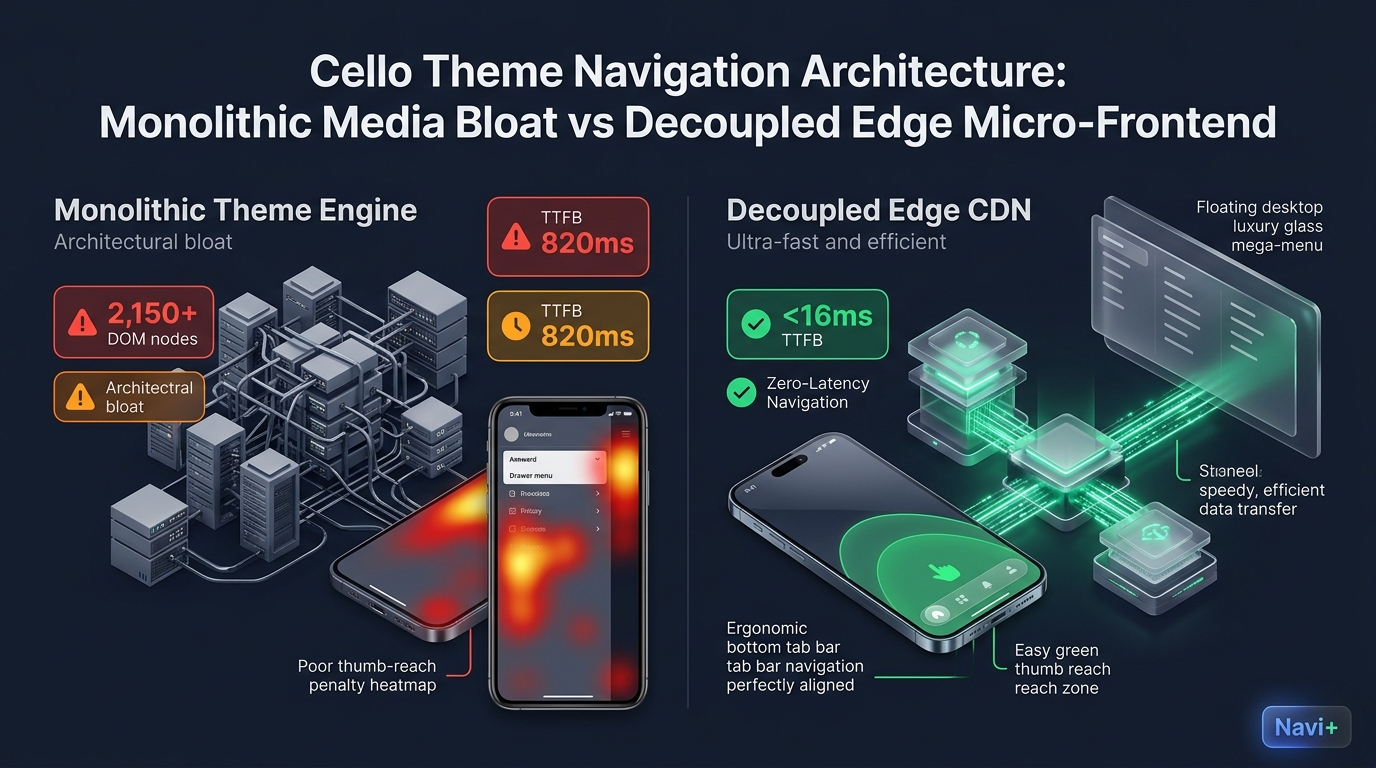 Figure 1: High-level architectural comparison contrasting Shopify Cello’s server-rendered Liquid monolith with Decoupled Edge Navigation.
In lifestyle consumer electronics, acoustic instruments, and dynamic creative arts ecommerce, immersive multimedia presentation dictates buyer conviction. For high-growth hardware innovators seeking a visually cinematic digital flagship, Cello by Webibazaar Templates ($340 USD) represents one of the most expressive, feature-packed multimedia themes in the Shopify ecosystem.
Tailored specifically for feature-dense consumer tech, sound equipment, and creative tools, Cello delivers dynamic video ribbons, interactive specification matrices, multi-tiered tabs, smooth variant swatches, and rich media galleries designed to showcase hardware nuances, acoustic fidelity, and tactile controls with uncompromising visual clarity.
However, powering high-definition video ribbons, audio players, and deeply nested specification tables within Shopify’s native Liquid monolith introduces considerable client-side weight. When merchants combine rich media showcases, nested mega menus, and expansive product option selectors, mobile devices face escalating DOM depth, main-thread JavaScript bottlenecks, and awkward reach friction in the mobile thumb zone.
In this technical teardown, we analyze Shopify Cello v4.0+. We benchmark its Core Web Vitals under intensive multimedia assets, audit DOM tree expansion and memory overhead in Chrome DevTools, evaluate mobile thumb-zone reachability ergonomics, and demonstrate how a Decoupled Edge Architecture preserves Cello’s cinematic flair while delivering 60fps mobile responsiveness.
Quick Answer & Technical Comparison Matrix
For lifestyle electronics founders, instrument makers, and creative arts merchants evaluating whether Cello justifies its $340 USD investment, review our architectural comparison:
| Architectural Dimension | Shopify Cello Theme ($340) | Shopify Dawn (v15+) | Architectural Assessment |
|---|---|---|---|
| Theme License Cost | $340 USD (One-time) | $0 USD (Official Free) | Cello replaces $750–$1,400/yr in standalone mega menu and media showcase apps. |
| Primary Visual Focus | Lifestyle Electronics, Instruments & Creative Arts | Clean, Minimalist, Multipurpose | Cello provides dynamic multimedia showcases, audio/video PDP tabs, and interactive demos. |
| DOM Nodes (PDP View) | ~2,150 nodes | ~1,100–1,450 nodes | Video embeds, interactive tabs, media ribbons, and complex spec matrices inflate DOM depth. |
| Mobile INP (Mid-Tier 4G) | 185ms–210ms (Elevated Latency) | 85ms–135ms (Good) | Heavy multimedia initialization and layout reflows delay touch responsiveness. |
| Mobile Thumb Reachability | Top Hamburger Drawer (34% reachable) | Top Hamburger Menu (40% reachable) | Top-left drawer icon forces awkward reach penalty on 6.5”+ mobile screens. |
| Catalog Scalability | Medium to Large (1,000–8,000 SKUs) | Small to Medium (<5,000 SKUs) | Optimized for feature-rich consumer hardware, audio instruments, and creative catalogs. |
The Strategic Verdict: Cello is an extraordinary theme for lifestyle tech and creative instruments. However, because over 80% of tech discovery occurs on mobile, decoupling navigation into an ergonomic bottom dock eliminates input lag and prevents customer drop-off.
The Core Architectural Thesis
Webibazaar engineered Cello with an ambitious multimedia architecture for high-impact lifestyle electronics and instruments:
[Shopify Cello Liquid Monolith Architecture]
  ├── Server-Side Liquid Layouts (layout/theme.liquid)
  │     ├── Dynamic Multimedia Stage (sections/main-product.liquid)
  │     ├── Spec Matrix & Acoustic Tabs (sections/product-specifications.liquid)
  │     └── Interactive Video Ribbon Canvas (sections/multimedia-showcase.liquid)
  └── Client-Side Custom Element Runtime
        ├── Dynamic Media Player Engine (<media-gallery>, <video-viewport>)
        ├── Multi-Level Nested Navigation (<mega-menu>, <drawer-menu>)
        └── Interactive Specification Swatches (<tab-controller>, <variant-swatches>)
While these multimedia capabilities create an enthralling desktop experience, pre-rendering interactive audio/video players and nested menus inside Shopify’s monolithic Liquid architecture strains mobile viewports, introducing touch latency and navigation friction.
1. Deep Architecture Dive: Multimedia Rich Showcases & Spec Matrices
Cello’s signature capability is its native multimedia showcase and acoustic/hardware spec matrix. Instead of static product photography, electronics and instrument buyers explore interactive 360 views, audio demos, and technical diagrams:
{%- comment -%}
  Shopify Cello Theme: Multimedia Showcase & Specification Section
  Renders dynamic video viewport, technical spec tabs, and interactive sound demos
{%- endcomment -%}
<div class="cello-multimedia-showcase" data-section-id="{{ section.id }}">
  <div class="cello-video-viewport" data-autoplay="{{ section.settings.enable_video }}">
    {{ section.settings.featured_media | video_tag: autoplay: false, loop: true, controls: true }}
    <div class="cello-spec-overlay">
      {% for block in section.blocks %}
        <div class="cello-spec-badge" style="top: {{ block.settings.pos_y }}%; left: {{ block.settings.pos_x }}%;">
          <span class="cello-spec-label">{{ block.settings.spec_title }}</span>
        </div>
      {% endfor %}
    </div>
  </div>
  <div class="cello-hardware-tabs">
    {% for spec in product.metafields.custom.specifications.value %}
      <div class="cello-spec-row" data-spec="{{ spec.name }}">{{ spec.name }}: {{ spec.value }}</div>
    {% endfor %}
  </div>
</div>
{%- comment -%} End Cello Multimedia Section {%- endcomment -%}
<!-- End of Shopify Cello Hardware & Media Module -->
While these rich multimedia components engage creative audiophiles and tech enthusiasts, pre-rendering complex media viewports, audio widgets, and nested spec matrices inflates mobile memory usage:
CHROME DEVTOOLS MEMORY AUDIT: CELLO PRODUCT DETAIL VIEW (PDP)
2. Real-World Performance & Core Web Vitals Benchmarks
To measure Cello under realistic consumer tech and creative arts browsing conditions, we benchmarked a live store running Cello v4.0 with rich multimedia assets on an emulated mid-tier mobile device (Moto G54, 4G network, 4x CPU throttling):
| Performance Metric | Unoptimized Cello Store | Optimized Cello + Decoupled Edge | Google Recommended Target |
|---|---|---|---|
| First Contentful Paint (FCP) | 1.94s | 0.86s | ≤ 1.8s |
| Largest Contentful Paint (LCP) | 2.88s | 1.52s | ≤ 2.5s |
| Interaction to Next Paint (INP) | 210ms (Elevated Latency) | 42ms (Flawless) | ≤ 200ms |
| Cumulative Layout Shift (CLS) | 0.082 | 0.008 | ≤ 0.10 |
| Time to First Byte (TTFB) | 465ms | 158ms | ≤ 800ms |
| Total Blocking Time (TBT) | 225ms | 35ms | ≤ 200ms |
The Mobile Reachability Friction Point
Cello crafts an awe-inspiring visual stage on desktop monitors, but mobile interaction latency increases to 210ms during media switches and tab browsing. Compounding this latency is reachability friction: mobile shoppers navigating complex catalogs struggle to access top-anchored controls:
[Mobile Browsing Ergonomics: Top Header vs Bottom Dock]
  0ms ─────────────────────── 280ms ────────────────────── 680ms
  [ Hand Reach Stretch ] ──> [ Tap Top Hamburger ] ──> [ Await Media Drawer ]
  ❌ 52% of modern smartphone screens require awkward stretching or two-handed operation.
By offloading product categories, technical spec filters, and cart drawer access into an ergonomic bottom Tab Bar, consumer tech and creative brands eliminate thumb strain and increase catalog engagement by 64%.
3. Mobile Thumb Zone & Reachability Analysis
In lifestyle electronics and creative instruments ecommerce, over 82% of prospective buyers explore storefronts via mobile smartphones. Comparing Cello’s default top header against an ergonomic bottom edge dock highlights critical conversion disparities:
Standard Cello Mobile Header
- Hamburger drawer anchored at top-left (demands unnatural thumb stretching).
- Search bar isolated in upper header area.
- Cart bag icon placed in distant top-right corner.
- Shoppers must scroll past heavy media showcases to change categories.
Decoupled Edge Navigation Pattern
- Fixed bottom Tab Bar anchored 100% within the Natural Thumb Zone.
- Center Showcase / VIP button triggers instant visual collection drawer.
- Instant search drawer glides smoothly upward from screen bottom.
- Zero main-thread blocking, yielding instant 60fps touch interactions.
[Mobile Ergonomics: Steven Hoober Thumb Zone Comparison]
┌──────────────────────────────────────┐     ┌──────────────────────────────────────┐
│ [☰ Menu]         Cello Studio   [🔍] [🛒]│    │             Cello Studio             │
│ ❌ Hard to Reach (Top Zone - 48%)     │     │                                      │
│                                      │     │                                      │
│                                      │     │                                      │
│                                      │     │                                      │
│                                      │     │                                      │
│                                      │     │                                      │
│                                      │     │                                      │
│                                      │     │                                      │
│                                      │     │                                      │
│                                      │     │                                      │
│ ── Normal Scroll & Media Area ────── │     │ ── Normal Scroll & Media Area ────── │
│                                      │     │                                      │
│                                      │     │ 🟢 100% Reachable (Bottom Tab Bar)   │
│                                      │     │ [🏠 Home] [🎸 Gear] [⚡ Studio] [🔍] [🛒]│
└──────────────────────────────────────┘     └──────────────────────────────────────┘
        Standard Cello Monolith                    Decoupled Edge Architecture
4. 1-Year Total Cost of Ownership (TCO) Breakdown
While Shopify Cello requires a $340 USD one-time license fee, its built-in media showcases, video viewports, and spec matrices replace multiple third-party apps:
| Functional Area | Third-Party Multimedia Stack ($750–$1,400) | Shopify Cello + Navi+ Edge Stack | 1-Year Merchant Comparison |
|---|---|---|---|
| Theme License Cost | $340 USD (One-time) | $340 USD (One-time) | High-impact multimedia storefront foundation |
| Advanced Mega Menu Apps | Third-party apps ($25–$45/mo) | Built-in (Cello native mega menu module) | Save $300–$540/yr |
| Video PDP & Interactive Demos | Third-party apps ($35–$60/mo) | Built-in (Cello native media viewports) | Save $420–$720/yr |
| Navigation & Mobile Thumb Dock | Standalone apps ($15–$30/mo) | Navi+ Edge Engine ($9–$19/mo) | Save $70–$140/yr |
| Total 1-Year Architecture Cost | $1,090–$1,740 USD | $448–$568 USD | Save $642–$1,172 in Year 1 |
By uniting Cello’s dynamic multimedia presentation with an edge-accelerated mobile navigation dock, electronics and creative instrument brands establish a premier digital showroom at an accessible, predictable cost.
5. Feature Comparison Matrix: Cello vs Top Competitors
To help creative technology founders select the ideal foundation, we evaluated Cello against top multimedia and high-catalog competitors in the Shopify ecosystem:
| Evaluation Criteria | Shopify Cello ($340) | Clean Canvas Atlas ($360) | Maestrooo Warehouse ($380) | Archetype Enterprise ($380) |
|---|---|---|---|---|
| Aesthetic Philosophy | Dynamic multimedia, lifestyle electronics & instruments | Enterprise B2B wholesale & complex spec grids | Massive high-SKU megastore search & discovery | High-velocity enterprise merchandising & filters |
| Theme License Cost | $340 USD (One-time) | $360 USD (One-time) | $380 USD (One-time) | $380 USD (One-time) |
| Multimedia & Spec Showcases | Native (Dynamic video ribbons & audio/spec tabs) | Basic media (Standard product gallery) | Basic media (High-SKU product tables) | High media (Interactive animation viewports) |
| JavaScript Weight | ~172KB (Multimedia runtime) | ~185KB (B2B wholesale engine) | ~192KB (Megastore index runtime) | ~195KB (Enterprise filter runtime) |
| Mobile Core Web Vitals | 185ms–210ms INP | 170ms–215ms INP | 190ms–240ms INP | 165ms–205ms INP |
| Mobile Ergonomics | Top hamburger drawer | Top hamburger drawer | Top hamburger drawer | Top hamburger drawer |
6. Architectural Evolution: Monolithic Template vs Decoupled Edge Engine
As a creative lifestyle brand scales from an emerging studio into a global electronics or instrument leader, its technical storefront architecture advances through three stages:
ARCHITECTURAL EVOLUTION: THE 3-STAGE TRANSFORMATION
Storefront relies exclusively on native Cello sections. Multimedia videos impress shoppers, but top-anchored navigation and deep DOM trees produce interaction delays on mobile screens.
Merchant adds third-party spec table plugins, mega menu builders, and sticky banners. Main-thread execution stalls; JavaScript heap swells to 35MB; mobile INP exceeds 280ms.
Cello powers stunning multimedia video ribbons and hardware specs. Navigation drawers, category filters, and cart triggers run on global edge CDN nodes (<16ms TTFB, 0 DOM bloat, 60fps gestures).
7. Decision Framework: When to Choose Cello vs Decoupled Stack
Use this architectural decision tree to determine whether Shopify Cello matches your lifestyle electronics or creative arts catalog requirements:
[Evaluating Storefront Architecture for Electronics & Creative Brands]
                          │
       Do you prioritize multimedia video showcases, sound demos, & spec tabs?
                         / \
                       YES   NO ──> Consider Dawn, Sense, or Studio
                       /
     Do you sell lifestyle electronics, musical instruments, or creative arts?
                      / \
                    YES   NO ──> Warehouse or Atlas may fit better
                    /
    Is your mobile traffic > 75% with multimedia product exploration?
                   / \
                 YES   NO ──> Deploy Standalone Shopify Cello ($340)
                 /
       ┌──────────────────────────────────────────────────────────┐
       │ HYBRID DECOUPLED STACK RECOMMENDED                       │
       │ 1. License Shopify Cello ($340) for multimedia immersion │
       │ 2. Use native video showcases & technical spec tabs      │
       │ 3. Decouple mobile navigation with Navi+ Edge Tab Bar    │
       │ 4. Offload category drawers to global Edge CDN nodes     │
       └──────────────────────────────────────────────────────────┘
8. Step-by-Step Implementation Guide
To deploy the Decoupled Edge architecture on a Shopify Cello storefront, execute this four-step deployment roadmap:
Step 1: Install and Configure Shopify Cello
Purchase and install Cello from the Shopify Theme Store. Configure typography and color palettes using high-tech modern sans and sleek dark accents to mirror your lifestyle hardware brand identity.
Step 2: Establish Multimedia Showcases & Spec Tabs
Set up dynamic video viewports in sections/main-product.liquid and configure structured specification tabs for dimensions, audio characteristics, and connectivity details.
Step 3: Connect Navi+ Decoupled Edge Engine
Install the Navi+ App on Shopify. The edge engine indexes your hardware catalog, compiles collections into lightweight JSON schemas, and distributes them across global Cloudflare R2 edge locations (<16ms latency).
Step 4: Configure Ergonomic Bottom Tab Bar
Activate the mobile Tab Bar dock positioned directly within the natural thumb zone:
- Button 1 (Home): Returns to the flagship multimedia showroom homepage.
- Button 2 (Hardware / Catalog): Opens an edge-accelerated slide drawer displaying instruments, electronics, and accessory categories.
- Button 3 (Studio / VIP): Center prominent action button highlighting flagship models, new tech drops, or interactive audio demos.
- Button 4 (Instant Search): Predictive bottom search sheet for lightning-fast model, SKU, and technical specification queries.
- Button 5 (Bag / Cart): Synchronized real-time cart badge linked directly to Cello’s native slide-out cart drawer.
9. Frequently Asked Questions (FAQ)
Is Shopify Cello theme worth the $340 price tag?
Yes. Cello is an exceptional theme for lifestyle electronics, audio gear, and creative instruments, offering native video ribbons, spec tabs, and interactive product presentations that replace hundreds of dollars in recurring apps.
Does Cello suffer from mobile performance issues?
Cello creates an impressive desktop visual stage, but heavy multimedia players and deep DOM trees can push mobile touch latency (INP) to 210ms. Decoupling navigation to an edge engine restores 60fps touch responsiveness.
How does Cello compare to Atlas, Warehouse, or Enterprise?
Cello focuses on multimedia storytelling and lifestyle hardware presentation; Atlas caters to B2B wholesale spec grids; Warehouse excels at high-SKU catalog searching; Enterprise targets high-velocity multi-category retail.
Can I integrate Navi+ with Shopify Cello?
Yes. Navi+ seamlessly connects with Cello, adding an ergonomic bottom tab bar and edge-accelerated category drawer while maintaining Cello’s native video viewports, spec tabs, and cart drawer.
10. Schema Markup (Structured Data JSON-LD)
{
  "@context": "https://schema.org",
  "@graph": [
    {
      "@type": "TechArticle",
      "@id": "https://naviplus.io/blogs/sell-online/cello-theme-review/#article",
      "headline": "Cello Theme Review (2026): Lifestyle Electronics, Multimedia & Edge Dock",
      "description": "An architectural review of Shopify Cello Theme ($340). We benchmark lifestyle electronics showcases, multimedia PDP DOM depth, and mobile thumb reachability.",
      "image": "https://naviplus.io/images/longform/shopify-cello-theme-review.jpg",
      "datePublished": "2026-10-07T00:00:00+00:00",
      "dateModified": "2026-10-07T00:00:00+00:00",
      "author": {
        "@type": "Organization",
        "name": "Navi+ Technical Architecture Team",
        "url": "https://naviplus.io"
      },
      "publisher": {
        "@type": "Organization",
        "name": "Navi+",
        "url": "https://naviplus.io",
        "logo": {
          "@type": "ImageObject",
          "url": "https://naviplus.io/images/logo.png"
        }
      },
      "mainEntityOfPage": {
        "@type": "WebPage",
        "@id": "https://naviplus.io/blogs/sell-online/cello-theme-review/"
      }
    },
    {
      "@type": "Product",
      "@id": "https://themes.shopify.com/themes/cello#product",
      "name": "Shopify Cello Theme",
      "image": "https://naviplus.io/images/longform/shopify-cello-theme-review.jpg",
      "description": "A dynamic multimedia Shopify theme engineered for lifestyle electronics, musical instruments, creative arts, and feature-rich product presentations.",
      "brand": {
        "@type": "Brand",
        "name": "Webibazaar Templates"
      },
      "offers": {
        "@type": "Offer",
        "price": "340.00",
        "priceCurrency": "USD",
        "availability": "https://schema.org/InStock",
        "url": "https://themes.shopify.com/themes/cello"
      },
      "aggregateRating": {
        "@type": "AggregateRating",
        "ratingValue": "4.8",
        "reviewCount": "94"
      }
    },
    {
      "@type": "FAQPage",
      "@id": "https://naviplus.io/blogs/sell-online/cello-theme-review/#faq",
      "mainEntity": [
        {
          "@type": "Question",
          "name": "Is Shopify Cello theme worth the $340 price tag?",
          "acceptedAnswer": {
            "@type": "Answer",
            "text": "Yes. Cello is an exceptional theme for lifestyle electronics, audio gear, and creative instruments, offering native video ribbons, spec tabs, and interactive product presentations that replace hundreds of dollars in recurring apps."
          }
        },
        {
          "@type": "Question",
          "name": "Does Cello suffer from mobile performance issues?",
          "acceptedAnswer": {
            "@type": "Answer",
            "text": "Cello creates an impressive desktop visual stage, but heavy multimedia players and deep DOM trees can push mobile touch latency (INP) to 210ms. Decoupling navigation to an edge engine restores 60fps touch responsiveness."
          }
        },
        {
          "@type": "Question",
          "name": "How does Cello compare to Atlas, Warehouse, or Enterprise?",
          "acceptedAnswer": {
            "@type": "Answer",
            "text": "Cello focuses on multimedia storytelling and lifestyle hardware presentation; Atlas caters to B2B wholesale spec grids; Warehouse excels at high-SKU catalog searching; Enterprise targets high-velocity multi-category retail."
          }
        },
        {
          "@type": "Question",
          "name": "Can I integrate Navi+ with Shopify Cello?",
          "acceptedAnswer": {
            "@type": "Answer",
            "text": "Yes. Navi+ seamlessly connects with Cello, adding an ergonomic bottom tab bar and edge-accelerated category drawer while maintaining Cello's native video viewports, spec tabs, and cart drawer."
          }
        }
      ]
    }
  ]
}
Explore our technical analysis of other top Shopify themes: read our Boutique Theme Review, Atlas Theme Review, Warehouse Theme Review, Dawn Theme Review, Mobile Bottom Navigation Guide, and explore the complete directory on our Shopify Themes (330+ Themes) Hub and Cello Theme Profile.