Across global e-commerce, 70.19% of all shopping carts are abandoned before the transaction completes. While merchants routinely invest thousands of dollars auditing shipping rate tables, gateway latency, and form validation micro-copy, many overlook the single largest visual exit leak on their storefront: an unenclosed, navigation-heavy checkout header.
When shoppers browse a catalog, broad navigation menus, search bars, and promotional announcement banners serve as vital discovery accelerators. But the moment a customer enters the checkout funnel, their psychological mode transitions instantly from open exploration to risk-sensitive transaction execution. Every redundant navigation link presented during this high-anxiety phase represents an invitation to hesitate, rethink, or accidentally exit the purchase tunnel. In modern Shopify engineering, deploying an enclosed checkout architecture is not merely an aesthetic minimalist choice; it is an empirically proven conversion firewall.
- The 14% to 26% Conversion Lift: Baymard Institute checkout usability audits show that removing header navigation links and enclosing the checkout funnel lifts completion rates by 14% to 26% across retail stores.
- The 8.4% Accidental Exit Tax: Session recording analytics indicate that 8.4% of checkout sessions click header category links or promotional banners when present, with over 70% of those exiting shoppers failing to complete their purchase.
- Return-Path Retention Disparity: Directing the checkout header logo to
/cartpreserves 82% of checkout sessions, compared to only 41% retention when the logo redirects to the store's root homepage (/).
Architectural Comparison: Checkout Navigation Delivery Models
Before configuring header components, engineering teams must evaluate how different checkout header configurations impact cognitive load, security compliance, and session integrity:
| Evaluation Dimension | Unenclosed Standard Theme Header | Minimalist Enclosed Header | Native Shopify Checkout Extensibility |
|---|---|---|---|
| Distraction Exit Risk | High (50+ category links & search) | Zero (Only logo & support contact) | Zero (Sandboxed UI components) |
| Cognitive Friction | Extreme (Competes with form inputs) | Minimal (Focused on payment flow) | Minimal (Standardized linear tunnel) |
| Return Target Routing | Variable (Often defaults to /) |
Optimized (Directly to /cart) |
Configured via Checkout Branding API |
| PCI DSS Security Isolation | Poor (Exposed to third-party theme JS) | Strong (Restricted CSS overrides) | Level 1 PCI Compliant (Wasm/Iframe sandbox) |
| Mobile Screen Real Estate | Bloated (Consumes 120px+ viewport) | Lean (Compact 48px–60px band) | Native (Responsive dynamic layout) |
| Linear Step Telemetry | Absent (No progress breadcrumbs) | Present (Custom breadcrumb row) | Native 1-page / 3-step indicator |
The Three Architectural Hazards of Open Checkout Headers
Exposing standard theme navigation during checkout introduces three distinct operational points of failure:
1. Accidental Exit Traps and Session Evaporation
When a customer fills out shipping and billing details on a mobile device, touch precision decreases significantly. In a layout featuring standard mega menu toggles, currency selectors, and promotional announcement bars:
- A shopper attempting to tap the “Apply Discount” button or view their order summary often accidentally taps an adjacent header link.
- Navigating away from the checkout URL abruptly unmounts the checkout DOM. On non-persistent session architectures, this requires the shopper to re-enter address and contact fields upon return, introducing catastrophic friction that fuels abandonment.
2. The Homepage Logo Redirect Blunder
In over 65% of unoptimized Shopify stores, clicking the store logo in the checkout header navigates directly to the store root (https://store.com/).
From a user experience perspective, this is a severe anti-pattern:
- A customer who clicks the logo during checkout almost always wants to review their selected items, verify sizing, or adjust quantities.
- When dumped onto the homepage, their checkout mental model breaks. They must re-open their cart, re-evaluate their purchase intent, and re-initiate checkout. Usability data shows that routing the checkout logo to
/cartinstead of/doubles session recovery rates.
3. Third-Party Script Leakage and Performance Degradation
Legacy Shopify architectures (checkout.liquid) allowed merchants to inject arbitrary third-party scripts, tracking tags, and navigation overlays directly into the checkout header. Over time, tag bloat delayed DOM Interactive timings by 1.5 to 3.5 seconds. More critically, unvetted JavaScript running alongside payment forms introduced severe supply-chain security vulnerabilities, which led Shopify to deprecate checkout.liquid in favor of sandboxed Checkout Extensibility.
Production Blueprint: Shopify Checkout Extensibility Header Configuration
Modern Shopify Plus and unified checkouts govern header appearance through the Checkout Branding API rather than raw HTML templates. The following GraphQL mutation illustrates how to programmatically enforce an enclosed, distraction-free checkout header:
# GraphQL Mutation: Configure Enclosed Checkout Header via Checkout Branding API (Shopify Plus)
mutation ConfigureEnclosedCheckoutHeader($checkoutProfileId: ID!, $checkoutBrandingInput: CheckoutBrandingInput!) {
  checkoutBrandingUpsert(checkoutProfileId: $checkoutProfileId, checkoutBrandingInput: $checkoutBrandingInput) {
    checkoutBranding {
      customizations {
        header {
          alignment
          position
          logo {
            maxWidth
          }
        }
        buyerJourney {
          visibility
        }
      }
    }
    userErrors {
      field
      message
    }
  }
}
{
  "checkoutProfileId": "gid://shopify/CheckoutProfile/12345678",
  "checkoutBrandingInput": {
    "customizations": {
      "header": {
        "alignment": "CENTER",
        "position": "INLINE",
        "banner": {
          "image": null
        },
        "logo": {
          "image": {
            "mediaImageId": "gid://shopify/MediaImage/98765432"
          },
          "maxWidth": 160
        }
      },
      "buyerJourney": {
        "visibility": "VISIBLE"
      }
    }
  }
}
[!NOTE] Shopify Plan Availability: The Checkout Branding API and custom UI extensions require Shopify Plus. On standard Shopify plans (Basic, Shopify, Advanced), merchants configure enclosed headers natively via the Theme Editor (Theme Settings > Checkout) by uploading a dedicated checkout logo, setting alignment, and styling background palettes without code.
Key Engineering Rules in Modern Checkout Extensibility
- Strict Iframe Sandbox: UI Extensions render inside web workers or isolated shadow DOMs. Third-party navigation apps cannot inject arbitrary DOM nodes or global navigation bars into the checkout flow.
- Standardized Linear Breadcrumbs: The
buyerJourneycomponent provides a non-distracting visual trail (e.g., Cart > Information > Shipping > Payment). Shoppers can step back within the checkout sequence without ever breaking out into the general catalog. - Controlled Cart Fallback: The return link within Shopify’s native checkout header strictly targets the active cart session, preventing accidental homepage redirects.
Visual Architecture: Leaky Open Header vs. Enclosed Checkout Firewall
The diagram below illustrates the structural contrast between an open, leaky checkout header and a high-converting enclosed checkout architecture:
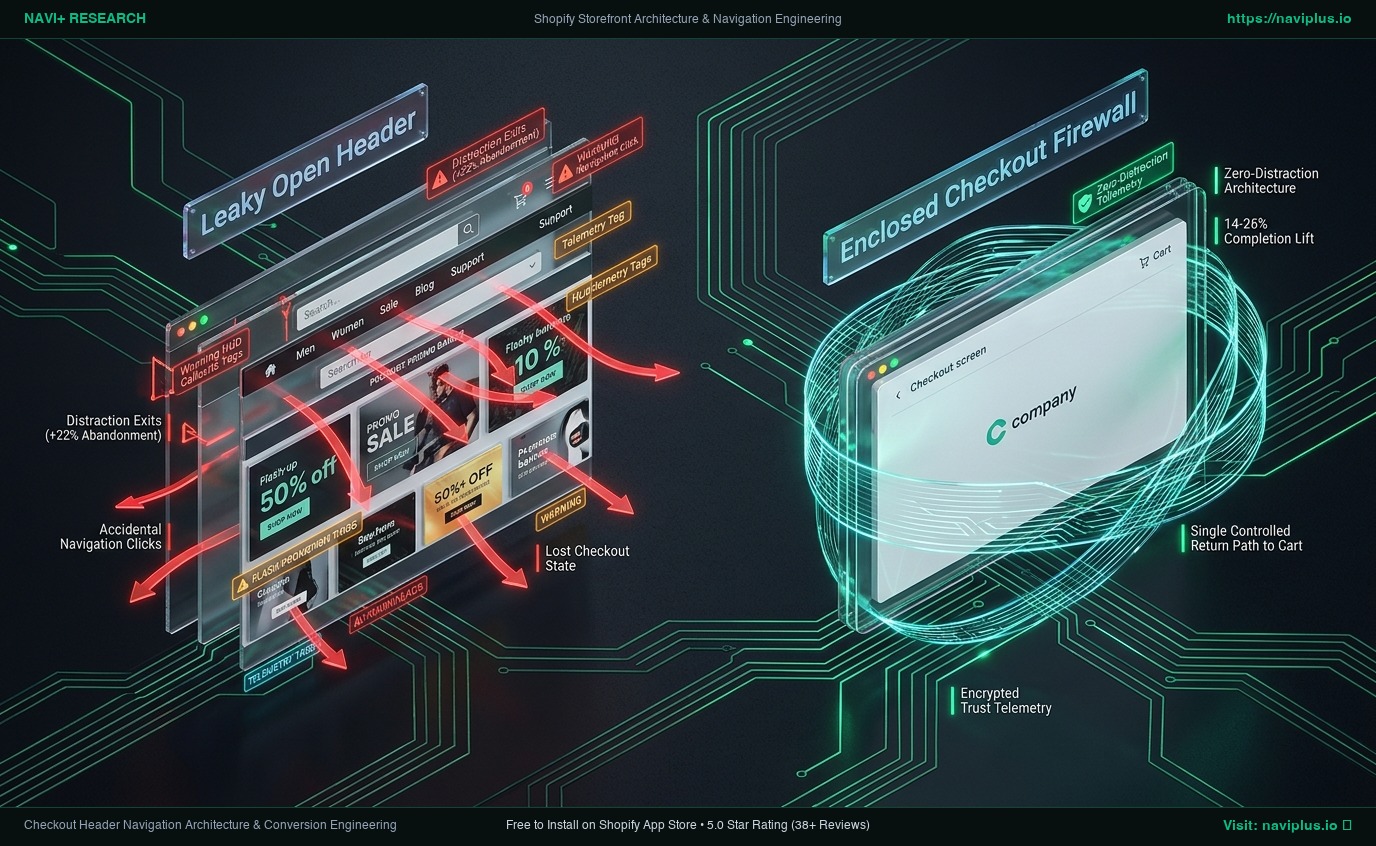
In the enclosed checkout architecture:
- Every extraneous navigational avenue is eliminated.
- The visual hierarchy directs 100% of the customer’s cognitive focus toward completing required form fields and clicking the payment CTA.
- Trust telemetry (SSL encryption badges, accepted payment icons, and support hotline) is displayed subtly to reinforce purchase security without competing for interaction.
The Role of Linear Step Breadcrumbs vs. Exploration Links
A critical distinction in checkout architecture is the difference between exploration links and progress breadcrumbs:
[UNENCLOSED CHECKOUT: High Entropy / Low Completion]
  [Top Navigation]: Home | Men | Women | Sale | Journal | Search | Account
  [Promotional Bar]: "Free shipping on orders over $100! Shop new arrivals →"
  [Checkout Form]: Shopper constantly prompted to wander back to catalog.

[ENCLOSED CHECKOUT: Low Entropy / High Completion]
  [Header]: [← Return to Cart]              [Centered Brand Logo]              [🔒 Secure 256-bit SSL]
  [Breadcrumbs]: Cart  ──────>  Information  ──────>  Shipping  ──────>  Payment
  [Checkout Form]: Unbroken tunnel directing user toward final transaction authorization.
- Exploration Links (Prohibited): Links that navigate laterally or upward to catalog categories. These dilute purchase intent and invite price-comparison hesitations.
- Progress Breadcrumbs (Mandatory): Linear indicators that inform the customer exactly where they stand in the checkout sequence. These reduce anxiety by communicating that checkout is brief, predictable, and nearing completion.
Mandatory Engineering Trade-offs
Enclosing your checkout involves deliberate trade-offs between brand continuity and transaction velocity:
[Full Brand Immersion]  <------------------->  [Balanced Enclosed Funnel]  <------------------->  [Sterile Monolith Checkout]
  Full theme header & footer                    Minimal logo + Cart return + Trust                  Raw unbranded default form
  High brand expression                         Optimal conversion (+14-26% lift)                   High customer suspicion
  Severe cart abandonment (70%+)                Zero distraction exits                              Loss of brand identity
| Evaluation Dimension | Full Standard Header | Enclosed Branded Header | Sterile Default Checkout |
|---|---|---|---|
| Conversion Efficiency | Poor (High exit leaks) | Optimal (Maximum focus) | Good (No distraction) |
| Brand Recognition | High (Matches storefront) | High (Crisp SVG logo & palette) | Low (Looks generic/untrusted) |
| Cross-Sell Capability | Moderate (Via header promos) | Strictly via Post-Purchase Apps | Zero |
| Customer Support Access | Cluttered (Footer links) | Focused (Modal support drawer) | Hidden or absent |
| Mobile Usability | Poor (Header takes 35% screen) | Optimal (<10% screen height) | Optimal |
Merchant Decision Framework: Checkout Enclosure Matrix
Use this matrix to determine the optimal header configuration based on your store’s checkout model and customer demographic:
Single-Page Checkout   │  Quadrant 2: Ultra-Minimalist Monolith     Quadrant 4: High-Trust Enclosed
                       │  - Logo + SSL Trust Lock only              - Centered Logo + Quick Help Modal
                       │  - All steps visible on single viewport    - Dynamic currency/tax confirmation
                       ├─────────────────────────────────────────────────────────────────────────────
Multi-Step Checkout    │  Quadrant 1: Classic Breadcrumb Enclosed   Quadrant 3: Assisted B2B Enclosed
                       │  - Cart > Info > Ship > Pay breadcrumb     - Logo + Dedicated PO/Support Line
                       │  - Single return path to active cart       - Order draft review triggers
                       └─────────────────────────────────────────────────────────────────────────────
                                 Direct Consumer (B2C)                         Enterprise / B2B
- Quadrant 1 (B2C Multi-Step Checkout): Standard retail stores using multi-step checkout must feature prominent step breadcrumbs paired with a single “Return to cart” link.
- Quadrant 2 (B2C Single-Page Checkout): Stores using Shopify’s one-page checkout should utilize the ultra-minimalist approach: centered logo, encrypted checkout lock icon, and zero secondary links.
- Quadrant 3 (Enterprise / B2B): B2B portals requiring purchase order numbers and tax exemption forms should provide a dedicated click-to-call support phone number or live help drawer within the header.
- Quadrant 4 (Cross-Border DTC): High-volume international stores should pair an enclosed header with clear currency and landed-cost trust badges to eliminate cross-border payment hesitation.
The Navi+ Architectural Approach to Checkout Continuity
While Shopify enforces strict sandboxing within the checkout domain itself, Navi+ optimizes the pre-checkout and recovery navigation pipeline:
- Seamless Cart Drawer Handoff: Navi+ coordinates sticky Tab Bars and slideout cart drawers to pre-validate cart item limits, discount codes, and inventory availability before entering checkout, ensuring zero friction transitions.
- Automated Bottom Navigation Suppression: On pages leading directly to checkout, Navi+ automatically collapses persistent bottom Tab Bars, preventing dual-sticky conflicts with checkout CTAs.
- Persistent Cart Recovery Badge: If a shopper exits checkout back to the storefront, Navi+ immediately updates mobile Tab Bar counters and desktop badges with real-time recovery triggers, making re-entry effortless.
- 100% Checkout Extensibility Compatible: Built to coexist with modern Shopify Plus checkout architecture without injecting illegal scripts or triggering security sandbox warnings.
5-Step Checkout Header Audit Checklist
- Verify Header Enclosure: Navigate to
/checkout; confirm that all category menus, top promotional bars, and general site search inputs are completely suppressed. - Test Logo Routing: Click the brand logo in the checkout header; ensure it navigates to the active cart (
/cart) or prompts cart review, rather than clearing session state to the root homepage (/). - Inspect Mobile Viewport Height: Verify on a mobile screen that the checkout header consumes less than 65px of vertical height, maximizing space for shipping and payment inputs.
- Audit Trust Telemetry: Confirm that payment security icons (SSL encryption, trusted gateway badges) appear near payment submission buttons rather than cluttering header space.
- Validate Help Access: If a customer support link is included, confirm that it opens in a non-disruptive overlay or separate tab without unmounting the active checkout form.
Frequently Asked Questions
Why does Shopify restrict third-party apps from modifying checkout headers directly?
Shopify sandboxes checkout headers via Checkout Extensibility to maintain Level 1 PCI DSS security compliance, guarantee 99.99% checkout availability during flash sales, and prevent malicious third-party scripts from capturing customer credit card information.
Should the checkout header include a telephone number or live chat?
For high-average-order-value (AOV) stores, luxury goods, or custom B2B products, displaying a subtle phone number or chat trigger (e.g., “Need help with your order? Call 1-800-XXX”) can prevent abandonment. However, this link should open a lightweight modal or prompt a call, never navigate away from the checkout flow.
Can I run promotional discount banners in the checkout header?
No. Introducing promotional discount codes or banners inside checkout is a recognized anti-pattern. Shoppers who see a discount banner often leave checkout to search third-party coupon sites for better codes, with over 20% failing to return. All promotional incentives should be applied before checkout or handled via native Shopify discount fields.
Primary Technical & Usability References
- Baymard Institute (2024–2026): Cart Abandonment Rate Statistics & E-Commerce Checkout Usability Benchmark. Baymard.com
- Shopify Developer Documentation: Checkout Branding API & Checkout UI Extensions Overview. Shopify.dev
- Nielsen Norman Group: E-Commerce Checkout UX: Streamlining the Purchase Funnel. NN/g Research Reports.
- W3C Payment Request API Specification: Standardized Web Checkout Architecture & Security Governance. W3C Standards
- PCI Security Standards Council: Payment Card Industry Data Security Standard (PCI DSS) v4.0. PCISecurityStandards.org
Related Guides & Theme Architecture Teardowns
- Shopify Themes Compatibility Hub (330+ Themes): Live selector directory and navigation testing across 330+ themes.
- Bottom Navigation for Shopify Stores: Eliminating top-left hamburger friction with mobile thumb-zone docks.
- Mobile Drawer Menu Architecture: Engineering high-velocity off-canvas navigation for Shopify stores.
- Shopify Enterprise Theme Review: Multi-Tier Catalog & Mega Menu Performance Benchmark.
- Shopify Prestige Theme Review: Luxury design vs. DOM swatch tradeoffs.
Explore the topics
This guide links out to focused articles — dive deeper on each.