


Localization Is More Than Translation
The first instinct when localizing navigation for international customers is translation: take the English labels and translate them into French, German, Spanish, or whatever language the target market speaks. Translation is necessary, but it's the baseline — a navigation that's grammatically correct in the target language but otherwise identical to the English version misses most of what localization actually requires.
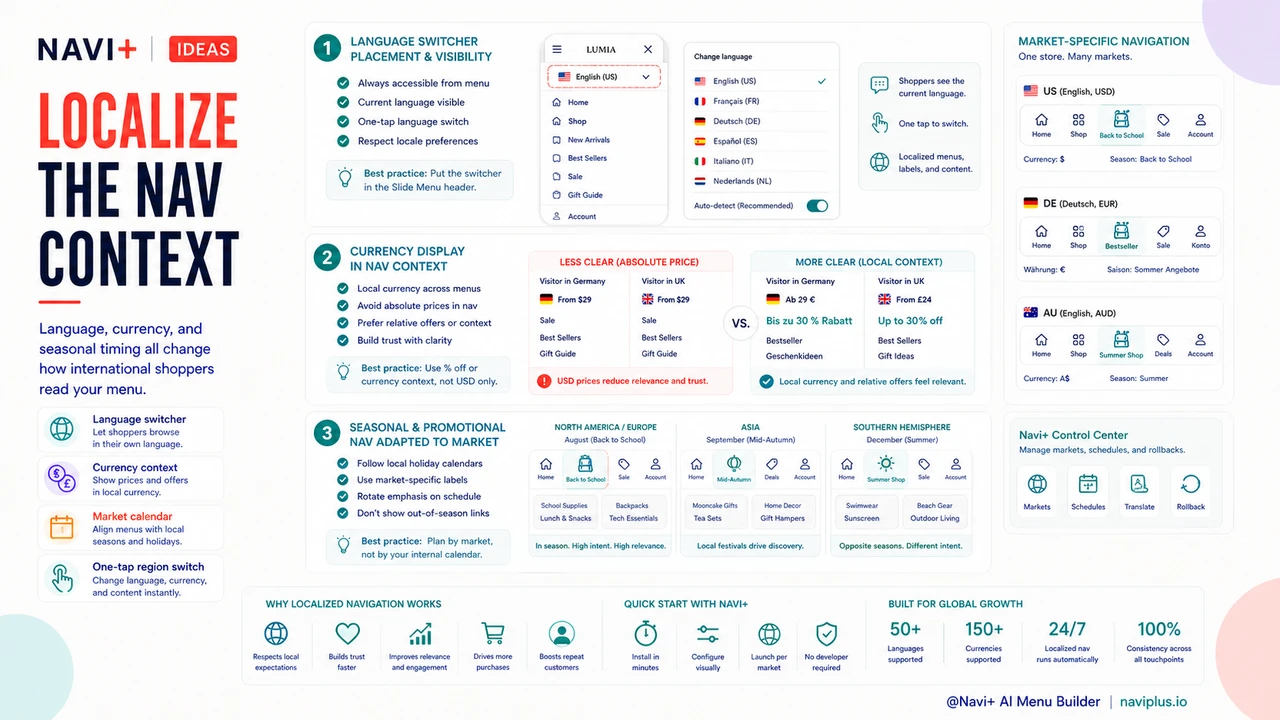
Localized navigation adapts not just the text but the structure, emphasis, and conventions of the navigation to match the expectations of visitors from a specific market. Different markets have different conventions for how stores organize their navigation — some expect size and fit information prominent in the navigation, others expect brand-organized sub-navigation, others expect navigating by occasion. Different markets have different seasonal emphases — the holiday shopping calendar in Australia runs differently than in Germany. And different markets use different product terminology that isn't just a translation issue: a "jumper" in the UK is a "sweater" in the US, and a "chemist" in Australia is a "pharmacy" everywhere else. True navigation localization accounts for all of these dimensions, not just the word-for-word label translation.
"We translated our navigation into French for our French-Canadian market and thought we were done. Our bounce rate from Quebec was still twice our English-Canada rate. When we worked with a Quebec-based translator who was also an e-commerce user, she pointed out that several of our category names were technically correct but not the terms French-Canadian shoppers use — they were European French equivalents, not Quebec French. After updating the labels to match local terminology and reordering the categories to put the most popular Quebec product types first, our Quebec conversion rate improved substantially. Localization isn't just translation — it's knowing the market."
— A Navi+ customer, Canadian apparel brand
The Navigation Localization Checklist
Language switcher placement and visibility. The language/market selector in navigation should be prominent enough that international visitors can find it without effort, but not so prominent that it dominates the navigation for the majority of visitors who are already in the right market. The Slide Menu header is an effective location: visible when the menu is open, accessible on every page, but not competing with the primary category navigation for attention. The selector should show the current language/region clearly and make switching frictionless — one tap to a list of options, not a multi-step flow.
Currency display in navigation context. Navigation links that include pricing — sale section labels that mention discount percentages, featured collection labels that include price ranges — should adapt to the visitor's currency. "Up to 30% off" translates cleanly; "From $29" does not if the visitor is browsing in euros or pounds. Navigation that acknowledges the visitor's currency context — whether through explicit currency display in the menu header or by ensuring that any price-related navigation language uses percentage terms rather than absolute values — reduces the cognitive overhead of currency conversion that international visitors otherwise carry throughout the session.
Seasonal and promotional navigation adapted to market calendars. The seasonal navigation updates appropriate for one market may be actively irrelevant for another. Promoting a "Back to School" category in August is relevant for North American and European markets but mistimed for Southern Hemisphere markets where August is mid-winter with school already in session. Stores selling into multiple international markets should maintain market-specific navigation updates that match local seasonal and promotional calendars rather than deploying a single global navigation update that's only accurate for the primary market.
| Localization Dimension | Minimum (Translation Only) | Full Localization |
|---|---|---|
| Category labels | Direct translation | Market-specific terminology |
| Category emphasis | Same order as English | Reordered by local preference |
| Seasonal navigation | Global update applied to all | Market-specific seasonal calendar |
| Language/currency access | Footer link (hard to find) | Slide Menu header (always visible) |
Localization as a Cost Reduction Strategy
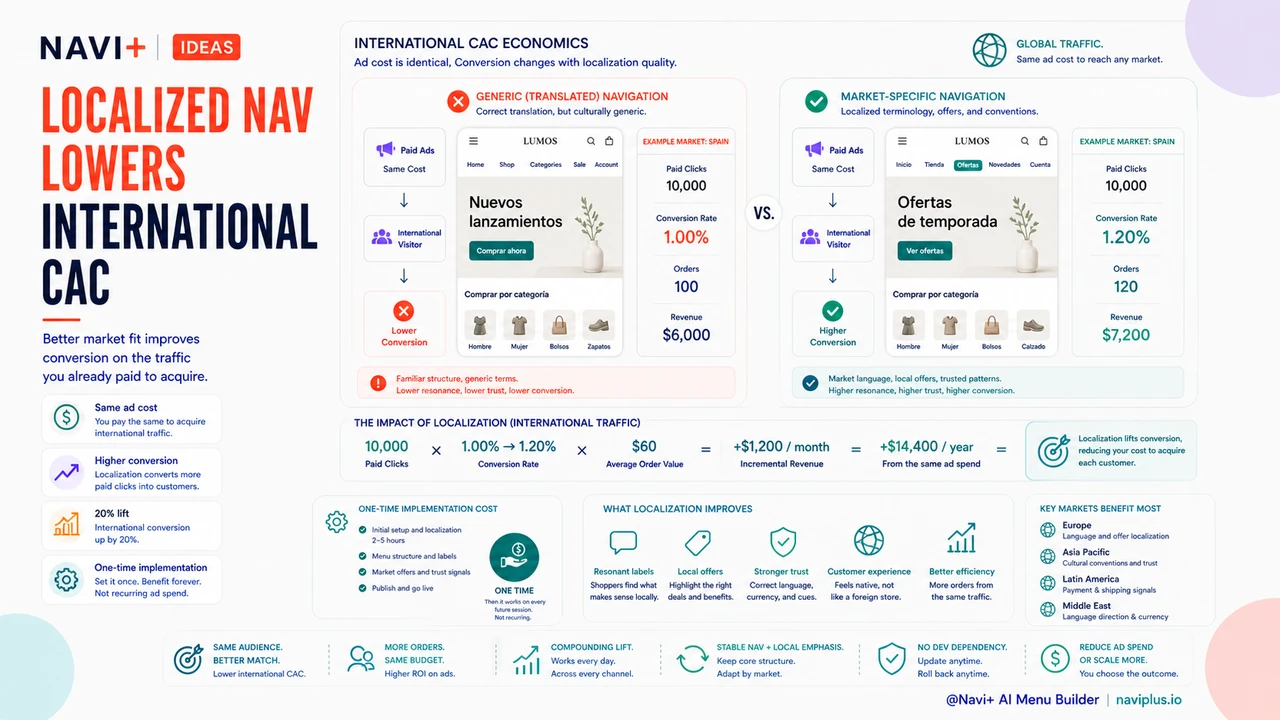
Investing in navigation localization is ultimately a cost reduction strategy measured in customer acquisition costs. Acquiring an international customer through paid advertising costs the same regardless of the visitor's navigation experience after the click — but the conversion rate that determines whether that acquisition cost produces a purchase is significantly affected by navigation localization quality. A French-speaking visitor who lands on correctly translated but culturally generic navigation converts at a lower rate than one who lands on navigation that reflects their market's terminology and conventions. The advertising cost is identical; the conversion cost per order is higher for the less-localized experience. Navigation localization that produces a 20% improvement in international conversion rates produces the same revenue impact as a 20% reduction in international advertising spend — both levers move the cost of international customer acquisition in the same direction, but localization is a one-time implementation cost rather than a recurring spend.
Try it free — no code, no developer needed
Install in minutes on Shopify, WordPress, or any website.