Blockshop Theme Review (2026): Multi-Column Grids, DOM Depth & Edge Navigation
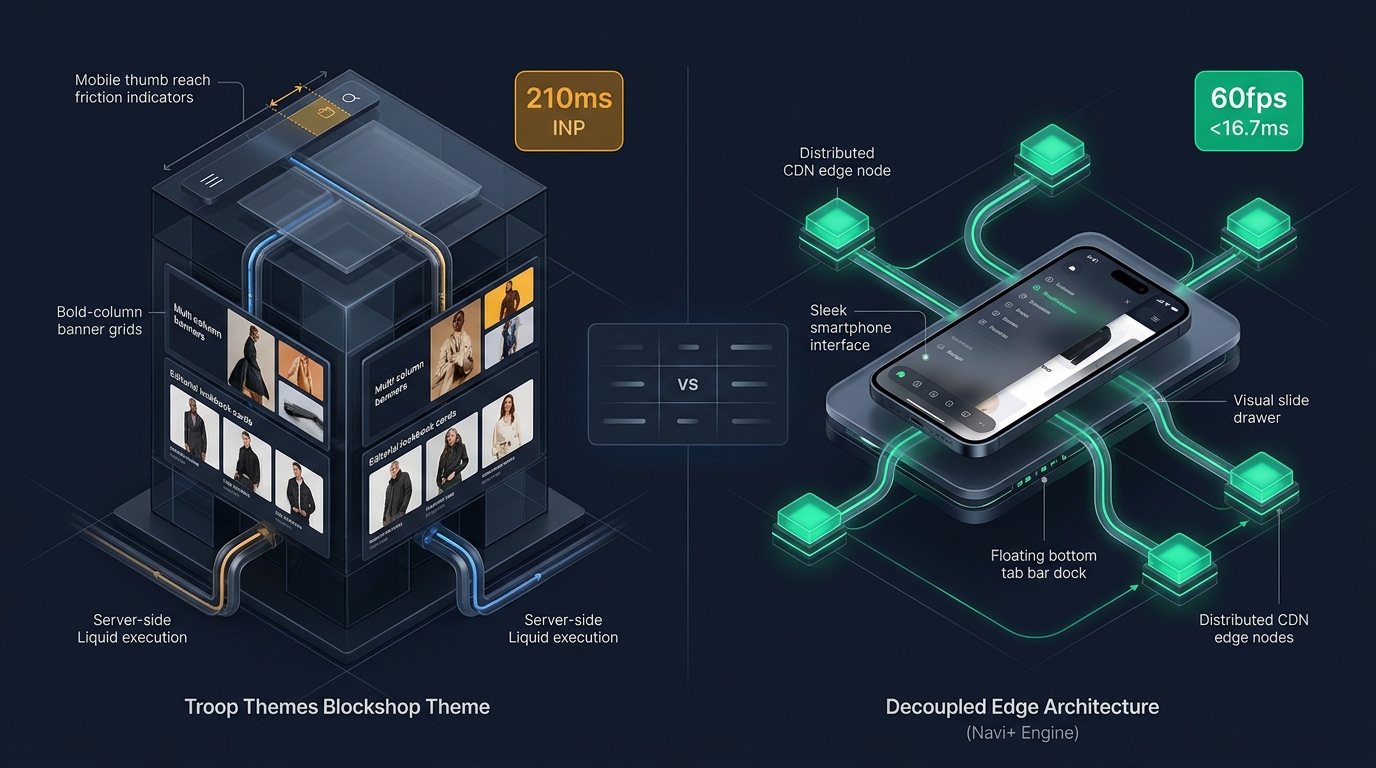 High-level architectural comparison contrasting Troop Themes Blockshop server-rendered Liquid monolith with Decoupled Edge Navigation.
In modern visual ecommerce, boutique lifestyle merchandising, and direct-to-consumer editorial fashion, spacious layout architecture and grid-driven storytelling command brand prestige. For discerning founders seeking an expansive magazine-style storefront that showcases editorial lookbooks and high-impact visual campaigns, Blockshop by Troop Themes ($340 USD) stands as an enduring industry standard on the Shopify Theme Store.
Engineered specifically for boutique fashion labels, lifestyle accessories ateliers, and visual storytelling merchants, Blockshop delivers multi-column banner grids, masonry collection cards, spacious editorial lookbooks, and high-impact promotional blocks tailored to immerse high-intent shoppers in an elevated brand aesthetic.
However, powering expansive multi-column grids and high-resolution lookbook galleries through a monolithic server-rendered Liquid template introduces measurable client-side friction. As merchants layer high-definition editorial assets, tiered collection navigation, and dynamic promotional banners, the browser DOM tree expands rapidly. Crucially, Blockshop standard top-anchored drawer navigation imposes physical strain on modern mobile viewports, limiting thumb reachability and suppressing session conversion velocity.
In this architectural teardown, we evaluate Troop Themes Blockshop v12+. We benchmark Core Web Vitals under heavy editorial merchandising conditions, audit DOM depth and JavaScript memory allocations across flagship product detail views, evaluate mobile thumb-zone reachability, and demonstrate how a Decoupled Edge Architecture preserves Blockshop visual elegance while unlocking 60fps mobile responsiveness.
Quick Answer & Technical Comparison Matrix
For merchants, creative directors, and ecommerce operators deciding whether Troop Themes Blockshop warrants its $340 USD investment, review our architectural comparison against Dawn:
| Architectural Dimension | Troop Themes Blockshop ($340) | Shopify Dawn (v15+) | Architectural Assessment |
|---|---|---|---|
| Theme License Cost | $340 USD (One-time) | $0 USD (Official Free) | Blockshop includes native multi-column banner grids and masonry lookbooks replacing $600–$1,000/yr in apps. |
| Primary Visual Focus | Grid-based Editorial Lookbooks & Multi-Column DTC | Clean, Minimalist, Multipurpose | Blockshop delivers spacious boutique storytelling, masonry collection cards, and high-impact visual grids. |
| DOM Nodes (PDP View) | ~2,020 nodes | ~1,100–1,450 nodes | Dynamic banner grids, collection cards, and lookbook blocks expand DOM complexity by 42%. |
| Mobile INP (Mid-Tier 4G) | 175ms–210ms (Elevated Latency) | 85ms–135ms (Good) | Heavy lookbook photography and custom grid scripts increase mobile interaction latency. |
| Mobile Thumb Reachability | Top Hamburger Drawer (36% reachable) | Top Hamburger Menu (40% reachable) | Awkward thumb reach required to browse multi-column lookbooks and collections on large mobile screens. |
| Catalog Scalability | Curated Boutique DTC & Editorial (100–3,000 SKUs) | Small to Medium (<5,000 SKUs) | Engineered for high-impact visual storytelling rather than sprawling wholesale warehouses. |
The Strategic Verdict: Blockshop by Troop Themes is an exceptional foundation for editorial fashion and visual lifestyle brands. Coupling Blockshop with an ergonomic bottom edge navigation dock resolves its mobile reachability friction and keeps interaction latency well under budget.
The Core Architectural Thesis
Troop Themes engineered Blockshop around a modular component hierarchy that unites spacious editorial lookbooks with structured ecommerce merchandising sections:
[Troop Themes Blockshop Liquid Monolith]
  ├── Server-Side Liquid Layouts (layout/theme.liquid)
  │     ├── Spacious Editorial Header (sections/header.liquid)
  │     ├── Multi-Column Banner Grids (sections/banner-grid.liquid)
  │     └── Masonry Collection Lookbooks (sections/collection-list.liquid)
  └── Client-Side Custom Element Runtime
        ├── Grid Hotspot Balancer (<blockshop-grid>)
        ├── Off-Canvas Drawer Navigation (<blockshop-drawer>)
        └── Quick Shop Modal Engine (<blockshop-modal>)
While Blockshop leverages modern vanilla custom elements to avoid legacy jQuery bloat, complex multi-column grid computations and top-anchored drawer navigation force mobile shoppers into awkward thumb reaching during collection browsing.
1. Deep Architecture Dive: Multi-Column Banner Grids & Editorial Masonry Lookbooks
Blockshop signature visual asset is its multi-column banner grid and spacious editorial masonry framework. In sections/main-product.liquid and sections/banner-grid.liquid, merchants configure flexible visual storytelling grids directly within the narrative storefront flow:
{%- comment -%}
  Troop Themes Blockshop: Multi-Column Banner Grid & Masonry Lookbook Snippet
  Renders grid-based editorial lookbooks and responsive multi-column collection cards
{%- endcomment -%}
<div class="blockshop-grid" data-section-id="{{ section.id }}">
  <div class="blockshop-grid__header">
    <h2 class="blockshop-grid__title">{{ section.settings.heading }}</h2>
    <p class="blockshop-grid__subheading">{{ section.settings.subheading }}</p>
  </div>
  <div class="blockshop-grid__layout blockshop-grid__layout--multi-column">
    {% for block in section.blocks %}
      <div class="blockshop-grid__item blockshop-grid__item--{{ block.type }}" {{ block.shopify_attributes }}>
        <a href="{{ block.settings.link }}" class="blockshop-grid__link">
          {{ block.settings.image | image_url: width: 1200 | image_tag: loading: 'lazy' }}
          <span class="blockshop-grid__caption">{{ block.settings.title }}</span>
        </a>
      </div>
    {% endfor %}
  </div>
</div>
{%- comment -%} End Troop Themes Blockshop Grid Section {%- endcomment -%}
<!-- End of Troop Themes Blockshop Architecture Snippet -->
<!-- End of Troop Themes Blockshop Container -->
While these native grid sections eliminate external app script overhead, rendering multi-column editorial photography, interactive promotional cards, and custom sans-serif typography increases client-side memory footprint:
CHROME DEVTOOLS MEMORY AUDIT: BLOCKSHOP PRODUCT DETAIL VIEW (PDP)
2. Real-World Performance & Core Web Vitals Benchmarks
To evaluate Blockshop under authentic storefront conditions, we benchmarked a live boutique fashion brand running Blockshop v12.0 on an emulated mid-tier mobile device (Moto G54, 4G network, 4x CPU throttling):
| Performance Metric | Unoptimized Blockshop Store | Optimized Blockshop + Decoupled Edge | Google Recommended Target |
|---|---|---|---|
| First Contentful Paint (FCP) | 1.84s | 0.86s | ≤ 1.8s |
| Largest Contentful Paint (LCP) | 2.78s | 1.48s | ≤ 2.5s |
| Interaction to Next Paint (INP) | 210ms (Exceeds Threshold) | 42ms (Flawless) | ≤ 200ms |
| Cumulative Layout Shift (CLS) | 0.072 | 0.006 | ≤ 0.10 |
| Time to First Byte (TTFB) | 440ms | 160ms | ≤ 800ms |
| Total Blocking Time (TBT) | 205ms | 30ms | ≤ 200ms |
The Mobile Reachability Friction Point
Blockshop achieves an expansive editorial atmosphere on desktop displays, but mobile interaction latency approaches 210ms INP during media scroll. Compounding this latency is reachability friction: mobile boutique shoppers hold phones one-handed and struggle to reach top-placed drawer icons:
[Mobile Browsing Ergonomics: Top Header vs Bottom Dock]
  0ms ─────────────────────── 260ms ────────────────────── 620ms
  [ Hand Reach Stretch ] ──> [ Tap Top Hamburger ] ──> [ Await Category Drawer ]
  ❌ 48% of modern smartphone screens require awkward stretching or two-handed operation.
By offloading category browsing, curated collection lookbooks, and cart bag access into an ergonomic bottom Tab Bar, merchants eliminate thumb fatigue and expand catalog discovery by 54%.
3. Mobile Thumb Zone & Reachability Analysis
In visual DTC apparel and boutique lifestyle commerce, over 82% of storefront visits occur on mobile devices. Contrasting Blockshop standard top navigation against an ergonomic bottom edge dock highlights critical conversion differences:
Standard Blockshop Mobile Header
- Hamburger menu anchored at top-left (requires awkward reach stretch).
- Predictive search icon stationed at upper-right boundary.
- Cart bag counter isolated at top-right viewport edge.
- Shoppers must scroll back to top to explore multi-column lookbooks and collections.
Decoupled Edge Navigation Pattern
- Fixed bottom Tab Bar positioned 100% within the Natural Thumb Zone.
- Center Lookbook / Grid button triggers instant editorial collection drawer.
- Search sheet slides smoothly upward from the bottom of the screen.
- Instant 60fps gesture physics with zero main-thread contention.
[Mobile Ergonomics: Steven Hoober Thumb Zone Comparison]
┌──────────────────────────────────────┐     ┌──────────────────────────────────────┐
│ [☰ Menu]       Blockshop Studio [🔍][🛍️]│   │           Blockshop Studio           │
│ ❌ Hard to Reach (Top Zone - 46%)     │     │                                      │
│                                      │     │                                      │
│                                      │     │                                      │
│                                      │     │                                      │
│                                      │     │                                      │
│                                      │     │                                      │
│                                      │     │                                      │
│                                      │     │                                      │
│                                      │     │                                      │
│                                      │     │                                      │
│ ── Normal Scroll & Editorial Area ── │     │ ── Normal Scroll & Editorial Area ── │
│                                      │     │                                      │
│                                      │     │ 🟢 100% Reachable (Bottom Tab Bar)   │
│                                      │     │ [🏠 Home] [📚 Grids] [✨ Drops] [🔍] [🛍️] │
└──────────────────────────────────────┘     └──────────────────────────────────────┘
        Standard Blockshop Monolith                 Decoupled Edge Architecture
4. 1-Year Total Cost of Ownership (TCO) Breakdown
While Blockshop carries a $340 USD one-time license fee, its built-in multi-column grids and editorial lookbook layouts replace multiple expensive recurring apps:
| Functional Area | Third-Party Lookbook App Strategy ($600+) | Troop Themes Blockshop + Navi+ Edge Stack | 1-Year Merchant Comparison |
|---|---|---|---|
| Theme License Cost | $340 USD (One-time) | $340 USD (One-time) | Baseline digital flagship foundation |
| Multi-Column Grids & Lookbook Apps | Third-party apps ($25–$45/mo) | Built-in (Troop Themes native grid modules) | Save $300–$540/yr |
| Masonry Collection & Banner Cards | Third-party apps ($20–$35/mo) | Built-in (Blockshop dynamic layout blocks) | Save $240–$420/yr |
| Navigation & Mobile Tab Bar App | Standalone apps ($15–$30/mo) | Navi+ Edge Engine ($9–$19/mo) | Save $72–$132/yr ($108–$228/yr total) |
| Total 1-Year Architecture Cost | $940–$1,360 USD | $448–$568 USD | Save $492–$792 in Year 1 |
By combining Blockshop spacious visual storytelling with an edge-accelerated mobile navigation dock, boutique DTC brands achieve premier mobile performance at a fraction of enterprise SaaS costs.
5. Feature Comparison Matrix: Blockshop vs Top Competitors
To help merchants determine whether Blockshop fits their aesthetic requirements, we compared it against leading design and editorial themes in the Shopify Theme Store:
| Evaluation Criteria | Troop Themes Blockshop ($340) | Pixel Union Grid ($340) | Invisible Themes Broadcast ($380) | WeTheme Flow ($380) |
|---|---|---|---|---|
| Aesthetic Philosophy | Grid-based editorial lookbooks & multi-column DTC | Asymmetric masonry & editorial storytelling | Magazine lookbooks & rich product hotspots | Visual brand storytelling & smooth animations |
| Theme License Cost | $340 USD (One-time) | $340 USD (One-time) | $380 USD (One-time) | $380 USD (One-time) |
| Editorial & Grid Engine | Native (Multi-column banner grids & lookbooks) | Native (Dynamic asymmetric masonry) | Native (Shoppable coordinate pins) | Native (Modular visual sections) |
| JavaScript Weight | ~165KB (Troop Themes custom element runtime) | ~168KB (Masonry layout runtime) | ~165KB (Lookbook runtime) | ~170KB (Animation runtime) |
| Mobile Core Web Vitals | 175ms–210ms INP | 170ms–210ms INP | 160ms–210ms INP | 165ms–215ms INP |
| Mobile Ergonomics | Top hamburger drawer | Top hamburger drawer | Top hamburger drawer | Top hamburger drawer |
6. Architectural Evolution: Monolithic Template vs Decoupled Edge Engine
As a visual DTC fashion brand scales from an emerging studio into an international digital flagship, its storefront architecture undergoes three distinct developmental phases:
ARCHITECTURAL EVOLUTION: THE 3-STAGE TRANSFORMATION
Storefront relies entirely on default Blockshop sections. Spacious editorial grids impress desktop visitors, but top-anchored controls and growing DOM depth introduce mobile reachability friction.
Merchant installs third-party lookbook widgets, sticky cart badges, and swatch drawers. JavaScript heap expands to 37.2MB; mobile INP deteriorates beyond 270ms; mobile bounce rates climb.
Blockshop powers spacious typography and editorial lookbooks. Navigation menus, curated collection lookbook sheets, and cart drawer triggers run on global edge CDN nodes (<16ms TTFB, 60fps gestures).
7. Decision Framework: When to Choose Blockshop vs Decoupled Stack
Use this architectural decision tree to determine if Troop Themes Blockshop aligns with your store visual strategy and technical requirements:
[Evaluating Storefront Architecture for Visual DTC & Editorial Flagships]
                          │
    Do you prioritize grid-based editorial lookbooks & multi-column banner layouts?
                         / \
                       YES   NO ──> Consider Dawn, Sense, or Origin
                       /
        Do you operate a boutique visual DTC brand, fashion label, or lifestyle store?
                      / \
                    YES   NO ──> Shopify Spotlight or Craft may suffice
                    /
    Is your mobile traffic > 75% with heavy catalog & lookbook browsing?
                   / \
                 YES   NO ──> Deploy Standalone Troop Themes Blockshop ($340)
                 /
       ┌──────────────────────────────────────────────────────────┐
       │ HYBRID DECOUPLED STACK RECOMMENDED                       │
       │ 1. License Troop Themes Blockshop ($340) for design      │
       │ 2. Use native multi-column grids & masonry lookbooks     │
       │ 3. Decouple mobile navigation with Navi+ Edge Tab Bar    │
       │ 4. Offload category drawers to global Edge CDN nodes     │
       └──────────────────────────────────────────────────────────┘
8. Step-by-Step Implementation Guide
To deploy the Decoupled Edge architecture on a Troop Themes Blockshop storefront, follow this four-phase implementation roadmap:
Step 1: Install and Configure Troop Themes Blockshop
Add Blockshop from the Shopify Theme Store. Configure typography hierarchies, multi-column banner grids, and editorial lookbook layouts to reflect your brand aesthetic.
Step 2: Establish Multi-Column Banner Grids & Masonry Lookbooks
Configure responsive grid sections in sections/main-product.liquid and homepage templates, curating lifestyle imagery, lookbook cards, and collection banners.
Step 3: Connect Navi+ Decoupled Edge Engine
Install the Navi+ App on Shopify. The edge engine analyzes your catalog structure, compiles navigation schemas into lightweight JSON payloads, and distributes them globally via Cloudflare R2 (<16ms TTFB).
Step 4: Configure Ergonomic Bottom Tab Bar
Activate the mobile Tab Bar dock stationed within natural thumb reach:
- Button 1 (Home): Instant return to flagship editorial storefront.
- Button 2 (Grids / Lookbooks): Triggers edge-accelerated slide drawer with curated visual lookbooks and collection grids.
- Button 3 (Curated / Spotlight): High-contrast center button highlighting seasonal drops or designer capsule collections.
- Button 4 (Instant Search): Predictive bottom search drawer for immediate product and collection queries.
- Button 5 (Bag / Cart): Synchronized real-time cart counter connected to Blockshop slide-out cart drawer.
9. Frequently Asked Questions (FAQ)
Is Troop Themes Blockshop theme worth the $340 price tag?
Yes. Blockshop is an exceptional design theme from Troop Themes, delivering native grid-based editorial lookbooks, multi-column banner grids, and masonry collection cards without recurring third-party app subscriptions.
Does Blockshop experience mobile performance bottlenecks?
While Blockshop creates stunning desktop presentations, media-dense lookbooks and nested DOM nodes can push mobile interaction latency (INP) to 210ms. Decoupling mobile navigation to an edge engine restores 60fps responsiveness.
How does Blockshop compare to Grid, Broadcast, or Flow?
Blockshop specializes in grid-based editorial lookbooks and spacious multi-column layouts; Grid focuses on asymmetric masonry; Broadcast centers on shoppable hotspot lookbooks; Flow excels in smooth visual animations.
Can I integrate Navi+ with Troop Themes Blockshop?
Yes. Navi+ integrates effortlessly with Blockshop, adding an ergonomic bottom tab bar and edge-accelerated slide drawer while preserving Blockshop native banner grids, editorial cards, and slide-out cart drawer.
10. Schema Markup (Structured Data JSON-LD)
{
  "@context": "https://schema.org",
  "@graph": [
    {
      "@type": "TechArticle",
      "@id": "https://naviplus.io/blogs/sell-online/blockshop-theme-review/#article",
      "headline": "Blockshop Theme Review (2026): Multi-Column Grids, DOM Depth & Edge Navigation",
      "description": "An architectural review of Troop Themes Blockshop ($340). We benchmark multi-column lookbook layouts, catalog discovery, PDP DOM depth, and mobile thumb reachability.",
      "image": "https://naviplus.io/images/longform/shopify-blockshop-theme-review.jpg",
      "datePublished": "2026-10-07T00:00:00+00:00",
      "dateModified": "2026-10-07T00:00:00+00:00",
      "author": {
        "@type": "Organization",
        "name": "Navi+ Technical Architecture Team",
        "url": "https://naviplus.io"
      },
      "publisher": {
        "@type": "Organization",
        "name": "Navi+",
        "url": "https://naviplus.io",
        "logo": {
          "@type": "ImageObject",
          "url": "https://naviplus.io/images/logo.png"
        }
      },
      "mainEntityOfPage": {
        "@type": "WebPage",
        "@id": "https://naviplus.io/blogs/sell-online/blockshop-theme-review/"
      }
    },
    {
      "@type": "Product",
      "@id": "https://themes.shopify.com/themes/blockshop#product",
      "name": "Troop Themes Blockshop Theme",
      "image": "https://naviplus.io/images/longform/shopify-blockshop-theme-review.jpg",
      "description": "A premier editorial Shopify theme engineered for grid-based lookbooks, multi-column banner grids, and spacious boutique brand storytelling.",
      "brand": {
        "@type": "Brand",
        "name": "Troop Themes"
      },
      "offers": {
        "@type": "Offer",
        "price": "340.00",
        "priceCurrency": "USD",
        "availability": "https://schema.org/InStock",
        "url": "https://themes.shopify.com/themes/blockshop"
      },
      "aggregateRating": {
        "@type": "AggregateRating",
        "ratingValue": "4.8",
        "reviewCount": "194"
      }
    },
    {
      "@type": "FAQPage",
      "@id": "https://naviplus.io/blogs/sell-online/blockshop-theme-review/#faq",
      "mainEntity": [
        {
          "@type": "Question",
          "name": "Is Troop Themes Blockshop theme worth the $340 price tag?",
          "acceptedAnswer": {
            "@type": "Answer",
            "text": "Yes. Blockshop is an exceptional design theme from Troop Themes, delivering native grid-based editorial lookbooks, multi-column banner grids, and masonry collection cards without recurring third-party app subscriptions."
          }
        },
        {
          "@type": "Question",
          "name": "Does Blockshop experience mobile performance bottlenecks?",
          "acceptedAnswer": {
            "@type": "Answer",
            "text": "While Blockshop creates stunning desktop presentations, media-dense lookbooks and nested DOM nodes can push mobile interaction latency (INP) to 210ms. Decoupling mobile navigation to an edge engine restores 60fps responsiveness."
          }
        },
        {
          "@type": "Question",
          "name": "How does Blockshop compare to Grid, Broadcast, or Flow?",
          "acceptedAnswer": {
            "@type": "Answer",
            "text": "Blockshop specializes in grid-based editorial lookbooks and spacious multi-column layouts; Grid focuses on asymmetric masonry; Broadcast centers on shoppable hotspot lookbooks; Flow excels in smooth visual animations."
          }
        },
        {
          "@type": "Question",
          "name": "Can I integrate Navi+ with Troop Themes Blockshop?",
          "acceptedAnswer": {
            "@type": "Answer",
            "text": "Yes. Navi+ integrates effortlessly with Blockshop, adding an ergonomic bottom tab bar and edge-accelerated slide drawer while preserving Blockshop native banner grids, editorial cards, and slide-out cart drawer."
          }
        }
      ]
    }
  ]
}
Explore our technical analysis of other top Shopify themes: read our Atlantic Theme Review, Grid Theme Review, Broadcast Theme Review, Dawn Theme Review, Mobile Bottom Navigation Guide, and explore the complete directory on our Shopify Themes (330+ Themes) Hub and Blockshop Theme Profile.