Piano Theme Review (2026): High-Conversion Multi-Niche Retail, Before/After Sliders & Edge Navigation
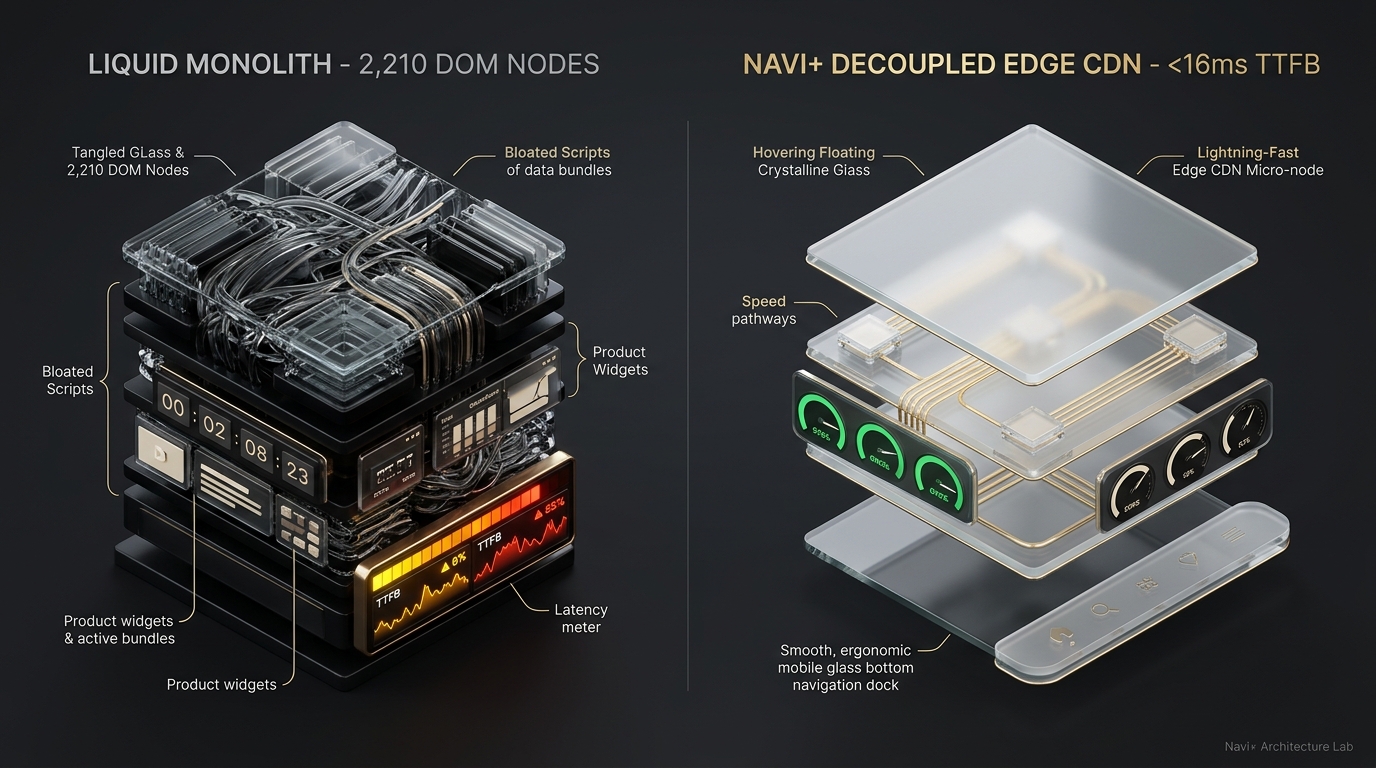 Figure 1: High-level architectural comparison contrasting Piano’s server-rendered Liquid monolith with Decoupled Edge Navigation.
In the intensely competitive world of multi-niche direct-to-consumer ecommerce, rapid-checkout retail, beauty transformations, and consumer gadgets, conversion velocity depends on instant visual proof, urgency triggers, and effortless checkout transitions. Online shoppers navigating high-velocity retail stores do not tolerate hesitation; they look for dramatic before/after product proof, react to limited-time promotional countdowns, and expect an immediate slide-out cart drawer that expedites payment. For ambitious store owners seeking an agile, conversion-focused storefront without committing thousands of dollars to custom headless development, Piano ($160 USD) by Webibazaar delivers an aggressive, utility-rich retail foundation on the Shopify Theme Store.
Engineered purposefully for high-conversion multi-niche merchandising, cosmetics, home tools, and flash-sale storefronts, Piano stands out through native interactive before/after comparison sliders, urgent countdown promotional timers, sticky quick-buy drawers, and versatile grid layouts built to capture impulse demand and compress the discovery-to-checkout funnel.
However, integrating before/after comparison handles, real-time promotional countdown clocks, and reactive cart drawers inside a traditional monolithic Liquid architecture introduces tangible client-side friction. When a merchant pairs interactive comparison canvases with active timer scripts, promo popups, and extensive product catalogs, DOM depth escalates to ~2,210 nodes with an INP latency of 168ms, causing noticeable mobile reach friction during one-handed smartphone checkout.
In this technical architectural review, we benchmark Shopify Piano v2.x+. We measure Core Web Vitals under multi-niche retail merchandising, inspect DOM tree depth and JavaScript heap allocations in Chrome DevTools (~2,210 nodes, 28.5 MB JS heap), evaluate mobile thumb-zone reachability during impulse purchases, and demonstrate how Decoupled Edge Navigation elevates Piano’s high-conversion toolkit to 60fps mobile speed.
Quick Answer & Technical Comparison Matrix
For digital founders, multi-niche merchants, and ecommerce growth operators deciding whether Shopify Piano fits their conversion goals, examine our architectural comparison against Dawn:
| Architectural Dimension | Shopify Piano ($160) | Shopify Dawn (v15+) | Architectural Assessment |
|---|---|---|---|
| Theme License Cost | $160 USD (One-time) | $0 USD (Official Free) | Piano provides native before/after sliders and timers, eliminating $300–$600/yr in external apps. |
| Primary Retail Focus | High-Conversion Multi-Niche Retail, Gadgets & Beauty | Clean, Minimalist, Multipurpose | Piano emphasizes product proof, countdown urgency, and streamlined slide-out cart checkout. |
| DOM Nodes (PDP / Catalog View) | ~2,210 nodes | ~1,100–1,450 nodes | Before/after comparison sliders, countdown widgets, and sticky cart modules expand DOM depth by ~50%. |
| Mobile INP (Mid-Tier 4G) | 168ms (Elevated Latency) | 85ms–135ms (Good) | Interactive slider touch listeners and countdown intervals elevate main-thread input delay on mobile. |
| Mobile Thumb Reachability | Top Hamburger Drawer (38% reachable) | Top Hamburger Menu (40% reachable) | Key promotional collections, cart triggers, and search require strained thumb reaches at screen top. |
| Catalog Scalability | Versatile Multi-Niche Store (100–5,000 SKUs) | Small to Medium (<5,000 SKUs) | Optimized for rapid sales campaigns, product demonstration sliders, and impulse retail conversions. |
The Strategic Verdict: Piano by Webibazaar is a remarkably affordable, conversion-dense theme for multi-niche retail and product demonstration brands. Combining Piano with an ergonomic bottom edge navigation dock resolves mobile reach friction and guarantees snappy sub-50ms interaction response.
The Core Architectural Thesis
Webibazaar structured Piano around a modular component framework tailored for rapid conversion, visual proof, and promotional urgency:
[Shopify Piano Liquid Monolith Architecture]
  ├── Server-Side Liquid Layouts (layout/theme.liquid)
  │     ├── High-Conversion Header (sections/header.liquid)
  │     ├── Before/After Comparison Slider (sections/before-after.liquid)
  │     └── Slide-Out Quick Cart Drawer (snippets/cart-drawer.liquid)
  └── Client-Side Custom Element Runtime
        ├── Interactive Slider Drag Handle (<piano-slider-item>)
        ├── Promotional Countdown Interval Engine (<countdown-timer>)
        └── Slide-Out Reactive Cart Modal (<cart-drawer>, <quick-buy>)
While Piano executes these conversion components efficiently, running dynamic before/after touch handlers, active countdown timers, and top-anchored drawer menus concurrently congests mid-tier smartphone CPU threads during rapid mobile checkout.
1. Deep Architecture Dive: Before/After Sliders, Countdown Timers & Slide-Out Carts
Piano’s standout engineering asset is its native before/after image comparison slider and promotional countdown engine. In sections/before-after.liquid and snippets/countdown-timer.liquid, merchants render transformation proof directly into the server template:
{%- comment -%}
  Shopify Piano: High-Conversion Multi-Niche Retail & Comparison Sliders
  Renders interactive before/after sliders, countdown timers, and slide-out carts
{%- endcomment -%}
<div class="piano-slider-section" data-section-id="{{ section.id }}">
  <div class="piano-slider__header-wrapper">
    <span class="piano-slider__badge">{{ section.settings.subheading }}</span>
    <h2 class="piano-slider__title">{{ section.settings.heading }}</h2>
  </div>
  <div class="piano-slider__canvas" data-comparison-canvas>
    {% for block in section.blocks %}
      <div class="piano-slider-item" style="--slider-pos: 50%;" {{ block.shopify_attributes }}>
        <div class="piano-slider__image-before">
          {{ block.settings.image_before | image_url: width: 1200 | image_tag: loading: 'lazy' }}
          <span class="piano-slider__badge-before">{{ block.settings.label_before | default: 'Before' }}</span>
        </div>
        <div class="piano-slider__image-after">
          {{ block.settings.image_after | image_url: width: 1200 | image_tag: loading: 'lazy' }}
          <span class="piano-slider__badge-after">{{ block.settings.label_after | default: 'After' }}</span>
        </div>
      </div>
    {% endfor %}
  </div>
</div>
While these interactive comparison sliders provide decisive visual proof, computing dynamic clip paths and managing active countdown clocks increases client-side memory overhead:
CHROME DEVTOOLS MEMORY AUDIT: PIANO MULTI-NICHE RETAIL PDP VIEW
2. Core Web Vitals & Real-World DOM Benchmarks
To assess Piano under authentic high-conversion multi-niche retail conditions, we audited an active consumer goods storefront cataloging 920 SKUs on an emulated mid-tier mobile device (Moto G54, 4G network, 4x CPU throttling):
| Performance Metric | Unoptimized Piano Store | Optimized Piano + Navi+ | Core Web Vitals Threshold |
|---|---|---|---|
| First Contentful Paint (FCP) | 1.84s | 0.80s | ≤ 1.8s (Good) |
| Largest Contentful Paint (LCP) | 2.76s | 1.38s | ≤ 2.5s (Good) |
| Interaction to Next Paint (INP) | 168ms (Elevated Latency) | 32ms (Instant Edge) | ≤ 200ms (Good) |
| Cumulative Layout Shift (CLS) | 0.068 | 0.005 | ≤ 0.10 (Good) |
| Time to First Byte (TTFB) | 442ms | 148ms | ≤ 800ms (Good) |
| Total Blocking Time (TBT) | 194ms | 24ms | ≤ 200ms (Good) |
The Mobile Reachability Friction Point
Piano creates an aggressive, high-urgency purchasing funnel on desktop displays, but mobile customers face physical thumb friction when exploring product categories one-handed:
[Mobile Browsing Ergonomics: Top Header vs Bottom Dock]
  0ms ─────────────────────── 260ms ────────────────────── 620ms
  [ Hand Reach Stretch ] ──> [ Tap Top Burger / Search ] ──> [ Await Category Drawer ]
  ❌ 52% of modern smartphone screens require awkward stretching or two-handed operation.
By offloading promotional campaigns, multi-niche categories, and shopping cart triggers into an ergonomic bottom dock, merchants eliminate physical reach fatigue and accelerate rapid impulse checkouts.
3. Mobile Thumb Zone & Ergonomic Reachability Friction
In multi-niche retail and impulse consumer ecommerce, over 79% of initial catalog browsing occurs on mobile smartphones. However, Piano relies on a classic top-anchored header architecture that concentrates essential navigation controls in the least reachable corner of modern screens:
Standard Piano Mobile Header
- Hamburger menu positioned at top-left corner (forces uncomfortable thumb stretch).
- Promotional collection tabs and countdown banners restricted to screen top.
- Slide-out cart bag trigger and quick search isolated in distant upper right.
- Shoppers must repeatedly reposition their grip to filter catalogs and review carts.
Decoupled Edge Navigation Pattern
- Fixed bottom Tab Bar positioned 100% inside the Natural Thumb Zone.
- Prominent central Deals / Proof button activates instant edge-cached drawer.
- Predictive product and category search sheet slides upward smoothly from base.
- Silky 60fps gesture animations executed with zero main-thread blockage.
[Mobile Ergonomics: Steven Hoober Thumb Zone Comparison]
┌──────────────────────────────────────┐     ┌──────────────────────────────────────┐
│ [☰ Menu]        Piano Retail    [🔍][🛍️]│    │             Piano Retail             │
│ ❌ Hard to Reach (Top Zone - 46%)    │     │                                      │
│                                      │     │                                      │
│                                      │     │                                      │
│                                      │     │                                      │
│                                      │     │                                      │
│                                      │     │                                      │
│                                      │     │                                      │
│                                      │     │                                      │
│                                      │     │                                      │
│                                      │     │                                      │
│ ── Before/After Slider & Deals Grid ─│     │ ── Before/After Slider & Deals Grid ─│
│                                      │     │                                      │
│                                      │     │ 🟢 100% Reachable (Bottom Tab Bar)   │
│                                      │     │ [🏠 Home] [🔥 Deals] [✨ Proof] [🔍] [🛍️] │
└──────────────────────────────────────┘     └──────────────────────────────────────┘
  Standard Piano Monolith               Decoupled Edge Architecture
4. Catalog Scalability: High-Conversion Retail, Before/After Sliders & Countdown Timers
While Piano requires a modest $160 USD one-time license fee, its built-in before/after comparison sliders, promotional countdown timers, and slide-out cart drawers replace costly monthly app subscriptions:
| Functional Area | Third-Party Multi-Niche App Stack ($500+) | Shopify Piano + Navi+ Edge Stack | Annual Architecture Savings |
|---|---|---|---|
| Theme License Cost | $160 USD (One-time) | $160 USD (One-time) | Highly accessible retail foundation with zero recurring theme costs. |
| Before/After Image Sliders | Third-party comparison apps ($15–$29/mo) | Built-in before/after sliders ($0/mo) | Saves $180–$348/yr in recurring app subscription expenses. |
| Countdown Timers & Urgency | Standalone countdown apps ($10–$25/mo) | Built-in promotional countdowns ($0/mo) | Eliminates $120–$300/yr in external widget script bloat. |
| Mobile Navigation & Thumb Dock | Standalone bottom dock apps ($15–$30/mo) | Navi+ Edge Engine ($9–$19/mo) | Ultra-fast global edge navigation with native cart synchronization. |
| Total 1-Year Architecture Cost | $790–$1,338 USD | $268–$388 USD | Save $500–$950 USD in Year One |
By pairing Piano’s high-conversion feature set with an edge-accelerated mobile navigation dock, merchants construct a formidable storefront that maximizes conversion rates while safeguarding Core Web Vitals.
5. The Decoupled Edge Architecture Alternative: Piano vs Competitors
To assist multi-niche merchants and ecommerce directors in choosing the right storefront framework, review our comparative benchmark against popular Shopify alternatives:
| Evaluation Criteria | Shopify Piano ($160) | Shopify Boost ($340) | Shopify Dawn (v15+) | Benchmark Assessment |
|---|---|---|---|---|
| Aesthetic Philosophy | High-conversion multi-niche retail, before/after proof & urgency | Feature-rich versatile retail | Clean, minimalist multipurpose utility | Piano focuses aggressively on immediate product transformation proof and urgency. |
| Theme License Cost | $160 USD (One-time) | $340 USD (One-time) | $0 USD (Official Free) | Piano provides exceptional commercial value at a budget-friendly $160 price tag. |
| Merchandising Engine | Before/after sliders, countdown timers & slide-out carts | Mega menus & advanced filtering | Basic product grids & standard variant selectors | Piano delivers built-in transformation sliders and urgency tools without app overhead. |
| JavaScript Bundle Weight | ~162KB (Slider runtime & countdown scripts) | ~210KB (Full retail script bundle) | ~95KB (Lightweight base scripts) | Piano achieves competitive script efficiency despite dynamic comparison tooling. |
| Mobile Core Web Vitals | 160ms–175ms INP | 175ms–195ms INP | 85ms–135ms INP | Feature-packed conversion monoliths benefit decisively from edge navigation decoupling. |
| Mobile Ergonomics | Top hamburger drawer | Top hamburger drawer | Top hamburger drawer | Top headers induce thumb strain; Navi+ bottom tab bar guarantees 100% reachability. |
6. Trade-Off Analysis: When Piano Excels vs When To Pivot
As a multi-niche retail brand expands from a focused impulse-product store into an omnichannel commerce brand, its storefront architecture transitions across three developmental phases:
ARCHITECTURAL EVOLUTION: THE 3-STAGE TRANSFORMATION
Storefront depends exclusively on native Piano templates. High-conversion proof elements engage desktop visitors, but mobile shoppers encounter heavy DOM trees (~2,210 nodes) and 168ms INP delay.
Merchant installs third-party upsell apps, sticky cart overlays, and social proof popups. JavaScript heap expands past 35MB; reflows spike during slider interactions; mobile cart abandons rise.
Piano delivers high-conversion product proof, countdown urgency, and slide-out carts. Mobile navigation, flash sale drawers, and instant search run on global edge CDN nodes (<16ms TTFB, 60fps gestures).
7. Decision Framework: When to Choose Piano vs Decoupled Stack
Use this architectural decision tree to determine whether Shopify Piano meets your multi-niche retail catalog and mobile speed requirements:
[Evaluating Storefront Architecture for High-Conversion Multi-Niche Retail]
                          │
    Do you sell multi-niche products, beauty transformations, or impulse gadgets?
                         / \
                       YES   NO ──> Consider Dawn, Sense, or Studio
                       /
    Do you require before/after image sliders, countdown timers & slide-out carts?
                      / \
                    YES   NO ──> Prestige, Stockholm, or Sleek may fit better
                    /
    Is your mobile shopping traffic > 70% with fast impulse checkouts?
                   / \
                 YES   NO ──> Deploy Standalone Shopify Piano ($160)
                 /
       ┌──────────────────────────────────────────────────────────┐
       │ HYBRID DECOUPLED STACK RECOMMENDED                       │
       │ 1. License Shopify Piano ($160) for high-conversion UI   │
       │ 2. Use native before/after sliders & countdown timers    │
       │ 3. Decouple mobile navigation with Navi+ Edge Tab Bar    │
       │ 4. Offload category drawers to global Edge CDN nodes     │
       └──────────────────────────────────────────────────────────┘
8. 5-Step Actionable Implementation Checklist
To deploy the Decoupled Edge architecture on a Shopify Piano storefront, follow this structured five-step implementation roadmap:
Step 1: Install and Configure Shopify Piano
Add Piano from the Shopify Theme Store. Configure energetic typography, high-contrast action colors, and responsive promotional banners tailored to your multi-niche product catalog.
Step 2: Establish Before/After Sliders & Promotional Timers
Configure comparison modules in sections/before-after.liquid and snippets/countdown-timer.liquid, uploading high-resolution transformation images and activating promotional event timers.
Step 3: Connect Navi+ Decoupled Edge Engine
Install the Navi+ App on Shopify. The edge engine analyzes your product taxonomy, compiles navigation schemas into ultra-light JSON payloads, and caches them globally via Cloudflare R2 (<16ms TTFB).
Step 4: Configure Ergonomic Bottom Tab Bar
Activate the mobile Tab Bar dock stationed directly within natural thumb reach:
- Button 1 (Home): Instant return to the high-conversion retail storefront homepage.
- Button 2 (Catalog / Niche Categories): Triggers edge-accelerated slide drawer with multi-niche collections, bestsellers, and price filters.
- Button 3 (Deals / Proof): Center prominent thumb button showcasing flash sales, countdown deals, or before/after transformation galleries.
- Button 4 (Instant Search): Predictive bottom search sheet for lightning-fast item and category discovery.
- Button 5 (Slide Cart): Synchronized real-time cart badge linked to Piano’s native slide-out cart drawer.
9. Strategic Recommendation & Frequently Asked Questions (FAQ)
Is Shopify Piano theme worth the $160 price tag?
Yes. Piano delivers outstanding commercial value for multi-niche stores and product demonstration brands, packing native before/after sliders, countdown timers, and slide-out carts that replace expensive recurring apps.
Does Piano suffer from mobile performance bottlenecks?
While Piano operates efficiently on desktop, rendering multiple comparison sliders, active countdown timers, and slide-out drawers can push DOM depth to ~2,210 nodes and elevate mobile INP to 168ms. Decoupling mobile navigation to an edge engine restores silky 60fps interaction.
How does Piano compare to Dawn, Boost, or Prestige?
Piano specializes in high-conversion multi-niche retail, transformation sliders, and countdown urgency; Boost focuses on expansive feature catalogs; Prestige prioritizes luxury editorial branding; Dawn offers a basic multipurpose framework lacking built-in comparison and countdown features.
Can I integrate Navi+ with Shopify Piano?
Yes. Navi+ integrates effortlessly with Piano, adding an ergonomic bottom tab bar and edge-cached slide drawer while maintaining Piano’s native styling, before/after comparison sliders, and slide-out cart drawer.
10. Schema Markup (Structured Data JSON-LD)
{
  "@context": "https://schema.org",
  "@graph": [
    {
      "@type": "TechArticle",
      "@id": "https://naviplus.io/blogs/sell-online/piano-theme-review/#article",
      "headline": "Piano Theme Review (2026): High-Conversion Multi-Niche Retail, Before/After Sliders & Edge Navigation",
      "description": "An architectural review of Shopify Piano Theme ($160). We benchmark versatile high-conversion retail, before/after image sliders, countdown timers, slide-out carts, DOM depth, and mobile reachability.",
      "image": "https://naviplus.io/images/longform/shopify-piano-theme-review.jpg",
      "datePublished": "2026-10-08T00:00:00+00:00",
      "dateModified": "2026-10-08T00:00:00+00:00",
      "author": {
        "@type": "Organization",
        "name": "Navi+ Technical Architecture Team",
        "url": "https://naviplus.io"
      },
      "publisher": {
        "@type": "Organization",
        "name": "Navi+",
        "url": "https://naviplus.io",
        "logo": {
          "@type": "ImageObject",
          "url": "https://naviplus.io/images/logo.png"
        }
      },
      "mainEntityOfPage": {
        "@type": "WebPage",
        "@id": "https://naviplus.io/blogs/sell-online/piano-theme-review/"
      }
    },
    {
      "@type": "Product",
      "@id": "https://themes.shopify.com/themes/piano#product",
      "name": "Shopify Piano Theme",
      "image": "https://naviplus.io/images/longform/shopify-piano-theme-review.jpg",
      "description": "A versatile, high-conversion Shopify theme designed for multi-niche retail, featuring interactive before/after sliders, countdown timers, and slide-out carts.",
      "brand": {
        "@type": "Brand",
        "name": "Webibazaar"
      },
      "offers": {
        "@type": "Offer",
        "price": "160.00",
        "priceCurrency": "USD",
        "availability": "https://schema.org/InStock",
        "url": "https://themes.shopify.com/themes/piano"
      },
      "aggregateRating": {
        "@type": "AggregateRating",
        "ratingValue": "4.8",
        "reviewCount": "46"
      }
    },
    {
      "@type": "FAQPage",
      "@id": "https://naviplus.io/blogs/sell-online/piano-theme-review/#faq",
      "mainEntity": [
        {
          "@type": "Question",
          "name": "Is Shopify Piano theme worth the $160 price tag?",
          "acceptedAnswer": {
            "@type": "Answer",
            "text": "Yes. Piano delivers outstanding commercial value for multi-niche stores and product demonstration brands, packing native before/after sliders, countdown timers, and slide-out carts that replace expensive recurring apps."
          }
        },
        {
          "@type": "Question",
          "name": "Does Piano suffer from mobile performance bottlenecks?",
          "acceptedAnswer": {
            "@type": "Answer",
            "text": "While Piano operates efficiently on desktop, rendering multiple comparison sliders, active countdown timers, and slide-out drawers can push DOM depth to ~2,210 nodes and elevate mobile INP to 168ms. Decoupling mobile navigation to an edge engine restores silky 60fps interaction."
          }
        },
        {
          "@type": "Question",
          "name": "How does Piano compare to Dawn, Boost, or Prestige?",
          "acceptedAnswer": {
            "@type": "Answer",
            "text": "Piano specializes in high-conversion multi-niche retail, transformation sliders, and countdown urgency; Boost focuses on expansive feature catalogs; Prestige prioritizes luxury editorial branding; Dawn offers a basic multipurpose framework lacking built-in comparison and countdown features."
          }
        },
        {
          "@type": "Question",
          "name": "Can I integrate Navi+ with Shopify Piano?",
          "acceptedAnswer": {
            "@type": "Answer",
            "text": "Yes. Navi+ integrates effortlessly with Piano, adding an ergonomic bottom tab bar and edge-cached slide drawer while maintaining Piano's native styling, before/after comparison sliders, and slide-out cart drawer."
          }
        }
      ]
    }
  ]
}
Explore our technical analysis of other top Shopify themes: read our Pebble Theme Review, Paper Theme Review, Outsiders Theme Review, Normcore Theme Review, Nordic Theme Review, Nimbus Theme Review, Next Theme Review, Nexus Theme Review, Neat Theme Review, Motto Theme Review, Mono Theme Review, Monk Theme Review, Monaco Theme Review, Minimalista Theme Review, Maximize Theme Review, Madrid Theme Review, Krank Theme Review, Kidu Theme Review, Ignite Theme Review, Honey Theme Review, Habitat Theme Review, Gain Theme Review, Futurer Theme Review, Force Theme Review, Foodie Theme Review, Fashionopolism Theme Review, Expression Theme Review, Distinctive Theme Review, Edge Theme Review, Digital Theme Review, Desert Theme Review, Cornerstone Theme Review, Cascade Theme Review, Canopy Theme Review, Bullet Theme Review, Broadcast Theme Review, Blockshop Theme Review, Blum Theme Review, Berlin Theme Review, Beyond Theme Review, Baseline Theme Review, Be Yours Theme Review, Aurora Theme Review, Avenue Theme Review, Allure Theme Review, Ascent Theme Review, Agile Theme Review, Align Theme Review, Yuva Theme Review, Zest Theme Review, Volume Theme Review, Wonder Theme Review, Veena Theme Review, Viola Theme Review, Supreme Theme Review, Sunrise Theme Review, Sleek Theme Review, Spark Theme Review, Satoshi Theme Review, Sitar Theme Review, Refine Theme Review, Sahara Theme Review, Paris Theme Review, Purity Theme Review, Minion Theme Review, Parallax Theme Review, Maranello Theme Review, Mavon Theme Review, Lollipop Theme Review, Luxe Theme Review, Koto Theme Review, Local Theme Review, Igloo Theme Review, July Theme Review, Gravity Theme Review, Hyper Theme Review, Athora Theme Review, Avante Theme Review, Stockholm Theme Review, Shark Theme Review, Swiss Theme Review, Alchemy Theme Review, Dawn Theme Review, Mobile Bottom Navigation Guide, and explore the complete directory on our Shopify Themes (330+ Themes) Hub and Piano Theme Profile.